





 本文介绍了如何在SpringBoot项目中使用Jasypt库对数据库密码进行加密,提供了三种不同的配置方法,包括直接配置、启动参数和脚本启动时输入密文,以增强密码安全性。
📌为避免配置文件直接密码明文配置,可能存在泄漏,引入密文来加密明文密码
项目文件引入依赖
        <dependency>
            <groupId>com.github.ulisesbocchio</groupId>
            <artifactId>jasypt-spring-boot-starter</artifactId>
            <version>2.1.0</version>
        </dependency>
找到对应加密jar对明文密码进行加密
例如密钥为test123
数据库密码为123456
进入jar包所在目录1,打开控制台,注意jar包版本号,这里使用的是1.9.2
加密密码使用java -cp jasypt-1.9.2.jar org.jasypt.intf.cli.JasyptPBEStringEncryptionCLI input="123456" password=test123 algorithm=PBEWithMD5AndDES
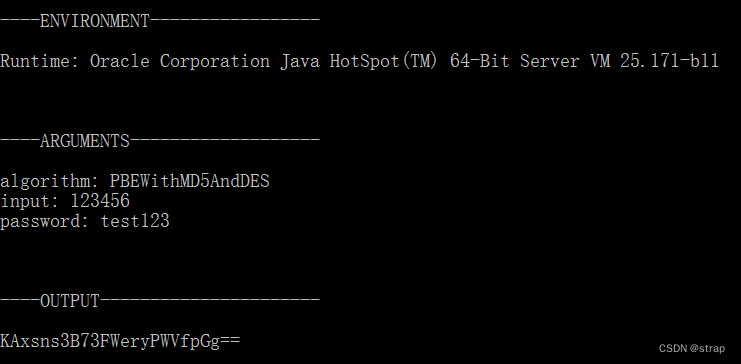
解密密码使用java -cp jasypt-1.9.2.jar org.jasypt.intf.cli.JasyptPBEStringDecryptionCLI input="KAxsns3B73FWeryPWVfpGg==" password=test123 algorithm=PBEWithMD5AndDES
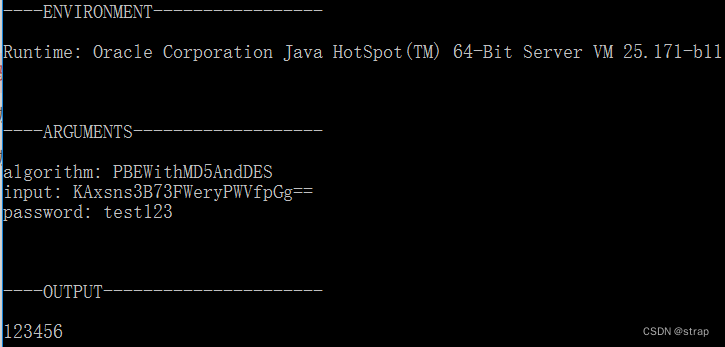
项目配置文件修改
spring:
  datasource:
    driver-class-name: com.p6spy.engine.spy.P6SpyDriver
    url: jdbc:p6spy:postgresql://127.0.0.1:5432/postgres?currentSchema=public
    username: postgres
    password:  ENC(KAxsns3B73FWeryPWVfpGg==)
修改passwod处密码为上面输出的加密密码即可
密钥配置启动
方式一、直接在配置文件中配置
jasypt:
  encryptor:
    password: test123
这样配置密文简单粗暴,容易被暴露,原密码便可以被解密出来
方式二、启动参数配置
-
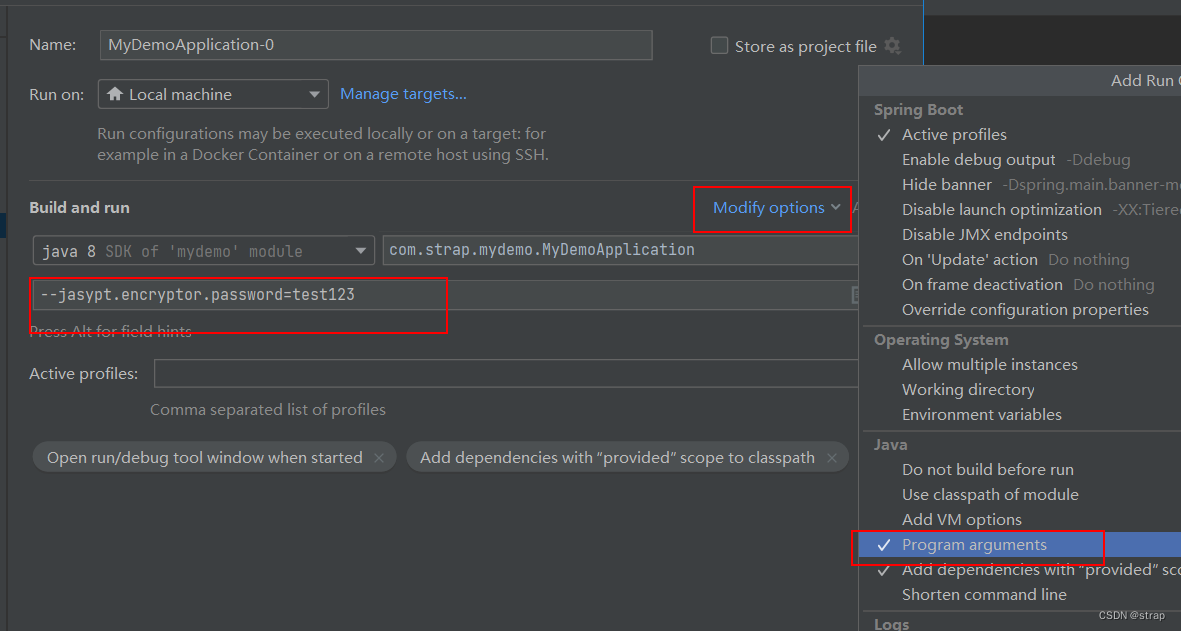
本地项目增加如图配置项–jasypt.encryptor.password=test123
-
线上运行jar时,
java -jar -Djasypt.encryptor.password=test123 project.jar
这样配置相比第一种不易暴露,但这些启动参数是可以通过查看进程信息,密文会明文显示出来,原密码便可以被解密出来
方式三、脚本启动时手动输入
思路:脚本启动服务时,手动输入密文,并保存到临时文件,springboot初始化时读取该密文到内存中,脚本再删除临时文件。
这种方式相对于前面两种,密文暴露的可能性就极低了,因为密文是直接保存在内存中的
脚本
#!/bin/bash

echo "please input jasypt.encryptor.password: "

read encryption

echo "${encryption}" > /tmp/encryption.tmp

nohup java -jar project.jar >/dev/null 2>&1 &

sleep 10

rm -rf /tmp/encryption.tmp
启动类
@SpringBootApplication
@EnableScheduling
public class MyDemoApplication {
    private static final String TMP_ENCRYPTION_PATH = "/tmp/encryption.tmp";
    private static final String JASYPT_ENCRYPTOR_PASSWORD = "jasypt.encryptor.password";

    public static void main(String[] args) throws Exception {
        SpringApplication app = new SpringApplication(MyDemoApplication.class);
        app.setDefaultProperties(
                MapUtil.of(
                        JASYPT_ENCRYPTOR_PASSWORD,
                        FileUtil.readLine(new RandomAccessFile(new File(TMP_ENCRYPTION_PATH), "r"), Charset.defaultCharset())
                )
        );
        app.run(args);
    }
}
全局搜索JasyptPBEStringEncryptionCLI类即可找到对应jar ↩︎





 扫一扫
扫一扫


 5995
5995

 被折叠的 条评论
为什么被折叠?
被折叠的 条评论
为什么被折叠?
 到【灌水乐园】发言





