


使用GDX版本:1.7.1
使用Ashley版本:1.7.0
使用JDK1.8.0
然后使用libgdx-setUp启动生成文本即可。
每个类需要Import的类,因为文档占太多的内容就不粘贴了,没必要。
1)游戏启动类。,加载完程序,进入MainMenuScreen登录界面
public class SuperJumper extends Game {
// 唯一一个游戏绘制渲染的类,在其内部用构建函数进行传递
public SpriteBatch batcher;
@Override
public void create () {
batcher = new SpriteBatch();
Settings.load();
Assets.load();
setScreen(new MainMenuScreen(this));
}
@Override
public void render() {
GL20 gl = Gdx.gl;
gl.glClearColor(1.0f, 1.0f, 1.0f, 0.0f);
gl.glClear(GL20.GL_COLOR_BUFFER_BIT);
super.render();
}
}
2)Settings设置类
public class Settings {
//关闭声音开关
public static boolean soundEnabled = true;
//记录得分排行榜
public final static int[] highscores = new int[] {100, 80, 50, 30, 10};
public final static String file = ".superjumper";
public static void load () {
try {
//superjumper 文件,记录数据,得分信息
FileHandle filehandle = Gdx.files.external(file);
String[] strings = filehandle.readString().split("\n");
soundEnabled = Boolean.parseBoolean(strings[0]);
for (int i = 0; i < 5; i++) {
highscores[i] = Integer.parseInt(strings[i+1]);
}
} catch (Throwable e) {
// :( It's ok we have defaults
}
}
public static void save () {
try {
FileHandle filehandle = Gdx.files.external(file);
filehandle.writeString(Boolean.toString(soundEnabled)+"\n", false);
for (int i = 0; i < 5; i++) {
filehandle.writeString(Integer.toString(highscores[i])+"\n", true);
}
} catch (Throwable e) {
}
}
public static void addScore (int score) {
for (int i = 0; i < 5; i++) {
if (highscores[i] < score) {
for (int j = 4; j > i; j--)
highscores[j] = highscores[j - 1];
highscores[i] = score;
break;
}
}
}
}
3) Assets资源管理类
//这是一个资源加载类,都声明在内存堆中,注意使用得是static类,当然这是一个例子程序,
//具体的加载方式,应该是需要Scene场景切换,资源释放等操作的,该例子主要是讲述Entity的游戏框架的。
//所以不要在乎细节了
public class Assets {
public static Texture background;
public static TextureRegion backgroundRegion;
public static Texture items;
public static TextureRegion mainMenu;
public static TextureRegion pauseMenu;
public static TextureRegion ready;
public static TextureRegion gameOver;
public static TextureRegion highScoresRegion;
public static TextureRegion logo;
public static TextureRegion soundOn;
public static TextureRegion soundOff;
public static TextureRegion arrow;
public static TextureRegion pause;
public static TextureRegion spring;
public static TextureRegion castle;
public static Animation coinAnim;
public static Animation bobJump;
public static Animation bobFall;
public static Animation bobHit;
public static Animation squirrelFly;
public static Animation platform;
public static Animation breakingPlatform;
public static BitmapFont font;
public static Music music;
public static Sound jumpSound;
public static Sound highJumpSound;
public static Sound hitSound;
public static Sound coinSound;
public static Sound clickSound;
public static Texture loadTexture (String file) {
return new Texture(Gdx.files.internal(file));
}
public static void load () {
background = loadTexture("data/background.png");
backgroundRegion = new TextureRegion(background, 0, 0, 320, 480);
items = loadTexture("data/items.png");
mainMenu = new TextureRegion(items, 0, 224, 300, 110);
pauseMenu = new TextureRegion(items, 224, 128, 192, 96);
ready = new TextureRegion(items, 320, 224, 192, 32);
gameOver = new TextureRegion(items, 352, 256, 160, 96);
highScoresRegion = new TextureRegion(Assets.items, 0, 257, 300, 110 / 3);
logo = new TextureRegion(items, 0, 352, 274, 142);
soundOff = new TextureRegion(items, 0, 0, 64, 64);
soundOn = new TextureRegion(items, 64, 0, 64, 64);
arrow = new TextureRegion(items, 0, 64, 64, 64);
pause = new TextureRegion(items, 64, 64, 64, 64);
spring = new TextureRegion(items, 128, 0, 32, 32);
castle = new TextureRegion(items, 128, 64, 64, 64);
coinAnim = new Animation(0.2f, new TextureRegion(items, 128, 32, 32, 32), new TextureRegion(items, 160, 32, 32, 32),
new TextureRegion(items, 192, 32, 32, 32), new TextureRegion(items, 160, 32, 32, 32));
bobJump = new Animation(0.2f, new TextureRegion(items, 0, 128, 32, 32), new TextureRegion(items, 32, 128, 32, 32));
bobFall = new Animation(0.2f, new TextureRegion(items, 64, 128, 32, 32), new TextureRegion(items, 96, 128, 32, 32));
bobHit = new Animation(0.2f, new TextureRegion(items, 128, 128, 32, 32));
squirrelFly = new Animation(0.2f, new TextureRegion(items, 0, 160, 32, 32), new TextureRegion(items, 32, 160, 32, 32));
platform = new Animation(0.2f, new TextureRegion(items, 64, 160, 64, 16));
breakingPlatform = new Animation(0.2f, new TextureRegion(items, 64, 160, 64, 16), new TextureRegion(items, 64, 176, 64, 16),
new TextureRegion(items, 64, 192, 64, 16), new TextureRegion(items, 64, 208, 64, 16));
font = new BitmapFont(Gdx.files.internal("data/font.fnt"), Gdx.files.internal("data/font.png"), false);
music = Gdx.audio.newMusic(Gdx.files.internal("data/music.mp3"));
music.setLooping(true);
music.setVolume(0.5f);
if (Settings.soundEnabled) music.play();
jumpSound = Gdx.audio.newSound(Gdx.files.internal("data/jump.wav"));
highJumpSound = Gdx.audio.newSound(Gdx.files.internal("data/highjump.wav"));
hitSound = Gdx.audio.newSound(Gdx.files.internal("data/hit.wav"));
coinSound = Gdx.audio.newSound(Gdx.files.internal("data/coin.wav"));
clickSound = Gdx.audio.newSound(Gdx.files.internal("data/click.wav"));
coinAnim.setPlayMode(PlayMode.LOOP);
bobJump.setPlayMode(PlayMode.LOOP);
bobFall.setPlayMode(PlayMode.LOOP);
bobHit.setPlayMode(PlayMode.LOOP);
squirrelFly.setPlayMode(PlayMode.LOOP);
platform.setPlayMode(PlayMode.LOOP);
}
public static void playSound (Sound sound) {
if (Settings.soundEnabled) sound.play(1);
}
}
3) MainMenuScreen登录类
public class MainMenuScreen extends ScreenAdapter {
SuperJumper game;
OrthographicCamera guiCam;
Rectangle soundBounds;
Rectangle playBounds;
Rectangle highscoresBounds;
Rectangle helpBounds;
Vector3 touchPoint;
public MainMenuScreen (SuperJumper game) {
this.game = game;
//游戏界面大小是320*480
guiCam = new OrthographicCamera(320, 480);
//游戏的画面原点是屏幕左下角(即0,0)
guiCam.position.set(320 / 2, 480 / 2, 0);
//一下是游戏图标的绘制位置,在libgdx中这是最笨的方法了,推荐读友选择overlap2d软件绘制界面,
//这里只是作为讲解,这么去使用
soundBounds = new Rectangle(0, 0, 64, 64);
playBounds = new Rectangle(160 - 150, 200 + 18, 300, 36);
highscoresBounds = new Rectangle(160 - 150, 200 - 18, 300, 36);
helpBounds = new Rectangle(160 - 150, 200 - 18 - 36, 300, 36);
touchPoint = new Vector3();
}
public void update () {
if (Gdx.input.justTouched()) {
//Gdx.input.getX()是屏幕坐标,起点是屏幕左上角,将屏幕坐标转为世界坐标世界坐标是上面相机设置的,左下角。这个是任何时候都需要写的,只要涉及到点击触碰屏幕,
//跳转界面
guiCam.unproject(touchPoint.set(Gdx.input.getX(), Gdx.input.getY(), 0));
if (playBounds.contains(touchPoint.x, touchPoint.y)) {
Assets.playSound(Assets.clickSound);
game.setScreen(new GameScreen(game));
return;
}
if (highscoresBounds.contains(touchPoint.x, touchPoint.y)) {
Assets.playSound(Assets.clickSound);
game.setScreen(new HighscoresScreen(game));
return;
}
if (helpBounds.contains(touchPoint.x, touchPoint.y)) {
Assets.playSound(Assets.clickSound);
game.setScreen(new HelpScreen(game));
return;
}
if (soundBounds.contains(touchPoint.x, touchPoint.y)) {
Assets.playSound(Assets.clickSound);
Settings.soundEnabled = !Settings.soundEnabled;
if (Settings.soundEnabled)
Assets.music.play();
else
Assets.music.pause();
}
}
}
public void draw () {
GL20 gl = Gdx.gl;
gl.glClearColor(1, 0, 0, 1);
gl.glClear(GL20.GL_COLOR_BUFFER_BIT);
guiCam.update();
game.batcher.setProjectionMatrix(guiCam.combined);
game.batcher.disableBlending();
game.batcher.begin();
game.batcher.draw(Assets.backgroundRegion, 0, 0, 320, 480);
game.batcher.end();
game.batcher.enableBlending();
game.batcher.begin();
game.batcher.draw(Assets.logo, 160 - 274 / 2, 480 - 10 - 142, 274, 142);
game.batcher.draw(Assets.mainMenu, 10, 200 - 110 / 2, 300, 110);
game.batcher.draw(Settings.soundEnabled ? Assets.soundOn : Assets.soundOff, 0, 0, 64, 64);
game.batcher.end();
}
@Override
public void render (float delta) {
update();
draw();
}
@Override
public void pause () {
Settings.save();
}
}
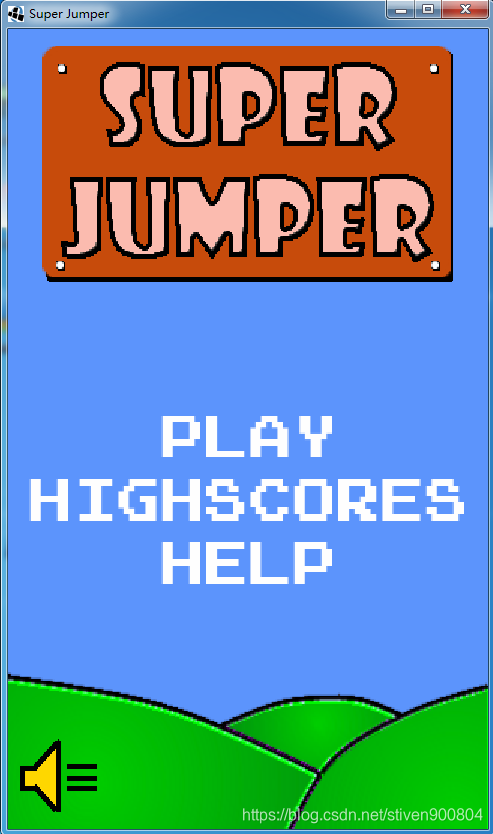
游戏登录界面如图:各个图片按照上面的布置进行了绘制
游戏源代码:进群992188441 获取





 扫一扫
扫一扫


 6263
6263

 被折叠的 条评论
为什么被折叠?
被折叠的 条评论
为什么被折叠?
 到【灌水乐园】发言





