 VSCode 自定义 Snippets 配置


首先 Ctrl+Shift+P 调出命令窗口,输入 snippets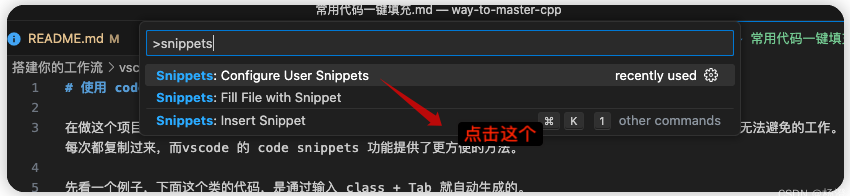
然后选择你的语言, 这里我以 C++ 为例,不同语言的 snippets 是存放在单独的配置文件里。
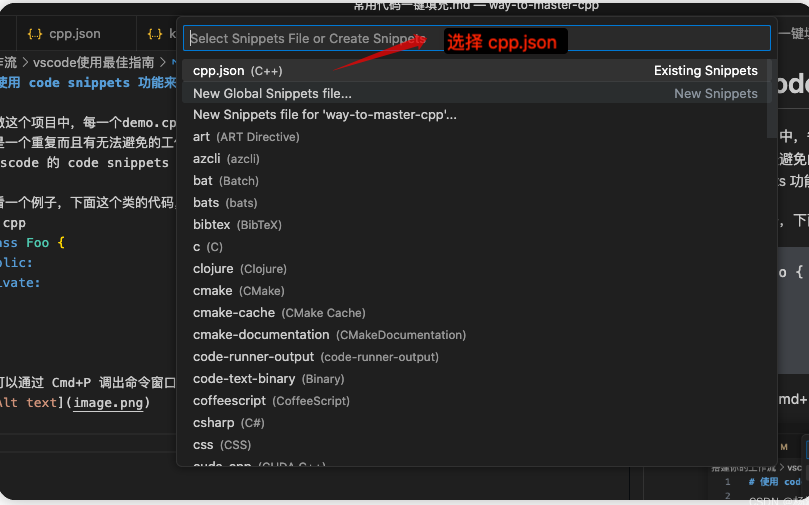
配置文件 json 内容如下:
{
    // Place your global snippets here. Each snippet is defined under a snippet name and has a scope, prefix, body and
    // description. Add comma separated ids of the languages where the snippet is applicable in the scope field. If scope
    // is left empty or omitted, the snippet gets applied to all languages. The prefix is what is
    // used to trigger the snippet and the body will be expanded and inserted. Possible variables are:
    // $1, $2 for tab stops, $0 for the final cursor position, and ${1:label}, ${2:another} for placeholders.
    // Placeholders with the same ids are connected.
    // Example:
    // "Print to console": {
    //  "scope": "javascript,typescript",
    //  "prefix": "log",
    //  "body": [
    //      "console.log('$1');",
    //      "$2"
    //  ],
    //  "description": "Log output to console"
    // }
    "MainPage Func": {
        "prefix": ".func",
        "body": [
            "/***********************************************************************",
            " *",
            " * FunctionName:",
            " *  Description:",
            " *",
            " *        Parms:",
            " *",
            " *       Return:",
            " *",
            " *        Notes:",
            " ***********************************************************************/",
        ],
        "description": "MainPage Func"
    },
    "MainPage Header": {
        "prefix": ".header",
        "body": [
            "\n/***********************************************************************************************",
            " *",
            " *    Filename: ${TM_FILENAME}",
            " *",
            " * Description: XXXXXX",
            " *",
            " *     Version: 1.0",
            " *     Created: ${CURRENT_YEAR}/${CURRENT_MONTH}/${CURRENT_DATE} ${CURRENT_HOUR}:${CURRENT_MINUTE}:${CURRENT_SECOND}",
            " *     Created: xxxx@simcom.com",
            " *    Revision: none",
            " *    Compiler: gcc",
            " *",
            " *      Author: xxx",
            " *   Copyright: Copyright (c) 2023, XXXXXX Co.,Ltd",
            " *",
            " *   History:",
            " *   <Date>         | <Author>      | <Description>",
            " *---------------------------------------------------------------------",
            " *   xxxx/xx/xx     | xxxxx         |",
            "**********************************************************************************************/\n"
        ],
        "description": "MainPage Header"
    },
    "Avoid Repetition": {
        "prefix": ".hinit",
        "body": [
            "\n#ifndef ${1:${TM_FILENAME/(.*)\\.h$/${1:/upcase}_H/i}} \n#define $1 \n\n${2:#ifdef __cplusplus\nextern \"C\"{\n#endif}",
            "",
            "/*----------------------------------include-----------------------------------*/",
            "",
            "/*-----------------------------------macro------------------------------------*/",
            "",
            "/*----------------------------------typedef-----------------------------------*/",
            "",
            "/*----------------------------------variable----------------------------------*/",
            "",
            "/*-------------------------------------os-------------------------------------*/",
            "",
            "/*----------------------------------function----------------------------------*/",
            "",
            "#ifdef __cplusplus",
            "}",
            "#endif",
            "",
            "#endif\t/* __$1__ */\n"
        ],
        "description": "Avoid Repetition"
    }
}





 扫一扫
扫一扫


 1501
1501

 被折叠的 条评论
为什么被折叠?
被折叠的 条评论
为什么被折叠?
 到【灌水乐园】发言





