


首先要懂得一些基础的布局知识,这样在开发的过程中才能游刃有余.
布局主要写到xam里面,在xaml基本的主要涉及到三个布局控件Canvas,StackPanel,Grid
概括起来很简单
1.Canvas就是根据坐标、大小进行绝对定位布局。
示例代码

1 <Canvas>
2             <Button Canvas.Left="28" Canvas.Top="26" Content="Button" Height="45" Width="92" />
3 </Canvas>
由于Canvas是绝对定位我没怎么用过只简单的说下 ,用的最多的还是他的z-index的附加属性;
 View
Code
View
Code3.Grid他类似于html的<Table></Table>标签,由于我是从web开发转过来的所以特别喜欢它,基本上和table类似由行和列构成的
<RowDefinition ><ColumnDefinition >可以用这俩属性类定义他的行和列,并用Grid.Row,Grid.Column附加属性,来设置grid容器里的空间位于哪行哪列,Grid.RowSpan等可以用来跨行列,总之很方面
注:在用来定义行列大小高度的时候还可以用百分比,稍微变动不是加%而是用*,默认width=“1*”是平分高了分得多少了分的少可以自己去感受下同时*是表示剩下的全部,Auto:自动
此外这些基本布局控件,都是容器,就像你的web开发中的div就Ok了~还会有一个一开始我经常犯得错误!就是button的content属性他是Object类型想对里装俩控件会报错说存在重复的属性,其实想通了很简单你给content赋值给他同时赋俩值它没那么智能不知道你到底想给他赋什么所以就报错了,这时你只需要给他一个容器包裹着再赋给它就Ok了!
下面闲话少扯泳用这些基本的控件来布局一个
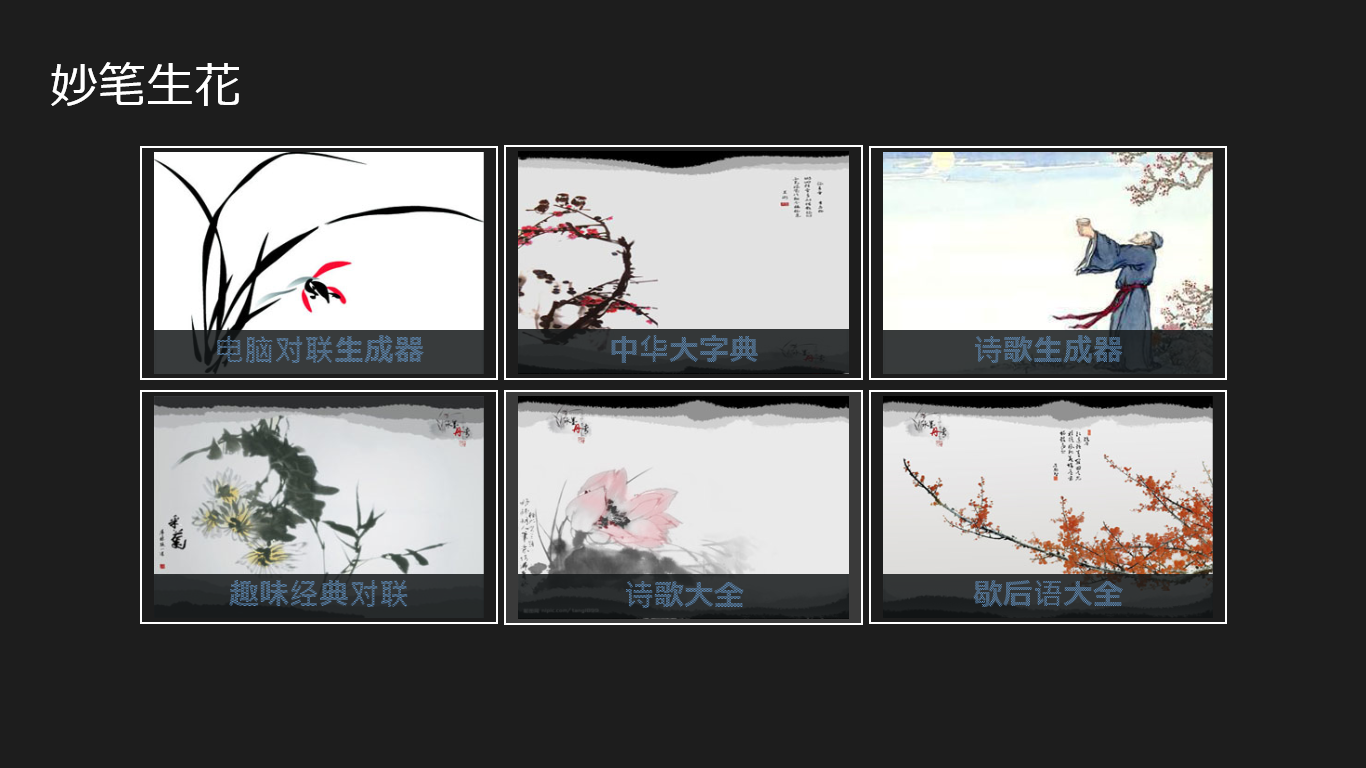
这是做的项目的第一页截图接下来就看其简单的实现,这是一开始尝试做的没用样式和资源比较繁琐和乱套,下节用样式和资源来重构一下,不过对练布局还好吧
代码示例:

<Grid Background="{StaticResource ApplicationPageBackgroundThemeBrush}">
        <Grid.RowDefinitions>
            <RowDefinition ></RowDefinition>
            <RowDefinition Height="3.5*"></RowDefinition>
            <RowDefinition ></RowDefinition>
        </Grid.RowDefinitions>
        <Grid.ColumnDefinitions>
            <ColumnDefinition ></ColumnDefinition>
            <ColumnDefinition Width="8*"></ColumnDefinition>
            <ColumnDefinition ></ColumnDefinition>
        </Grid.ColumnDefinitions>
        <TextBlock Text="妙笔生花" Grid.Row="0" Grid.Column="0" Grid.ColumnSpan="2" Margin="50,60,0,0" FontSize="48"></TextBlock>
        <Grid Grid.Column="1" Grid.Row="1" Name="auto">
            <Grid.ColumnDefinitions>
                <ColumnDefinition></ColumnDefinition>
                <ColumnDefinition></ColumnDefinition>
                <ColumnDefinition></ColumnDefinition>
            </Grid.ColumnDefinitions>
            <Grid.RowDefinitions>
                <RowDefinition></RowDefinition>
                <RowDefinition></RowDefinition>
            </Grid.RowDefinitions>
            <Button  Grid.Row="0" Grid.Column="0" Click="OnClick">
                <Button.Content>
                    <ContentControl>
                        <Grid >
                            <Grid.RowDefinitions>
                                <RowDefinition Height="4*" ></RowDefinition>
                                <RowDefinition></RowDefinition>
                            </Grid.RowDefinitions>
                            <Image Source="Images/Grop_Item00.jpg" Grid.RowSpan="2" ></Image>
                            <Image Grid.Row="1" Source="Images/11.png"></Image>
                            <TextBlock Text="电脑对联生成器"   Grid.Row="1" FontSize="30" HorizontalAlignment="Center">
                                <TextBlock.Foreground>
                                    <ImageBrush ImageSource="Images/background.png">
                                    </ImageBrush>
                                </TextBlock.Foreground>
                            </TextBlock>
                        </Grid>
                    </ContentControl>
                </Button.Content>
            </Button>
            <Button  Grid.Row="0" Grid.Column="1" Click="OndicClick">
                <Button.Content>
                    <ContentControl>
                        <Grid >
                            <Grid.RowDefinitions>
                                <RowDefinition Height="4*" ></RowDefinition>
                                <RowDefinition></RowDefinition>
                            </Grid.RowDefinitions>
                            <Image Source="Images/Grop_Item10.jpg" Grid.RowSpan="2" ></Image>
                            <Image Grid.Row="1" Source="Images/11.png"></Image>
                            <TextBlock Text="中华大字典"   Grid.Row="1" FontSize="30" HorizontalAlignment="Center"  >
                                <TextBlock.Foreground>
                                    <ImageBrush ImageSource="Images/backGround.png">
                                    </ImageBrush>
                                </TextBlock.Foreground>
                            </TextBlock>
                        </Grid>
                    </ContentControl>
                </Button.Content>
            </Button>
            <Button  Grid.Row="0" Grid.Column="2">
                <Button.Content>
                    <ContentControl>
                        <Grid >
                            <Grid.RowDefinitions>
                                <RowDefinition Height="4*" ></RowDefinition>
                                <RowDefinition></RowDefinition>
                            </Grid.RowDefinitions>
                            <Image Source="Images/Grop_Item02.jpg" Grid.RowSpan="2" ></Image>
                            <Image Grid.Row="1" Source="Images/11.png"></Image>
                            <TextBlock Text="诗歌生成器"   Grid.Row="1" FontSize="30" HorizontalAlignment="Center"  >
                                <TextBlock.Foreground>
                                    <ImageBrush ImageSource="Images/backGround.png">
                                    </ImageBrush>
                                </TextBlock.Foreground>
                            </TextBlock>
                        </Grid>
                    </ContentControl>
                </Button.Content>
            </Button>
            <Button  Grid.Row="1" Grid.Column="0">
                <Button.Content>
                    <ContentControl>
                        <Grid >
                            <Grid.RowDefinitions>
                                <RowDefinition Height="4*" ></RowDefinition>
                                <RowDefinition></RowDefinition>
                            </Grid.RowDefinitions>
                            <Image Source="Images/Grop_Item01.jpg" Grid.RowSpan="2" ></Image>
                            <Image Grid.Row="1" Source="Images/11.png"></Image>
                            <TextBlock Text="趣味经典对联"   Grid.Row="1" FontSize="30" HorizontalAlignment="Center"  >
                                <TextBlock.Foreground>
                                    <ImageBrush ImageSource="Images/backGround.png">
                                    </ImageBrush>
                                </TextBlock.Foreground>
                            </TextBlock>
                        </Grid>
                    </ContentControl>
                </Button.Content>
            </Button>
            <Button  Grid.Row="1" Grid.Column="1" Click="OnPoetryClick">
                <Button.Content>
                    <ContentControl>
                        <Grid >
                            <Grid.RowDefinitions>
                                <RowDefinition Height="4*" ></RowDefinition>
                                <RowDefinition></RowDefinition>
                            </Grid.RowDefinitions>
                            <Image Source="Images/Grop_Item11.jpg" Grid.RowSpan="2" ></Image>
                            <Image Grid.Row="1" Source="Images/11.png"></Image>
                            <TextBlock Text="诗歌大全"   Grid.Row="1" FontSize="30" HorizontalAlignment="Center"  >
                                <TextBlock.Foreground>
                                    <ImageBrush ImageSource="Images/backGround.png">
                                    </ImageBrush>
                                </TextBlock.Foreground>
                            </TextBlock>
                        </Grid>
                    </ContentControl>
                </Button.Content>
            </Button>
            <Button  Grid.Row="1" Grid.Column="2" Click="OnallegoricalClick">
                <Button.Content>
                    <ContentControl>
                        <Grid >
                            <Grid.RowDefinitions>
                                <RowDefinition Height="4*" ></RowDefinition>
                                <RowDefinition></RowDefinition>
                            </Grid.RowDefinitions>
                            <Image Source="Images/Grop_Item12.jpg" Grid.RowSpan="2" ></Image>
                            <Image Grid.Row="1" Source="Images/11.png"></Image>
                            <TextBlock Text="歇后语大全"   Grid.Row="1" FontSize="30" HorizontalAlignment="Center"  >
                                <TextBlock.Foreground>
                                    <ImageBrush ImageSource="Images/backGround.png">
                                    </ImageBrush>
                                </TextBlock.Foreground>
                            </TextBlock>
                        </Grid>
                    </ContentControl>
                </Button.Content>
            </Button>
        </Grid>
    </Grid>
仅个人意见,初学还有很多不懂欢迎大家批评指导





 扫一扫
扫一扫


 3149
3149

 被折叠的 条评论
为什么被折叠?
被折叠的 条评论
为什么被折叠?
 到【灌水乐园】发言





