



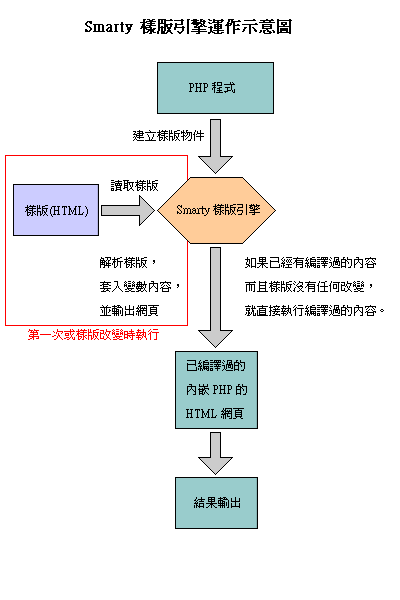
Smarty是一个使用PHP写出来的模板引擎,是目前业界最著名的PHP模板引擎之一。它分离了逻辑代码和外在的内容,提供了一种易于管理和使用的方法,用来将原本与HTML代码混杂在一起PHP代码逻辑分离。简单的讲,目的就是要使PHP程序员同前端人员分离,使程序员改变程序的逻辑内容不会影响到前端人员的页面设计,前端人员重新修改页面不会影响到程序的程序逻辑,这在多人合作的项目中显的尤为重要。
一. 安装
下载最新版本的Smarty。解压下载的文件(目录结构还蛮复杂的)。接下来演示给大家一个安装实例,看过应该会举一反三的。
(1) 在根目录下建立一个目录smarty/。将刚才解压缩出来的目录的libs/拷贝到smarty/里,再在smarty/里新建templates目录,templates里新建cache/,templates/,templates_c/, configs/.
(2)建一个setup.php文件,配置文件:
<?php
require('class/Smarty.class.php');
define('_ROOTPATH','e:/1688/smarty');
$php_sm = new Smarty();
$php_sm->template_dir = _ROOTPATH."/templates/";
$php_sm->compile_dir =_ROOTPATH."/templates_c/";
$php_sm->config_dir = _ROOTPATH."/configs/";
$php_sm->cache_dir = _ROOTPATH."/cache/";
$php_sm->left_delimiter = '<{';
$php_sm->right_delimiter = '}>';
?>
(3)建一个模板文件,放到smarty下,如:forum.php
<?php
require('includes/setup.php');//上面那个setup.php放到了smarty文件夹下的includes文件夹中
$forum=array(
array("category_id"=>1, "category_name"=>"科技",
"topic"=>array(
array("topic_id"=>1, "topic_name"=>"计算机"),
array("topic_id"=>2, "topic_name"=>"天文学")
)
),
array("category_id"=>2, "category_name"=>"娱乐",
"topic"=>array(
array("topic_id"=>1, "topic_name"=>"周星星"),
array("topic_id"=>2, "topic_name"=>"周时发"),
array("topic_id"=>3, "topic_name"=>"周公"),
array("topic_id"=>4, "topic_name"=>"周欣儿")
)
),
array("category_id"=>3, "category_name"=>"文化",
"topic"=>array(
array("topic_id"=>1, "topic_name"=>"good")
)
)
);
$php_sm->assign(array("title"=>"BBS2011", "forum"=>$forum));
$php_sm->display('arr.htm');//arr.htm文件放到smarty文件夹下的templates文件夹中
?>
(4)显示文件,arr.htm
<html>
<head>
<meta http-equiv="Content-Type" content="text/html; charset=utf-8">
<title><{$title}></title>
</head>
<body>
<table width="200" border="1" align="center" cellpadding="3" cellspacing="0">
<{section name=sec1 loop=$forum}>
<tr>
<td width="50">|-<{$forum[sec1].category_id}></td>
<td width="150"><{$forum[sec1].category_name}></td>
</tr>
<{section name=sec2 loop=$forum[sec1].topic}>
<tr>
<td> ---<{$forum[sec1].topic[sec2].topic_id}></td>
<td> <{$forum[sec1].topic[sec2].topic_name}></td>
</tr>
<{/section}>
<{/section}>
</table>
</body>
</html>
(5)执行forum.php。
整理一下整个 Smarty 程式撰写步骤:
Step 1. 加载 Smarty 模版引擎。
Step 2. 建立 Smarty 对象。
Step 3. 设定 Smarty 对象的参数。
Step 4. 在程式中处理变量后,再用 Smarty 的 assign 方法将变量置入模版里。
Step 5. 利用 Smarty 的 display 方法将网页秀出。
二、判断
模板文件中可以使用if else等判断语句,即可以将一些逻辑程序放在模板里。"eq","ne", "neq", "gt", "lt","lte", "le", "gte" "ge","is even", "is odd", "is not even", "is notodd", "not", "mod", "div by", "evenby", "odd by","==","!=",">","<","<=",">="这些是if中可以用到的比较。看看就能知道什么意思吧。
eq相等,
f7Y"Y f3m @,V+Z }4X0 ne、neq不相等,
7C E z R S8P t,i:@ ^0 gt大于,
4d D H4F,Yg;D X)Y0 lt小于,
gte、ge大于等于,
lte、le 小于等于,
not非, mod求模。
is [not] div by是否能被某数整除,
,B z M E m I w0 is [not] even是否为偶数,
$a is [not] even by $b即($a / $b) % 2 == 0,
is [not] odd是否为奇,
$a is not odd by $b即($a / $b) % 2 != 0
示例:
{if $name eq"Fred"}
WelcomeSir.
{elseif $name eq"Wilma"}
WelcomeMa'am.
Welcome,whatever you are.
{/if}
三、循环
section: http://www.phpjc.cn/smarty/2009/1021/89.html
foreach: http://www.phpjc.cn/smarty/2009/1021/88.html





 扫一扫
扫一扫


 1622
1622

 被折叠的 条评论
为什么被折叠?
被折叠的 条评论
为什么被折叠?
 到【灌水乐园】发言





