





个人博客(纯手戳 vue3 + nodejs + mysql)http://snows-l.site http://snows-l.site
node 实现导出, 在导出excel中包含图片(附件)
一、效果
如图:
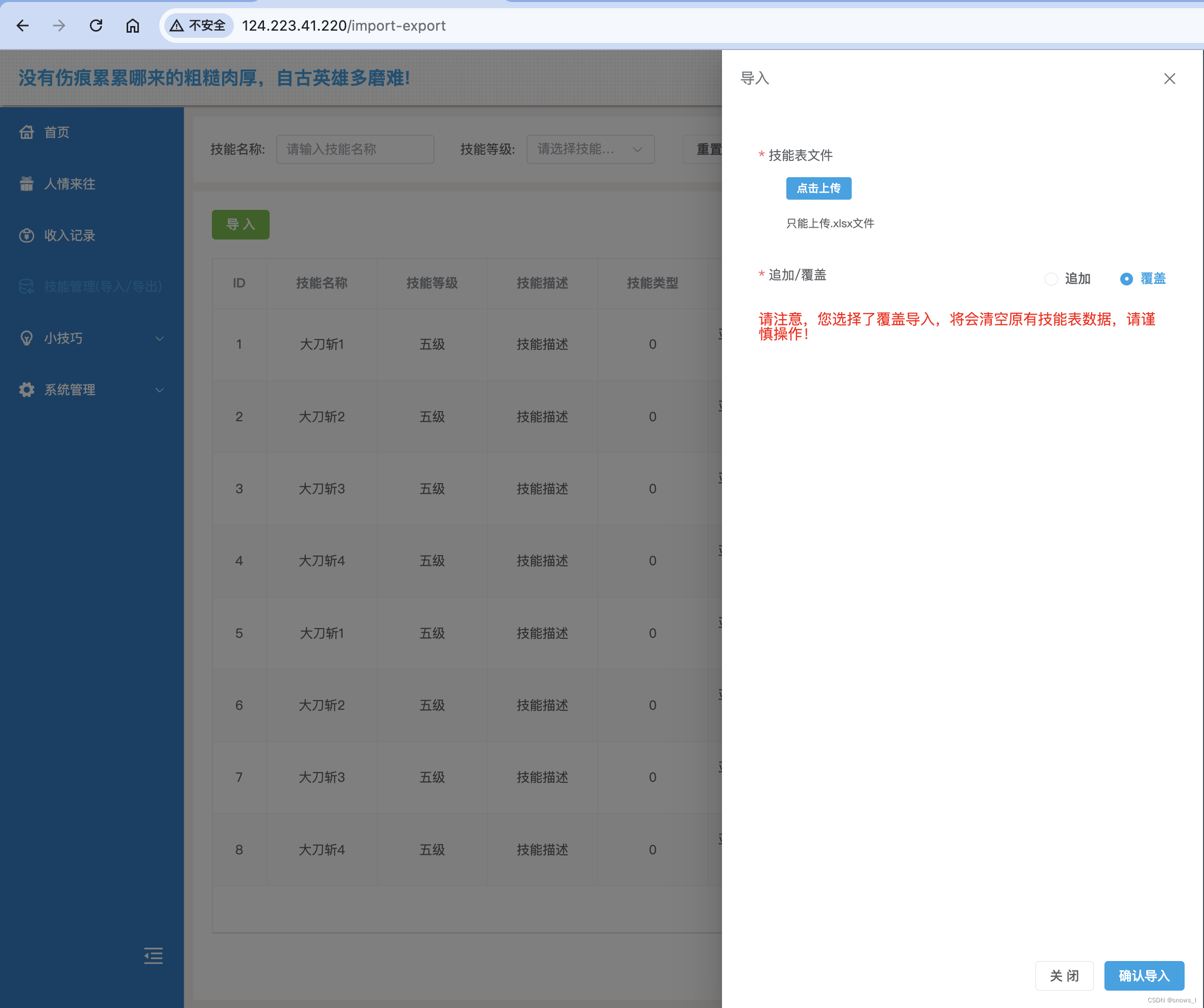
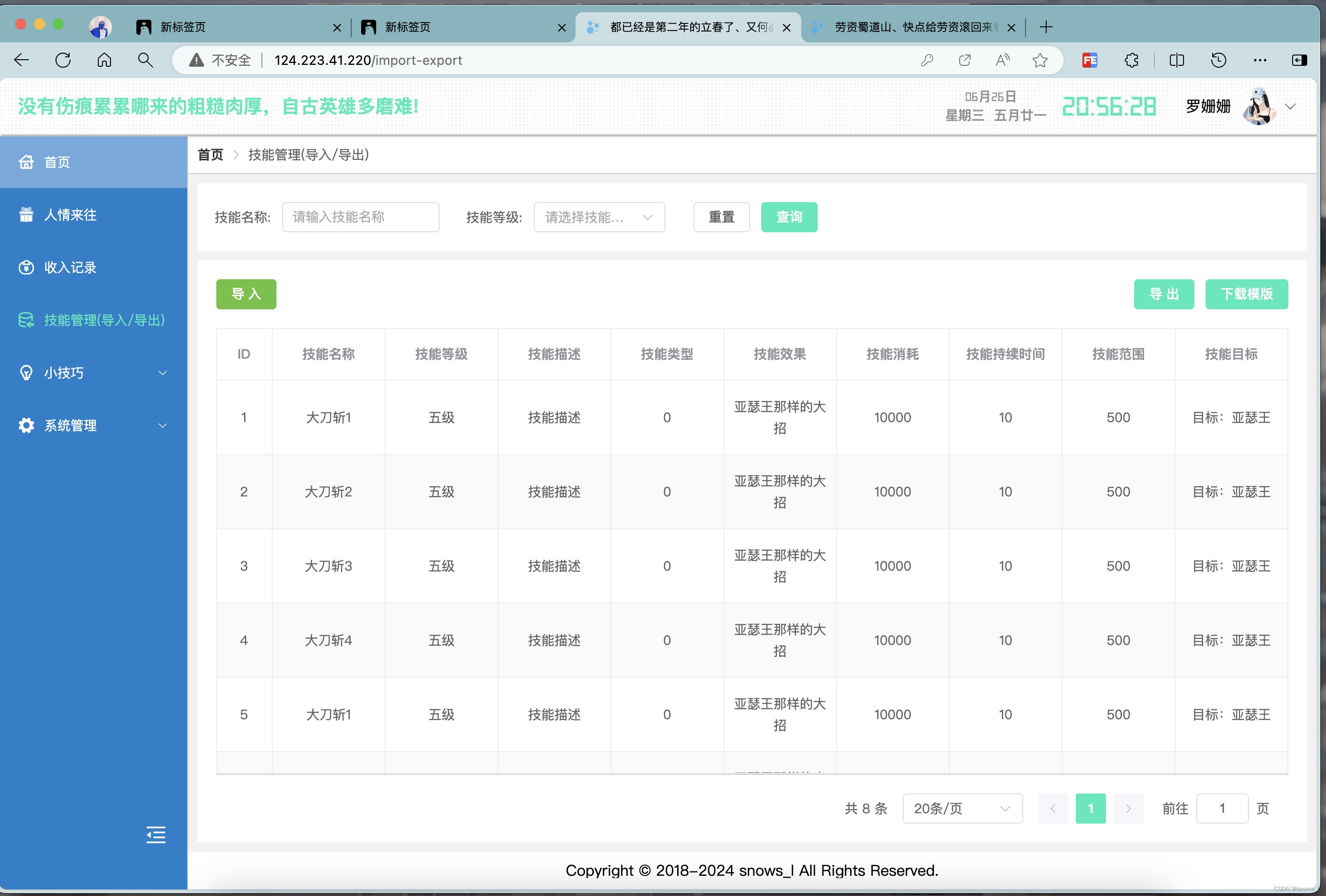
二、导入
1、前端上传文件
// template
<el-form-item class="custom-item-skill-upoad" label="技能表文件" prop="file" style="width: 100%">
  <el-upload style="width: 100%" :limit="1" :auto-upload="false" :show-file-list="true" accept=".xlsx" :on-change="handleFileChange">
    <template #trigger>
      <el-button size="small" type="primary">点击上传</el-button>
    </template>
    <template #tip>
      <div class="el-upload__tip text-red">只能上传.xlsx文件</div>
    </template>
  </el-upload>
</el-form-item>
// api 导入技能
export function importSkill(file, append = 1, name = '') {
let formData = new FormData();
let suffix = file.name && file.name.split('.')[1];
let defaultName = file.name && file.name.split('.')[0];
let fileName = name ? name.replace(/[\u4e00-\u9fa5]/g, '') + '.' + suffix : defaultName.replace(/[\u4e00-\u9fa5]/g, '') + '.' + suffix;
formData.append('file', file, fileName);
return request({
url: '/sys/skill/import/' + append,
method: 'post',
data: formData,
headers: {
'Content-Type': 'multipart/form-data'
}
});
}/**
* @script
*
*/
const state = reactive({
form:{
file:null, // 用于存储上传的文件
append:1 // 是否是追加导入 1:追加导入 2:覆盖导入
}
})
// 选择文件
const handleFileChange = file => {
if (file) {
state.form.file = file;
formRef.value.validateField('file');
}
};
// 确认导入
const handleSubmitImport = () => {
(formRef.value as any).validate((valid: boolean) => {
if (valid) {
importSkill(state.form.file.raw, state.form.append).then(res => {
if (res.code === 200) {
ElMessage.success('导入成功!');
state.dialogVisible = false;
getSkillListFn();
} else {
ElMessage.error('导入失败!' + res.message);
}
});
}
});
};2、后端 node 需要使用到 multer 中间件 将文件上传到服务器,然后使用 exceljs 这个插件进行文件的解析文件,代码如下:
/**
 * @description: 上传技能
 * @param {Object} req 请求对象
 * @param {Object} res 响应对象
 * @param {Function} next
 */
// 配置 multer 存储
const storage = multer.diskStorage({
  destination: function (req, file, cb) {
    cb(null, '../public/common');
  },
  filename: function (req, file, cb) {
    cb(null, 'skill_' + file.originalname);
  }
});
const upload = multer({ storage: storage });
// 导入技能
router.post('/skill/import/:append', upload.single('file'), (req, res) => {

  const workbook = new Excel.Workbook();
  const filePath = req.file.path;
  // 读取文件
  workbook.xlsx
    .readFile(filePath)
    .then(async () => {
      const worksheet = workbook.getWorksheet(1);
      // data 为解析文件得到的数据
      const data = [];
      worksheet.eachRow({ includeEmpty: false }, (row, rowNumber) => {
        if (rowNumber === 1) return; // 跳过表头
        const rowData = row.values.slice(1); // 去掉第一列的索引
        data.push(rowData);
      });

      ...

    })

});
3、最后拿到数据进行数据的批量插入
批量插入的sql语句如下
 // 处理sql语句
let sql = 'INSERT INTO skill (name, level, description, type, effect, cost, duration, ranges, target) VALUES ?';
// data为解析到的数据
const params = data.map(item => [item[0], item[1], item[2], item[3], item[4], item[5], item[6], item[7], item[8]]);

// 使用的时候
db.queryAsync(sql, [params])
  .then(result => {
    res.send({
      code: 200,
      data: data,
      msg: '导入成功'
    });
  })
  .catch(err => {
    console.log(err);
    res.send({
      code: 500,
      data: null,
      msg: '导入失败'
    });
  });
特别注意的是,插入一条的时候 sql 语句 values 后面紧跟的 () , 然后 () 中的参数个数以及参数要与前面的key一一对应,
当批量插入的时候: values 后面紧跟的是 [] , 然后数组 [] 中在是如同插入一条数据那样用 () , 一样 () 中的参数个数以及参数要与前面的key一一对应, 数组 [] 有多少个子项就插入多少条数据
1)、eg1:插入一条数据sql:
key与value一一对应 values 后紧跟()
let sql = 'INSERT INTO skill (name, level, description, type, effect, cost, duration, ranges, target) VALUES ('亚瑟王', '1', '老亚瑟', '1', '100', '200', '1s', '500', '周围敌人');';2)、eg1:插入3条(批量)数据sql:
key与value一一对应 values 后紧跟[(), (), ()]
let sql = 'INSERT INTO skill (name, level, description, type, effect, cost, duration, ranges, target) VALUES [('亚瑟王1', '1', '老亚瑟', '1', '100', '200', '1s', '500', '周围敌人'), ('亚瑟王', '1', '老亚瑟2', '1', '100', '200', '1s', '500', '周围敌人'), ('亚瑟王3', '1', '老亚瑟', '1', '100', '200', '1s', '500', '周围敌人')];';三、导出
导出就简单了 也是利用 exceljs 进行数据写入,直接上代码
router.post('/skill/export', (req, res) => {
  const { template } = req.body;
  const sql = 'SELECT * FROM skill';
  db.queryAsync(sql)
    .then(async result => {
      const data = result.results;
      const workbook = new Excel.Workbook();
      const worksheet = workbook.addWorksheet('收入明细');
      // 设置表头
      // worksheet.addRow(['标题', '月份', '收入金额', '备注', '收入截图']);
      let baseTableTitle = [
        { header: '技能名称', key: 'name', width: 12 },
        { header: '技能等级', key: 'level', width: 10 },
        { header: '技能描述', key: 'description', width: 20 },
        { header: '技能类型', key: 'type', width: 12 },
        { header: '技能效果', key: 'effect', width: 18 },
        { header: '技能消耗', key: 'cost', width: 18 },
        { header: '技能持续时间', key: 'duration', width: 20 },
        { header: '技能范围', key: 'ranges', width: 20 },
        { header: '技能目标', key: 'target', width: 20 }
      ];
      worksheet.columns = baseTableTitle;

      // 如果不是模板,循环写入数据
      if (!template) {
        data.forEach(async (item, index) => {
          const rowData = worksheet.addRow([item.name, item.level, item.description, item.type, item.effect, item.cost, item.duration, item.ranges, item.target]);
          // 指定行高
          rowData.height = 50;
        });
      } else {
        // 如果下载模版 写入一条格式数据
        const rowData = worksheet.addRow(['大刀斩', '5', '技能描述', '大招', '亚瑟王那样的大招', '10000', '10', '500', '目标:亚瑟王']);
        // 指定行高
        rowData.height = 50;
      }
      const buffer = await workbook.xlsx.writeBuffer();
      // 处理中文文件名
      const realName = encodeURI('技能报表.xlsx', 'GBK').toString('iso8859-1');
      // 设置响应头
      res.setHeader('Content-Type', 'application/vnd.openxmlformats-officedocument.spreadsheetml.sheet');
      res.setHeader('Content-Disposition', 'attachment; filename=' + realName);
      // 发送Excel文件
      res.send(buffer);
    })
    .catch(err => {
      console.log(err);
      res.send({
        code: 500,
        msg: 'failed'
      });
    });
});
四、完整代码(整个文件)
/*
 * @Description: ------------ fileDescription -----------
 * @Author: snows_l snows_l@163.com
 * @Date: 2024-06-26 10:20:25
 * @LastEditors: snows_l snows_l@163.com
 * @LastEditTime: 2024-06-26 18:06:52
 * @FilePath: /Website/Server/src/router/skill.js
 */
const express = require('express');
const db = require('../../utils/connDB');
const Excel = require('exceljs');
const multer = require('multer');

const router = express.Router();

// 获取技能列表
router.get('/skill/list', (req, res) => {
  const { page = 1, size = 20, name, level } = req.query;
  let offset = (page - 1) * size;
  let sql = 'SELECT * FROM skill';
  let lenSql = `SELECT count('id') FROM skill`;
  if (name) {
    sql += ` WHERE name LIKE '%${name}%'`;
    lenSql += ` WHERE name LIKE '%${name}%'`;
  }
  if (level) {
    sql += ` ${name ? 'AND' : 'WHERE'} level = ${level}`;
    lenSql += ` ${name ? 'AND' : 'WHERE'} level = ${level}`;
  }
  sql += ` ORDER BY id ASC LIMIT ${size} OFFSET ${offset};`;
  db.queryAsync(lenSql).then(lenRes => {
    db.queryAsync(sql)
      .then(result => {
        res.send({
          code: 200,
          data: result.results,
          total: lenRes.results[0]["count('id')"],
          msg: 'success'
        });
      })
      .catch(err => {
        console.log(err);
        res.send({
          code: 500,
          data: null,
          total: 0,
          msg: '系统异常, 请联系管理员'
        });
      });
  });
});

// 导出技能
router.post('/skill/export', (req, res) => {
  const { template } = req.body;
  const sql = 'SELECT * FROM skill';
  db.queryAsync(sql)
    .then(async result => {
      const data = result.results;
      const workbook = new Excel.Workbook();
      const worksheet = workbook.addWorksheet('收入明细');
      // 设置表头
      // worksheet.addRow(['标题', '月份', '收入金额', '备注', '收入截图']);
      let baseTableTitle = [
        { header: '技能名称', key: 'name', width: 12 },
        { header: '技能等级', key: 'level', width: 10 },
        { header: '技能描述', key: 'description', width: 20 },
        { header: '技能类型', key: 'type', width: 12 },
        { header: '技能效果', key: 'effect', width: 18 },
        { header: '技能消耗', key: 'cost', width: 18 },
        { header: '技能持续时间', key: 'duration', width: 20 },
        { header: '技能范围', key: 'ranges', width: 20 },
        { header: '技能目标', key: 'target', width: 20 }
      ];
      worksheet.columns = baseTableTitle;
      // 循环写入数据 如果不是模板,则默认写入数据
      if (!template) {
        data.forEach(async (item, index) => {
          const rowData = worksheet.addRow([item.name, item.level, item.description, item.type, item.effect, item.cost, item.duration, item.ranges, item.target]);
          // 指定行高
          rowData.height = 50;
        });
      } else {
        const rowData = worksheet.addRow(['大刀斩', '5', '技能描述', '大招', '亚瑟王那样的大招', '10000', '10', '500', '目标:亚瑟王']);
        // 指定行高
        rowData.height = 50;
      }
      const buffer = await workbook.xlsx.writeBuffer();
      // 处理中文文件名
      const realName = encodeURI('技能报表.xlsx', 'GBK').toString('iso8859-1');
      // 设置响应头
      res.setHeader('Content-Type', 'application/vnd.openxmlformats-officedocument.spreadsheetml.sheet');
      res.setHeader('Content-Disposition', 'attachment; filename=' + realName);
      // 发送Excel文件
      res.send(buffer);
    })
    .catch(err => {
      console.log(err);
      res.send({
        code: 500,
        msg: 'failed'
      });
    });
});

/**
 * @description: 上传技能
 * @param {Object} req 请求对象
 * @param {Object} res 响应对象
 * @param {Function} next 中间件函数
 */
// 配置 multer 存储
const storage = multer.diskStorage({
  destination: function (req, file, cb) {
    cb(null, '../public/common');
  },
  filename: function (req, file, cb) {
    cb(null, 'skill_' + file.originalname);
  }
});
const upload = multer({ storage: storage });
// 导入技能
router.post('/skill/import/:append', upload.single('file'), (req, res) => {
  const { append } = req.params;

  // 下一步
  function next(params) {
    const workbook = new Excel.Workbook();
    const filePath = req.file.path;
    // 读取文件
    workbook.xlsx
      .readFile(filePath)
      .then(async () => {
        const worksheet = workbook.getWorksheet(1);
        const data = [];
        worksheet.eachRow({ includeEmpty: false }, (row, rowNumber) => {
          if (rowNumber === 1) return; // 跳过表头
          const rowData = row.values.slice(1); // 去掉第一列的索引
          data.push(rowData);
        });
        // 处理sql语句
        let sql = 'INSERT INTO skill (name, level, description, type, effect, cost, duration, ranges, target) VALUES ?';
        const params = data.map(item => [item[0], item[1], item[2], item[3], item[4], item[5], item[6], item[7], item[8]]);

        db.queryAsync(sql, [params])
          .then(result => {
            res.send({
              code: 200,
              data: data,
              msg: '导入成功'
            });
          })
          .catch(err => {
            console.log(err);
            res.send({
              code: 500,
              data: null,
              msg: '导入失败'
            });
          });
      })
      .catch(err => {
        console.log(err);
        res.send({
          code: 500,
          data: null,
          msg: '导入失败'
        });
      });
  }

  // 如果是覆盖导入
  if (append == 2) {
    // 先清点所有数据
    let cleanSql = 'TRUNCATE TABLE skill;';
    db.queryAsync(cleanSql).then(() => {
      next();
    });
  } else {
    next();
  }
});

module.exports = router;





 扫一扫
扫一扫


 1722
1722

 被折叠的 条评论
为什么被折叠?
被折叠的 条评论
为什么被折叠?
 到【灌水乐园】发言





