



作者简介:大家好,我是smart哥,前中兴通讯、美团架构师,现某互联网公司CTO
联系qq:184480602,加我进群,大家一起学习,一起进步,一起对抗互联网寒冬
学习必须往深处挖,挖的越深,基础越扎实!
12.3 完整解决方案
为了让系统具有更好的灵活性和可扩展性,克服继承复用所带来的问题,Sunny公司开发人员使用装饰模式来重构图形界面构件库的设计,其中部分类的基本结构如图12-4所示:
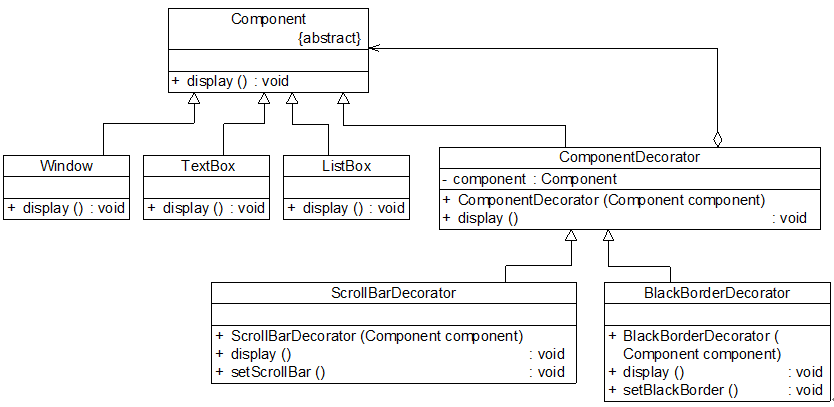
图12-4 图形界面构件库结构图
在图12-4中,Component充当抽象构件类,其子类Window、TextBox、ListBox充当具体构件类,Component类的另一个子类ComponentDecorator充当抽象装饰类,ComponentDecorator的子类ScrollBarDecorator和BlackBorderDecorator充当具体装饰类。完整代码如下所示:
//抽象界面构件类:抽象构件类,为了突出与模式相关的核心代码,对原有控件代码进行了大量的简化
abstract class Component
{
public abstract void display();
}
//窗体类:具体构件类
class Window extends Component
{
public void display()
{
System.out.println("显示窗体!");
}
}
//文本框类:具体构件类
class TextBox extends Component
{
public void display()
{
System.out.println("显示文本框!");
}
}
//列表框类:具体构件类
class ListBox extends Component
{
public void display()
{
System.out.println("显示列表框!");
}
}
//构件装饰类:抽象装饰类
class ComponentDecorator extends Component
{
private Component component; //维持对抽象构件类型对象的引用
public ComponentDecorator(Component component) //注入抽象构件类型的对象
{
this.component = component;
}
public void display()
{
component.display();
}
}
//滚动条装饰类:具体装饰类
class ScrollBarDecorator extends ComponentDecorator
{
public ScrollBarDecorator(Component component)
{
super(component);
}
public void display()
{
this.setScrollBar();
super.display();
}
public void setScrollBar()
{
System.out.println("为构件增加滚动条!");
}
}
//黑色边框装饰类:具体装饰类
class BlackBorderDecorator extends ComponentDecorator
{
public BlackBorderDecorator(Component component)
{
super(component);
}
public void display()
{
this.setBlackBorder();
super.display();
}
public void setBlackBorder()
{
System.out.println("为构件增加黑色边框!");
}
}
编写如下客户端测试代码:
class Client
{
public static void main(String args[])
{
Component component,componentSB; //使用抽象构件定义
component = new Window(); //定义具体构件
componentSB = new ScrollBarDecorator(component); //定义装饰后的构件
componentSB.display();
}
}
编译并运行程序,输出结果如下:
为构件增加滚动条!
显示窗体!
在客户端代码中,我们先定义了一个Window类型的具体构件对象component,然后将component作为构造函数的参数注入到具体装饰类ScrollBarDecorator中,得到一个装饰之后对象componentSB,再调用componentSB的display()方法后将得到一个有滚动条的窗体。如果我们希望得到一个既有滚动条又有黑色边框的窗体,不需要对原有类库进行任何修改,只需将客户端代码修改为如下所示:
class Client
{
public static void main(String args[])
{
Component component,componentSB,componentBB; //全部使用抽象构件定义
component = new Window();
componentSB = new ScrollBarDecorator(component);
componentBB = new BlackBorderDecorator(componentSB); //将装饰了一次之后的对象继续注入到另一个装饰类中,进行第二次装饰
componentBB.display();
}
}
编译并运行程序,输出结果如下:
为构件增加黑色边框!
为构件增加滚动条!
显示窗体!
我们可以将装饰了一次之后的componentSB对象注入另一个装饰类BlackBorderDecorator中实现第二次装饰,得到一个经过两次装饰的对象componentBB,再调用componentBB的display()方法即可得到一个既有滚动条又有黑色边框的窗体。
如果需要在原有系统中增加一个新的具体构件类或者新的具体装饰类,无须修改现有类库代码,只需将它们分别作为抽象构件类或者抽象装饰类的子类即可。与图12-2所示的继承结构相比,使用装饰模式之后将大大减少了子类的个数,让系统扩展起来更加方便,而且更容易维护,是取代继承复用的有效方式之一。





 扫一扫
扫一扫


 639
639

 被折叠的 条评论
为什么被折叠?
被折叠的 条评论
为什么被折叠?
 到【灌水乐园】发言





