


插槽应用功能描述
- 表格和标签为插槽,可以自定义设置内容
- 双击标签名进入编辑状态,点击enter键提交并保存修改
- 只记录了大致的思路,具体还需进一步学习
实现效果
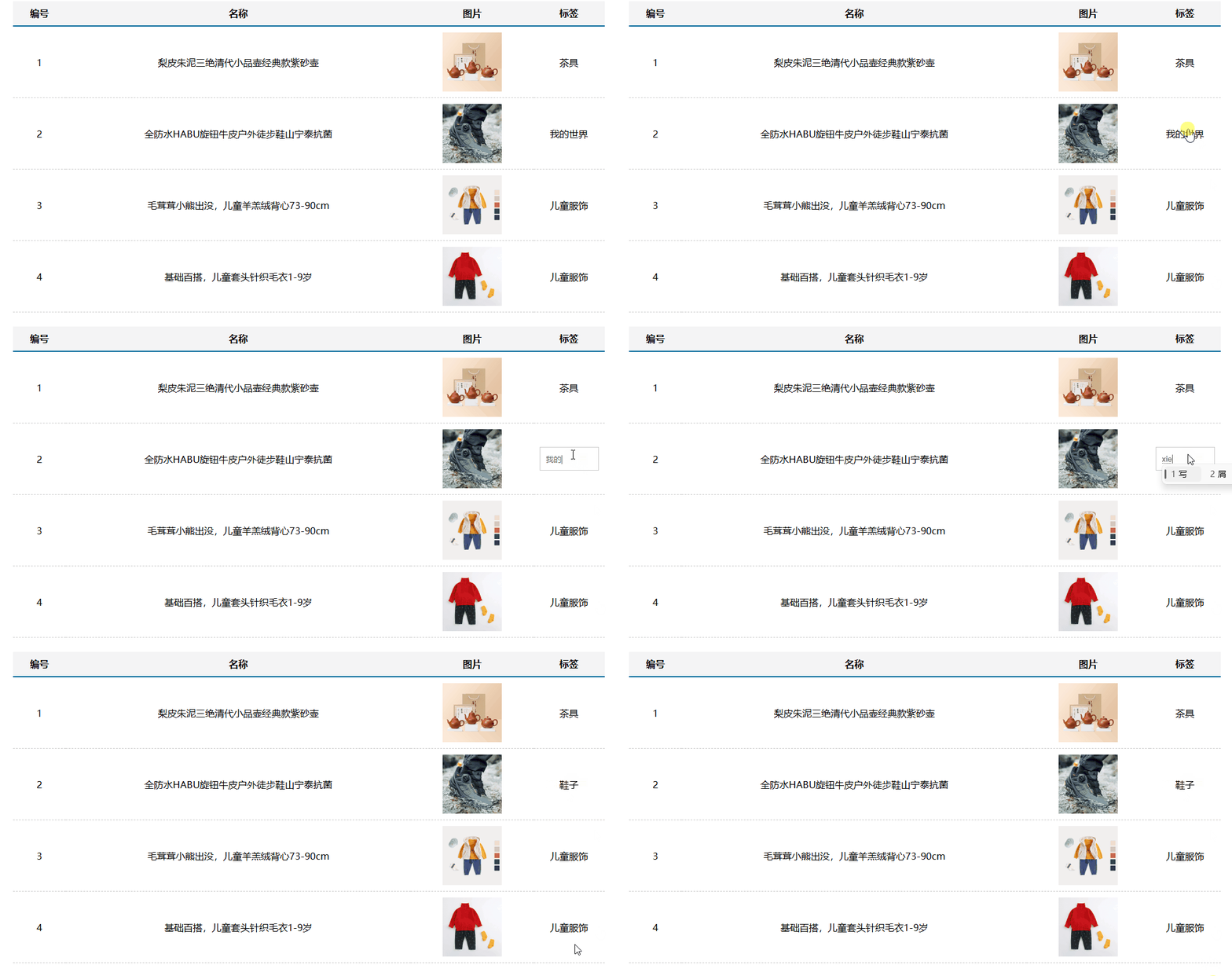
插槽应用实现步骤
1. 概念理解
了解插槽的使用和分类
- 普通插槽(适用于一处自定义)
<自定义组件>
<slot>默认值</slot>			//占位符,当自定义组件没有传内容时,使用默认值填充
</自定义组件>
//父组件
<自定义组件>自定义内容</自定义组件>		//当使用自定义组件时,自定义内容会自动填充到占位符位置中,实现组件个性化
- 具名插槽(适用于多处自定义)
<自定义组件>
<slot name="自定义名称1"></slot>			//设置两处以上自定义内容
<slot name="自定义名称2"></slot>
</自定义组件>
//父组件
<自定义组件>
<template #自定义名称1>自定义内容1</template>		//自定义内容设置
<template #自定义名称2>自定义内容2</template>
</自定义组件>
- 作用域插槽(用于组件间传值)
<自定义组件>
<slot :自定义属性名="属性值"></slot>			//设置两处以上自定义内容
</自定义组件>
//父组件
<自定义组件>
<template #自定义属性名="自定义属性值">自定义内容1</template>		//自定义属性值可以解构
</自定义组件>
自定义属性
- 全局定义
Vue.directive("自定义属性名称",{
inserted(el,binding){
//el为绑定的元素,binding.value可以取到自定义属性设置的值
}
updated(el,binding){			//inserted为插入后触发,updated为改变后触发
}
})
//使用
v-自定义属性名="自定义属性值"
- 局部定义
directive:{
inserted(el,binding){
//用法同上
}
updated(el,binding){
}
}
2.拆分组件
将整个页面拆分成两个组件,分别为表格和标签
MyTable.vue
<template>
  <table class="my-table">
    <thead>
      <slot name="thead"></slot>			//具名插槽占位符
    </thead>
    <tbody>
      <slot name="tbody"></slot>
    </tbody>
  </table>
</template>
MyTag.vue
<template>
  <div class="my-tag">
    <input class="input" type="text" placeholder="输入标签" v-if="flag" v-focus @keyup.enter="enter" :value="value" />
    <div v-else class="text" @dblclick="flag = true">
      {{ tag }}				//输入框与父组件tag所绑定,父组件tag传给标签,并和标签绑定
    </div>
  </div>
</template>
App.vue
<template>
  <div class="table-case">
    <MyTable :goods="goods">
      <template #thead>						//自定义头部
        <tr>
          <th>编号</th>
          <th>名称</th>
          <th>图片</th>
          <th width="100px">标签</th>
        </tr>
      </template>
      <template #tbody>						//自定义身体
        <tr v-for="(item, index) in goods" :key="item.id">
          <td>{{ index + 1 }}</td>
          <td>{{ item.name }}</td>
          <td>
            <img :src="item.picture" />
          </td>
          <td>
            <MyTag @change="handle(e)" v-model="item.tag" :tag="item.tag"></MyTag>
          </td>
        </tr>
      </template>
    </MyTable>
  </div>
</template>
3. 渲染数据
通过数据通信将父组件数据传到子组件中,并渲染出来
//子组件
props: {
    goods: Array
  }
//父组件
 <MyTable :goods="goods">
4. 编辑数据
使用v-if和v-else控制输入框和标签名的出现和消失,绑定点击事件,唤出输入框。将输入框和父组件的tag属性绑定在一起,当输入框数据改变时,对应父组件数据也进行改变,同时将改变后的数据发送给标签组件,并将其与标签绑定在一起,便可实现通过输入框更改标签
<script>
export default {
  data() {
    return {
      flag: false,
    }
  }, methods: {
    enter(e) {
      e.target.blur()				//部分知识点参考我的其他文章
      this.flag = false
      this.$emit('input', e.target.value)
    }
  },
  props: {
    value: String,
    tag: String
  }
}
</script>
完整实例代码
//App.vue
<template>
  <div id="app">
    <MyTable :records="records" @handleH="handle"></MyTable>
    <MyIndex :records="records"></MyIndex>
  </div>
</template>

<script>
import MyTable from './components/MyTable.vue'
import MyIndex from './components/MyIndex.vue'
export default {
  data() {
    return {
      records: [
        {
          date: '2022-01-01',
          doctor: '张三',
          diagnosis: '感冒',
          prescription: '感冒药',
        },
        {
          date: '2022-02-01',
          doctor: '李四',
          diagnosis: '头疼',
          prescription: '止疼药',
        },
        {
          date: '2022-03-01',
          doctor: '王五',
          diagnosis: '腰痛',
          prescription: '止痛贴',
        }
      ],
      records1: [
        {
          date: '2022-01-01',
          doctor: '张三',
          diagnosis: '感冒',
          prescription: '感冒药',
        },
        {
          date: '2022-02-01',
          doctor: '李四',
          diagnosis: '头疼',
          prescription: '止疼药',
        },
        {
          date: '2022-03-01',
          doctor: '王五',
          diagnosis: '腰痛',
          prescription: '止痛贴',
        }
      ]
    }
  },
  methods: {
    handle(value) {
      this.records = value ? this.records1.filter(item => item.doctor == value || item.diagnosis == value || item.prescription == value) : this.records1
    }
  },
  components: {
    MyTable,
    MyIndex
  }
}
</script>

<style></style>
//MyTable
<template>
  <div>
    <input placeholder="输入关键字搜索" @input="search" />
    <table class="my-table">
      <thead>
        <tr>
          <th>就诊日期</th>
          <th>医生姓名</th>
          <th>诊断结果</th>
          <th>处方信息</th>
          <th>操作</th>
        </tr>
      </thead>
      <tbody>
        <tr v-for="item in records" :key="item.doctor">
          <td>{{ item.date }}</td>
          <td>{{ item.doctor }}</td>
          <td>{{ item.prescription }}</td>
          <td>{{ item.diagnosis }}</td>
          <td @click="alert(item.doctor)">详情</td>
        </tr>
      </tbody>
    </table>
  </div>
</template>

<script>
import Bus from '../utils/EventBus'
export default {
  data() {
    return {
      timer: null,
      flag: true
    }
  },
  props: {
    value: String,
    records: Array
  },
  methods: {
    search(e) {
      if (this.timer) clearTimeout(this.timer)
      this.timer = setTimeout(() => {
        this.$emit('handleH', e.target.value)
      }, 500)
    },
    alert(doctor) {
      Bus.$emit('msg', doctor)
      Bus.$emit('show', this.flag)
    }
  }
}
</script>

<style scoped>
.my-table {
  border-collapse: collapse;
  width: 100%;
}

.my-table td,
.my-table th {
  border: 1px solid #ddd;
  padding: 8px;
  text-align: left;
}

.my-table th {
  background-color: #f2f2f2;
}
</style>
//MyIndex
<template>
  <div class="modal-mask" v-show="status">
    <div class="modal-container">
      <div class="modal-header">
        <h3>就诊记录详情</h3>
        <span class="close-btn" @click="close">X</span>
      </div>
      <div class="modal-body" v-for="item in data1" :key="item.doctor">
        <p><strong>就诊日期:</strong>{{item.date}}</p>
        <p><strong>医生姓名:</strong>{{item.doctor}}</p>
        <p><strong>诊断结果:</strong>{{item.diagnosis}}</p>
        <p><strong>处方信息:</strong>{{item.prescription}}</p>
      </div>
    </div>
  </div>
</template>

<script>
import Bus from '../utils/EventBus'
export default {
  data() {
    return {
      data1: [],
      status:false
    }
  },
  methods: {
    close() {
      this.status=false
    }
  },
  mounted() {
    Bus.$on('msg', (msg) => {
      this.data1 = this.records.filter(item => item.doctor === msg)
    })
    Bus.$on('show', (flag) => {
      this.status=flag
    })
  },
  props: {
    records:Array
  }

}
</script>

<style scoped>
  .hidden{
  display: none !important;
}
.modal-mask {
  position: fixed;
  top: 0;
  left: 0;
  bottom: 0;
  right: 0;
  background-color: rgba(0, 0, 0, 0.5);
  display: flex;
  justify-content: center;
  align-items: center;
}

.modal-container {
  background-color: #fff;
  border-radius: 5px;
  padding: 20px;
  max-width: 500px;
}

.modal-header {
  display: flex;
  justify-content: space-between;
  align-items: center;
}

.close-btn {
  cursor: pointer;
}
</style>





 扫一扫
扫一扫


 2667
2667


 到【灌水乐园】发言



