





 本文详细介绍如何使用C语言进行文件的读写操作,包括文件的打开、关闭、数据的写入和读取等基本流程,并提供了具体的代码示例,展示了如何通过fgets、fscanf等函数处理文本文件。
参考:
【2】https://mp.youkuaiyun.com/console/editor/html/105208262
————————————————————————
#define _CRT_SECURE_NO_WARNINGS
#include <iostream>
#include <cstdio>
#include <string>
using namespace std;

//C语言向文件存入数据
void writeFile()
{
	FILE *fp;
	fp = fopen("0501.txt", "w");
	if (!fp)
	{
		printf("文件打开失败\n");
		return;
	}

	fprintf(fp, "%s\n", "1234hello");
	fprintf(fp, "%s\n", "1234hello");
	fprintf(fp, "%s\n", "1234 hello");
	fprintf(fp, "%s\n", "12.34 hello");

	fclose(fp);
	printf("数据存储完成\n");
}

//使用C语言读取文件
void ReadFile1()
{
	FILE *fp;
	fp = fopen("0501.txt", "r");
	if (!fp)
	{
		printf("文件打开失败\n");
		return;
	}

	//读取第一行:fgets
	char str1[20];
	fgets(str1, 10, fp);
	cout << str1 << endl;
	//分解第一行
	//char str1_1[20] = { 0 };   //初始化为空
	char str1_1[20];
	memset(str1_1, '\0', sizeof(char)* 20); //初始化为空
	strncpy(str1_1, str1, 4);
	cout << str1_1 << endl;
	char str1_2[20] = { 0 };
	strncpy(str1_2, str1 + 4, 5);
	cout << str1_2 << endl;

	//读取第2行:fscanf
	char str2[20];
	fscanf(fp, "%s", str2);
	cout << str2 << endl;
	char str2_1[20] = { 0 };
	strncpy(str2_1, str2, 4);
	cout << str2_1 << endl;
	char str2_2[20] = { 0 };
	strncpy(str2_2, str2 + 4, 5);
	cout << str2_2 << endl;

	//读取第三行:fscanf
	int str3_1;
	char str3_2[20];
	fscanf(fp, "%d %s", &str3_1, str3_2);
	printf("%d %s\n", str3_1, str3_2);

	//读取第4行:fscanf
	float str4_1;
	char str4_2[20];
	fscanf(fp, "%f %s", &str4_1, str3_2);
	printf("%f %s\n", str4_1, str3_2);

	fclose(fp);
	printf("数据读取完成\n");
}


int main()

{
	writeFile();//使用C语言写文件
	ReadFile1();//使用C语言读取文件

	return 0;
}
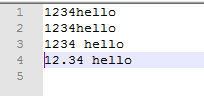
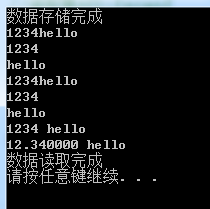
%===20200508 补充===
1】
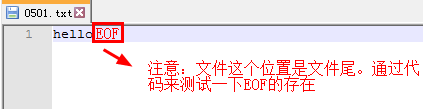
2】

方式1:
#include <stdlib.h>
#include <stdio.h>
#include <string.h>

int main(void)
{
	FILE *fp;
	fp = fopen("0501.txt", "r");

	char ch1;
	//char ch2[10];
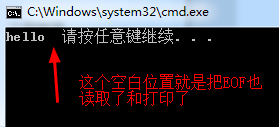
	while (!feof(fp))
	{
		ch1 = fgetc(fp);
		printf("%c", ch1);
		//strcpy(ch2 , fgets(ch2,10,fp));
	}

	fclose(fp);

	system("pause");
	return 0;

}
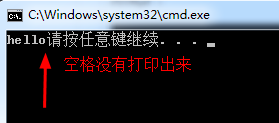
方式2:
#include <stdlib.h>
#include <stdio.h>
#include <string.h>

int main(void)
{
	FILE *fp;
	fp = fopen("0501.txt", "r");

	char ch1;
	while (!feof(fp))
	{
		ch1 = fgetc(fp);
		if (ch1 == EOF)
		{
			break;
		}
		printf("%c", ch1);

	}
	fclose(fp);
	system("pause");
	return 0;

}
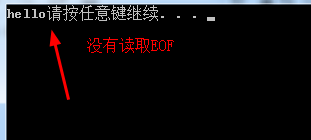
方式3:
#include <stdlib.h>
#include <stdio.h>
#include <string.h>

int main(void)
{
	FILE *fp;
	fp = fopen("0501.txt", "r");

	char ch1;
	while ((ch1=fgetc(fp))!= EOF)
	{
		printf("%c", ch1);

	}
	fclose(fp);
	system("pause");
	return 0;

}





 扫一扫
扫一扫


 7803
7803

 被折叠的 条评论
为什么被折叠?
被折叠的 条评论
为什么被折叠?
 到【灌水乐园】发言





