


前言
下面是一个完整的实现方案,主要包含了以下内容:
- 在主进程中创建child process
- 在子进程中使用systeminformation库读取硬件数据
- 每6秒读取一次数据,将数据保存到SQLite3数据库
- 页面中实现条件查询和分页查询
- 子进程异常退出时,自动重启
1. 依赖安装
npm install systeminformation sqlite3
2. 代码实现
Electron 的 主进程是单线程的,为了避免一些耗时操作或者代码异常影响主进程,我们不在主进程中直接实现功能,而且通过 child_process.fork() 将硬件采集任务交给子进程,主进程保持轻量、响应迅速。
main.ts (主进程)
const { app, BrowserWindow, ipcMain } = require('electron');
const path = require('path');
import { spawn, fork } from 'child_process'

let win;
let hardwareInterval = null;
const DB_PATH = path.join(app.getPath('userData'), 'hardware.db');

function startDBProcess(mainWindow, restartCount = 0) {
    const maxRestarts = 2

    if (restartCount >= maxRestarts) {
        log.error(
            `Maximum db restart attempts reached (${maxRestarts}). Stopping further restarts.`
        )
        return
    }
    dbProcess = fork(join(__dirname, 'dbprocess.js'), [DB_PATH])

    dbPro.on('message', (msg) => {
        switch (msg.type) {
            case 'usage':
                if (mainWindow) {
                    mainWindow.webContents.send('system-usage', msg.data)
                }
                break
        }
    })

    dbPro.on('close', (code) => {
        if (code !== 0) {
            startDB(mainWindow)
        }
    })

    dbPro.on('error', (err) => {
        log.error('Failed to start db process:', err)
    })
}

function createWindow() {
  win = new BrowserWindow({
    width: 1200,
    height: 800,
    webPreferences: {
      preload: path.join(__dirname, 'preload.js'),
      contextIsolation: true
    }
  });

  win.loadFile('index.html');
}

ipcMain.handle('query-database', async (_event, query) => {
    return new Promise((resolve, reject) => {
        dbPro.send({ type: 'query', query })

        dbPro.once('message', (msg) => {
            if (msg.type === 'queryresult') {
                resolve(msg)
            }
        })

        dbPro.once('error', (err) => {
            reject(err)
        })
    })
})

app.whenReady().then(() => {
  createWindow();
  startDBProcess(win);

  app.on('activate', () => {
    if (BrowserWindow.getAllWindows().length === 0) createWindow();
  });
});
dbProcess.ts
import sqlite3 from 'sqlite3'
import si from 'systeminformation'
import { join } from 'path'

let firstTime = true
let disks
let dbStatus = false
const getSystemInfo = async () => {
    let cpuUsage = ''
    let cpuTemperature = ''
    let memoryUsage = ''
    let diskUsage = ''

    if (firstTime) {
        await si.blockDevices().then((data) => {
            disks = data
                .filter((disk) => {
                    return disk.physical === 'Local'
                })
                .map((disk) => {
                    return disk.name
                })
        })
        firstTime = false
    }

    await si.currentLoad().then((data) => {
        cpuUsage = Math.floor(data.currentLoad) + '%'
    })

    await si.cpuTemperature().then((data) => {
        cpuTemperature = Math.floor(data.main) + '°C'
    })

    await si.mem().then((data) => {
        memoryUsage = Math.floor((data.used / data.total) * 100) + '%'
    })

    await si.fsSize().then((data) => {
        data.forEach((disk) => {
            if (disks.includes(disk.fs)) {
                diskUsage += disk.fs + Math.floor(disk.use) + '% '
            }
        })
    })

    return {
        cpu: cpuUsage,
        cpuTemp: cpuTemperature,
        memory: memoryUsage,
        disk: diskUsage
    }
}

const db = new sqlite3.Database(join(process.argv[2]), (err) => {
    if (err) {
        if (process.connected) {
            process.send({ type: 'fail' })
        }
    } else {
        dbStatus = true
    }
})

db.serialize(() => {
    db.run(
        `CREATE TABLE IF NOT EXISTS system_monitor (
            id INTEGER PRIMARY KEY AUTOINCREMENT,
            cpu_usage TEXT NOT NULL,
            cpu_temperature TEXT NOT NULL,
            memory_usage TEXT NOT NULL,
            disk_usage TEXT NOT NULL,
            insert_time TEXT NOT NULL DEFAULT (datetime('now', 'localtime'))
            )`,
        (err) => {
            if (err) {
                // log.error(err.message)
                if (process.connected) {
                    process.send({ type: 'dberror', error: 'failed to create table system_monitor' })
                }
            } else {
                // log.info('Connected to the SQlite database.')
            }
        }
    )
})

let socketMessagesBuffer = []

function storeSocketMessagesBatch() {
    if (socketMessagesBuffer.length > 0) {
        const stmt = db.prepare('INSERT INTO socket_messages (message) VALUES (?)')
        socketMessagesBuffer.forEach((message) => {
            stmt.run(message)
        })
        stmt.finalize()
        socketMessagesBuffer = []
    }
}

const i2 = setInterval(storeSocketMessagesBatch, 30000)

if (process) {
    process.on('message', (message) => {
        if (message.type === 'query') {
            const query = message.query
            const baseQueryMatch = query.match(
                /^(SELECT\s+[\s\S]*?)\s*(LIMIT\s+\d+\s*OFFSET\s*\d+)/i
            )
            let baseQuery = query
            if (baseQueryMatch && baseQueryMatch[1]) {
                baseQuery = baseQueryMatch[1]
            }

            const countQuery = `SELECT COUNT(*) AS count FROM (${baseQuery})`

            db.get(countQuery, [], (err, row: { count: number }) => {
                if (err) {
                    if (process.connected) {
                        process.send({ type: 'queryResult', data: null, error: err.message })
                    }
                }
                const totalRecords = row.count
                db.all(query, [], (err, rows) => {
                    if (err) {
                        if (process.connected) {
                            process.send({
                                type: 'queryresult',
                                data: null
                            })
                        }
                    } else {
                        if (process.connected) {
                            process.send({
                                type: 'queryresult',
                                count: totalRecords,
                                data: rows
                            })
                        }
                    }
                })
            })
        }
    })
}

const i1 = setInterval(async () => {
    const message = await getSystemInfo()
    if (process.connected) {
        process.send({ type: 'usage', data: message })
    }
    dbStatus && db.run(
                'insert into system_monitor (cpu_usage, cpu_temperature, memory_usage, disk_usage) values (?, ?, ?, ?)',
                [message.cpu, message.cpuTemp, message.memory, message.disk]
            )
}, 6000)

process.on('disconnect', () => {
    clearInterval(i1);
    clearInterval(i2);
    process.exit(0);
});
preload.js
const { contextBridge, ipcRenderer } = require('electron');

contextBridge.exposeInMainWorld('electronAPI', {
  queryDatabase: () => ipcRenderer.invoke('query-database')
});
src/App.vue (Vue3组件)
页面中使用Ant Design Vue的相关组件,实现条件查询和分页查询
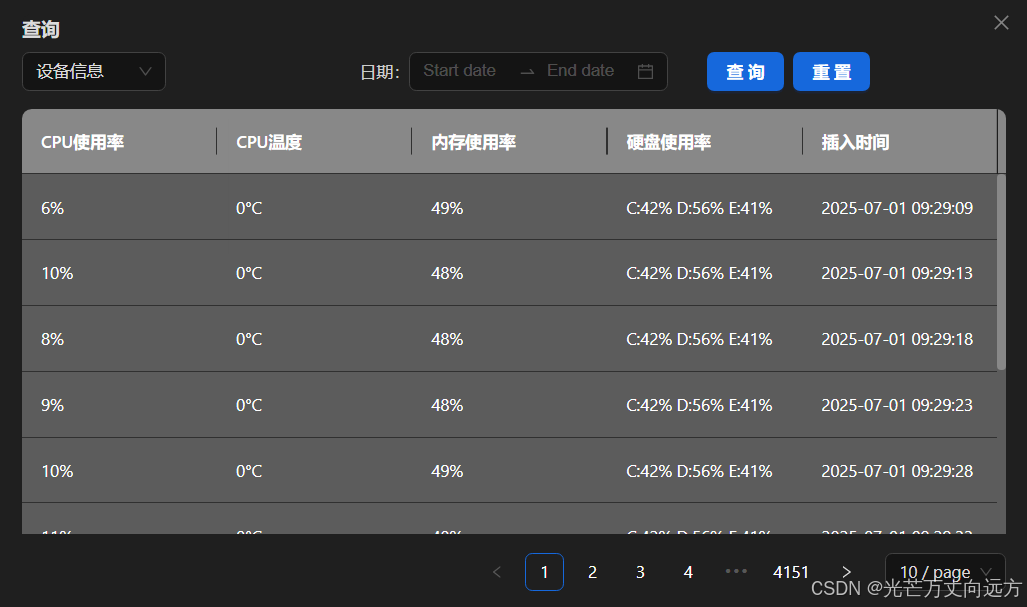
关键代码如下:
<script setup lang="ts">
import { ref, onMounted } from 'vue';

const handleSearch = async () => {
    formState.category = value1.value
    let param = { ...formState, ...pagination }
    formRef.value
        .validate()
        .then(async () => {
            let query = 'SELECT * FROM system_monitor'
            const selectedDates = formState['range-picker']

            if (selectedDates.length === 2) {
                let startDate = selectedDates[0] + ' 00:00:00'
                let endDate = selectedDates[1] + ' 23:59:59'
                query += ` WHERE insert_time BETWEEN '${startDate}' AND '${endDate}'`
            }

            query += ` LIMIT ${pagination.value.pageSize} OFFSET ${(pagination.value.current - 1) * pagination.value.pageSize}`
            try {
                const response = await window.api.queryDatabase(query)
                dataSource.value = response.data
                pagination.value.total = response.count
            } catch (error) {
                console.error('Query error:', error)
            }
        })
        .catch((error) => {
            console.error('Validation failed:', error)
        })
}
</script>
3. 重要注意事项
i. CPU温度支持:
Windows系统上读取系统温度,需要管理员权限,在使用electron builder打包的时候,添加如下打包参数
requestedExecutionLevel: requireAdministrator
ii. 数据库位置:
数据库保存路径是app.getPath(‘userData’),这个在不同的系统上,略有不同,Windows:
%APPDATA%\electron-app\hardware.db





 扫一扫
扫一扫


 被折叠的 条评论
为什么被折叠?
被折叠的 条评论
为什么被折叠?
 到【灌水乐园】发言





