



 本文详细介绍了如何使用LUA语言解析一个特定的JSON配置文件(gui-config.json)。通过展示具体的代码片段,包括文件读取、JSON解码以及遍历解析后的数据,读者可以学习到如何在LUA中操作JSON数据,特别关注于提取服务器配置信息。
需要解析的json数据gui-config.json
{
    "configs": [{
        "server": "JP3.ISS.TF",
        "server_port": 443,
        "password": "58603228",
        "method": "aes-256-cfb",
        "remarks": ""
    },
    {
        "server": "US1.ISS.TF",
        "server_port": 443,
        "password": "37382928",
        "method": "aes-256-cfb",
        "remarks": ""
    },
    {
        "server": "HK2.ISS.TF",
        "server_port": 8989,
        "password": "59434206",
        "method": "aes-256-cfb",
        "remarks": ""
    }],
    "strategy": null,
    "index": 0,
    "global": false,
    "enabled": true,
    "shareOverLan": false,
    "isDefault": false,
    "localPort": 1080,
    "pacUrl": null,
    "useOnlinePac": false,
    "availabilityStatistics": false
}
LUA解析代码:
function FileRead()
    local file = io.open("gui-config.json", "r");
    local json = file:read("*a");
    file:close();
    return json;
end

function FileWrite()
    local file = io.open("gui-config.json", "w");
    file:close();
end

local cjson = require("cjson");
local file = FileRead();
local json = cjson.decode(file);
for i, w in ipairs(json.configs) do
    print("server: " .. w.password)
    print("server_port: " .. w.server_port)
    print("password: " .. w.password)
    print("method: " .. w.method .. '\n')
end
输出:
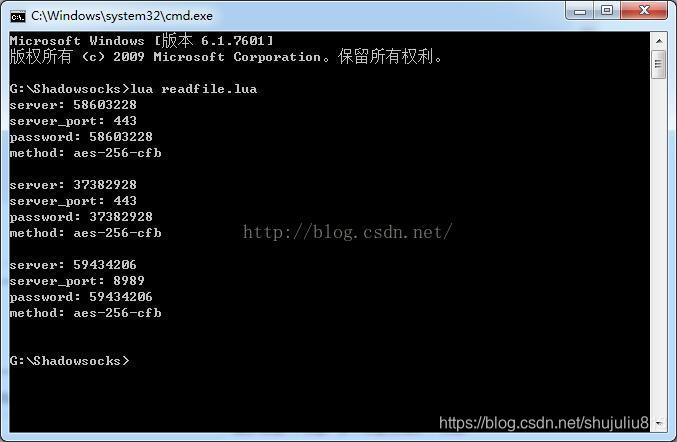
转自:https://blog.youkuaiyun.com/linxinfa/article/details/76557700





 扫一扫
扫一扫


 652
652

 被折叠的 条评论
为什么被折叠?
被折叠的 条评论
为什么被折叠?
 到【灌水乐园】发言





