
银行类app额度view

引用: compile 'com.a1002326270:amountlibs:1.0’
使用:
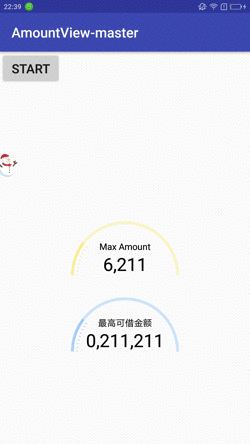
在这里插入图片描述
xml:

<com.xiangcheng.amount.AmountView
android:id="@+id/amount_view"
android:layout_width=“wrap_content”
android:layout_height=“wrap_content”
android:layout_centerInParent=“true”
app:hint_text=“Max Amount”
app:max_amount=“30000”
app:shadow_color="#FFD700" />

这里就定义了三个属性:

hint_text: 提示文字

max_amount: 最大的额度

shadow_color: 背景颜色

code:

//代码中设置额度
public void setAmount(int amount) {
}

//启动动画
public void start() {
}

maven dependence:

com.a1002326270 amountlibs 1.0 pom

gradle dependence:

compile ‘com.a1002326270:amountlibs:1.0’

欢迎大家提出问题,留言板留言或邮箱直接联系我。我会第一时间测试相关的bug

自定义View之仿支付宝芝麻信用分仪表盘效果,喜欢的话,请给个star,谢谢.使用添加项目依赖Add it in your root build.gradle at the end of repositories: allprojects {         repositories { ... maven { url "https://jitpack.io" }         }     } Add the dependency     dependencies {             compile 'com.github.HotBitmapGG:CreditSesameRingView:V1.0.2' }新版芝麻信用分使用     // The gradient color can define your own private final int[] mColors = new int[]{             0xFFFF80AB,             0xFFFF4081,             0xFFFF5177,             0xFFFF7997              }; // Set up the need to score mLayout = (RelativeLayout) view.findViewById(R.id.layout);       mButton = (Button) view.findViewById(R.id.btn);       newCreditSesameView = (NewCreditSesameViewview.findViewById(R.id.sesame_view);       mLayout.setBackgroundColor(mColors[0]);       mButton.setOnClickListener(new View.OnClickListener()       { @Override public void onClick(View view)            {                newCreditSesameView.setSesameValues(639);                startColorChangeAnim();            }       }); // The background color gradient animation Simply illustrates the effect Can customize according to your need public void startColorChangeAnim()      { ObjectAnimator animator = ObjectAnimator.ofInt(mLayout, "backgroundColor", mColors);          animator.setDuration(3000);          animator.setEvaluator(new ArgbEvaluator());          animator.start();      }旧版芝麻信用分使用      // Set up the need to score oldCreditSesameView = (OldCreditSesameViewview.findViewById(R.id.sesame_view);       mButton = (Button) view.findViewById(R.id.btn);       mButton.setOnClickListener(new View.OnClickListener()       { @Override public void onClick(View view)           {               oldCreditSesameView.setSesameValues(639);           }       });
评论
添加红包

请填写红包祝福语或标题

红包个数最小为10个

红包金额最低5元

当前余额3.43前往充值 >
需支付:10.00
成就一亿技术人!
领取后你会自动成为博主和红包主的粉丝 规则
hope_wisdom
发出的红包
实付
使用余额支付
点击重新获取
扫码支付
钱包余额 0

抵扣说明:

1.余额是钱包充值的虚拟货币,按照1:1的比例进行支付金额的抵扣。
2.余额无法直接购买下载,可以购买VIP、付费专栏及课程。

余额充值


