





 本文介绍Maven的基础使用方法,包括如何下载与安装Maven、配置环境变量及验证安装。此外,还详细讲解了如何配置Maven的settings.xml文件,如本地仓库路径、镜像源及配置开发库等。
Maven
maven的用处:
不用我们自己去download jar包,而是通过maven提供的pom.xml去配置jar包信息,然后maven通过pom.xml配置信息和规则,通过maven的命令,最后从maven的中央jar包仓库download到你的maven本地仓库,最后被我们自动依赖到项目中从而被使用。
3.1,下载,安装,环境变量配置
1)下载:http://maven.apache.org/download.cgi
windows系统下载第二行第一个,zip格式的。
解压
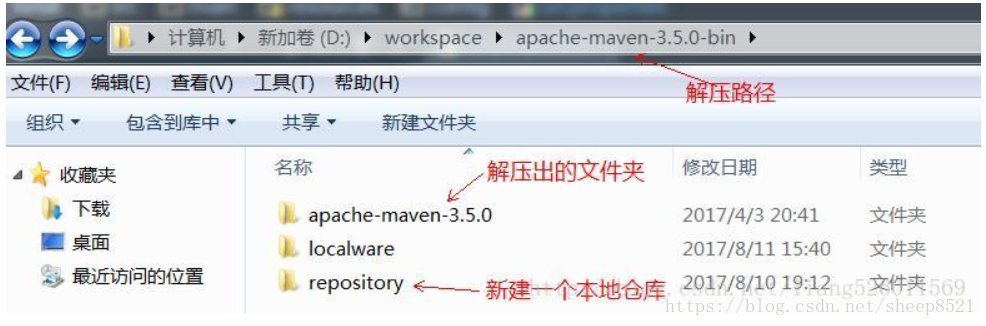
注明:一般导入maven项目的默认路径是放在C:\Users\migu.m2\repository。如果自己想新建repository文件夹,就像图片上面的一样新建一个本地仓库,并在maven的setting文件中指定。
2)在系统变量中新建M2_HOME、在Path中添加 %M2_HOME%\bin
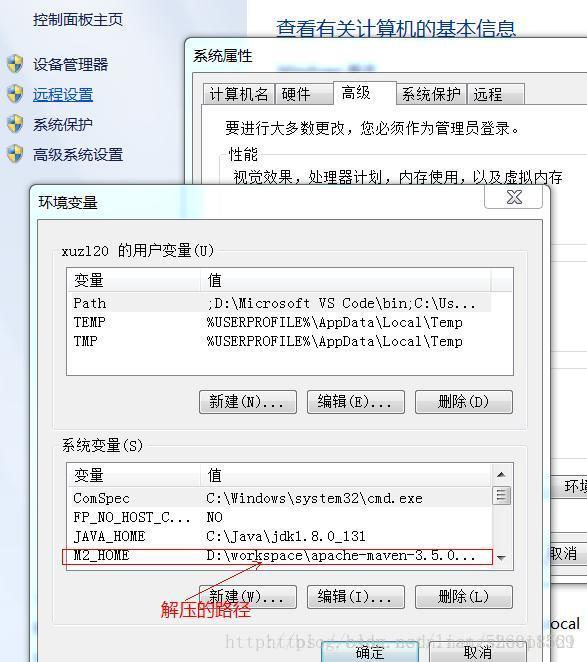
—在cmd命令行中输入mvn –version检测是否安装配置成功。
3.2 maven配置文件
maven需要配置的文件主要集中在pom.xml和settings.xml中.
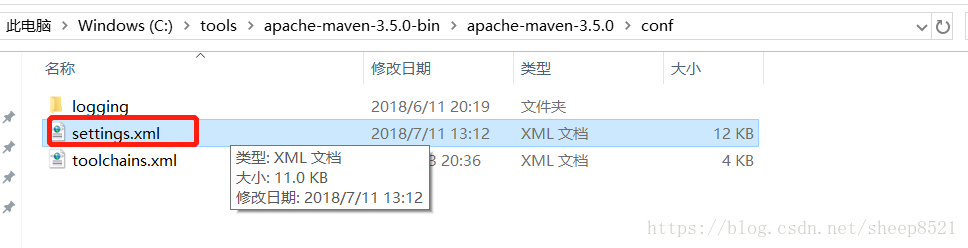
settings.xml在conf子目录下面,是Maven的基本配置,是一个包含了注释和例子的模板,你可以快速的修改它来达到你的要求。
在全局setting.xml中配置本地仓库
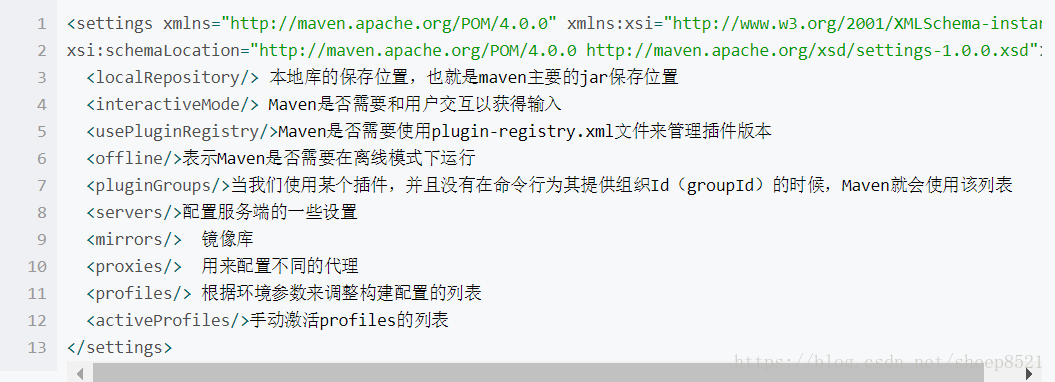
实际应用中,经常使用的是、、、有限几个节点,其他节点使用默认值足够应对大部分的应用场景。我本机实例:
1)localrepository:
本地仓库选择默认的也可以或者是自己新建的本地仓库,项目导入的时候,依赖的jar包就会自动下载存储在本地仓库中。

2)mirror:
有时候配置文件默认的镜像的内容不全,这时候需要配置别的镜像源这里用的阿里的
    <mirror>
        <id>alimaven</id>
        <mirrorOf>central</mirrorOf>
        <name>aliyun maven</name>
        <url>http://maven.aliyun.com/nexus/content/repositories/central/</url>
    </mirror>
    <mirror>
        <id>jboss-public-repository-group</id>
        <mirrorOf>central</mirrorOf>
        <name>JBoss Public Repository Group</name>
        <url>http://repository.jboss.org/nexus/content/groups/public</url>
     </mirror>
详情见:https://www.cnblogs.com/zengming/p/7786684.html
3)profiles:包含了激活(activation),仓库(repositories),插件仓库(pluginRepositories)和属性(properties)共四个子元素元素,repositories 和pluginRepositories 定义其他开发库和插件开发库。对于团队来说,肯定有自己的开发库。可以通过此配置来定义。
<profiles>
      <profile>
           <id>dev</id>
           <repositories>
                <repository>
                    <id>nexus</id>
                    <name>local private nexus</name>
                    <url>http://nexus.it.taikang.com/content/groups/maven-public/</url>
                    <releases>
                        <enabled>true</enabled>
                    </releases>
                    <snapshots>
                        <enabled>true</enabled>
                    </snapshots>
                </repository>
           </repositories>
           <pluginRepositories>
                <pluginRepository>
                    <id>nexus</id>
                    <url>http://nexus.it.taikang.com/content/groups/maven-public/</url>
                    <releases>
                        <enabled>true</enabled>
                    </releases>
                    <snapshots>
                        <enabled>true</enabled>
                    </snapshots>
                </pluginRepository>
           </pluginRepositories>
      </profile>
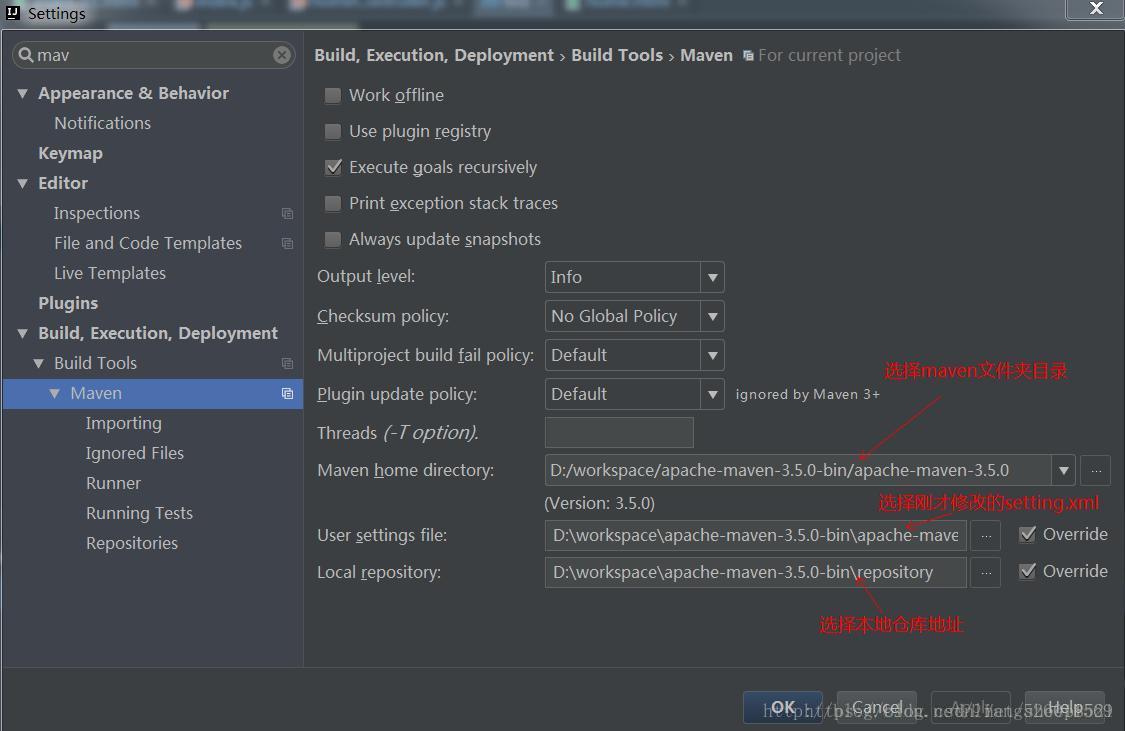
3.3 IDE中设置maven
—打开-File-Settings





 扫一扫
扫一扫


 1252
1252

 被折叠的 条评论
为什么被折叠?
被折叠的 条评论
为什么被折叠?
 到【灌水乐园】发言





