


有一段时间没有快速更新了。各位小伙伴有没有遇见虚拟化平台变更的需求,因为技术、版权等各种原因,从旧有虚拟化平台转向国产的虚拟化平台,近期逐步将测试的多款国产或是开源的虚拟化平台搭建过程发出来。搭建的标准是稳定、可靠,有成熟的备份方案比如Veeam、Veritas等主流备份工具可用。国内大部分底层KVM衍生品继续稳定、可用的备份方案。
此次使用Oracle Linux上的KVM,Oracle Linux Virtualization Manager 4.5 版基于 oVirt,这是一个免费的开源虚拟化解决方案。一直使用Oracle Linux作为database的基础系统,近期多轮测试Oracle Linux提供了更高的性价比和更强的兼容性、稳定性与安全性。
Veeam业界主流的数据管理和保护提供商,高效、可靠的备份和恢复。同样应该有很多测试的伙伴有测试用的最新版,新功能增加了对Oracle KVM,Proxmox VE的备份还原。复用原有资源,给替换那个订阅、取消永久授权的产品一个更好的方法。
一、Oracle Linux Virtualization Manager (ovirt-engine) 安装与配置
1.1 安装系统要求
- 主机:物理机或独立虚拟机(OLVM禁止与KVM主机复用)
- OS:Oracle Linux 8.8+ 最小化安装(Minimal Install)
- 资源:建议4核CPU/16GB RAM/100GB存储(生产环境按需扩展)
1.2 安装Mininal Oracle Linux截图
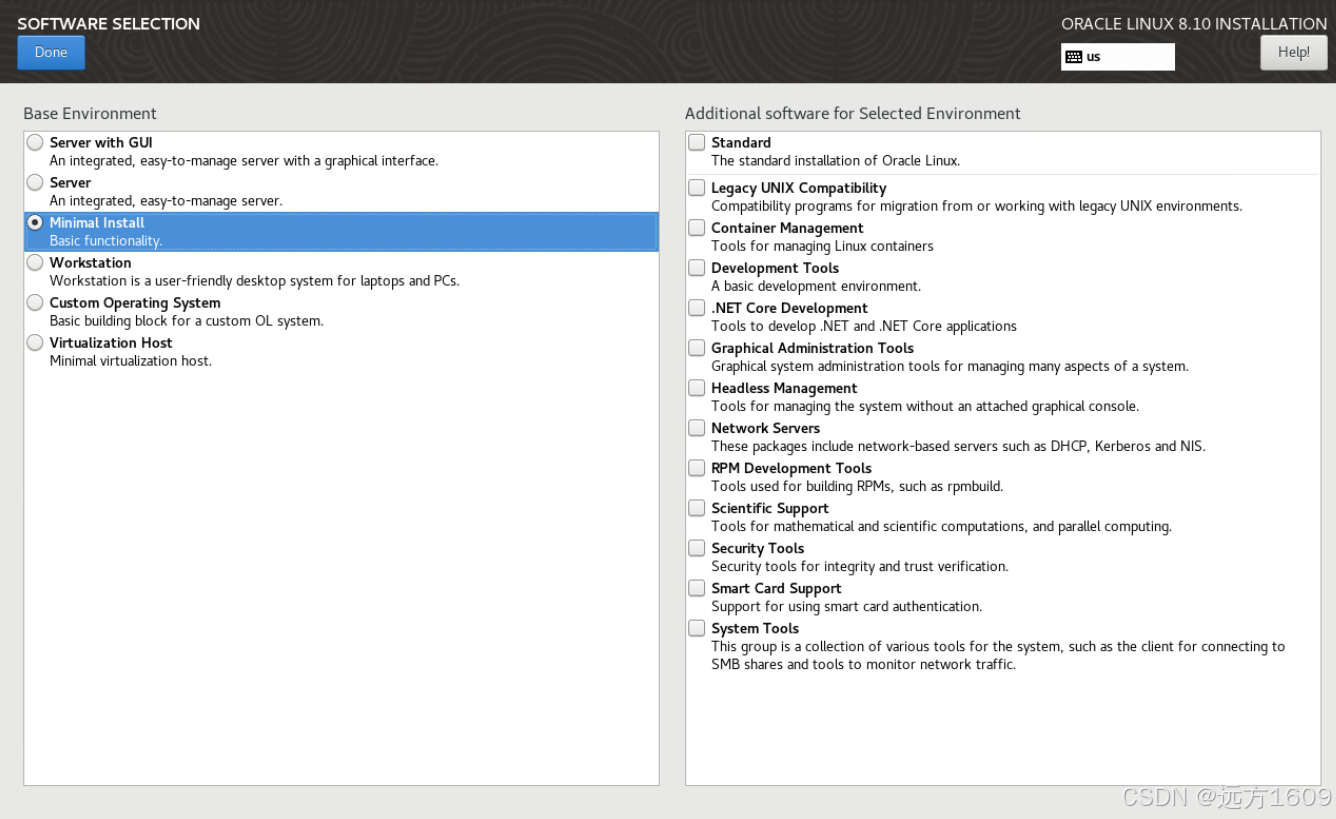
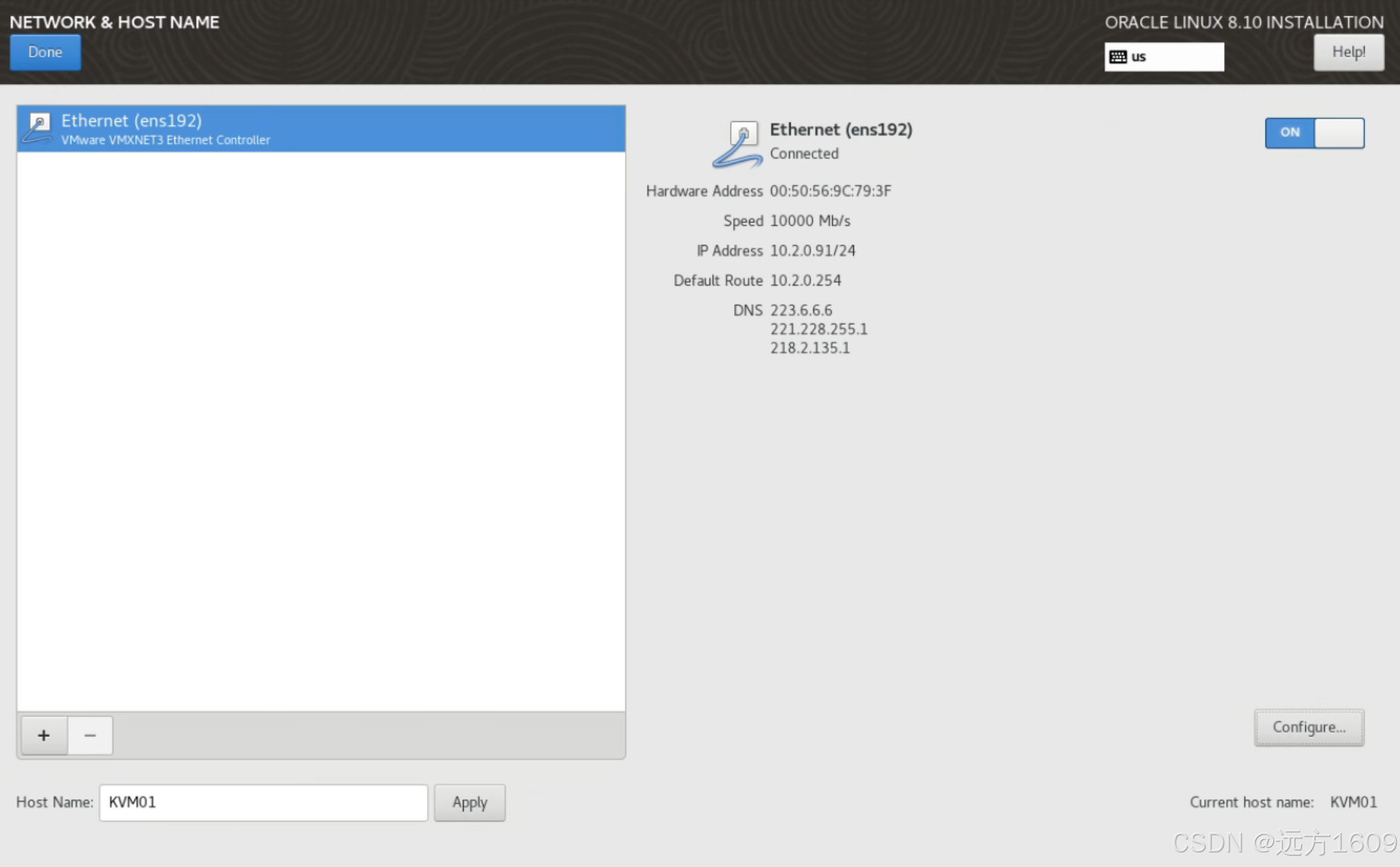
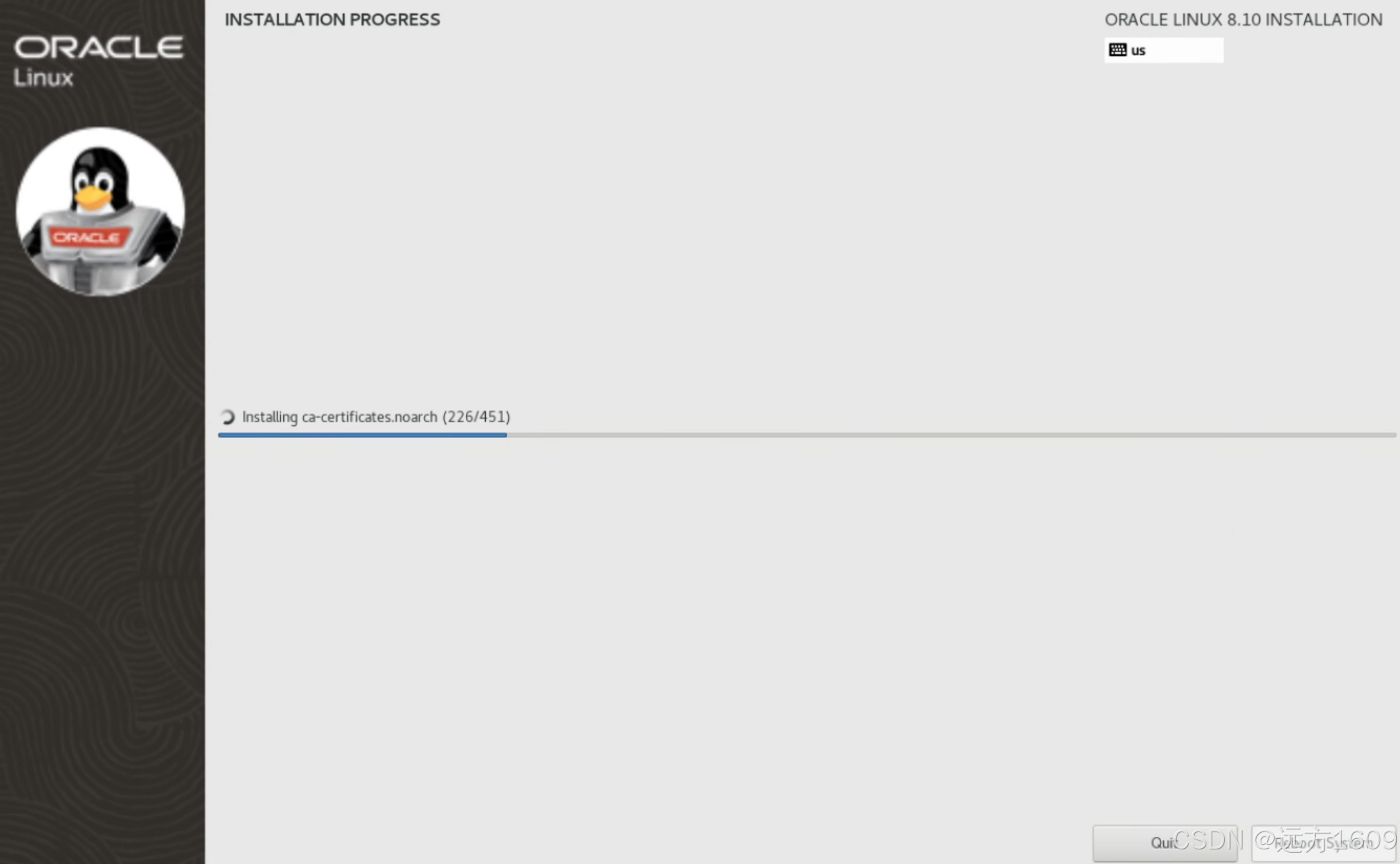
设置主机名和FQDN
[root@OLVM ~]# hostnamectl set-hostname ovlm.mingci.local
[root@OLVM ~]# cat /etc/hosts
127.0.0.1   localhost localhost.localdomain localhost4 localhost4.localdomain4
::1         localhost localhost.localdomain localhost6 localhost6.localdomain6

10.2.0.90   OLVM.mingci.local
10.2.0.91   KVM01.mingci.local
10.2.0.92   KVM02.mingci.local
[root@OLVM ~]#
设置 Cockpit Web 控制台
- 安装 cockpit-machines 扩展以基于 Libvirt 管理 VM。
sudo dnf install cockpit cockpit-machines

sudo systemctl enable --now cockpit.socket
sudo systemctl status cockpit.socket
1.3 安装oracle-ovirt-release-45-el8.rpm,同时加入REPO
--这一步骤预计需要十几分钟
dnf install oracle-ovirt-release-45-el8


Downloading Packages:
(1/4): oracle-gluster-release-el8-1.0-3.el8.x86_64.rpm                             22 kB/s |  18 kB     00:00
(2/4): oracle-ovirt-release-45-el8-1.0-39.el8.x86_64.rpm                           23 kB/s |  25 kB     00:01
(3/4): yum-utils-4.0.21-25.0.1.el8.noarch.rpm                                     133 kB/s |  75 kB     00:00
(4/4): python3-dnf-plugin-versionlock-4.0.21-25.0.1.el8.noarch.rpm                 25 kB/s |  65 kB     00:02
------------------------------------------------------------------------------------------------------------------
Total                                                                              70 kB/s | 183 kB     00:02
Running transaction check
Transaction check succeeded.
Running transaction test
Transaction test succeeded.
Running transaction
  Preparing        :                                                                                          1/1
  Installing       : yum-utils-4.0.21-25.0.1.el8.noarch                                                       1/4
  Installing       : oracle-gluster-release-el8-1.0-3.el8.x86_64                                              2/4
  Running scriptlet: oracle-gluster-release-el8-1.0-3.el8.x86_64                                              2/4
  Installing       : python3-dnf-plugin-versionlock-4.0.21-25.0.1.el8.noarch                                  3/4
  Running scriptlet: oracle-ovirt-release-45-el8-1.0-39.el8.x86_64                                            4/4
  Installing       : oracle-ovirt-release-45-el8-1.0-39.el8.x86_64                                            4/4
  Running scriptlet: oracle-ovirt-release-45-el8-1.0-39.el8.x86_64                                            4/4
Setting up modules. This can take a minute

Last metadata expiration check: 0:00:31 ago on Sat 09 Aug 2025 10:14:48 AM CST.
  Verifying        : oracle-gluster-release-el8-1.0-3.el8.x86_64                                              1/4
  Verifying        : oracle-ovirt-release-45-el8-1.0-39.el8.x86_64                                            2/4
  Verifying        : python3-dnf-plugin-versionlock-4.0.21-25.0.1.el8.noarch                                  3/4
  Verifying        : yum-utils-4.0.21-25.0.1.el8.noarch                                                       4/4

Last metadata expiration check: 0:00:31 ago on Sat 09 Aug 2025 11:58:02 AM CST.
Last metadata expiration check: 0:00:40 ago on Sat 09 Aug 2025 11:58:02 AM CST.
Last metadata expiration check: 0:00:50 ago on Sat 09 Aug 2025 11:58:02 AM CST.
Last metadata expiration check: 0:00:59 ago on Sat 09 Aug 2025 11:58:02 AM CST.
Last metadata expiration check: 0:01:09 ago on Sat 09 Aug 2025 11:58:02 AM CST.
Last metadata expiration check: 0:01:19 ago on Sat 09 Aug 2025 11:58:02 AM CST.
Last metadata expiration check: 0:01:28 ago on Sat 09 Aug 2025 11:58:02 AM CST.
Last metadata expiration check: 0:01:38 ago on Sat 09 Aug 2025 11:58:02 AM CST.
Last metadata expiration check: 0:01:47 ago on Sat 09 Aug 2025 11:58:02 AM CST.

Installed:
  oracle-gluster-release-el8-1.0-3.el8.x86_64                  oracle-ovirt-release-45-el8-1.0-39.el8.x86_64
  python3-dnf-plugin-versionlock-4.0.21-25.0.1.el8.noarch      yum-utils-4.0.21-25.0.1.el8.noarch

Complete!

dnf config-manager --enable ol8_baseos_latest
1.4 安装kernel-uek-modules-extra
[root@OLVM ~]# dnf install kernel-uek-modules-extra
Oracle Linux 8 BaseOS Latest (x86_64)                                             4.8 kB/s | 4.3 kB     00:00
Oracle Linux 8 Application Stream (x86_64)                                        5.7 kB/s | 4.5 kB     00:00
Oracle Linux 8 Addons (x86_64)                                                    4.4 kB/s | 3.5 kB     00:00
Last metadata expiration check: 0:00:01 ago on Sat 09 Aug 2025 10:14:48 AM CST.
Dependencies resolved.
==================================================================================================================
 Package                           Architecture    Version                               Repository          Size
==================================================================================================================
Installing:
 kernel-uek-modules-extra          x86_64          5.15.0-310.184.5.3.el8uek             ol8_UEKR7          8.0 M

Transaction Summary
==================================================================================================================
Install  1 Package

Total download size: 8.0 M
Installed size: 4.8 M
Is this ok [y/N]: y
Downloading Packages:
kernel-uek-modules-extra-5.15.0-310.184.5.3.el8uek.x86_64.rpm                     1.5 MB/s | 8.0 MB     00:05
------------------------------------------------------------------------------------------------------------------
Total                                                                             1.5 MB/s | 8.0 MB     00:05
Running transaction check
Transaction check succeeded.
Running transaction test
Transaction test succeeded.
Running transaction
  Preparing        :                                                                                          1/1
  Installing       : kernel-uek-modules-extra-5.15.0-310.184.5.3.el8uek.x86_64                                1/1
  Running scriptlet: kernel-uek-modules-extra-5.15.0-310.184.5.3.el8uek.x86_64                                1/1
二、安装 ovirt-engine ~engine-setup(虚拟化引擎~虚拟化初始化)
dnf install ovirt-engine
dnf install ovirt-engine
Installed:
  adobe-mappings-cmap-20171205-3.el8.noarch
  adobe-mappings-cmap-deprecated-20171205-3.el8.noarch
  adobe-mappings-pdf-20180407-1.el8.noarch
  alsa-lib-1.2.10-2.el8.x86_64
  ansible-runner-2.1.3-5.el8.noarch
  aopalliance-1.0-20.module+el8.8.0+20992+17ecf8f0.el8.noarch
  apache-commons-codec-1.15-8.module+el8.10.0+90277+7afb2dfa.noarch
  apache-commons-collections-3.2.2-10.module+el8.10.0+90302+23fbc0c1.noarch
  apache-commons-compress-1.18-1.module+el8+5206+de031079.noarch
  apache-commons-io-1:2.11.0-3.module+el8.10.0+90277+7afb2dfa.noarch
  apache-commons-lang-2.6-21.module+el8+5149+82e4357e.noarch
  apache-commons-lang3-3.12.0-8.module+el8.10.0+90277+7afb2dfa.noarch
  apache-sshd-1:2.9.2-0.1.el8.noarch
  apr-1.6.3-12.el8.x86_64
  apr-util-1.6.1-9.el8.x86_64
  apr-util-bdb-1.6.1-9.el8.x86_64
  apr-util-openssl-1.6.1-9.el8.x86_64
  atk-2.28.1-1.el8.x86_64
  bea-stax-api-1.2.0-16.module+el8+5149+82e4357e.noarch
  blosc-1.17.0-2.el8.x86_64
  cjose-0.6.1-4.module+el8.10.0+90549+7b4eddfc.x86_64
  collectd-postgresql-5.12.0-8.el8.x86_64
  copy-jdk-configs-4.0-2.el8.noarch
  cups-libs-1:2.2.6-62.el8_10.x86_64
  dejavu-sans-fonts-2.35-7.el8.noarch
  desktop-file-utils-0.26-1.el8.x86_64
  dom4j-2.1.3-1.redhat_00001.1.el8.noarch
  ebay-cors-filter-1.0.1-4.el8.noarch
  ecj-1:4.20-11.el8.noarch
  ed25519-java-0.3.0-1.el8.noarch
  emacs-filesystem-1:26.1-15.el8_10.noarch
  fapolicyd-1.3.2-1.0.1.el8.x86_64
  fapolicyd-selinux-1.3.2-1.0.1.el8.noarch
  fribidi-1.0.4-9.el8.x86_64
  gd-2.2.5-7.el8.x86_64
  gdk-pixbuf2-modules-2.36.12-7.el8_10.x86_64
  glassfish-fastinfoset-1.2.13-9.module+el8+5149+82e4357e.noarch
  glassfish-jaxb-api-2.2.12-8.module+el8+5149+82e4357e.noarch
  glassfish-jaxb-core-2.2.11-12.module+el8.10.0+90302+23fbc0c1.noarch
  glassfish-jaxb-runtime-2.2.11-12.module+el8.10.0+90302+23fbc0c1.noarch
  glassfish-jaxb-txw2-2.2.11-12.module+el8.10.0+90302+23fbc0c1.noarch
  google-droid-sans-fonts-20120715-13.el8.noarch
  grafana-9.2.10-25.el8_10.x86_64
  grafana-pcp-5.1.1-10.el8_10.x86_64
  grafana-selinux-9.2.10-25.el8_10.x86_64
  graphite2-1.3.10-10.el8.x86_64
  graphviz-2.40.1-45.el8.x86_64
  gtk-update-icon-cache-3.22.30-12.el8_10.x86_64
  gtk2-2.24.32-5.el8.x86_64
  harfbuzz-1.7.5-4.el8.x86_64
  hdf5-1.10.5-4.el8.x86_64
  hicolor-icon-theme-0.17-2.el8.noarch
  httpcomponents-client-4.5.13-6.module+el8.10.0+90277+7afb2dfa.noarch
  httpcomponents-core-4.4.13-8.module+el8.10.0+90277+7afb2dfa.noarch
  httpd-2.4.37-65.0.1.module+el8.10.0+90597+64bb2ac6.4.x86_64
  httpd-filesystem-2.4.37-65.0.1.module+el8.10.0+90597+64bb2ac6.4.noarch
  httpd-tools-2.4.37-65.0.1.module+el8.10.0+90597+64bb2ac6.4.x86_64
  jackson-annotations-2.14.2-1.module+el8.10.0+90302+23fbc0c1.noarch
  jackson-core-2.14.2-1.module+el8.10.0+90302+23fbc0c1.noarch
  jackson-databind-2.14.2-1.module+el8.10.0+90302+23fbc0c1.noarch
  jackson-jaxrs-json-provider-2.14.2-1.module+el8.10.0+90302+23fbc0c1.noarch
  jackson-jaxrs-providers-2.14.2-1.module+el8.10.0+90302+23fbc0c1.noarch
  jackson-module-jaxb-annotations-2.14.2-2.module+el8.10.0+90302+23fbc0c1.noarch
  jakarta-activation2-2.1.1-2.module+el8.8.0+21018+29768567.noarch
  jasper-libs-2.0.14-6.el8_10.x86_64
  java-1.8.0-openjdk-headless-1:1.8.0.462.b08-2.0.1.el8.x86_64
  java-21-openjdk-headless-1:21.0.8.0.9-1.0.1.el8.x86_64
  java-client-kubevirt-0.5.0-2.el8.noarch
  javapackages-filesystem-5.3.0-1.module+el8+5136+7ff78f74.noarch
  javapackages-tools-5.3.0-1.module+el8+5136+7ff78f74.noarch
  jaxb-api4-4.0.0-2.module+el8.8.0+21018+29768567.noarch
  jaxb-istack-commons-runtime-4.1.1-1.module+el8.8.0+21018+29768567.noarch
  jbig2dec-libs-0.16-1.el8.x86_64
  jbigkit-libs-2.1-14.el8.x86_64
  jboss-annotations-1.2-api-1.0.0-4.el8.noarch
  jboss-jaxrs-2.0-api-1.0.0-6.el8.noarch
  jboss-logging-3.3.0-5.el8.noarch
  jboss-logging-tools-2.0.1-6.el8.noarch
  jcl-over-slf4j-1.7.32-5.module+el8.10.0+90277+7afb2dfa.noarch
  jdeparser-2.0.0-5.el8.noarch
  lcms2-2.9-2.el8.x86_64
  libICE-1.0.9-15.el8.x86_64
  libSM-1.2.3-1.el8.x86_64
  libXaw-1.0.13-10.el8.x86_64
  libXcomposite-0.4.4-14.el8.x86_64
  libXcursor-1.1.15-3.el8.x86_64
  libXdamage-1.1.4-14.el8.x86_64
  libXfixes-5.0.3-7.el8.x86_64
  libXft-2.3.3-1.el8.x86_64
  libXi-1.7.10-1.el8.x86_64
  libXinerama-1.1.4-1.el8.x86_64
  libXmu-1.1.3-1.el8.x86_64
  libXpm-3.5.12-11.el8.x86_64
  libXrandr-1.5.2-1.el8.x86_64
  libXt-1.1.5-12.el8.x86_64
  libXxf86misc-1.0.4-1.el8.x86_64
  libXxf86vm-1.1.4-9.el8.x86_64
  libaec-1.0.2-3.el8.x86_64
  libcgroup-0.41-19.el8.x86_64
  libcgroup-tools-0.41-19.el8.x86_64
  libdatrie-0.2.9-7.el8.x86_64
  libfontenc-1.1.3-8.el8.x86_64
  libgfortran-8.5.0-26.0.1.el8_10.x86_64
  libgs-9.27-17.el8_10.x86_64
  libidn-1.34-5.el8.x86_64
  libijs-0.35-5.el8.x86_64
  libjpeg-turbo-1.5.3-14.el8_10.x86_64
  libmcpp-2.7.2-20.el8.x86_64
  libpaper-1.1.24-22.el8.x86_64
  libpq-13.20-1.el8_10.x86_64
  libqhull-2015.2-6.el8.x86_64
  libquadmath-8.5.0-26.0.1.el8_10.x86_64
  librsvg2-2.42.7-5.el8.x86_64
  libsodium-1.0.18-2.el8.x86_64
  libthai-0.1.27-2.el8.x86_64
  libtiff-4.0.9-34.el8_10.x86_64
  libwebp-1.0.0-11.el8_10.x86_64
  lua-5.3.4-12.el8.x86_64
  mailcap-2.1.48-3.el8.noarch
  mcpp-2.7.2-20.el8.x86_64
  mod_auth_openidc-2.4.9.4-8.module+el8.10.0+90568+7a187228.x86_64
  mod_http2-1.15.7-10.module+el8.10.0+90597+64bb2ac6.3.x86_64
  mod_ssl-1:2.4.37-65.0.1.module+el8.10.0+90597+64bb2ac6.4.x86_64
  nodejs-1:20.19.2-1.module+el8.10.0+90611+29f3ae1e.x86_64
  nodejs-docs-1:20.19.2-1.module+el8.10.0+90611+29f3ae1e.noarch
  nodejs-full-i18n-1:20.19.2-1.module+el8.10.0+90611+29f3ae1e.x86_64
  novnc-1.1.0-6.el8.noarch
  npm-1:10.8.2-1.20.19.2.1.module+el8.10.0+90611+29f3ae1e.x86_64
  olvm-branding-4.5.5-1.3.el8.noarch
  ongres-scram-2.1-3.el8.noarch
  ongres-scram-client-2.1-3.el8.noarch
  ongres-stringprep-1.1-2.el8.noarch
  openblas-0.3.15-6.el8.x86_64
  openblas-threads-0.3.15-6.el8.x86_64
  openjpeg2-2.4.0-5.el8.x86_64
  openstack-java-cinder-client-3.2.9-9.el8.noarch
  openstack-java-cinder-model-3.2.9-9.el8.noarch
  openstack-java-client-3.2.9-9.el8.noarch
  openstack-java-glance-client-3.2.9-9.el8.noarch
  openstack-java-glance-model-3.2.9-9.el8.noarch
  openstack-java-keystone-client-3.2.9-9.el8.noarch
  openstack-java-keystone-model-3.2.9-9.el8.noarch
  openstack-java-quantum-client-3.2.9-9.el8.noarch
  openstack-java-quantum-model-3.2.9-9.el8.noarch
  openstack-java-resteasy-connector-3.2.9-9.el8.noarch
  oracle-logos-httpd-84.5-1.0.2.el8.noarch
  ovirt-cockpit-sso-0.1.4-3.el8.noarch
  ovirt-dependencies-4.5.3-2.el8.noarch
  ovirt-engine-4.5.5-1.49.el8.noarch
  ovirt-engine-backend-4.5.5-1.49.el8.noarch
  ovirt-engine-dbscripts-4.5.5-1.49.el8.noarch
  ovirt-engine-dwh-4.5.8-1.6.el8.noarch
  ovirt-engine-dwh-grafana-integration-setup-4.5.8-1.6.el8.noarch
  ovirt-engine-dwh-setup-4.5.8-1.6.el8.noarch
  ovirt-engine-extension-aaa-jdbc-1.3.0-3.el8.noarch
  ovirt-engine-extension-aaa-misc-1.1.1-3.el8.noarch
  ovirt-engine-extensions-api-1.0.1-4.el8.noarch
  ovirt-engine-keycloak-15.0.2-6.el8.noarch
  ovirt-engine-keycloak-setup-15.0.2-6.el8.noarch
  ovirt-engine-metrics-1.6.2-1.el8.noarch
  ovirt-engine-restapi-4.5.5-1.49.el8.noarch
  ovirt-engine-setup-4.5.5-1.49.el8.noarch
  ovirt-engine-setup-base-4.5.5-1.49.el8.noarch
  ovirt-engine-setup-plugin-cinderlib-4.5.5-1.49.el8.noarch
  ovirt-engine-setup-plugin-imageio-4.5.5-1.49.el8.noarch
  ovirt-engine-setup-plugin-ovirt-engine-4.5.5-1.49.el8.noarch
  ovirt-engine-setup-plugin-ovirt-engine-common-4.5.5-1.49.el8.noarch
  ovirt-engine-setup-plugin-vmconsole-proxy-helper-4.5.5-1.49.el8.noarch
  ovirt-engine-setup-plugin-websocket-proxy-4.5.5-1.49.el8.noarch
  ovirt-engine-tools-4.5.5-1.49.el8.noarch
  ovirt-engine-tools-backup-4.5.5-1.49.el8.noarch
  ovirt-engine-ui-extensions-1.3.7-1.el8.noarch
  ovirt-engine-vmconsole-proxy-helper-4.5.5-1.49.el8.noarch
  ovirt-engine-webadmin-portal-4.5.5-1.49.el8.noarch
  ovirt-engine-websocket-proxy-4.5.5-1.49.el8.noarch
  ovirt-engine-wildfly-24.0.1-2.el8.x86_64
  ovirt-engine-wildfly-overlay-24.0.1-2.el8.noarch
  ovirt-openvswitch-ovn-central-2.15-4.el8.noarch
  ovirt-provider-ovn-1.2.36-1.el8.noarch
  ovirt-vmconsole-proxy-1.0.9-4.el8.noarch
  ovirt-web-ui-1.9.3-1.el8.noarch
  ovn-2021-central-21.12.0-83.el8.x86_64
  pango-1.42.4-8.el8.x86_64
  perl-Compress-Raw-Bzip2-2.081-1.el8.x86_64
  perl-Compress-Raw-Zlib-2.081-1.el8.x86_64
  perl-Data-Dump-1.23-7.module+el8.3.0+7692+542c56f9.noarch
  perl-Digest-HMAC-1.03-17.module+el8.3.0+7692+542c56f9.noarch
  perl-Digest-SHA-1:6.02-1.el8.x86_64
  perl-Encode-Locale-1.05-10.0.1.module+el8.3.0+90378+3cefc087.noarch
  perl-File-Listing-6.04-17.module+el8.3.0+7692+542c56f9.noarch
  perl-Filter-2:1.58-2.el8.x86_64
  perl-HTML-Parser-3.72-15.module+el8.3.0+7692+542c56f9.x86_64
  perl-HTML-Tagset-3.20-34.module+el8.3.0+7692+542c56f9.noarch
  perl-HTTP-Cookies-6.04-2.module+el8.3.0+7692+542c56f9.noarch
  perl-HTTP-Date-6.02-19.module+el8.3.0+7692+542c56f9.noarch
  perl-HTTP-Message-6.18-1.module+el8.3.0+7692+542c56f9.noarch
  perl-HTTP-Negotiate-6.01-19.module+el8.3.0+7692+542c56f9.noarch
  perl-IO-Compress-2.081-1.el8.noarch
  perl-IO-HTML-1.001-11.module+el8.3.0+7692+542c56f9.noarch
  perl-LWP-MediaTypes-6.02-15.module+el8.3.0+7692+542c56f9.noarch
  perl-NTLM-1.09-17.module+el8.3.0+7692+542c56f9.noarch
  perl-Net-HTTP-6.17-2.module+el8.3.0+7692+542c56f9.noarch
  perl-Text-Unidecode-1.30-5.el8.noarch
  perl-TimeDate-1:2.30-15.module+el8.3.0+7692+542c56f9.noarch
  perl-Try-Tiny-0.30-7.module+el8.3.0+7692+542c56f9.noarch
  perl-WWW-RobotRules-6.02-18.module+el8.3.0+7692+542c56f9.noarch
  perl-XML-Parser-2.44-11.0.1.el8.x86_64
  perl-XML-XPath-1.42-3.el8.noarch
  perl-encoding-4:2.22-3.el8.x86_64
  perl-libwww-perl-6.34-1.module+el8.3.0+7692+542c56f9.noarch
  perl-open-1.11-423.el8_10.noarch
  pki-servlet-engine-1:9.0.62-1.module+el8.10.0+90302+23fbc0c1.noarch
  postgresql-13.20-1.module+el8.10.0+90526+050ec11b.x86_64
  postgresql-contrib-13.20-1.module+el8.10.0+90526+050ec11b.x86_64
  postgresql-jdbc-42.2.27-1.el8.noarch
  postgresql-server-13.20-1.module+el8.10.0+90526+050ec11b.x86_64
  publicsuffix-list-20180723-1.el8.noarch
  python-oslo-db-lang-8.4.1-1.el8.noarch
  python-oslo-middleware-lang-4.1.1-2.el8.noarch
  python-oslo-versionedobjects-lang-2.3.0-2.el8.noarch
  python3-Bottleneck-1.2.1-13.el8.x86_64
  python3-PyMySQL-0.10.1-2.module+el8.10.0+90473+c30184f9.noarch
  python3-alembic-1.0.11-2.el8.noarch
  python3-amqp-2.5.2-3.0.1.el8.noarch
  python3-ansible-runner-2.1.3-5.el8.noarch
  python3-automaton-2.2.0-1.el8.noarch
  python3-bcrypt-3.1.7-3.el8.x86_64
  python3-cachetools-3.1.1-4.el8.noarch
  python3-cinder-common-1:17.2.0-1.el8.noarch
  python3-cinderlib-1:3.0.0-1.el8.noarch
  python3-cycler-0.10.0-11.el8.noarch
  python3-editor-1.0.4-1.el8.noarch
  python3-futurist-2.3.0-2.el8.noarch
  python3-httplib2-0.10.3-5.el8.noarch
  python3-kazoo-2.8.0-1.el8.noarch
  python3-kiwisolver-1.1.0-3.el8.x86_64
  python3-kombu-1:4.6.6-4.el8.noarch
  python3-mako-1.0.6-14.el8.noarch
  python3-matplotlib-3.0.3-5.el8.x86_64
  python3-matplotlib-data-3.0.3-5.el8.noarch
  python3-matplotlib-data-fonts-3.0.3-5.el8.noarch
  python3-matplotlib-tk-3.0.3-5.el8.x86_64
  python3-migrate-0.13.0-2.el8.noarch
  python3-mock-2.0.0-11.el8.noarch
  python3-networkx-2.5-1.el8.noarch
  python3-numexpr-2.7.0-3.el8.x86_64
  python3-numpy-1:1.17.0-11.2.el8.x86_64
  python3-numpy-f2py-1:1.17.0-11.2.el8.x86_64
  python3-oslo-db-8.4.1-1.el8.noarch
  python3-oslo-messaging-12.5.2-1.el8.noarch
  python3-oslo-middleware-4.1.1-2.el8.noarch
  python3-oslo-rootwrap-6.2.0-2.el8.noarch
  python3-oslo-versionedobjects-2.3.0-2.el8.noarch
  python3-ovirt-engine-lib-4.5.5-1.49.el8.noarch
  python3-ovsdbapp-0.17.5-1.el8.noarch
  python3-pandas-0.25.3-1.el8.x86_64
  python3-paramiko-2.7.2-1.el8.noarch
  python3-pillow-5.1.1-21.el8_10.x86_64
  python3-psycopg2-2.7.5-7.el8.x86_64
  python3-pydot-1.2.4-6.el8.noarch
  python3-pygraphviz-1.6-1.el8.x86_64
  python3-pynacl-1.4.0-1.el8.x86_64
  python3-pyngus-2.3.0-1.el8.noarch
  python3-qpid-proton-0.37.0-2.el8.x86_64
  python3-redis-3.3.8-1.el8.noarch
  python3-rtslib-2.1.75-4.0.1.el8.noarch
  python3-scipy-1.0.0-21.module+el8.10.0+90473+c30184f9.x86_64
  python3-sqlalchemy-1.3.2-3.module+el8.10.0+90473+c30184f9.x86_64
  python3-sqlparse-0.2.4-6.el8.noarch
  python3-statsd-3.2.1-16.el8.noarch
  python3-tables-3.5.2-6.el8.x86_64
  python3-tabulate-0.8.7-4.el8.noarch
  python3-taskflow-4.5.0-2.el8.noarch
  python3-tkinter-3.6.8-70.0.1.el8_10.x86_64
  python3-tooz-2.7.2-1.el8.noarch
  python3-vine-1.3.0-5.el8.noarch
  python3-voluptuous-0.11.7-2.el8.noarch
  python3-websocket-client-0.56.0-5.el8.noarch
  python3-websockify-0.9.0-1.el8.noarch
  python3-zake-0.2.2-18.el8.noarch
  python3-zstd-1.4.5.1-1.el8.x86_64
  python38-jmespath-0.9.0-11.1.el8.noarch
  qpid-proton-c-0.37.0-2.el8.x86_64
  relaxngDatatype-2011.1-7.module+el8+5149+82e4357e.noarch
  resteasy-3.0.26-6.module+el8.4.0+20041+bb8828ef.noarch
  rhel-system-roles-1.23.0-4.0.1.el8_10.noarch
  rpm-plugin-fapolicyd-4.14.3-32.0.1.el8_10.x86_64
  slf4j-1.7.32-5.module+el8.10.0+90277+7afb2dfa.noarch
  snmp4j-3.6.4-0.2.el8.noarch
  sqlite-3.26.0-20.el8_10.x86_64
  stax-ex-1.7.7-8.module+el8+5149+82e4357e.noarch
  tcl-1:8.6.8-2.el8.x86_64
  texlive-base-7:20180414-29.el8_8.noarch
  texlive-dvipng-7:20180414-29.el8_8.x86_64
  texlive-kpathsea-7:20180414-29.el8_8.x86_64
  texlive-lib-7:20180414-29.el8_8.x86_64
  texlive-tetex-7:20180414-29.el8_8.noarch
  texlive-texlive.infra-7:20180414-29.el8_8.noarch
  tk-1:8.6.8-1.el8.x86_64
  tomcat-1:9.0.87-1.el8_10.4.noarch
  tomcat-el-3.0-api-1:9.0.87-1.el8_10.4.noarch
  tomcat-jsp-2.3-api-1:9.0.87-1.el8_10.4.noarch
  tomcat-lib-1:9.0.87-1.el8_10.4.noarch
  tomcat-servlet-4.0-api-1:9.0.87-1.el8_10.4.noarch
  tzdata-java-2025b-1.0.1.el8.noarch
  urw-base35-bookman-fonts-20170801-10.el8.noarch
  urw-base35-c059-fonts-20170801-10.el8.noarch
  urw-base35-d050000l-fonts-20170801-10.el8.noarch
  urw-base35-fonts-20170801-10.el8.noarch
  urw-base35-fonts-common-20170801-10.el8.noarch
  urw-base35-gothic-fonts-20170801-10.el8.noarch
  urw-base35-nimbus-mono-ps-fonts-20170801-10.el8.noarch
  urw-base35-nimbus-roman-fonts-20170801-10.el8.noarch
  urw-base35-nimbus-sans-fonts-20170801-10.el8.noarch
  urw-base35-p052-fonts-20170801-10.el8.noarch
  urw-base35-standard-symbols-ps-fonts-20170801-10.el8.noarch
  urw-base35-z003-fonts-20170801-10.el8.noarch
  uuid-1.6.2-43.el8.x86_64
  vdsm-jsonrpc-java-1.7.3-2.el8.noarch
  velocity-1.7-24.module+el8.10.0+90302+23fbc0c1.noarch
  ws-commons-util-1.0.2-1.el8.noarch
  xdg-utils-1.1.2-5.el8.noarch
  xmlrpc-client-3.1.3-1.el8.noarch
  xmlrpc-common-3.1.3-1.el8.noarch
  xmlstreambuffer-1.5.4-8.module+el8+5149+82e4357e.noarch
  xorg-x11-font-utils-1:7.5-41.el8.x86_64
  xorg-x11-fonts-ISO8859-1-100dpi-7.5-19.el8.noarch
  xorg-x11-server-utils-7.7-27.el8.x86_64
  xsom-0-19.20110809svn.module+el8+5149+82e4357e.noarch

Complete!
engine-setup
[root@OLVM ~]# engine-setup
[ INFO  ] Stage: Initializing
[ INFO  ] Stage: Environment setup
          Configuration files: /etc/ovirt-engine-setup.conf.d/10-packaging-jboss.conf,
          /etc/ovirt-engine-setup.conf.d/10-packaging.conf
          Log file: /var/log/ovirt-engine/setup/ovirt-engine-setup-20250809172755-p9f684.log
          Version: otopi-1.10.4 (otopi-1.10.4-1.el8)
[ INFO  ] Stage: Environment packages setup
[ INFO  ] Stage: Programs detection
[ INFO  ] Stage: Environment setup (late)
[ INFO  ] Stage: Environment customization

          --== PRODUCT OPTIONS ==--

          Configure Cinderlib integration (Currently in tech preview) (Yes, No) [No]:
          Configure Engine on this host (Yes, No) [Yes]:Yes

          Configuring ovirt-provider-ovn also sets the Default cluster's default network provider to
          ovirt-provider-ovn.
          Non-Default clusters may be configured with an OVN after installation.
          Configure ovirt-provider-ovn (Yes, No) [Yes]:
          Configure WebSocket Proxy on this host (Yes, No) [Yes]:

          * Please note * : Data Warehouse is required for the engine.
          If you choose to not configure it on this host, you have to configure
          it on a remote host, and then configure the engine on this host so
          that it can access the database of the remote Data Warehouse host.
          Configure Data Warehouse on this host (Yes, No) [Yes]:

          * Please note * : Keycloak is now deprecating AAA/JDBC authentication module.
          It is highly recommended to install Keycloak based authentication.
          Configure Keycloak on this host (Yes, No) [Yes]:
          Configure VM Console Proxy on this host (Yes, No) [Yes]:
          Configure Grafana on this host (Yes, No) [Yes]:

          --== PACKAGES ==--

[ INFO  ] Checking for product updates...
[ INFO  ] DNF Package grafana-postgres available, but not installed.
[ INFO  ] No product updates found

          --== NETWORK CONFIGURATION ==--

          Host fully qualified DNS name of this server [OLVM]:olvm.mingci.local
[WARNING] Failed to resolve olvm.mingci.local using DNS, it can be resolved only locally

          Setup can automatically configure the firewall on this system.
          Note: automatic configuration of the firewall may overwrite current settings.
          Do you want Setup to configure the firewall? (Yes, No) [Yes]:
[ INFO  ] firewalld will be configured as firewall manager.

          --== DATABASE CONFIGURATION ==--

          Where is the DWH database located? (Local, Remote) [Local]:

          Setup can configure the local postgresql server automatically for the DWH to run. This may
          conflict with existing applications.
          Would you like Setup to automatically configure postgresql and create DWH database, or prefer to
          perform that manually? (Automatic, Manual) [Automatic]:
          Where is the Keycloak database located? (Local, Remote) [Local]:

          Setup can configure the local postgresql server automatically for the Keycloak to run. This may
          conflict with existing applications.
          Would you like Setup to automatically configure postgresql and create Keycloak database, or prefer
          to perform that manually? (Automatic, Manual) [Automatic]:
          Where is the Engine database located? (Local, Remote) [Local]:

          Setup can configure the local postgresql server automatically for the engine to run. This may
          conflict with existing applications.
          Would you like Setup to automatically configure postgresql and create Engine database, or prefer
          to perform that manually? (Automatic, Manual) [Automatic]:

          --== OVIRT ENGINE CONFIGURATION ==--

          Engine admin password:
          Confirm engine admin password:
          Application mode (Virt, Gluster, Both) [Both]:
          Use Engine admin password as initial keycloak admin password (Yes, No) [Yes]:

          --== STORAGE CONFIGURATION ==--

          Default SAN wipe after delete (Yes, No) [No]:

          --== PKI CONFIGURATION ==--

          Organization name for certificate [mingci.local]:

          --== APACHE CONFIGURATION ==--

          Setup can configure the default page of the web server to present the application home page. This
          may conflict with existing applications.
          Do you wish to set the application as the default page of the web server? (Yes, No) [Yes]:

          Setup can configure apache to use SSL using a certificate issued from the internal CA.
          Do you wish Setup to configure that, or prefer to perform that manually? (Automatic, Manual)
          [Automatic]:

          --== SYSTEM CONFIGURATION ==--


          --== MISC CONFIGURATION ==--

          Please choose Data Warehouse sampling scale:
          (1) Basic
          (2) Full
          (1, 2)[1]:
          Use Engine admin password as initial Grafana admin password (Yes, No) [Yes]:

          --== END OF CONFIGURATION ==--

[ INFO  ] Stage: Setup validation

          --== CONFIGURATION PREVIEW ==--

          Application mode                        : both
          Default SAN wipe after delete           : False
          Host FQDN                               : olvm.mingci.local
          Firewall manager                        : firewalld
          Update Firewall                         : True
          Set up Cinderlib integration            : False
          Configure local Engine database         : True
          Set application as default page         : True
          Configure Apache SSL                    : True
          Keycloak installation                   : True
          Engine database host                    : localhost
          Engine database port                    : 5432
          Engine database secured connection      : False
          Engine database host name validation    : False
          Engine database name                    : engine
          Engine database user name               : engine
          Engine installation                     : True
          PKI organization                        : mingci.local
          Set up ovirt-provider-ovn               : True
          DWH installation                        : True
          DWH database host                       : localhost
          DWH database port                       : 5432
          DWH database secured connection         : False
          DWH database host name validation       : False
          DWH database name                       : ovirt_engine_history
          Configure local DWH database            : True
          Grafana integration                     : True
          Grafana database user name              : ovirt_engine_history_grafana
          Keycloak database host                  : localhost
          Keycloak database port                  : 5432
          Keycloak database secured connection    : False
          Keycloak database host name validation  : False
          Keycloak database name                  : ovirt_engine_keycloak
          Keycloak database user name             : ovirt_engine_keycloak
          Configure local Keycloak database       : True
          Configure VMConsole Proxy               : True
          Configure WebSocket Proxy               : True

          Please confirm installation settings (OK, Cancel) [OK]:
[ INFO  ] Stage: Transaction setup
[ INFO  ] Stopping engine service
[ INFO  ] Stopping ovirt-fence-kdump-listener service
[ INFO  ] Stopping dwh service
[ INFO  ] Stopping vmconsole-proxy service
[ INFO  ] Stopping websocket-proxy service
[ INFO  ] Stage: Misc configuration (early)
[ INFO  ] Stage: Package installation
[ INFO  ] Stage: Misc configuration
[ INFO  ] Upgrading CA
[ INFO  ] Initializing PostgreSQL
[ INFO  ] Creating PostgreSQL 'engine' database
[ INFO  ] Configuring PostgreSQL
[ INFO  ] Creating PostgreSQL 'ovirt_engine_history' database
[ INFO  ] Configuring PostgreSQL
[ INFO  ] Creating PostgreSQL 'ovirt_engine_keycloak' database
[ INFO  ] Configuring PostgreSQL
[ INFO  ] Creating CA: /etc/pki/ovirt-engine/ca.pem
[ INFO  ] Creating CA: /etc/pki/ovirt-engine/qemu-ca.pem
[ INFO  ] Creating a user for Grafana
[ INFO  ] Allowing ovirt_engine_history_grafana to read data on ovirt_engine_history
[ INFO  ] Setting up ovirt-vmconsole proxy helper PKI artifacts
[ INFO  ] Setting up ovirt-vmconsole SSH PKI artifacts
[ INFO  ] Configuring WebSocket Proxy
[ INFO  ] Creating/refreshing Engine database schema
[ INFO  ] Creating/refreshing DWH database schema
[ INFO  ] Updating OVN SSL configuration
[ INFO  ] Updating OVN timeout configuration
[ INFO  ] Creating/refreshing Engine 'internal' domain database schema
[ INFO  ] Creating default mac pool range
[ INFO  ] Adding default OVN provider to database
[ INFO  ] Adding OVN provider secret to database
[ INFO  ] Setting a password for internal user admin
[ INFO  ] Creating initial Keycloak admin user
[ INFO  ] Generating post install configuration file '/etc/ovirt-engine-setup.conf.d/20-setup-ovirt-post.conf'
[ INFO  ] Stage: Transaction commit
[ INFO  ] Stage: Closing up

          --== SUMMARY ==--

[ INFO  ] No need to restart fapolicyd because it is not running.
[ INFO  ] Starting dwh service
[ INFO  ] Starting Grafana service
[ INFO  ] Restarting ovirt-vmconsole proxy service
          To login to oVirt using Keycloak SSO, enter 'admin@ovirt' as username and the password provided
          during Setup
          To login to Keycloak Administration Console enter 'admin' as username and the password provided
          during Setup
          Web access for Keycloak Administration Console is enabled at:
              https://olvm.mingci.local/ovirt-engine-auth/admin
          Web access is enabled at:
              http://olvm.mingci.local:80/ovirt-engine
              https://olvm.mingci.local:443/ovirt-engine
          Internal CA fingerprint: SHA256:
          E0:60:38:9A:F9:D2:03:2B:10:8D:20:1A:7E:A9:8D:85:56:C7:0E:FA:D7:8C:AB:DE:54:B9:39:FB:76:5C:82:62
          SSH fingerprint: SHA256:LibArgVNFqYK1ukWq8Nvs/UqMWY/eKGcJLmL0NCNLqw
[ INFO  ] Starting engine service
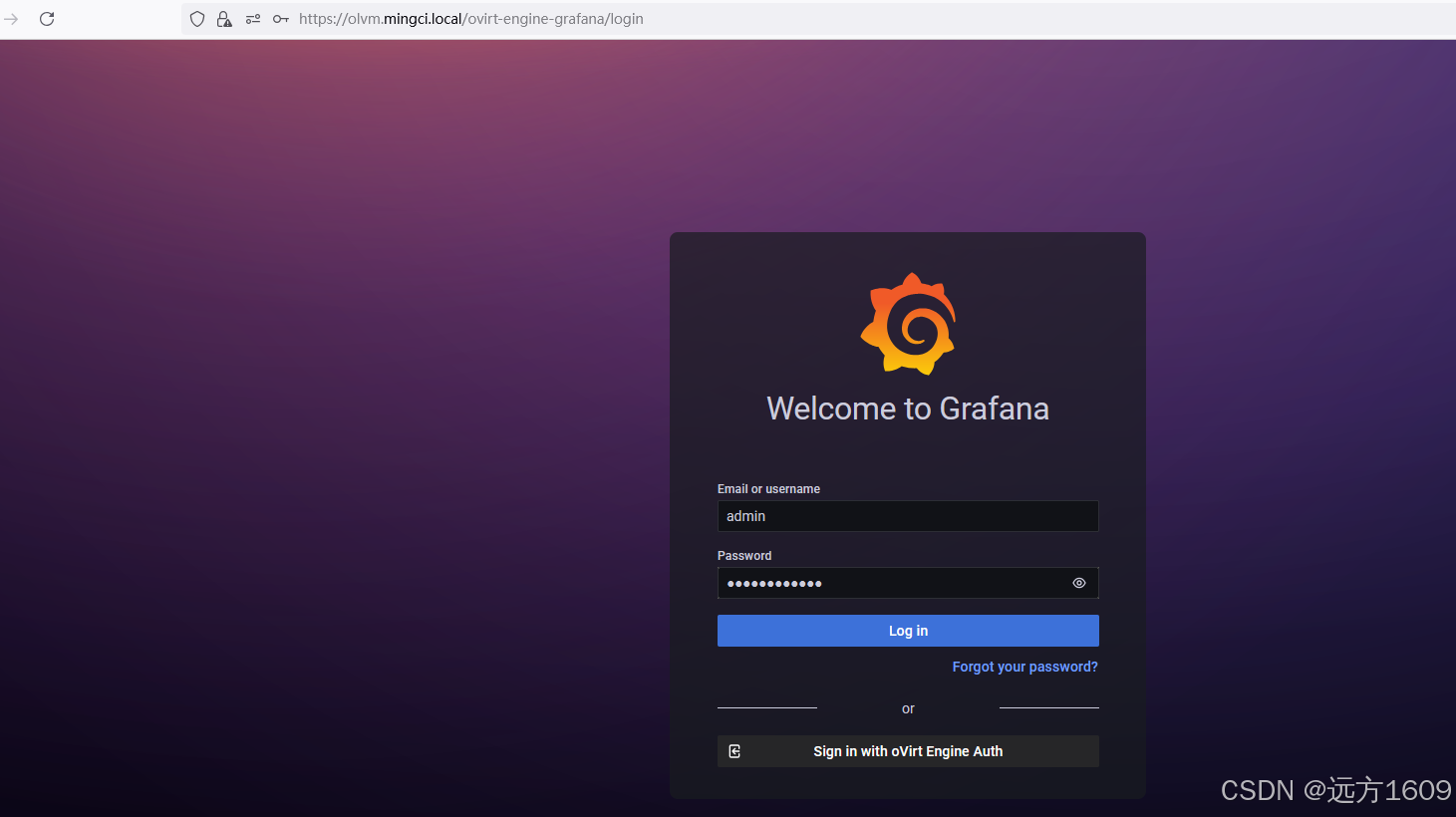
          Web access for grafana is enabled at:
              https://olvm.mingci.local/ovirt-engine-grafana/
          Please run the following command on the engine machine olvm.mingci.local, for SSO to work:
          systemctl restart ovirt-engine

          --== END OF SUMMARY ==--

[ INFO  ] Restarting httpd
[ INFO  ] Start with setting up Keycloak for Ovirt Engine
[ INFO  ] Done with setting up Keycloak for Ovirt Engine
[ INFO  ] Stage: Clean up
          Log file is located at /var/log/ovirt-engine/setup/ovirt-engine-setup-20250809172755-p9f684.log
[ INFO  ] Generating answer file '/var/lib/ovirt-engine/setup/answers/20250809173904-setup.conf'
[ INFO  ] Stage: Pre-termination
[ INFO  ] Stage: Termination
[ INFO  ] Execution of setup completed successfully
三、 登录管理门户
- 1.访问管理门户:https:///ovirt-engine
- 2.登录账号:admin@ovirt 配置时设置的密码
- 3.检查引擎状态:systemctl status ovirt-engine
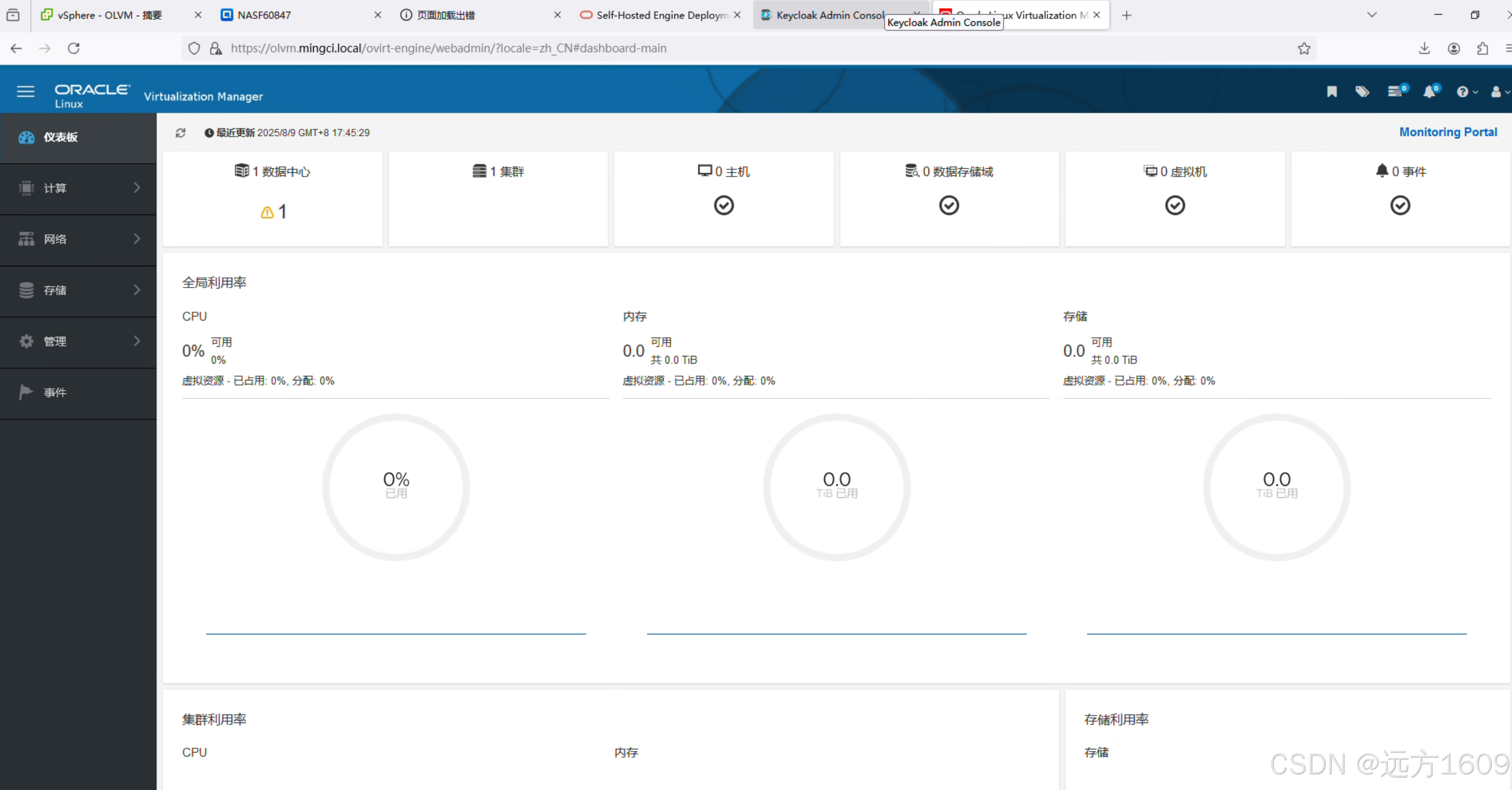
四、KVM主机部署与接入OLVM
1. KVM主机准备
•OS:Oracle Linux 8.x 最小化安装
•依赖:
dnf install qemu-kvm libvirt virt-install
systemctl enable --now libvirtd
2. 在OLVM中添加KVM主机
OLVM控制台操作:
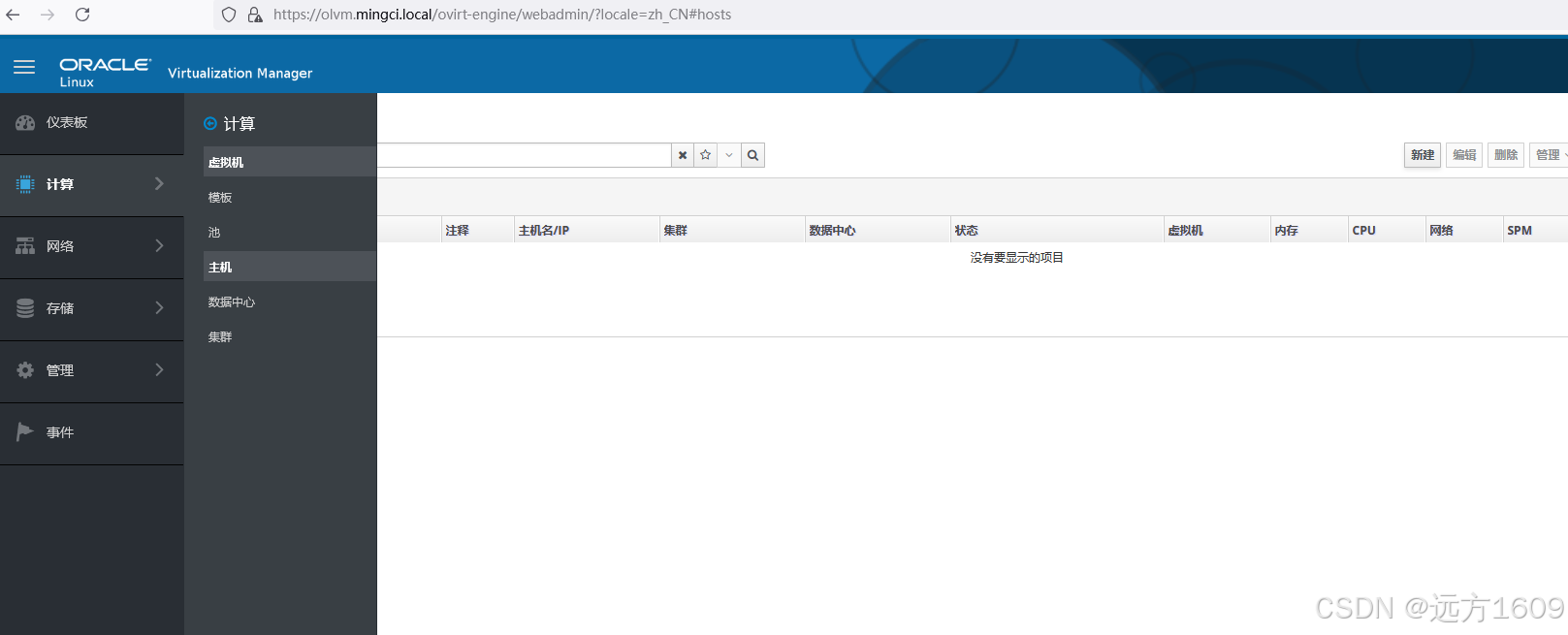
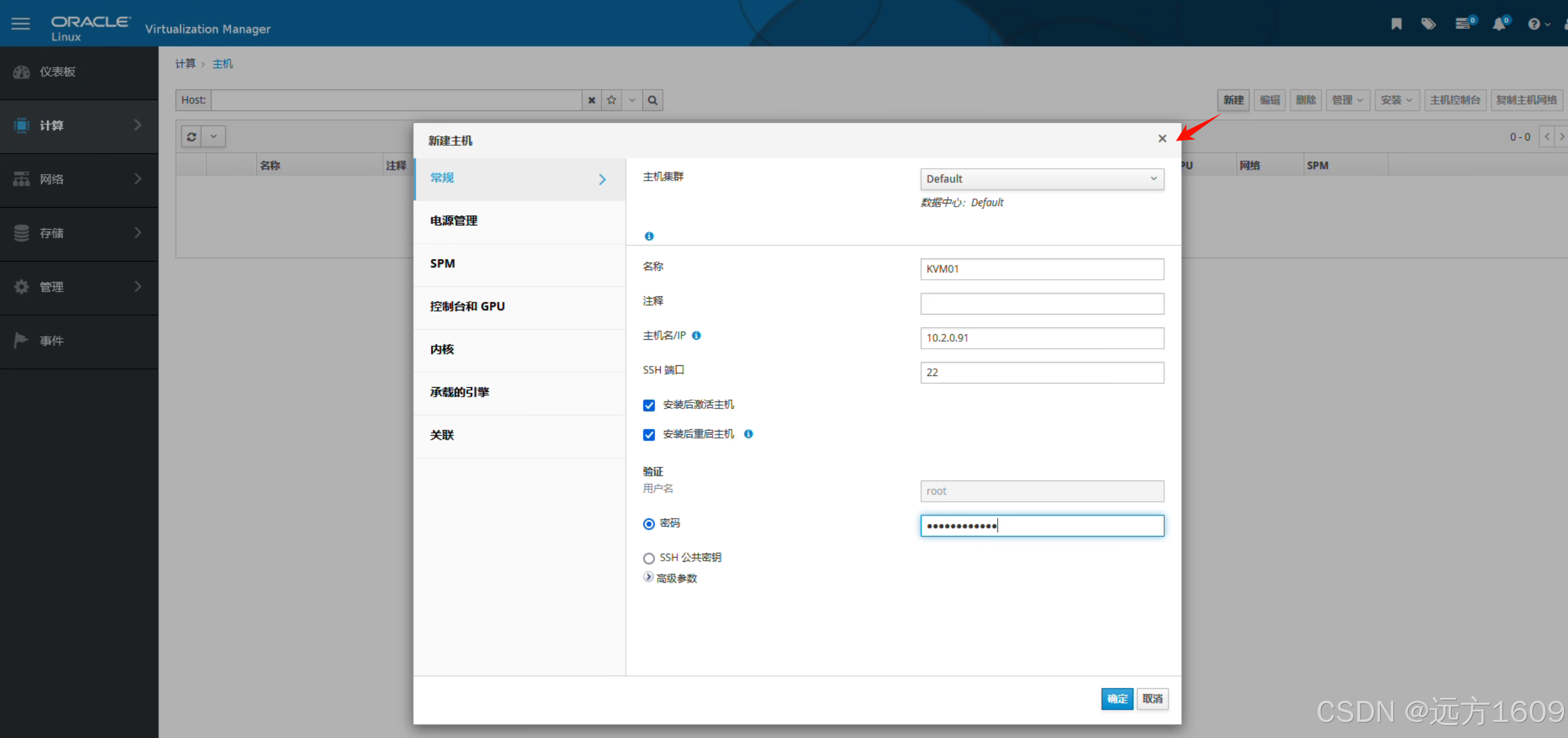
•导航:计算→ 主机→ 新建•填写:主机名/IP、集群、root凭证•跳过电源管理(测试环境)
主机状态修复:
# 主机自动安装后因存储未配置进入NonOperational
# 在KVM主机配置本地存储:路径按照实际需要建立
mkdir -p /usr/local_storage
chown vdsm:kvm /usr/local_storage
# 关键权限!
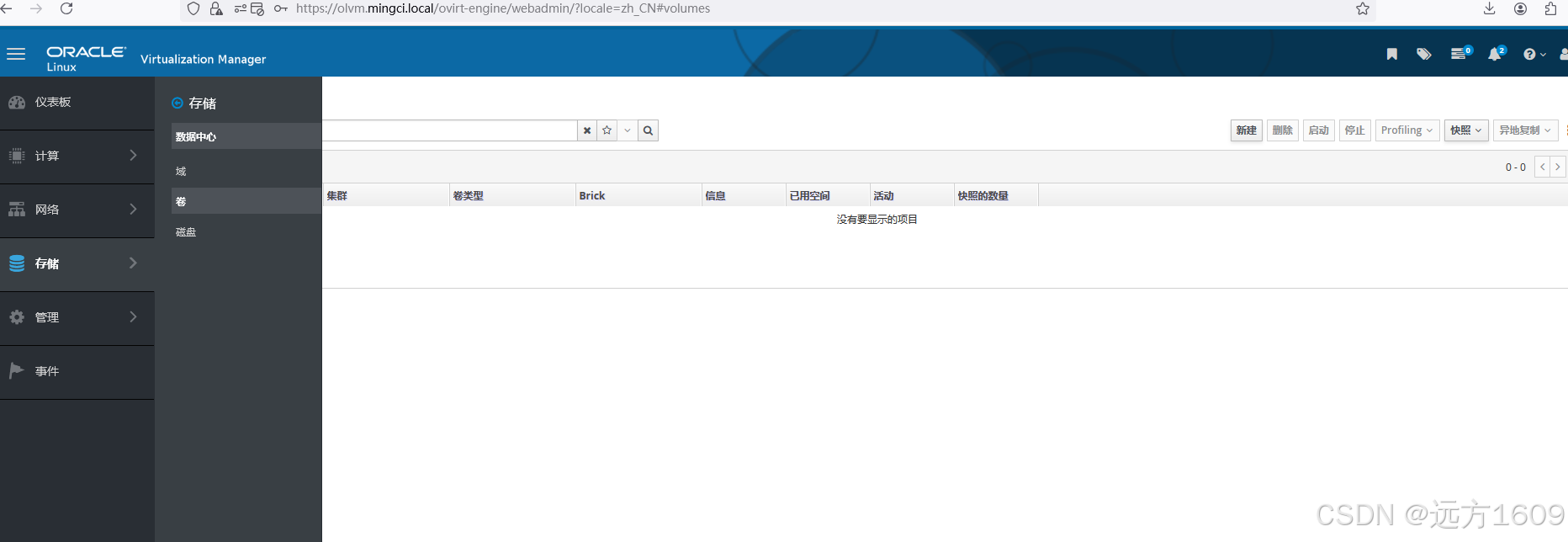
OLVM存储配置:
将主机置为维护模式•选择配置本地存储→ 绑定创建的存储路径
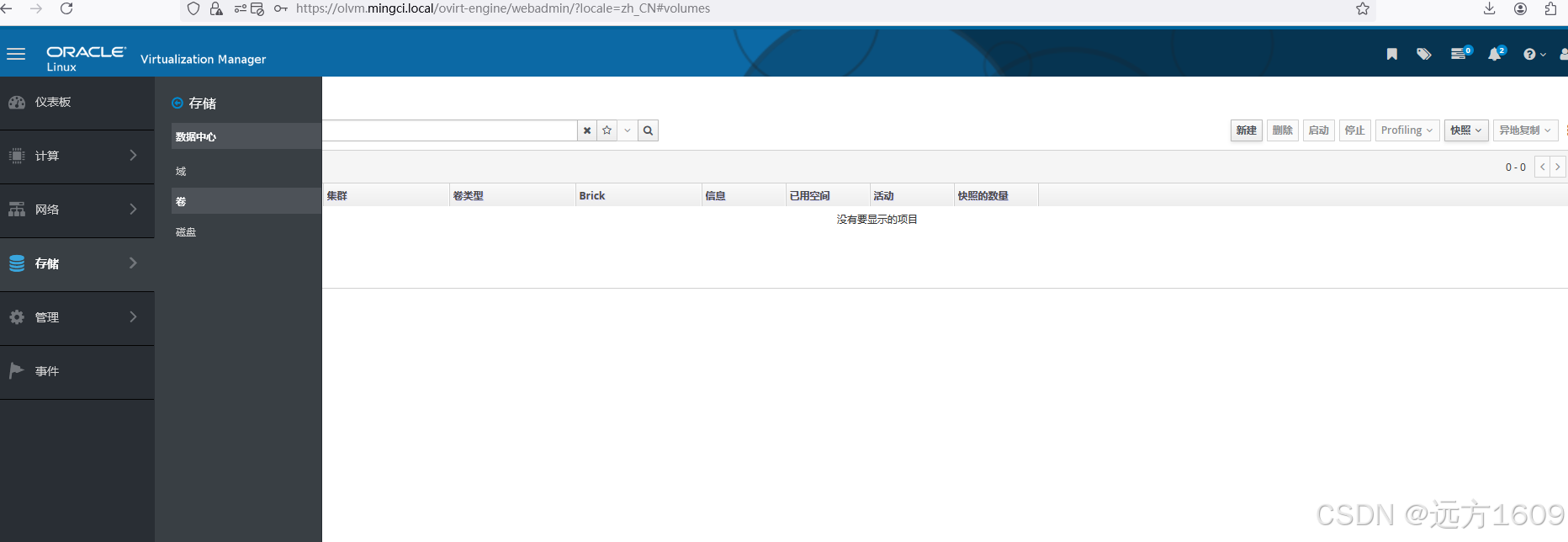
五、OLVM管理门户
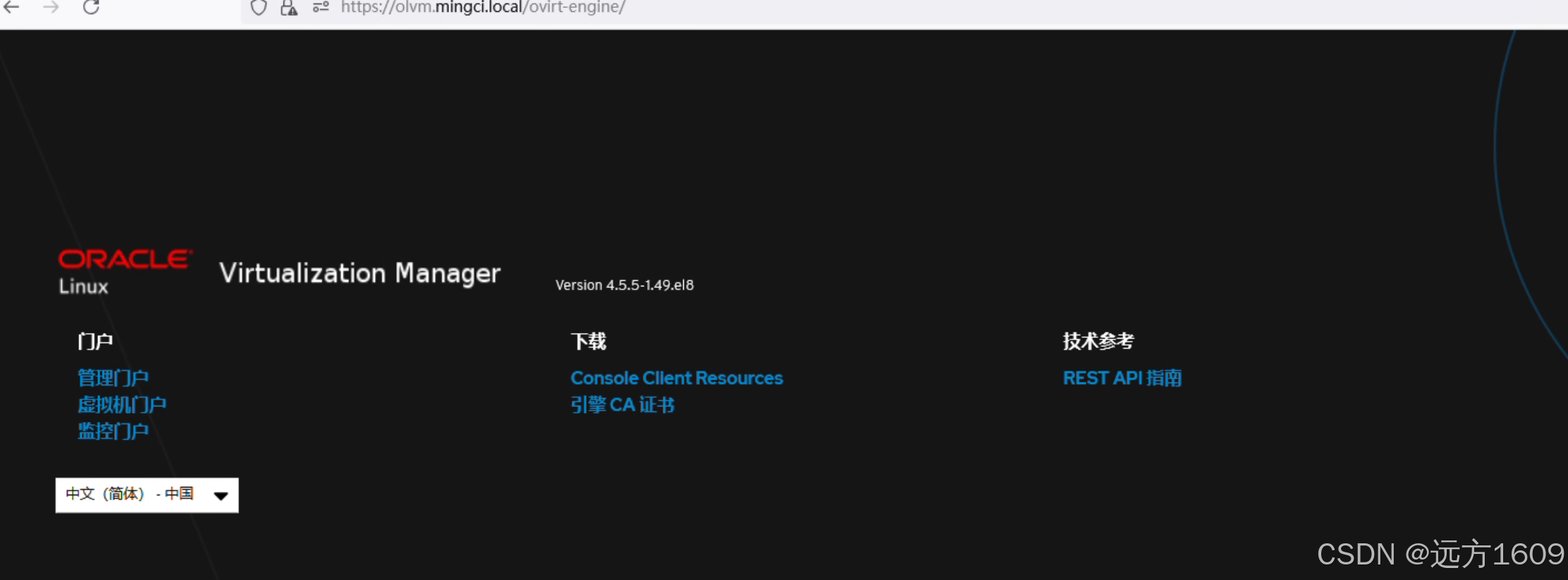
门户登录
监控登录
数据中心管理
下期补充Veeam备份Oracle Linux KVM






 扫一扫
扫一扫


 973
973

 被折叠的 条评论
为什么被折叠?
被折叠的 条评论
为什么被折叠?
 到【灌水乐园】发言





