


 本文介绍了在Java中使用正则表达式的方法。首先讲解了在String中使用正则表达式,包括各种正则写法及含义,如单个字符范围匹配、数量比较等。接着介绍了Java中使用Pattern类,它能获取匹配的数据,还说明了使用Pattern和Matcher类的具体步骤及常用方法。
正则表达式
一.在String中使用正则表达式
- boolean
matches(String regex) 通知此字符串是否匹配给定的正则表达式。 - 使用Java定义好的写法遵循字符串的匹配规则 ,匹配规则其实就是一个使用特殊写法的字符串。

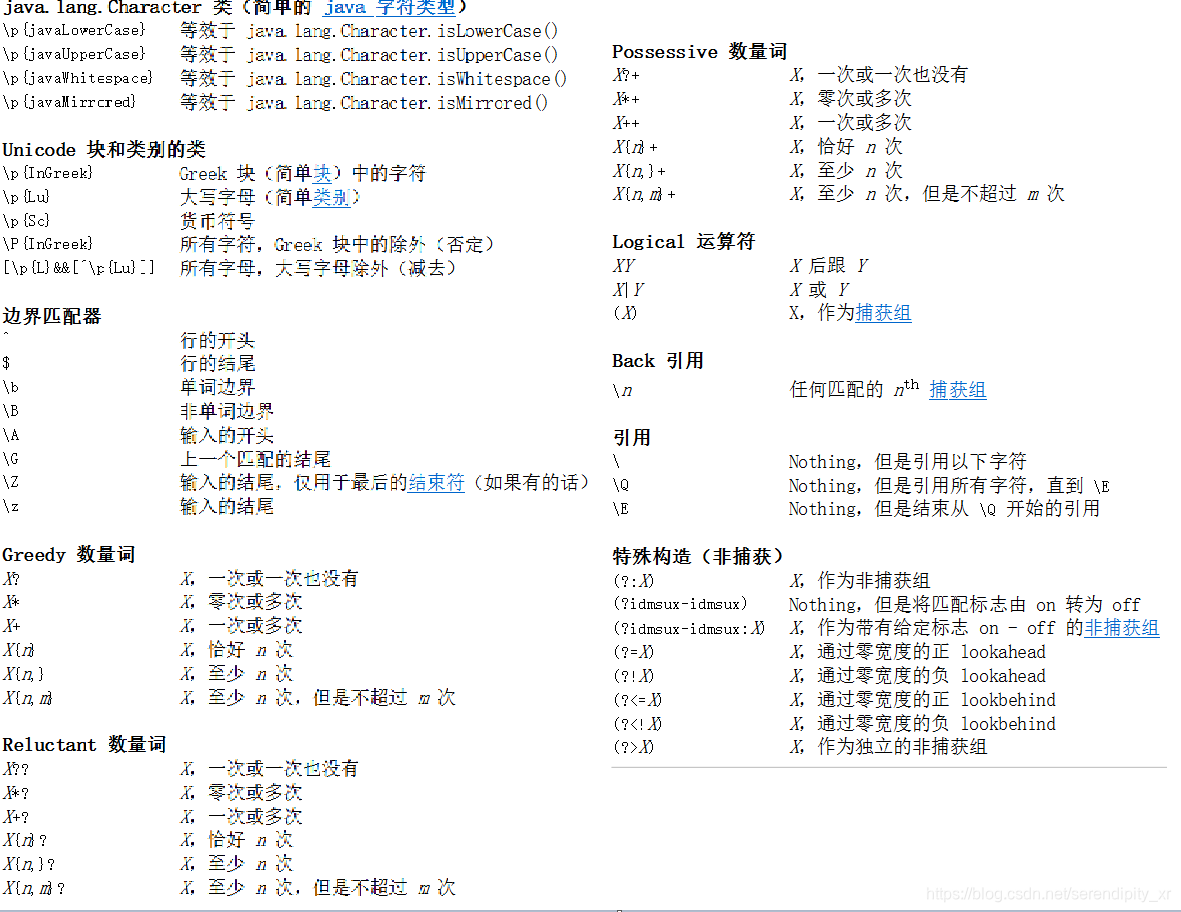
- 重要的代码分析与演示
- 正则写法:“x…”
意思: 一个字符或者一个字符串 - 正则写法:"[x…]"
意思:使用每一个x与字符串进行匹配 - 正则写法:
- [a-zA-Z] [0-9]
- \d 数字
- \w 大小写字母加数字
- \D 非数字
- \W 非字符
意思:单个字符的范围匹配 使用时要使用""转义符
- 正则写法:
- X? X,一次或一次也没有
- X* X,零次或多次
- X+ X,一次或多次
意思:数量比较,设定好的数量
- 正则写法:
- X{n} X,恰好 n 次
- X{n,} X,至少 n 次
- X{n,m} X,至少 n 次,但是不超过 m 次
意思:数量由自己定义
@Test
	void test() {
		String str="好好学习,天天向上";
		String str01="A";
		String str02="1";
		//字符串长度
		System.out.println("字符串的长度是:"+str.length());//字符串的长度是:9
		//正则表达式,使用特殊的Java能够识别的符号来进行规则匹配
		//"  "里面的字符全部比较
		System.out.println(str01.matches("A"));//true
		System.out.println(str01.matches("Abc"));//flase
		//[xxx]一个字符,匹配的时候是使用每一x与str01进行匹配
		System.out.println(str01.matches("[Abc]"));//true
		// str01是不是 一个小写字母a-zA-B范围
		System.out.println(str01.matches("[a-zA-B]"));//true
		//str02是不是一个数字
		System.out.println(str02.matches("[0-9]"));//true
		//str02是不是一个数字 \d是数字   \D 不是数字  \w单词字符:[a-zA-Z_0-9]
		System.out.println(str02.matches("[\\d]"));//true
		//单个字符多次出现
		String str03="aaa";
		//0-1
		System.out.println(str03.matches("[a]?"));//false
		//0-无穷
		System.out.println(str03.matches("[a]*"));//true
		//1-无穷
		System.out.println(str03.matches("[a]+"));//true
		//字符串中的不同字符
		String str04="fdhapigikfkjlgoigheor";
		//s04是不是由一个到多个小写字母组成
		System.out.println(str04.matches("[a-z]+"));//true
		//使用固定个数的匹配
		String str05 = "123456790";
		//数字刚好5个
		System.out.println(str05.matches("[0-9]{5}"));//false
		//数字个数至少有5个
		System.out.println(str05.matches("[0-9]{5,}"));//false
		//数字个数至少有5个,最多10个
		System.out.println(str05.matches("[0-9]{5,10}"));//false
	}
- 正则实例
@Test
	void test01() {
		//正则实例
		// 验证是不是一个电话号码,11位全数字,并且以13  15  18 开头
		Scanner input=new Scanner(System.in);
		System.out.println("请输入你的电话号码:");//15855294478
		String phone=input.next();
		System.out.println(phone.matches("[1][358][\\d]{9}"));//true
		// 验证邮箱号码,@前 5-10 数字,@后是qq.com或163
		System.out.println("请输入你的邮箱号码:");//123456@qq.com/123456@163.com
		String email=input.next();
		System.out.println(email.matches("[0-9]{5,10}@[1q][6q][3]?.com"));//true
	}
二.Java中使用Pattern类
- 上面只能进行规则校验但是无法获取匹配的数据,只能进行整体匹配 。之前的底层是使用pattern进行操作的

使用Pattern和matcher类的具体步骤: - 使用Pattern 定义匹配规则
- 进行匹配 将匹配结果保存到Matcher中
- 从matcher中获取需要的数据
常用方法:
- boolean
find() 尝试查找与该模式匹配的输入序列的下一个子序列。第一次从头开始,每一次找到之后,指针会停留到第一次找的后面,该位置就是find的下一次的其实位置 - int
start() 返回以前匹配的初始索引。 - Pattern
pattern() 返回由此匹配器解释的模式。 - static Pattern
compile(String regex) 将给定的正则表达式编译到模式中。 - atcher
reset() 重置匹配器(将指针重新回到起始位置)
@Test
	void test02() {
		//获取该内容中的所有数字
		String mess="人生不456相见,动如参111与商。今夕复何夕,共此灯烛479光! ";
		//使用Pattern 定义匹配规则
		Pattern compile = Pattern.compile("[0-9]{3}");
		//进行匹配 将匹配结果保存到Matcher中
		Matcher matcher = compile.matcher(mess);
		//从matcher中获取需要的数据
		boolean find = matcher.find();//有没有
		System.out.println(find);//true
		System.out.println(matcher.start());// 找到的标记位3
		boolean find01 = matcher.find();
		System.out.println(find01);//true
		System.out.println(matcher.start());//12
		boolean find02 = matcher.find();
		System.out.println(find02);//true
		System.out.println(matcher.start());//28
		//如果加上该语句(matcher.reset();),下面的输出结果为true,不加为false
		matcher.reset();// 将指针重新回到起始位置
		boolean find03 = matcher.find();
		System.out.println(find03);
	}
- boolean
lookingAt() 尝试将从区域开头开始的输入序列与该模式匹配。
@Test
	void test03() {
		//获取该内容中的所有数字
		String mess="人生不456相见,动如参111与商。今夕复何夕,共此灯烛479光! ";
		//使用Pattern 定义匹配规则
		Pattern compile = Pattern.compile("[0-9]{3}");
		//进行匹配 将匹配结果保存到Matcher中
		Matcher matcher = compile.matcher(mess);
		// 必须从头开始匹配
		System.out.println(matcher.lookingAt());//false
		System.out.println(matcher.lookingAt());//false
		System.out.println(matcher.lookingAt());//false
		String mess1="456相见,动如参111与商。今夕复何夕,共此灯烛479光! ";
		Pattern compile01 = Pattern.compile("[0-9]{3}");
		Matcher matcher01 = compile.matcher(mess1);
		System.out.println(matcher01.lookingAt());//true
	}
- 在整篇内容中获取我们需要的数据,并进行统计
- String
group() 返回由以前匹配操作所匹配的输入子序列。
@Test
	void test04() {
		//获取该内容中的所有数字
		String mess="人生不456相见,动如参111与商。今夕复何夕,共此灯烛479光! ";
		//使用Pattern 定义匹配规则
		Pattern compile = Pattern.compile("[0-9]{3}");
		//进行匹配 将匹配结果保存到Matcher中
		Matcher matcher = compile.matcher(mess);
		//获取数字
//		boolean find = matcher.find();
//		String group = matcher.group();
//		System.out.println(group);//456
		//循环匹配
		int count=0;
		while(matcher.find()) {
			count++;
			System.out.println("数字为:"+matcher.group());//数字为:456   数字为:111   数字为:479
		}
		System.out.println("总共匹配了"+count+"次");//总共匹配了3次
	}





 扫一扫
扫一扫


 2568
2568

 被折叠的 条评论
为什么被折叠?
被折叠的 条评论
为什么被折叠?
 到【灌水乐园】发言





