



 本文介绍了一个基于Python的自动化办公方案,该方案通过定时检查特定主题的邮件,并根据邮件内容触发一系列操作,如刷新指定网页和关闭浏览器窗口等。此方案利用了Python的多种库和Windows批处理脚本来实现。
Python 运行在windows系统中 windows11无问题的。
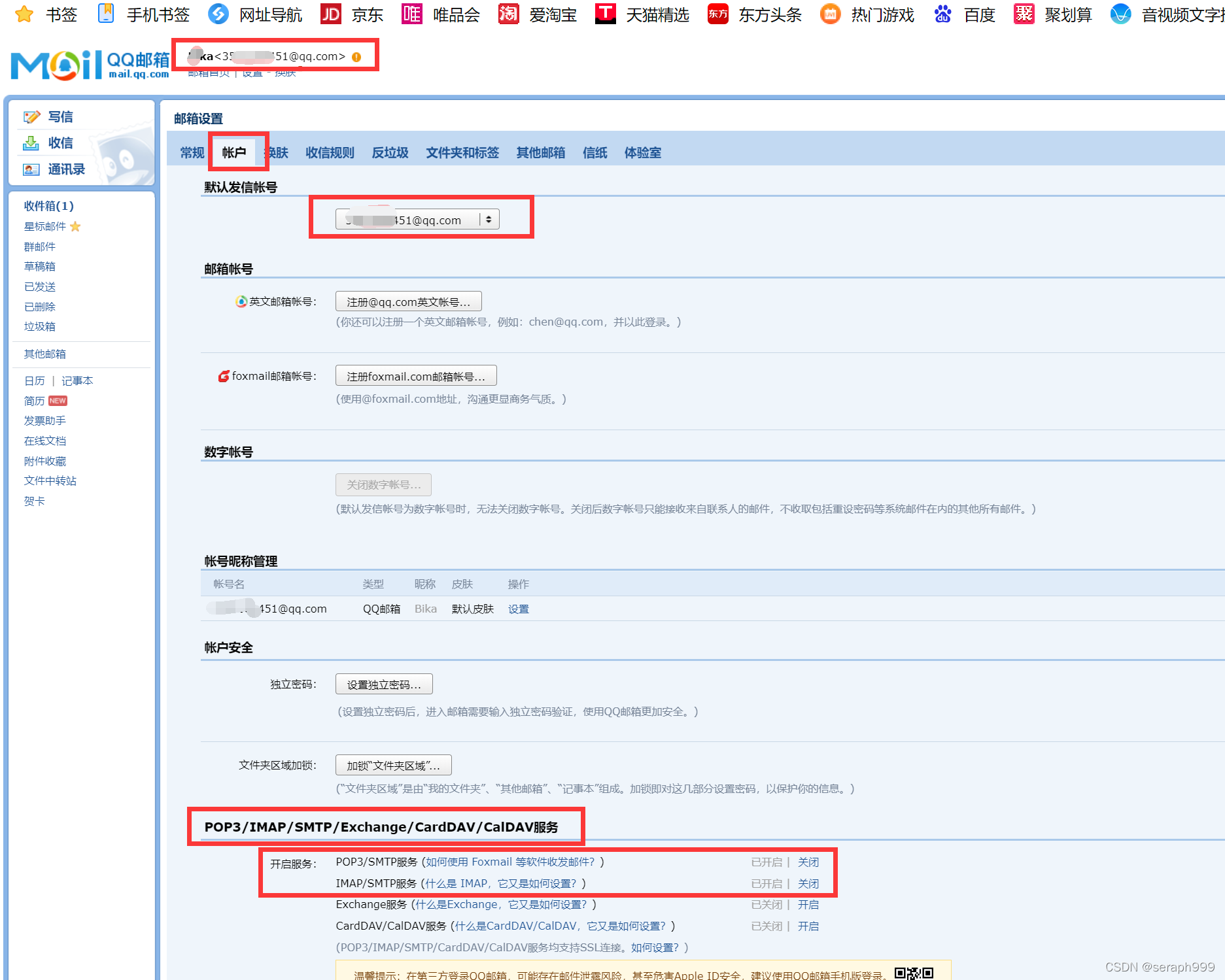
01.申请QQ邮箱的授权码
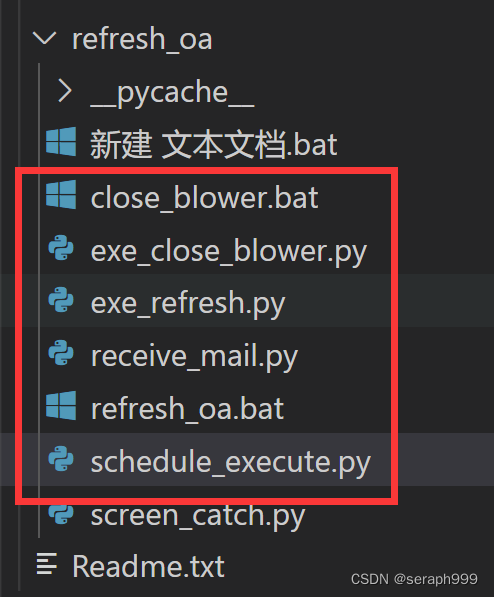
02.我用Visual Studio Code 写的,目录结构是这样的。
02.pip install 需要的库,没有的就安装
03.先执行schedule
#这个是schedule_execute.py 每20秒去邮箱收邮件
# coding=utf-8

import datetime

import time

import os

def schedule_exe():

# 把要启动的程序放在这个方法里
# 路径要加转义符
    os.system("python D:\\Study\\myproject\\Python_auto_office\\C22\\refresh_oa\\receive_mail.py")

    print("receive_mail.py")
    # os.system("pause")

    print("程序已经执行了!")

def main():
    while True:
        time.sleep(20)
        schedule_exe()

main()
#这个是receive_mail.py的内容
from imbox import Imbox
import os
import time
import exe_close_blower

#refresh
#pwd 是 QQ邮箱授权码 在QQ邮箱中设置获取
pwd = "XXXXXX"
with Imbox('imap.qq.com','XXXXXX@qq.com',pwd,ssl=True) as imbox:
# 获取未读邮件
    unread_messages = imbox.messages(unread = True)
    for uid,message in unread_messages:
        #打印一下邮件的标题
        print("未读邮件有:")
        print(message.subject)#主题
        #如果邮件的标题等于“refresh”
        if message.subject =='refresh':
        #     #执行exe_bat.py
            print(message.subject)
            #os.system 不能运行两次,所以要导入再使用方法
            os.system("python D:\\Study\\myproject\\Python_auto_office\\C22\\refresh_oa\\exe_refresh.py")
            print("执行exe_bat.py")
            time.sleep(20)
            exe_close_blower.cmd_test()
            # os.system("python D:\\Study\\myproject\\Python_auto_office\\C22\refresh_oa\exe_close_blower.py")
            print("exe_close_blower.py")
            #标记邮件
            imbox.mark_seen(uid)
        # print(message.body['plain'])


    # print("星标邮件:")
    # for uid,message in unflagged_messages:
    #     print(message.subject)
#这个是exe_refresh.py 调用*.bat脚本刷新网页
#coding=utf-8
import subprocess

def cmd_test():
    # cmd = 'cmd.exe d:/start.bat'
    addr = "D:/Study/myproject/Python_auto_office/C22/refresh_oa/refresh_oa.bat"
    p = subprocess.Popen("cmd.exe /c" + addr, stdout=subprocess.PIPE, stderr=subprocess.STDOUT)
    curline = p.stdout.readline()
    while (curline != b''):
        print(curline)
        curline = p.stdout.readline()
    p.wait()
    print(p.returncode)

if __name__ == '__main__':
    cmd_test()
::  这个是refresh_oa.bat 这个后序为.bat的脚本文件 这个可以在windows中运行

@echo off
cd /d cd /d C:\Users\HP\AppData\Local\Google\Chrome\Application\chrome.exe
::start chrome.exe http://www.baidu.com
::start chrome.exe https://www.sina.com.cn/
:: 这个是  close_blower.bat  后序为bat的脚本,用来关闭浏览器
::taskkill /f /im SLBrowser.exe
taskkill /f /im chrome.exe
::taskkill /f /im msedge.exe
::taskkill /f /im iexplore.exe
#exe_close_blower.py
#coding=utf-8
import subprocess

def cmd_test():
    # cmd = 'cmd.exe d:/start.bat'
    addr = "D:/Study/myproject/Python_auto_office/C22/refresh_oa/close_blower.bat"
    p = subprocess.Popen("cmd.exe /c" + addr, stdout=subprocess.PIPE, stderr=subprocess.STDOUT)
    curline = p.stdout.readline()
    while (curline != b''):
        print(curline)
        curline = p.stdout.readline()
    p.wait()
    print(p.returncode)

if __name__ == '__main__':
    cmd_test()
#exe_refresh.py
#coding=utf-8
import subprocess

def cmd_test():
    # cmd = 'cmd.exe d:/start.bat'
    addr = "D:/Study/myproject/Python_auto_office/C22/refresh_oa/refresh_oa.bat"
    p = subprocess.Popen("cmd.exe /c" + addr, stdout=subprocess.PIPE, stderr=subprocess.STDOUT)
    curline = p.stdout.readline()
    while (curline != b''):
        print(curline)
        curline = p.stdout.readline()
    p.wait()
    print(p.returncode)

if __name__ == '__main__':
    cmd_test()





 扫一扫
扫一扫


 9061
9061

 被折叠的 条评论
为什么被折叠?
被折叠的 条评论
为什么被折叠?
 到【灌水乐园】发言





