



TDBGrid 一行代码实现斑马纹和行号显示!
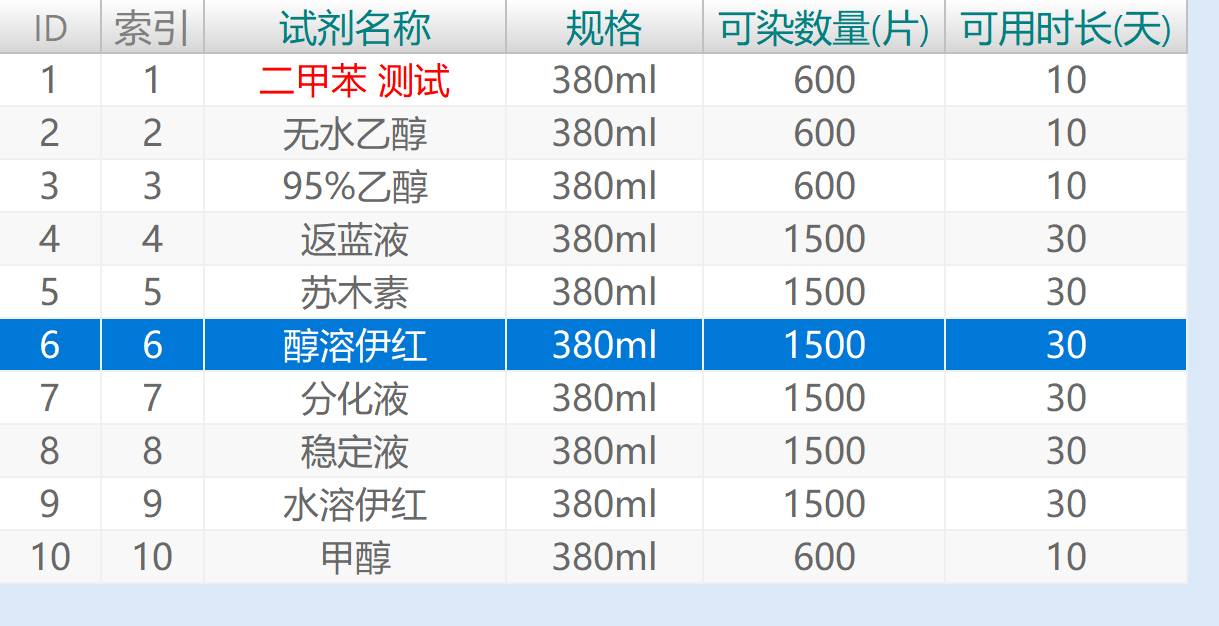
在用 Delphi 开发数据表显示时,经常会用到TDBGrid控件,利用三方控件可以看到实现非常美观漂亮的斑马纹,那么不使用第三方的控件,可否也能方便的实现斑马纹以及数据记录行号的显示呢?当然是可以的,而且只需一行代码即可实现。
本文介绍通过Delphi的Helper来实现通用TDBGird显示斑马纹和行号。
调用:
DBGrid.EnableZebraStriping;
//或者
DBGrid.EnableZebraStriping(clGreen,clGray,True,'ID');
使用说明如下:
功能:
1. 通过 Helper 自动实现 GBDird 按照斑马纹显示,斑马纹奇数行和偶数行颜色可以设置
2. 自动实现显示数据表的行号,从 1 开始,可以设置行号的标题,默认为:行号
调用:
1. 需要设置 DBGrid 的单元中需要引用本单元:uTDBGrid_Helper.pas
2. 在 FormShow 事件中或者合适的试剂调用函数:EnableZebraStriping
参数说明:
OddRowColor :奇数行颜色 默认白色 clWhite
EvenRowColor :偶数行颜色 默认浅灰 $00F8F8F8
ShowRowID :是否自动显示数据表的行号, True表示显示, False表示不显示 默认:True
RowIDCaption :行号的标题文字,默认:行号
例如:
DBGrid.EnableZebraStriping(clGreen,clGray,True,'ID');
显示奇数行绿色,偶数行灰色,标题文字为:ID
恢复默认显示: 不在显示斑马纹
DBGrid.DisableZebraStriping
3. 额外说明:选择行有焦点颜色为:clHighlight 无焦点颜色为:$00FFA940
程序没有通过函数设置,可以通过修改这两个参数来改变选择行的颜色
4. 正常的 DBGrid 的 OnDrawColumnCell 事件不受影响,无需在做斑马纹功能
完整的代码如下:
{
  作者: sensor  2025-08-10
  功能:
    1. 通过 Helper 自动实现 GBDird 按照斑马纹显示,斑马纹奇数行和偶数行颜色可以设置
    2. 自动实现显示数据表的行号,从 1 开始,可以设置行号的标题,默认为:行号

  调用:
    1. 需要设置 DBGrid 的单元中需要引用本单元:uTDBGrid_Helper.pas
    2. 在 FormShow 事件中或者合适的试剂调用函数:EnableZebraStriping
       参数说明:
          OddRowColor  :奇数行颜色  默认白色 clWhite
          EvenRowColor :偶数行颜色  默认浅灰 $00F8F8F8
          ShowRowID    :是否自动显示数据表的行号, True表示显示, False表示不显示 默认:True
          RowIDCaption :行号的标题文字,默认:行号

       例如:
         DBGrid.EnableZebraStriping(clGreen,clGray,True,'ID');
           显示奇数行绿色,偶数行灰色,标题文字为:ID

       恢复默认显示: 不在显示斑马纹
         DBGrid.DisableZebraStriping

    3. 额外说明:选择行有焦点颜色为:clHighlight 无焦点颜色为:$00FFA940
         程序没有通过函数设置,可以通过修改这两个参数来改变选择行的颜色

    4. 正常的 DBGrid 的 OnDrawColumnCell 事件不受影响,无需在做斑马纹功能

       如果需要改变显示的内容以及颜色等,可以在标准的 OnDrawColumnCell 事件中实现

                procedure TForm_Reagent.DBGrid_Table_stainDrawColumnCell(Sender: TObject;
                  const Rect: TRect; DataCol: Integer; Column: TColumn; State: TGridDrawState);
                  var
                   TextRect: TRect;
                begin
                  if Column.FieldName = 'stainname' then
                    begin
                      S := Column.Field.AsString;
                      if S = '二甲苯' then
                        begin
                         S := S + ' 测试';
                          //(Sender as TDBGrid).Canvas.Brush.Color := clHighlight;
                          (Sender as TDBGrid).Canvas.Font.Color  := clRed;
                          (Sender as TDBGrid).Canvas.FillRect(Rect);
                          TextRect := Rect;
                          InflateRect(TextRect, -2, -2); // 文字边距
                          DrawText((Sender as TDBGrid).Canvas.Handle, PChar(S),
                            Length(S), TextRect, DT_CENTER or DT_VCENTER or DT_SINGLELINE);
                        end;


                end;


}
unit uTDBGrid_Helper;

interface
uses
  Vcl.DBGrids,
  Vcl.Graphics,
  Vcl.Grids,
  System.Types,
  System.Generics.Collections,
  Winapi.Windows,
  System.SysUtils,
  System.Classes,
  Data.DB;

type
  TZebra_Color = record
    OddRowColor  : TColor;
    EvenRowColor : TColor;
    ShowRowID    : Boolean;  //是否显示行号
    RowIDCaption : string;
  end;

var
  OriginalDrawEvents: TDictionary<TDBGrid, TDrawColumnCellEvent>;
  ZebraDrawColor    : TDictionary<TDBGrid, TZebra_Color>;

type
  TDBGridHelper = class helper for TDBGrid
    procedure DrawColumnCellEvent_New(Sender: TObject; const Rect: TRect; DataCol: Integer;
              Column: TColumn; State: TGridDrawState);
    //查找是否已经包含 "行号"这一列  返回 -1 表示不存在
    function Get_RowID_Index : integer;

  public
    procedure EnableZebraStriping(OddRowColor: TColor = clWhite; EvenRowColor: TColor = $00F8F8F8; ShowRowID : Boolean = True; RowIDCaption : string = '行号');
    procedure DisableZebraStriping;
  end;

implementation

procedure TDBGridHelper.DrawColumnCellEvent_New(Sender: TObject;
  const Rect: TRect; DataCol: Integer; Column: TColumn; State: TGridDrawState);
var
  Grid: TDBGrid;
  OriginalEvent: TDrawColumnCellEvent;
  Zebra_Color  : TZebra_Color;
  TextRect     : TRect;
  idText       : string;
begin
  Grid := Sender as TDBGrid;

  // 调用原始事件(如果存在)
  if Assigned(OriginalDrawEvents) then
  if not OriginalDrawEvents.TryGetValue(Grid, OriginalEvent) then Exit;


  if Assigned(ZebraDrawColor) and ZebraDrawColor.TryGetValue(Self, Zebra_Color) then
     begin
      // 如果不是选中行,则应用斑马纹
      if not (gdSelected in State) then
        begin
          if (Grid.DataSource.DataSet.RecNo mod 2) = 1 then
            Grid.Canvas.Brush.Color := Zebra_Color.OddRowColor
          else
            Grid.Canvas.Brush.Color := Zebra_Color.EvenRowColor;
        end
      else
        begin
         //if gdFocused in State then   //这一句在这里并不起作用,不知道为什么?
         if Self.Focused then
           begin
             Grid.Canvas.Brush.Color := clHighlight;
             Grid.Canvas.Font.Color  := clwhite;
           end
         else
           begin
             Grid.Canvas.Brush.Color := $00FFA940;
             Grid.Canvas.Font.Color  := clwhite;
           end;
        end;

       //如果需要显示行号
       if Zebra_Color.ShowRowID then
        begin
          if (Column.Title.Caption = Zebra_Color.RowIDCaption) and (Column.FieldName = '') and (Column.DropDownRows = 0) then
             begin
               idText :=  Grid.DataSource.DataSet.RecNo.ToString;
               Grid.Canvas.FillRect(Rect);
               TextRect := Rect;
               InflateRect(TextRect, -2, -2); // 文字边距
               DrawText(Grid.Canvas.Handle, PChar(idText),
                 Length(idText), TextRect, DT_CENTER or DT_VCENTER or DT_SINGLELINE);
               Exit;    //这里已经画好行号,直接退出
             end;
        end;


      Grid.Canvas.FillRect(Rect);
      Grid.DefaultDrawColumnCell(Rect, DataCol, Column, State);
     end;

  //调用原来的事件
  if Assigned(OriginalEvent) then
     OriginalEvent(Sender, Rect, DataCol, Column, State);


end;

procedure TDBGridHelper.EnableZebraStriping(OddRowColor, EvenRowColor: TColor; ShowRowID : Boolean; RowIDCaption : string);
var
  Zebra_Color : TZebra_Color;
begin
  if not Assigned(OriginalDrawEvents) then
    OriginalDrawEvents := TDictionary<TDBGrid, TDrawColumnCellEvent>.Create;

  if not Assigned(ZebraDrawColor) then
    ZebraDrawColor := TDictionary<TDBGrid, TZebra_Color>.Create;

  // 存储原始事件(如果尚未存储)
  if not OriginalDrawEvents.ContainsKey(Self) then
    OriginalDrawEvents.Add(Self, Self.OnDrawColumnCell);

  //存储斑马纹颜色
  Zebra_Color.OddRowColor  := OddRowColor;
  Zebra_Color.EvenRowColor := EvenRowColor;
  Zebra_Color.ShowRowID    := ShowRowID;
  Zebra_Color.RowIDCaption := RowIDCaption;

  //如果需要显示行号,则需要在DBGrid中增加一列
  if ShowRowID then
    begin
      if Get_RowID_Index = -1 then
        with Self.Columns.Add do
          begin
            Index := 0;
            Title.Caption := RowIDCaption;
            Width         := 100;
            Title.Alignment := taCenter;
            Title.Font    := Self.Columns[1].Title.Font;
            FieldName     := '';
            ReadOnly      := True;
            DropDownRows  := 0;        //作为和用户的列区分的标志,0表示不是用户列
          end;
    end;


  if not ZebraDrawColor.ContainsKey(Self) then
     ZebraDrawColor.Add(Self, Zebra_Color);

  Self.DefaultDrawing := False;

  Self.OnDrawColumnCell := DrawColumnCellEvent_New;

  //刷新显示界面
  Self.Refresh;
end;

function TDBGridHelper.Get_RowID_Index: integer;
var
  Zebra_Color : TZebra_Color;
  i,count : integer;
begin
  Result := -1;
  if Assigned(ZebraDrawColor) and ZebraDrawColor.TryGetValue(Self, Zebra_Color) then
    begin
      count := Self.Columns.Count;
      for i := 0 to count - 1  do
        begin
          if (Self.Columns[i].Title.Caption = Zebra_Color.RowIDCaption) and (self.Columns[i].FieldName = '') and (Self.Columns[i].DropDownRows = 0) then
            Exit(i);
        end;
    end;
end;

procedure TDBGridHelper.DisableZebraStriping;
var
  OriginalEvent: TDrawColumnCellEvent;
  Zebra_Color : TZebra_Color;
  i           : integer;
begin
  if Assigned(OriginalDrawEvents) and OriginalDrawEvents.TryGetValue(Self, OriginalEvent) then
  begin
    Self.OnDrawColumnCell := OriginalEvent;
    OriginalDrawEvents.Remove(Self);
  end;

  Self.DefaultDrawing := True;

  if Assigned(ZebraDrawColor) and ZebraDrawColor.TryGetValue(Self, Zebra_Color) then
    begin
      if Zebra_Color.ShowRowID then
         begin
           i := Get_RowID_Index;
           if i >= 0  then
             Self.Columns.Delete(i);
         end;
    end;


  //刷新显示界面
  Self.Refresh;
end;

// 在程序退出时释放字典
initialization

finalization
  if Assigned(OriginalDrawEvents) then
    OriginalDrawEvents.Free;
  if Assigned(ZebraDrawColor) then
    ZebraDrawColor.Free;

end.






 扫一扫
扫一扫


 585
585

 被折叠的 条评论
为什么被折叠?
被折叠的 条评论
为什么被折叠?
 到【灌水乐园】发言





