



打造最漂亮的串口调试助手(基于WPF + .NET C# VS2013)附源码!
WPF界面全部用XAML语言手打,基本都是Grid布局,VS很强大,编程很舒服便捷,源码有很详细的注释。
* 学C#和WPF编的第一个软件,整个编程过程,通过百度不断学习,其中很多借鉴了一叶知秋串口助手的代码
* 作者是做硬件的,只为学习做简单的上位机程序,C#简单,开发效率高,所以选择C#
* 以前没有PC端软件编程经验,所以该编程思想继承于单片机编程思想,未用到面向对象和WPF的精髓,不建议模仿,仅供参考
* 实际上到现在我还不知道面向对象是什么意思 ̄□ ̄||
* 欢迎反馈BUG QQ45213212 E-MAIL lincolne@126.com
下载点这里http://download.youkuaiyun.com/detail/q45213212/7560727
直接上图
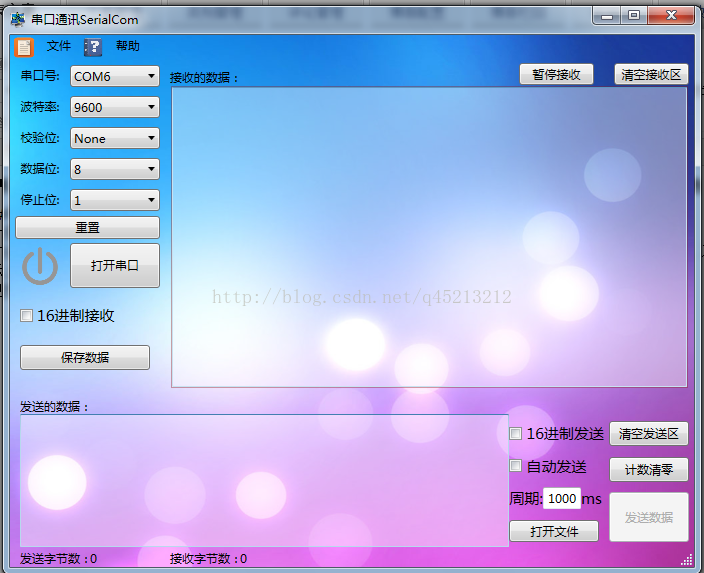


以下为主体c#源码
-
-
//相对单线收发模式,占用系统资源稍微大些,但是执行效果更好,尤其是在大数据收发时的UI反应尤其明显
-
using Microsoft.Win32;
-
using SerialComWindow;
-
using System;
-
using System.Collections;
-
using System.Collections.Generic;
-
using System.IO;
-
using System.IO.Ports;
-
using System.Linq;
-
using System.Security.Permissions;
-
using System.Text;
-
using System.Threading;
-
using System.Threading.Tasks;
-
using System.Windows;
-
using System.Windows.Controls;
-
using System.Windows.Data;
-
using System.Windows.Documents;
-
using System.Windows.Input;
-
using System.Windows.Media;
-
using System.Windows.Media.Imaging;
-
using System.Windows.Navigation;
-
using System.Windows.Shapes;
-
using System.Windows.Threading;
-
-
-
-
-
namespace SerialCom
-
{
-
/// <summary>
-
/// MainWindow.xaml 的交互逻辑
-
/// </summary>
-
public partial class MainWindow : Window
-
{
-
SerialPort ComPort = new SerialPort(); //声明一个串口
-
private string[] ports; //可用串口数组
-
private bool recStaus = true; //接收状态字
-
private bool ComPortIsOpen = false; //COM口开启状态字,在打开/关闭串口中使用,这里没有使用自带的ComPort.IsOpen,因为在串口突然丢失的时候,ComPort.IsOpen会自动false,逻辑混乱
-
private bool Listening = false; //用于检测是否没有执行完invoke相关操作,仅在单线程收发使用,但是在公共代码区有相关设置,所以未用#define隔离
-
private bool WaitClose = false; //invoke里判断是否正在关闭串口是否正在关闭串口,执行Application.DoEvents,并阻止再次invoke ,解决关闭串口时,程序假死,具体参见http://news.ccidnet.com/art/32859/20100524/2067861_4.html 仅在单线程收发使用,但是在公共代码区有相关设置,所以未用#define隔离
-
IList<customer> comList = new List<customer>(); //可用串口集合
-
DispatcherTimer autoSendTick = new DispatcherTimer(); //定时发送
-
-
private static bool Sending = false; //正在发送数据状态字
-
private static Thread _ComSend; //发送数据线程
-
Queue recQueue = new Queue(); //接收数据过程中,接收数据线程与数据处理线程直接传递的队列,先进先出
-
private SendSetStr SendSet = new SendSetStr(); //发送数据线程传递参数的结构体
-
private struct SendSetStr //发送数据线程传递参数的结构体格式
-
{
-
public string SendSetData; //发送的数据
-
public bool? SendSetMode; //发送模式
-
}
-
-
-
public MainWindow()//主窗口
-
{
-
InitializeComponent(); //控件初始化
-
-
}
-
-
private void Window_Loaded(object sender, RoutedEventArgs e)//主窗口初始化
-
{
-
//↓↓↓↓↓↓↓↓↓可用串口下拉控件↓↓↓↓↓↓↓↓↓
-
ports= SerialPort.GetPortNames(); //获取可用串口
-
if (ports.Length > 0) //ports.Length > 0说明有串口可用
-
{
-
for ( int i = 0; i < ports.Length; i++)
-
{
-
comList.Add( new customer() { com = ports[i] }); //下拉控件里添加可用串口
-
}
-
AvailableComCbobox.ItemsSource = comList; //资源路劲
-
AvailableComCbobox.DisplayMemberPath = "com"; //显示路径
-
AvailableComCbobox.SelectedValuePath = "com"; //值路径
-
AvailableComCbobox.SelectedValue = ports[ 0]; //默认选第1个串口
-
}
-
else //未检测到串口
-
{
-
MessageBox.Show( "无可用串口");
-
}
-
//↑↑↑↑↑↑↑↑↑可用串口下拉控件↑↑↑↑↑↑↑↑↑
-
-
//↓↓↓↓↓↓↓↓↓波特率下拉控件↓↓↓↓↓↓↓↓↓
-
IList<customer> rateList = new List<customer>(); //可用波特率集合
-
rateList.Add( new customer() { BaudRate = "1200" });
-
rateList.Add( new customer() { BaudRate = "2400" });
-
rateList.Add( new customer() { BaudRate = "4800" });
-
rateList.Add( new customer() { BaudRate = "9600" });
-
rateList.Add( new customer() { BaudRate = "14400" });
-
rateList.Add( new customer() { BaudRate = "19200" });
-
rateList.Add( new customer() { BaudRate = "28800" });
-
rateList.Add( new customer() { BaudRate = "38400" });
-
rateList.Add( new customer() { BaudRate = "57600" });
-
rateList.Add( new customer() { BaudRate = "115200" });
-
RateListCbobox.ItemsSource = rateList;
-
RateListCbobox.DisplayMemberPath = "BaudRate";
-
RateListCbobox.SelectedValuePath = "BaudRate";
-
//↑↑↑↑↑↑↑↑↑波特率下拉控件↑↑↑↑↑↑↑↑↑
-
-
//↓↓↓↓↓↓↓↓↓校验位下拉控件↓↓↓↓↓↓↓↓↓
-
IList<customer> comParity = new List<customer>(); //可用校验位集合
-
comParity.Add( new customer() { Parity = "None", ParityValue = "0" });
-
comParity.Add( new customer() { Parity = "Odd", ParityValue = "1" });
-
comParity.Add( new customer() { Parity = "Even", ParityValue = "2" });
-
comParity.Add( new customer() { Parity = "Mark", ParityValue = "3" });
-
comParity.Add( new customer() { Parity = "Space", ParityValue = "4" });
-
ParityComCbobox.ItemsSource = comParity;
-
ParityComCbobox.DisplayMemberPath = "Parity";
-
ParityComCbobox.SelectedValuePath = "ParityValue";
-
//↑↑↑↑↑↑↑↑↑校验位下拉控件↑↑↑↑↑↑↑↑↑
-
-
//↓↓↓↓↓↓↓↓↓数据位下拉控件↓↓↓↓↓↓↓↓↓
-
IList<customer> dataBits = new List<customer>(); //数据位集合
-
dataBits.Add( new customer() { Dbits = "8" });
-
dataBits.Add( new customer() { Dbits = "7" });
-
dataBits.Add( new customer() { Dbits = "6" });
-
DataBitsCbobox.ItemsSource = dataBits;
-
DataBitsCbobox.SelectedValuePath = "Dbits";
-
DataBitsCbobox.DisplayMemberPath = "Dbits";
-
//↑↑↑↑↑↑↑↑↑数据位下拉控件↑↑↑↑↑↑↑↑↑
-
-
//↓↓↓↓↓↓↓↓↓停止位下拉控件↓↓↓↓↓↓↓↓↓
-
IList<customer> stopBits = new List<customer>(); //停止位集合
-
stopBits.Add( new customer() { Sbits = "1" });
-
stopBits.Add( new customer() { Sbits = "1.5" });
-
stopBits.Add( new customer() { Sbits = "2" });
-
StopBitsCbobox.ItemsSource = stopBits;
-
StopBitsCbobox.SelectedValuePath = "Sbits";
-
StopBitsCbobox.DisplayMemberPath = "Sbits";
-
//↑↑↑↑↑↑↑↑↑停止位下拉控件↑↑↑↑↑↑↑↑↑
-
-
//↓↓↓↓↓↓↓↓↓默认设置↓↓↓↓↓↓↓↓↓
-
RateListCbobox.SelectedValue = "9600"; //波特率默认设置9600
-
ParityComCbobox.SelectedValue = "0"; //校验位默认设置值为0,对应NONE
-
DataBitsCbobox.SelectedValue = "8"; //数据位默认设置8位
-
StopBitsCbobox.SelectedValue = "1"; //停止位默认设置1
-
ComPort.ReadTimeout = 8000; //串口读超时8秒
-
ComPort.WriteTimeout = 8000; //串口写超时8秒,在1ms自动发送数据时拔掉串口,写超时5秒后,会自动停止发送,如果无超时设定,这时程序假死
-
ComPort.ReadBufferSize = 1024; //数据读缓存
-
ComPort.WriteBufferSize = 1024; //数据写缓存
-
sendBtn.IsEnabled = false; //发送按钮初始化为不可用状态
-
sendModeCheck.IsChecked = false; //发送模式默认为未选中状态
-
recModeCheck.IsChecked = false; //接收模式默认为未选中状态
-
//↑↑↑↑↑↑↑↑↑默认设置↑↑↑↑↑↑↑↑↑
-
ComPort.DataReceived += new SerialDataReceivedEventHandler(ComReceive); //串口接收中断
-
autoSendTick.Tick += new EventHandler(autoSend); //定时发送中断
-
-
Thread _ComRec = new Thread( new ThreadStart(ComRec)); //查询串口接收数据线程声明
-
_ComRec.Start(); //启动线程
-
-
-
}
-
-
-
private void Window_Closing(object sender, System.ComponentModel.CancelEventArgs e)//关闭窗口closing
-
{
-
MessageBoxResult result = MessageBox.Show( "确认是否要退出?", "退出", MessageBoxButton.YesNo); //显示确认窗口
-
if (result == MessageBoxResult.No)
-
{
-
e.Cancel = true; //取消操作
-
}
-
}
-
-
private void Window_Closed(object sender, EventArgs e)//关闭窗口确认后closed ALT+F4
-
{
-
Application.Current.Shutdown(); //先停止线程,然后终止进程.
-
Environment.Exit( 0); //直接终止进程.
-
}
-
-
public class customer //各下拉控件访问接口
-
{
-
-
public string com { get; set; } //可用串口
-
public string com1 { get; set; } //可用串口
-
public string BaudRate { get; set; } //波特率
-
public string Parity { get; set; } //校验位
-
public string ParityValue { get; set; } //校验位对应值
-
public string Dbits { get; set; } //数据位
-
public string Sbits { get; set; } //停止位
-
-
-
}
-
-
-
private void Button_Open(object sender, RoutedEventArgs e)//打开/关闭串口事件
-
{
-
if (AvailableComCbobox.SelectedValue == null) //先判断是否有可用串口
-
{
-
MessageBox.Show( "无可用串口,无法打开!");
-
return; //没有串口,提示后直接返回
-
}
-
-
if (ComPortIsOpen == false) //ComPortIsOpen == false当前串口为关闭状态,按钮事件为打开串口
-
{
-
-
try //尝试打开串口
-
{
-
ComPort.PortName = AvailableComCbobox.SelectedValue.ToString(); //设置要打开的串口
-
ComPort.BaudRate = Convert.ToInt32(RateListCbobox.SelectedValue); //设置当前波特率
-
ComPort.Parity = (Parity)Convert.ToInt32(ParityComCbobox.SelectedValue); //设置当前校验位
-
ComPort.DataBits = Convert.ToInt32(DataBitsCbobox.SelectedValue); //设置当前数据位
-
ComPort.StopBits = (StopBits)Convert.ToDouble(StopBitsCbobox.SelectedValue); //设置当前停止位
-
ComPort.Open(); //打开串口
-
-
}
-
catch //如果串口被其他占用,则无法打开
-
{
-
MessageBox.Show( "无法打开串口,请检测此串口是否有效或被其他占用!");
-
GetPort(); //刷新当前可用串口
-
return; //无法打开串口,提示后直接返回
-
}
-
-
//↓↓↓↓↓↓↓↓↓成功打开串口后的设置↓↓↓↓↓↓↓↓↓
-
openBtn.Content = "关闭串口"; //按钮显示改为“关闭按钮”
-
OpenImage.Source = new BitmapImage( new Uri( "image\\On.png", UriKind.Relative)); //开关状态图片切换为ON
-
ComPortIsOpen = true; //串口打开状态字改为true
-
WaitClose = false; //等待关闭串口状态改为false
-
sendBtn.IsEnabled = true; //使能“发送数据”按钮
-
defaultSet.IsEnabled = false; //打开串口后失能重置功能
-
AvailableComCbobox.IsEnabled = false; //失能可用串口控件
-
RateListCbobox.IsEnabled = false; //失能可用波特率控件
-
ParityComCbobox.IsEnabled = false; //失能可用校验位控件
-
DataBitsCbobox.IsEnabled = false; //失能可用数据位控件
-
StopBitsCbobox.IsEnabled = false; //失能可用停止位控件
-
//↑↑↑↑↑↑↑↑↑成功打开串口后的设置↑↑↑↑↑↑↑↑↑
-
-
if (autoSendCheck.IsChecked == true) //如果打开前,自动发送控件就被选中,则打开串口后自动开始发送数据
-
{
-
autoSendTick.Interval = TimeSpan.FromMilliseconds(Convert.ToInt32(Time.Text)); //设置自动发送间隔
-
autoSendTick.Start(); //开启自动发送
-
}
-
-
}
-
-
-
else //ComPortIsOpen == true,当前串口为打开状态,按钮事件为关闭串口
-
{
-
try //尝试关闭串口
-
{
-
autoSendTick.Stop(); //停止自动发送
-
autoSendCheck.IsChecked = false; //停止自动发送控件改为未选中状态
-
ComPort.DiscardOutBuffer(); //清发送缓存
-
ComPort.DiscardInBuffer(); //清接收缓存
-
WaitClose = true; //激活正在关闭状态字,用于在串口接收方法的invoke里判断是否正在关闭串口
-
while (Listening) //判断invoke是否结束
-
{
-
DispatcherHelper.DoEvents(); //循环时,仍进行等待事件中的进程,该方法为winform中的方法,WPF里面没有,这里在后面自己实现
-
}
-
ComPort.Close(); //关闭串口
-
WaitClose = false; //关闭正在关闭状态字,用于在串口接收方法的invoke里判断是否正在关闭串口
-
SetAfterClose(); //成功关闭串口或串口丢失后的设置
-
}
-
-
catch //如果在未关闭串口前,串口就已丢失,这时关闭串口会出现异常
-
{
-
if (ComPort.IsOpen == false) //判断当前串口状态,如果ComPort.IsOpen==false,说明串口已丢失
-
{
-
SetComLose();
-
}
-
else //未知原因,无法关闭串口
-
{
-
MessageBox.Show( "无法关闭串口,原因未知!");
-
return; //无法关闭串口,提示后直接返回
-
}
-
}
-
}
-
-
-
}
-
-
private void Button_Send(object sender, RoutedEventArgs e)//发送数据按钮点击事件
-
{
-
Send(); //调用发送方法
-
}
-
-
void autoSend(object sender, EventArgs e)//自动发送
-
{
-
Send(); //调用发送方法
-
}
-
void Send()//发送数据,分为多线程方式和单线程方式
-
{
-
-
if (Sending == true) return; //如果当前正在发送,则取消本次发送,本句注释后,可能阻塞在ComSend的lock处
-
_ComSend = new Thread( new ParameterizedThreadStart(ComSend)); //new发送线程
-
SendSet.SendSetData = sendTBox.Text; //发送数据线程传递参数的结构体--发送的数据
-
SendSet.SendSetMode = sendModeCheck.IsChecked; //发送数据线程传递参数的结构体--发送方式
-
_ComSend.Start(SendSet); //发送线程启动
-
-
ComSend(); //单线程发送方法
-
-
}
-
-
private void ComSend(Object obj)//发送数据 独立线程方法 发送数据时UI可以响应
-
{
-
-
lock ( this) //由于send()中的if (Sending == true) return,所以这里不会产生阻塞,如果没有那句,多次启动该线程,会在此处排队
-
{
-
Sending = true; //正在发生状态字
-
byte[] sendBuffer = null; //发送数据缓冲区
-
string sendData = SendSet.SendSetData; //复制发送数据,以免发送过程中数据被手动改变
-
if (SendSet.SendSetMode == true) //16进制发送
-
{
-
try //尝试将发送的数据转为16进制Hex
-
{
-
sendData = sendData.Replace( " ", ""); //去除16进制数据中所有空格
-
sendData = sendData.Replace( "\r", ""); //去除16进制数据中所有换行
-
sendData = sendData.Replace( "\n", ""); //去除16进制数据中所有换行
-
if (sendData.Length == 1) //数据长度为1的时候,在数据前补0
-
{
-
sendData = "0" + sendData;
-
}
-
else if (sendData.Length % 2 != 0) //数据长度为奇数位时,去除最后一位数据
-
{
-
sendData = sendData.Remove(sendData.Length - 1, 1);
-
}
-
-
List< string> sendData16 = new List< string>(); //将发送的数据,2个合为1个,然后放在该缓存里 如:123456→12,34,56
-
for ( int i = 0; i < sendData.Length; i += 2)
-
{
-
sendData16.Add(sendData.Substring(i, 2));
-
}
-
sendBuffer = new byte[sendData16.Count]; //sendBuffer的长度设置为:发送的数据2合1后的字节数
-
for ( int i = 0; i < sendData16.Count; i++)
-
{
-
sendBuffer[i] = ( byte)(Convert.ToInt32(sendData16[i], 16)); //发送数据改为16进制
-
}
-
}
-
catch //无法转为16进制时,出现异常
-
{
-
UIAction(() =>
-
{
-
autoSendCheck.IsChecked = false; //自动发送改为未选中
-
autoSendTick.Stop(); //关闭自动发送
-
MessageBox.Show( "请输入正确的16进制数据");
-
});
-
-
Sending = false; //关闭正在发送状态
-
_ComSend.Abort(); //终止本线程
-
return; //输入的16进制数据错误,无法发送,提示后返回
-
}
-
-
}
-
else //ASCII码文本发送
-
{
-
sendBuffer = System.Text.Encoding.Default.GetBytes(sendData); //转码
-
}
-
try //尝试发送数据
-
{ //如果发送字节数大于1000,则每1000字节发送一次
-
int sendTimes = (sendBuffer.Length / 1000); //发送次数
-
for ( int i = 0; i < sendTimes; i++) //每次发生1000Bytes
-
{
-
ComPort.Write(sendBuffer, i * 1000, 1000); //发送sendBuffer中从第i * 1000字节开始的1000Bytes
-
UIAction(() => //激活UI
-
{
-
sendCount.Text = (Convert.ToInt32(sendCount.Text) + 1000).ToString(); //刷新发送字节数
-
});
-
}
-
if (sendBuffer.Length % 1000 != 0) //发送字节小于1000Bytes或上面发送剩余的数据
-
{
-
ComPort.Write(sendBuffer, sendTimes * 1000, sendBuffer.Length % 1000);
-
UIAction(() =>
-
{
-
sendCount.Text = (Convert.ToInt32(sendCount.Text) + sendBuffer.Length % 1000).ToString(); //刷新发送字节数
-
});
-
}
-
-
-
}
-
catch //如果无法发送,产生异常
-
{
-
UIAction(() => //激活UI
-
{
-
if (ComPort.IsOpen == false) //如果ComPort.IsOpen == false,说明串口已丢失
-
{
-
SetComLose(); //串口丢失后的设置
-
}
-
else
-
{
-
MessageBox.Show( "无法发送数据,原因未知!");
-
}
-
});
-
}
-
//sendScrol.ScrollToBottom();//发送数据区滚动到底部
-
Sending = false; //关闭正在发送状态
-
_ComSend.Abort(); //终止本线程
-
}
-
-
}
-
-
private void ComSend()//发送数据 普通方法,发送数据过程中UI会失去响应
-
{
-
-
byte[] sendBuffer = null; //发送数据缓冲区
-
string sendData = sendTBox.Text; //复制发送数据,以免发送过程中数据被手动改变
-
if (sendModeCheck.IsChecked == true) //16进制发送
-
{
-
try //尝试将发送的数据转为16进制Hex
-
{
-
sendData = sendData.Replace( " ", ""); //去除16进制数据中所有空格
-
sendData = sendData.Replace( "\r", ""); //去除16进制数据中所有换行
-
sendData = sendData.Replace( "\n", ""); //去除16进制数据中所有换行
-
if (sendData.Length == 1) //数据长度为1的时候,在数据前补0
-
{
-
sendData = "0" + sendData;
-
}
-
else if (sendData.Length % 2 != 0) //数据长度为奇数位时,去除最后一位数据
-
{
-
sendData = sendData.Remove(sendData.Length - 1, 1);
-
}
-
-
List< string> sendData16 = new List< string>(); //将发送的数据,2个合为1个,然后放在该缓存里 如:123456→12,34,56
-
for ( int i = 0; i < sendData.Length; i += 2)
-
{
-
sendData16.Add(sendData.Substring(i, 2));
-
}
-
sendBuffer = new byte[sendData16.Count]; //sendBuffer的长度设置为:发送的数据2合1后的字节数
-
for ( int i = 0; i < sendData16.Count; i++)
-
{
-
sendBuffer[i] = ( byte)(Convert.ToInt32(sendData16[i], 16)); //发送数据改为16进制
-
}
-
}
-
catch //无法转为16进制时,出现异常
-
{
-
autoSendCheck.IsChecked = false; //自动发送改为未选中
-
autoSendTick.Stop(); //关闭自动发送
-
MessageBox.Show( "请输入正确的16进制数据");
-
return; //输入的16进制数据错误,无法发送,提示后返回
-
}
-
-
}
-
else //ASCII码文本发送
-
{
-
sendBuffer = System.Text.Encoding.Default.GetBytes(sendData); //转码
-
}
-
-
try //尝试发送数据
-
{ //如果发送字节数大于1000,则每1000字节发送一次
-
int sendTimes = (sendBuffer.Length / 1000); //发送次数
-
for ( int i = 0; i < sendTimes; i++) //每次发生1000Bytes
-
{
-
ComPort.Write(sendBuffer, i* 1000, 1000); //发送sendBuffer中从第i * 1000字节开始的1000Bytes
-
sendCount.Text = (Convert.ToInt32(sendCount.Text) + 1000).ToString(); //刷新发送字节数
-
}
-
if (sendBuffer.Length % 1000 != 0)
-
{
-
ComPort.Write(sendBuffer, sendTimes * 1000, sendBuffer.Length % 1000); //发送字节小于1000Bytes或上面发送剩余的数据
-
sendCount.Text = (Convert.ToInt32(sendCount.Text) + sendBuffer.Length % 1000).ToString(); //刷新发送字节数
-
}
-
}
-
catch //如果无法发送,产生异常
-
{
-
if (ComPort.IsOpen == false) //如果ComPort.IsOpen == false,说明串口已丢失
-
{
-
SetComLose(); //串口丢失后相关设置
-
}
-
else
-
{
-
MessageBox.Show( "无法发送数据,原因未知!");
-
}
-
}
-
//sendScrol.ScrollToBottom();//发送数据区滚动到底部
-
-
}
-
-
-
-
-
private void ComReceive(object sender, SerialDataReceivedEventArgs e)//接收数据 中断只标志有数据需要读取,读取操作在中断外进行
-
{
-
if (WaitClose) return; //如果正在关闭串口,则直接返回
-
Thread.Sleep( 10); //发送和接收均为文本时,接收中为加入判断是否为文字的算法,发送你(C4E3),接收可能识别为C4,E3,可用在这里加延时解决
-
if (recStaus) //如果已经开启接收
-
{
-
byte[] recBuffer; //接收缓冲区
-
try
-
{
-
recBuffer = new byte[ComPort.BytesToRead]; //接收数据缓存大小
-
ComPort.Read(recBuffer, 0, recBuffer.Length); //读取数据
-
recQueue.Enqueue(recBuffer); //读取数据入列Enqueue(全局)
-
}
-
catch
-
{
-
UIAction(() =>
-
{
-
if (ComPort.IsOpen == false) //如果ComPort.IsOpen == false,说明串口已丢失
-
{
-
SetComLose(); //串口丢失后相关设置
-
}
-
else
-
{
-
MessageBox.Show( "无法接收数据,原因未知!");
-
}
-
});
-
}
-
-
}
-
else //暂停接收
-
{
-
ComPort.DiscardInBuffer(); //清接收缓存
-
}
-
}
-
void ComRec()//接收线程,窗口初始化中就开始启动运行
-
{
-
while ( true) //一直查询串口接收线程中是否有新数据
-
{
-
if (recQueue.Count > 0) //当串口接收线程中有新的数据时候,队列中有新进的成员recQueue.Count > 0
-
{
-
string recData; //接收数据转码后缓存
-
byte[] recBuffer = ( byte[])recQueue.Dequeue(); //出列Dequeue(全局)
-
recData = System.Text.Encoding.Default.GetString(recBuffer); //转码
-
UIAction(() =>
-
{
-
if (recModeCheck.IsChecked == false) //接收模式为ASCII文本模式
-
{
-
recTBox.Text += recData; //加显到接收区
-
}
-
else
-
{
-
StringBuilder recBuffer16 = new StringBuilder(); //定义16进制接收缓存
-
for ( int i = 0; i < recBuffer.Length; i++)
-
{
-
recBuffer16.AppendFormat( "{0:X2}" + " ", recBuffer[i]); //X2表示十六进制格式(大写),域宽2位,不足的左边填0。
-
}
-
recTBox.Text += recBuffer16.ToString(); //加显到接收区
-
}
-
recCount.Text = (Convert.ToInt32(recCount.Text) + recBuffer.Length).ToString(); //接收数据字节数
-
recScrol.ScrollToBottom(); //接收文本框滚动至底部
-
});
-
}
-
else
-
Thread.Sleep( 100); //如果不延时,一直查询,将占用CPU过高
-
}
-
-
}
-
-
private void ComReceive(object sender, SerialDataReceivedEventArgs e)//接收数据 数据在接收中断里面处理
-
{
-
if (WaitClose) return; //如果正在关闭串口,则直接返回
-
if (recStaus) //如果已经开启接收
-
{
-
try
-
{
-
Listening = true; ////设置标记,说明我已经开始处理数据,一会儿要使用系统UI的。
-
Thread.Sleep( 10); //发送和接收均为文本时,接收中为加入判断是否为文字的算法,发送你(C4E3),接收可能识别为C4,E3,可用在这里加延时解决
-
string recData; //接收数据转码后缓存
-
byte[] recBuffer = new byte[ComPort.BytesToRead]; //接收数据缓存
-
ComPort.Read(recBuffer, 0, recBuffer.Length); //读取数据
-
recData = System.Text.Encoding.Default.GetString(recBuffer); //转码
-
this.recTBox.Dispatcher.Invoke( //WPF为单线程,此接收中断线程不能对WPF进行操作,用如下方法才可操作
-
new Action(
-
delegate
-
{
-
recCount.Text = (Convert.ToInt32(recCount.Text) + recBuffer.Length).ToString(); //接收数据字节数
-
if (recModeCheck.IsChecked == false) //接收模式为ASCII文本模式
-
{
-
recTBox.Text += recData; //加显到接收区
-
-
}
-
else
-
{
-
StringBuilder recBuffer16 = new StringBuilder(); //定义16进制接收缓存
-
for ( int i = 0; i < recBuffer.Length; i++)
-
{
-
recBuffer16.AppendFormat( "{0:X2}" + " ", recBuffer[i]); //X2表示十六进制格式(大写),域宽2位,不足的左边填0。
-
}
-
recTBox.Text += recBuffer16.ToString(); //加显到接收区
-
}
-
recScrol.ScrollToBottom(); //接收文本框滚动至底部
-
}
-
)
-
);
-
-
}
-
finally
-
{
-
Listening = false; //UI使用结束,用于关闭串口时判断,避免自动发送时拔掉串口,陷入死循环
-
}
-
-
}
-
else //暂停接收
-
{
-
ComPort.DiscardInBuffer(); //清接收缓存
-
}
-
-
-
}
-
-
void UIAction(Action action)//在主线程外激活线程方法
-
{
-
System.Threading.SynchronizationContext.SetSynchronizationContext( new System.Windows.Threading.DispatcherSynchronizationContext(App.Current.Dispatcher));
-
System.Threading.SynchronizationContext.Current.Post(_ => action(), null);
-
}
-
private void SetAfterClose()//成功关闭串口或串口丢失后的设置
-
{
-
-
openBtn.Content = "打开串口"; //按钮显示为“打开串口”
-
OpenImage.Source = new BitmapImage( new Uri( "image\\Off.png", UriKind.Relative));
-
ComPortIsOpen = false; //串口状态设置为关闭状态
-
sendBtn.IsEnabled = false; //失能发送数据按钮
-
defaultSet.IsEnabled = true; //打开串口后使能重置功能
-
AvailableComCbobox.IsEnabled = true; //使能可用串口控件
-
RateListCbobox.IsEnabled = true; //使能可用波特率下拉控件
-
ParityComCbobox.IsEnabled = true; //使能可用校验位下拉控件
-
DataBitsCbobox.IsEnabled = true; //使能数据位下拉控件
-
StopBitsCbobox.IsEnabled = true; //使能停止位下拉控件
-
}
-
private void SetComLose()//成功关闭串口或串口丢失后的设置
-
{
-
autoSendTick.Stop(); //串口丢失后要关闭自动发送
-
autoSendCheck.IsChecked = false; //自动发送改为未选中
-
WaitClose = true; //;//激活正在关闭状态字,用于在串口接收方法的invoke里判断是否正在关闭串口
-
while (Listening) //判断invoke是否结束
-
{
-
DispatcherHelper.DoEvents(); //循环时,仍进行等待事件中的进程,该方法为winform中的方法,WPF里面没有,这里在后面自己实现
-
}
-
MessageBox.Show( "串口已丢失");
-
WaitClose = false; //关闭正在关闭状态字,用于在串口接收方法的invoke里判断是否正在关闭串口
-
GetPort(); //刷新可用串口
-
SetAfterClose(); //成功关闭串口或串口丢失后的设置
-
}
-
-
-
private void AvailableComCbobox_PreviewMouseDown(object sender, MouseButtonEventArgs e)//刷新可用串口
-
{
-
GetPort(); //刷新可用串口
-
}
-
-
-
private void GetPort()//刷新可用串口
-
{
-
-
comList.Clear(); //情况控件链接资源
-
AvailableComCbobox.DisplayMemberPath = "com1";
-
AvailableComCbobox.SelectedValuePath = null; //路径都指为空,清空下拉控件显示,下面重新添加
-
-
ports = new string[SerialPort.GetPortNames().Length]; //重新定义可用串口数组长度
-
ports = SerialPort.GetPortNames(); //获取可用串口
-
if (ports.Length > 0) //有可用串口
-
{
-
for ( int i = 0; i < ports.Length; i++)
-
{
-
comList.Add( new customer() { com = ports[i] }); //下拉控件里添加可用串口
-
}
-
AvailableComCbobox.ItemsSource = comList; //可用串口下拉控件资源路径
-
AvailableComCbobox.DisplayMemberPath = "com"; //可用串口下拉控件显示路径
-
AvailableComCbobox.SelectedValuePath = "com"; //可用串口下拉控件值路径
-
}
-
-
-
}
-
-
-
private void sendClearBtn_Click(object sender, RoutedEventArgs e)//清空发送区
-
{
-
sendTBox.Text = "";
-
}
-
-
private void recClearBtn_Click(object sender, RoutedEventArgs e)//清空接收区
-
{
-
recTBox.Text = "";
-
}
-
-
-
private void countClearBtn_Click(object sender, RoutedEventArgs e)//计数清零
-
{
-
sendCount.Text = "0";
-
recCount.Text = "0";
-
}
-
-
private void stopRecBtn_Click(object sender, RoutedEventArgs e)//暂停/开启接收按钮事件
-
{
-
if (recStaus == true) //当前为开启接收状态
-
{
-
recStaus = false; //暂停接收
-
stopRecBtn.Content = "开启接收"; //按钮显示为开启接收
-
recPrompt.Visibility = Visibility.Visible; //显示已暂停接收提示
-
recBorder.Opacity = 0; //接收区透明度改为0
-
}
-
else //当前状态为关闭接收状态
-
{
-
recStaus = true; //开启接收
-
stopRecBtn.Content = "暂停接收"; //按钮显示状态改为暂停接收
-
recPrompt.Visibility = Visibility.Hidden; //隐藏已暂停接收提示
-
recBorder.Opacity = 0.4; ////接收区透明度改为0.4
-
}
-
}
-
-
-
-
-
private void autoSendCheck_Click(object sender, RoutedEventArgs e)//自动发送控件点击事件
-
{
-
-
if (autoSendCheck.IsChecked == true && ComPort.IsOpen == true) //如果当前状态为开启自动发送且串口已打开,则开始自动发送
-
{
-
autoSendTick.Interval = TimeSpan.FromMilliseconds(Convert.ToInt32(Time.Text)); //设置自动发送间隔
-
autoSendTick.Start(); //开始自动发送定时器
-
}
-
else //点击之前为开启自动发送状态,点击后关闭自动发送
-
{
-
autoSendTick.Stop(); //关闭自动发送定时器
-
}
-
}
-
-
private void Time_KeyDown(object sender, KeyEventArgs e)//发送周期文本控件-键盘按键事件
-
{
-
if (e.Key >= Key.D0 && e.Key <= Key.D9 || e.Key >= Key.NumPad0 && e.Key <= Key.NumPad9) //只能输入数字
-
{
-
e.Handled = false;
-
}
-
else e.Handled = true;
-
if (e.Key == Key.Enter) //输入回车
-
{
-
if (Time.Text.Length == 0 || Convert.ToInt32(Time.Text) == 0) //时间为空或时间等于0,设置为1000
-
{
-
Time.Text = "1000";
-
}
-
autoSendTick.Interval = TimeSpan.FromMilliseconds(Convert.ToInt32(Time.Text)); //设置自动发送周期
-
}
-
}
-
-
private void Time_TextChanged(object sender, TextChangedEventArgs e)//发送周期文本控件-文本内容改变事件,与上面Time_KeyDown事件相比,可以防止粘贴进来非数字数据
-
{
-
//只允许输入数字
-
TextBox textBox = sender as TextBox;
-
TextChange[] change = new TextChange[e.Changes.Count];
-
byte[] checkText = new byte[textBox.Text.Length];
-
bool result = true;
-
e.Changes.CopyTo(change, 0);
-
int offset = change[ 0].Offset;
-
checkText = System.Text.Encoding.Default.GetBytes(textBox.Text);
-
for ( int i = 0; i < textBox.Text.Length; i++)
-
{
-
result &= 0x2F < (Convert.ToInt32(checkText[i])) & (Convert.ToInt32(checkText[i])) < 0x3A; //0x2f-0x3a之间是数字0-10的ASCII码
-
}
-
if (change[ 0].AddedLength > 0)
-
{
-
-
if (!result || Convert.ToInt32(textBox.Text) > 100000) //不是数字或数据大于100000,取消本次change
-
{
-
textBox.Text = textBox.Text.Remove(offset, change[ 0].AddedLength);
-
textBox.Select(offset, 0);
-
}
-
}
-
-
}
-
-
private void Time_LostFocus(object sender, RoutedEventArgs e)//发送周期文本控件-失去事件
-
{
-
if (Time.Text.Length == 0 || Convert.ToInt32(Time.Text) == 0) //时间为空或时间等于0,设置为1000
-
{
-
Time.Text = "1000";
-
}
-
autoSendTick.Interval = TimeSpan.FromMilliseconds(Convert.ToInt32(Time.Text)); //设置自动发送周期
-
}
-
-
//模拟 Winfrom 中 Application.DoEvents() 详见 http://www.silverlightchina.net/html/study/WPF/2010/1216/4186.html?1292685167
-
public static class DispatcherHelper
-
{
-
[ ]
-
public static void DoEvents()
-
{
-
DispatcherFrame frame = new DispatcherFrame();
-
Dispatcher.CurrentDispatcher.BeginInvoke(DispatcherPriority.Background, new DispatcherOperationCallback(ExitFrames), frame);
-
try { Dispatcher.PushFrame(frame); }
-
catch (InvalidOperationException) { }
-
}
-
private static object ExitFrames(object frame)
-
{
-
((DispatcherFrame)frame).Continue = false;
-
return null;
-
}
-
}
-
-
private void defaultSet_Click(object sender, RoutedEventArgs e)//重置按钮click事件
-
{
-
RateListCbobox.SelectedValue = "9600"; //波特率默认设置9600
-
ParityComCbobox.SelectedValue = "0"; //校验位默认设置值为0,对应NONE
-
DataBitsCbobox.SelectedValue = "8"; //数据位默认设置8位
-
StopBitsCbobox.SelectedValue = "1"; //停止位默认设置1
-
}
-
private void FileOpen(object sender, ExecutedRoutedEventArgs e)//打开文件快捷键事件crtl+O
-
{
-
OpenFileDialog open_fd = new OpenFileDialog(); //调用系统打开文件窗口
-
open_fd.Filter = "TXT文本|*.txt"; //文件过滤器
-
if (open_fd.ShowDialog() == true) //选择了文件
-
{
-
sendTBox.Text = File.ReadAllText(open_fd.FileName); //读TXT方法1 简单,快捷,为StreamReader的封装
-
//StreamReader sr = new StreamReader(open_fd.FileName);//读TXT方法2 复杂,功能强大
-
//sendTBox.Text = sr.ReadToEnd();//调用ReadToEnd方法读取选中文件的全部内容
-
//sr.Close();//关闭当前文件读取流
-
}
-
}
-
private void FileSave(object sender, RoutedEventArgs e)//保存数据按钮crtl+S
-
{
-
SaveModWindow SaveMod = new SaveModWindow(); //new保存数据方式窗口
-
SaveMod.Owner = this; //赋予主窗口,子窗口打开后,再次点击主窗口,子窗口闪烁
-
SaveMod.ShowDialog(); //ShowDialog方式打开保存数据方式窗口
-
if (SaveMod.mode == "new") //保存为新文件
-
{
-
SaveNew(); //保存为新文件
-
}
-
else if (SaveMod.mode == "old") //保存到已有文件
-
{
-
SaveOld(); //保存到已有文件
-
}
-
else //取消
-
{
-
return;
-
}
-
-
}
-
private void SaveNew_Click(object sender, RoutedEventArgs e)//文件-保存-保存为新文件click事件
-
{
-
SaveNew(); //保存为新文件
-
}
-
private void SaveOld_Click(object sender, RoutedEventArgs e)//文件-保存-保存到已有文件click事件
-
{
-
SaveOld(); //保存到已有文件
-
}
-
private void SaveNew()//保存为新文件
-
{
-
if (recTBox.Text == string.Empty) //接收区数据为空
-
{
-
MessageBox.Show( "接收区为空,无法保存!");
-
}
-
else
-
{
-
SaveFileDialog Save_fd = new SaveFileDialog(); //调用系统保存文件窗口
-
Save_fd.Filter = "TXT文本|*.txt"; //文件过滤器
-
if (Save_fd.ShowDialog() == true) //选择了文件
-
{
-
File.WriteAllText(Save_fd.FileName, recTBox.Text); //写入新的数据
-
File.AppendAllText(Save_fd.FileName, "\r\n------" + DateTime.Now.ToString() + "\r\n"); //数据后面写入时间戳
-
MessageBox.Show( "保存成功!");
-
}
-
-
}
-
}
-
private void SaveOld()//保存到已有文件
-
{
-
if (recTBox.Text == string.Empty) //接收区数据为空
-
{
-
MessageBox.Show( "接收区为空,无法保存!");
-
}
-
else
-
{
-
OpenFileDialog Open_fd = new OpenFileDialog(); //调用系统保存文件窗口
-
Open_fd.Filter = "TXT文本|*.txt"; //文件过滤器
-
if (Open_fd.ShowDialog() == true) //选择了文件
-
{
-
File.AppendAllText(Open_fd.FileName, recTBox.Text); //在打开文件末尾写入数据
-
File.AppendAllText(Open_fd.FileName, "\r\n------" + DateTime.Now.ToString() + "\r\n"); //数据后面写入时间戳
-
MessageBox.Show( "添加成功!");
-
}
-
}
-
}
-
-
private void info_click(object sender, RoutedEventArgs e)//帮助-关于click事件
-
{
-
InfoWindow info = new InfoWindow(); //new关于窗口
-
info.Owner = this; //赋予主窗口,子窗口打开后,再次点击主窗口,子窗口闪烁
-
info.Show(); //ShowDialog方式打开关于窗口
-
}
-
-
private void feedBack_Click(object sender, RoutedEventArgs e)//帮助-反馈click事件
-
{
-
FeedBackWindow feedBack = new FeedBackWindow(); //new反馈窗口
-
feedBack.Owner = this; //赋予主窗口,子窗口打开后,再次点击主窗口,子窗口闪烁
-
feedBack.ShowDialog(); //ShowDialog方式打开反馈窗口
-
}
-
-
-
}
-
}





 扫一扫
扫一扫


 731
731

 被折叠的 条评论
为什么被折叠?
被折叠的 条评论
为什么被折叠?
 到【灌水乐园】发言





