



 本文深入解析Shiro中如何实现多Realm认证,包括多Realm配置示例、不同认证策略(FirstSuccessfulStrategy、AtLeastOneSuccessfulStrategy和AllSuccessfulStrategy)的应用,以及SecurityManager在多Realm中的整合。通过实例演示,掌握Shiro Realm的配置与策略选择技巧。
shiro讲解之 多Realm Authentication
本章节将详细讲解 Shiro 多 Realm 认证以、多 Realm 配置以及多 Realm 认证策略。
实例
首先我们以我们之前搭建的Spring + SpringMVC + Shiro 的基本框架为例子,然后进行多 Realm 配置。
-
多Realm 的实现
-
Realms 代码
为了直观体提现多Realm 认证策略,我们再次设定 ShiroRealm 中的认证能够顺利通过,而 MyRealm 中的不能。-
ShiroRealm
package com.shiro.example.interceptor.realm; import java.util.HashSet; import java.util.Set; import org.apache.shiro.authc.AuthenticationException; import org.apache.shiro.authc.AuthenticationInfo; import org.apache.shiro.authc.AuthenticationToken; import org.apache.shiro.authc.LockedAccountException; import org.apache.shiro.authc.SimpleAuthenticationInfo; import org.apache.shiro.authc.UnknownAccountException; import org.apache.shiro.authc.UsernamePasswordToken; import org.apache.shiro.authz.AuthorizationInfo; import org.apache.shiro.authz.SimpleAuthorizationInfo; import org.apache.shiro.crypto.hash.SimpleHash; import org.apache.shiro.realm.AuthorizingRealm; import org.apache.shiro.subject.PrincipalCollection; import org.apache.shiro.util.ByteSource; import com.shiro.example.entity.SubjectEntity; public class ShiroRealm extends AuthorizingRealm { @Override protected AuthenticationInfo doGetAuthenticationInfo(AuthenticationToken token) throws AuthenticationException { System.out.println("[FirstRealm] doGetAuthenticationInfo"); // 1. 把 AuthenticationToken 转换为 UsernamePasswordToken UsernamePasswordToken upToken = (UsernamePasswordToken) token; // 2. 从 UsernamePasswordToken 中来获取 username String username = upToken.getUsername(); // 3. 调用数据库的方法, 从数据库中查询 username 对应的用户记录 SubjectEntity principals = new SubjectEntity("580655386dc0bef1105a44f9dcbe4a1d3a7b0781", "Dustyone"); // 4. 若用户不存在, 则可以抛出 UnknownAccountException 异常 if ("unknown".equals(username)) { throw new UnknownAccountException("用户不存在!"); } // 5. 根据用户信息的情况, 决定是否需要抛出其他的 AuthenticationException 异常. if ("monster".equals(username)) { throw new LockedAccountException("用户被锁定"); } // 6. 根据用户的情况, 来构建 AuthenticationInfo 对象并返回. 通常使用的实现类为: // SimpleAuthenticationInfo // 以下信息是从数据库中获取的. // 1). principal: 认证的实体信息. 可以是 username, 也可以是数据表对应的用户的实体类对象. Object principal = principals.getUsername(); // 2). credentials: 密码. Object credentials = principals.getPassword(); // "fc1709d0a95a6be30bc5926fdb7f22f4"; // 3). realmName: 当前 realm 对象的 name. 调用父类的 getName() 方法即可 String realmName = getName(); // 4). 盐值. ByteSource credentialsSalt = ByteSource.Util.bytes(username); /* * SimpleAuthenticationInfo info = new * SimpleAuthenticationInfo(principal, credentials, realmName); */ SimpleAuthenticationInfo info = new SimpleAuthenticationInfo(principal, credentials, credentialsSalt,realmName); return info; } // 授权会被 shiro 回调的方法 @Override protected AuthorizationInfo doGetAuthorizationInfo(PrincipalCollection principals) { // 1. 从 PrincipalCollection 中来获取登录用户的信息 Object principal = principals.getPrimaryPrincipal(); // 2. 利用登录的用户的信息来用户当前用户的角色或权限(可能需要查询数据库) Set<String> roles = new HashSet<>(); roles.add("user"); if ("admin".equals(principal)) { roles.add("admin"); } // 3. 创建 SimpleAuthorizationInfo, 并设置其 roles 属性. SimpleAuthorizationInfo info = new SimpleAuthorizationInfo(roles); // 4. 返回 SimpleAuthorizationInfo 对象. return info; } } -
MyRealm
package com.shiro.example.interceptor.realm;

import java.util.HashSet;
import java.util.Set;

import org.apache.shiro.authc.AuthenticationException;
import org.apache.shiro.authc.AuthenticationInfo;
import org.apache.shiro.authc.AuthenticationToken;
import org.apache.shiro.authc.SimpleAuthenticationInfo;
import org.apache.shiro.authc.UsernamePasswordToken;
import org.apache.shiro.authz.AuthorizationInfo;
import org.apache.shiro.authz.SimpleAuthorizationInfo;
import org.apache.shiro.realm.AuthorizingRealm;
import org.apache.shiro.subject.PrincipalCollection;
import org.apache.shiro.util.ByteSource;

import com.shiro.example.entity.SubjectEntity;

public class MyRealm extends AuthorizingRealm {

    @Override
    protected AuthenticationInfo doGetAuthenticationInfo(AuthenticationToken token) throws AuthenticationException {
        System.out.println("[Second] doGetAuthenticationInfo");

        // 1. 把 AuthenticationToken 转换为 UsernamePasswordToken
        UsernamePasswordToken upToken = (UsernamePasswordToken) token;
        String username = upToken.getUsername();
        SubjectEntity principals = new SubjectEntity("580655386dc0bef1105a44f9dcbe4a1d3a7b0781", "Dustyone");

        Object principal = principals.getUsername();

        Object credentials = principals.getPassword();

        String realmName = getName();

        ByteSource credentialsSalt = ByteSource.Util.bytes(username);

        SimpleAuthenticationInfo info = new SimpleAuthenticationInfo(principal, credentials, credentialsSalt,realmName);

        return info;
    }


    @Override
    protected AuthorizationInfo doGetAuthorizationInfo(PrincipalCollection principals) {

        Object principal = principals.getPrimaryPrincipal();

        Set<String> roles = new HashSet<>();
        roles.add("user");
        if ("admin".equals(principal)) {
            roles.add("admin");
        }

        SimpleAuthorizationInfo info = new SimpleAuthorizationInfo(roles);

        return info;
    }
}
多Realm 认证的差异性体现在 Realm 在SpringContext中的配置,即一下配置。
-
-
设置多个 Realm Bean
-
ShiroRealm
<bean id="shiroRealm" class="com.shiro.example.interceptor.realm.ShiroRealm"> <property name="credentialsMatcher"> <bean class="org.apache.shiro.authc.credential.HashedCredentialsMatcher"> <property name="hashAlgorithmName" value="SHA-1"></property> <property name="hashIterations" value="1024"></property> </bean> </property> </bean> -
MyRealm
<bean id="myRealm" class="com.shiro.example.interceptor.realm.MyRealm">
<property name="credentialsMatcher">
    <bean class="org.apache.shiro.authc.credential.HashedCredentialsMatcher">
        <property name="hashAlgorithmName" value="MD5"></property>
        <property name="hashIterations" value="100"></property>
    </bean>
</property>
</bean>
-
-
设置 多Realm 认证策略
<!-- 多Realm认证策略 --> <bean id="authenticator" class="org.apache.shiro.authc.pam.ModularRealmAuthenticator"> <property name="authenticationStrategy"> <!-- 多个Reaml认证中有一个认证成功即成功策略 --> <bean class="org.apache.shiro.authc.pam.AtLeastOneSuccessfulStrategy"></bean> <!-- 第一个Reaml认证策略 --> <!-- <bean class="org.apache.shiro.authc.pam.FirstSuccessfulStrategy"></bean> --> <!-- 必须所有Reaml都成功认证策略 --> <!-- <bean class="org.apache.shiro.authc.pam.AllSuccessfulStrategy"></bean> --> </property> </bean> -
将 Realm 和多认证策略 Bean 交由SecurityManager 统一管理
<!-- 1.配置SecurityManager -->
<bean id="securityManager" class="org.apache.shiro.web.mgt.DefaultWebSecurityManager">
    <property name="cacheManager" ref="cacheManager" />
    <!-- Shiro 多Realm认证策略 -->
    <property name="authenticator" ref="authenticator"></property>
    <!-- 多Realm Bean 引用 -->
    <property name="realms">
        <list>
            <ref bean="shiroRealm"></ref>
            <ref bean="myRealm"></ref>
        </list>
    </property>
</bean>
-
-
结果
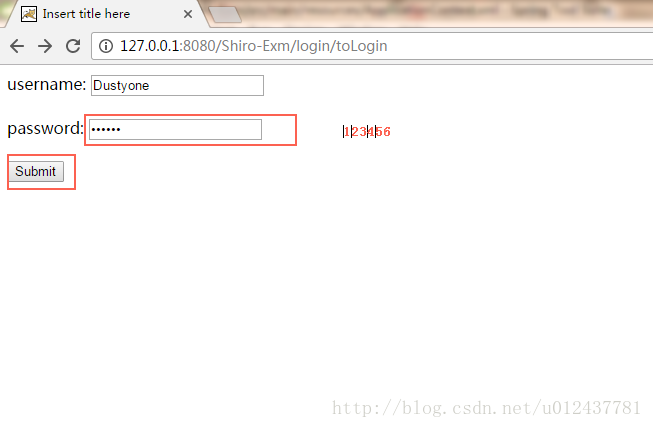
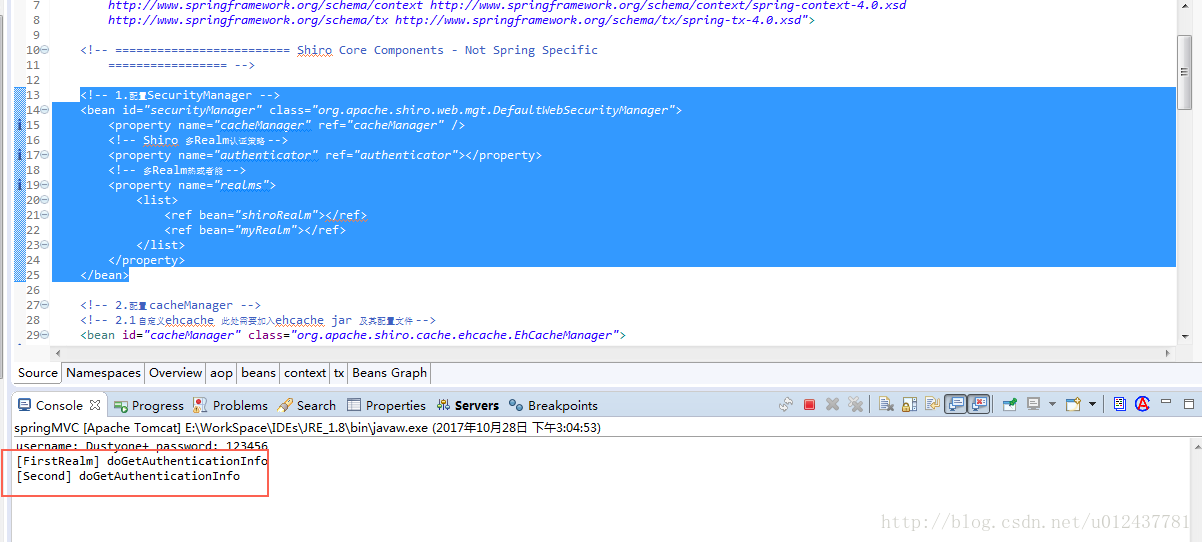
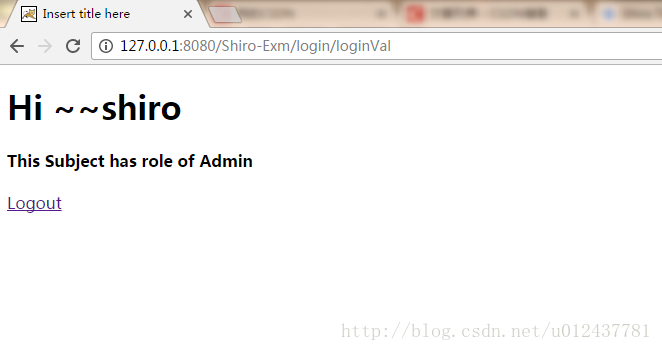
多 Realm 认证策略
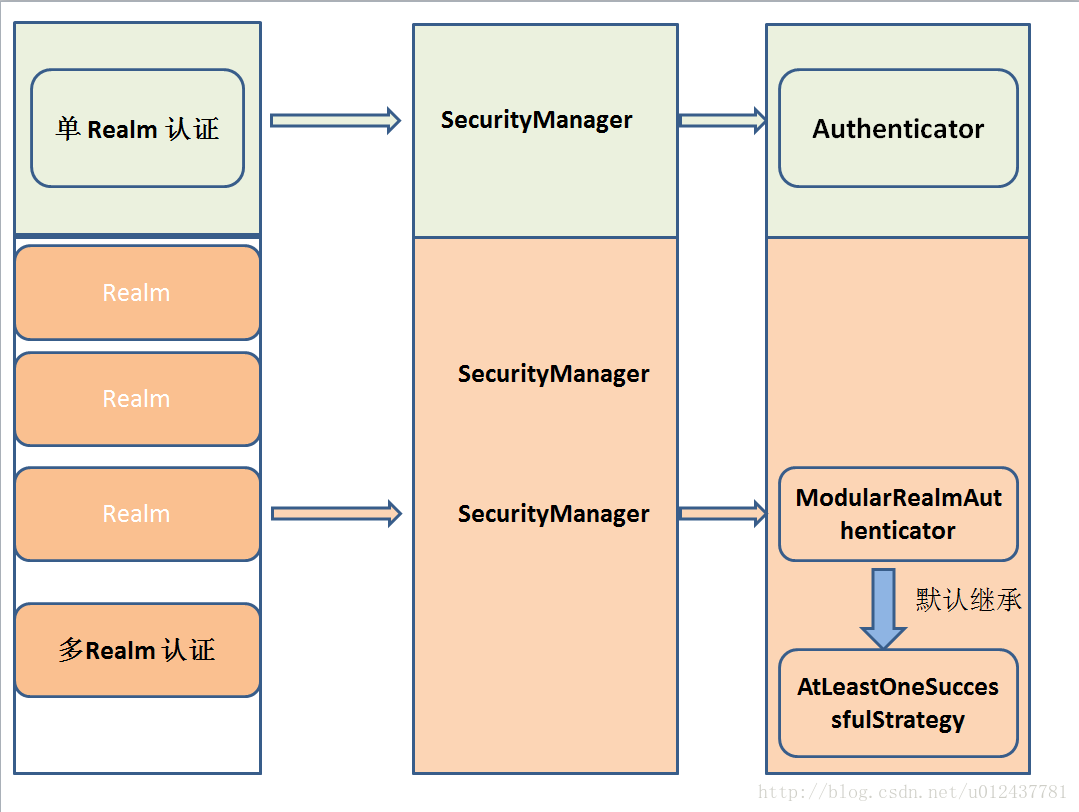
在我们的Application 中 如果我们使用的是Realm,那么一般而言 SecurityManager 继承了 Authenticator(Shiro API 中身份验证核心的入口点)。
如果使用的是多 Realm的话 一般继承 ModularRealmAuthenticator 即 SecurityManager 的身份认证将交由指定的多个 Realm 去实现,此时默认实现 AuthenticationStrategy(默认的认证策略,我们也可以自定义认证策略,自定义方式参考上文。) 接口。那么下面我们将详细了解下 Shiro 的多 Realm 认证策略。
-
FirstSuccessfulStrategy
只要有一个 Realm 验证成功即可,只返回第一个 Realm 身份验证成功的认证信息,其他的忽略 -
AtLeastOneSuccessfulStrategy
只要有一个Realm验证成功即可,和FirstSuccessfulStrategy 不同,将返回所有Realm身份验证成功的认证信息; -
AllSuccessfulStrategy
所有Realm验证成功才算成功,且返回所有Realm身份验证成功的认证信息,如果有一个失败就失败了
ModularRealmAuthenticator 默认是 AtLeastOneSuccessfulStrategy 策略
下图为 Shiro 的 Realm、SecurityManager、Authenticator以及认证策略之间的关系
小结
-
Shiro 中多 Realm 的配置和实现,以本章实例为例 需在Spring的 Context中配置
- Realm 的配置
- 多Realm 的认证策略
- 多Realm 和 多 Realm 认证策略统一交由 SecurityManager 管理。
-
理解 Realm、SecurityManager、Authenticator以及认证策略之间的关系 以便我们在设计多 Realm的时候能很好地实现我们的需求。
-
使用多 Realm 做认证时 realm 被执行的顺序与Spring Context 配置有关。顺序执行。






 扫一扫
扫一扫


 2271
2271

 被折叠的 条评论
为什么被折叠?
被折叠的 条评论
为什么被折叠?
 到【灌水乐园】发言





