





 本文详细介绍了如何通过yum管理和手动编译安装libzip,以及后续的PHP 7.4.30的配置过程,包括指定编译选项和环境变量设置。
安装依赖
yum install libxml2-devel openssl-devel sqlite-devel bzip2-devel curl-devel libjpeg-devel libpng-devel freetype-devel libmcrypt-devel openldap-devel oniguruma-devel libxslt-devel
因yum安装的libzip 版本不支持,所以需要先卸载已有,再编译安装
#先卸载已有
yum remove libzip
#安装
wget https://libzip.org/download/libzip-1.2.0.tar.gz
tar -zxvf libzip-1.2.0.tar.gz
cd libzip-1.2.0
./configure
make && make install
#装完了之后找一下/usr/local/lib下有没有 pkgconfig 目录,有的话执行命令 export PKG_CONFIG_PATH="/usr/local/lib/pkgconfig/"指定 PKG_CONFIG_PATH
export PKG_CONFIG_PATH="/usr/local/lib/pkgconfig/"
准备工作已完成,开始安装PHP 7.4.30
wget https://www.php.net/distributions/php-7.4.30.tar.gz
tar -zxvf php-7.4.30.tar.gz
cd php-7.4.30

./configure --prefix=/usr/local/php --with-config-file-path=/etc --with-fpm-user=www --with-fpm-group=www --enable-fpm --with-bz2 --with-gd --with-mysql=mysqlnd --with-mysqli=mysqlnd --with-jpeg-dir --with-png-dir --with-freetype-dir --with-zlib-dir --with-iconv-dir=/usr/local --with-mcrypt --enable-soap --enable-gd-native-ttf --enable-ftp --enable-mbstring --enable-exif --disable-ipv6 --with-curl --enable-bcmath --enable-sockets --enable-calendar --with-gettext --with-pdo-mysql=mysqlnd --disable-fileinfo --with-ldap --with-openssl --with-pear --with-xmlrpc --enable-gd-native-ttf --with-libdir=lib64 --with-libxml-dir --with-pcre-regex --with-pear --with-xsl --with-zlib --with-mhash --enable-libxml --enable-inline-optimization --enable-mbregex --enable-opcache --enable-pcntl --enable-shmop --enable-soap --enable-sockets --enable-sysvsem --enable-sysvshm --enable-xml --with-zip
make && make install

#You may want to add: /usr/local/php/lib/php to your php.ini include_path
查看php.ini的小技巧
#查看php配置项,过滤注释和空行
cat php.ini |grep -v "^;" |grep -v "^$"
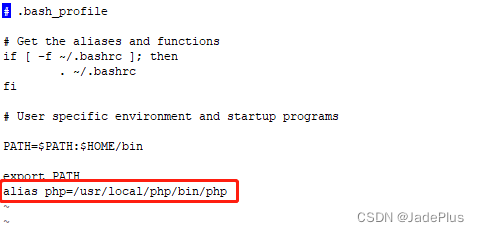
vi ~/.bash_profile
加上这句
alias php=/usr/local/php/bin/php

source ~/.bash_profile
查看PHP版本
[root@localhost ~]# php -v
PHP 7.4.30 (cli) (built: Jun 14 2022 17:30:00) ( NTS )
Copyright (c) The PHP Group
Zend Engine v3.4.0, Copyright (c) Zend Technologies
安装完成。





 扫一扫
扫一扫


 3479
3479

 被折叠的 条评论
为什么被折叠?
被折叠的 条评论
为什么被折叠?
 到【灌水乐园】发言





