


提示:文章写完后,目录可以自动生成,如何生成可参考右边的帮助文档
前言
起初是因为公司要求下班断网关机,由于有时候需要用到电脑,如果关机了,没有人工干预无法自动开机,因此开发一个定时自动断开网卡(假装电脑网络已断开,电脑不在线),够钟上班后自动启动网卡,从而达到自动拨号上网目的。
一、工具功能
(1)定时自动禁用网卡
(2)定时自动启用网卡
(3)定时自动关机
(4)自动开机启动
二、代码如下
import subprocess
import logging
import configparser
import datetime
import threading
import base64
from tkinter import *
from PIL import Image
from pystray import MenuItem, Menu
from logo import imgBase64
import os
import pystray
import winreg
import sys
import win32event
import win32api
import tkinter.messagebox
import ctypes
import time

MUTEX_NAME = "NetCardCheckStatus"
mutex = win32event.CreateMutex(None, False, MUTEX_NAME)
if win32api.GetLastError() == 183:  # ERROR_ALREADY_EXISTS
    print("程序已在运行!")
    sys.exit(1)

conf= configparser.RawConfigParser(allow_no_value=True)
appdata = os.getenv("APPDATA")
TEMP = os.environ.get('TEMP') or os.environ.get('TMP') or os.getenv("TEMP")
AuthConfig = appdata+"\\AuthConfig\\NetCard.ini"


def check_registry_value(root_key, sub_key, value_name):
    try:
        # 打开注册表键(只读模式)
        with winreg.OpenKey(root_key, sub_key, 0, winreg.KEY_READ) as key:
            value_data, _ = winreg.QueryValueEx(key, value_name)
            return True, value_data
    except FileNotFoundError:
        return False, None
    except PermissionError:
        raise PermissionError("需要管理员权限访问该注册表项")
    except Exception as e:
        raise Exception(f"注册表访问异常: {str(e)}")
def write_Reg():
    exists, data = check_registry_value(winreg.HKEY_CURRENT_USER, r"SOFTWARE\Microsoft\Windows\CurrentVersion\Run",'jwm2')
    if exists:
        print("已设置开机-------->启动")
    else:
        current_path = os.getcwd()

        reg_path = r"SOFTWARE\Microsoft\Windows\CurrentVersion\Run"
        key_name = "jwm2"
        value_to_write = current_path+"\\NetCardCheckStatus.exe"

        reg_key = winreg.OpenKey(winreg.HKEY_CURRENT_USER, reg_path, 0, winreg.KEY_WRITE)

        winreg.SetValueEx(reg_key, key_name, 0, winreg.REG_SZ, value_to_write)

        winreg.CloseKey(reg_key)
        print("写入注册表完成")
        logging.info("设置NetCardCheckStatus开机启动成功")
def disable_network_adapter(adapter_name):
    try:
        subprocess.run(['netsh', 'interface', 'set', 'interface', adapter_name, 'disabled'], check=True)
        print(f"网卡 '{adapter_name}' 已成功禁用。")
        logging.info(f"网卡 '{adapter_name}' 已成功禁用。")
    except subprocess.CalledProcessError as e:
        print(f"禁用 '{adapter_name}' 网卡失败: {e}")
        logging.info(f"禁用 '{adapter_name}' 网卡失败: {e}")

def enable_network_adapter(adapter_name):
    try:
        subprocess.run(['netsh', 'interface', 'set', 'interface', adapter_name, 'enabled'], check=True)
        print(f"网卡 '{adapter_name}' 已成功启用。")
        logging.info(f"网卡 '{adapter_name}' 已成功启用。")
    except subprocess.CalledProcessError as e:
        print(f"启用 '{adapter_name}' 网卡失败: {e}")
        logging.info(f"启用 '{adapter_name}' 网卡失败: {e}")

def createfolder():
    folder_path = appdata + "\\AuthConfig"
    if not os.path.exists(folder_path):
        os.makedirs(folder_path)
        print(f"文件夹 {folder_path} 已创建")
    else:
        print(f"文件夹 {folder_path} 已存在")

def createfile():
    folder_path = AuthConfig
    if not os.path.exists(folder_path):
        createfolder()
        createconfig()
        print(f"文件 {folder_path} 已创建")
    else:
        print(f"文件 {folder_path} 已存在")

def createconfig():
    conf['DEFAULT'] = {
        'NetCard_up_Time': '',
        'NetCard_down_Time': '',
        'shutdownTime': '',
        'NetCardName':''

    }

    with open(AuthConfig, 'w') as f:
        conf.write(f)

def checkConf(SectionName,key1,default_value):
    conf.read(AuthConfig)
    # 检查节是否存在,不存在则创建
    if not conf.has_section(SectionName):
        conf.add_section(SectionName)

    # 检查键是否存在,不存在则创建
    if not conf.has_option(SectionName, key1):
        conf.set(SectionName, key1, default_value)

    # 将修改写回文件
    with open(AuthConfig, 'w') as configfile:
        conf.write(configfile)

def shutdown_old():
    logging.info("关机成功")
    os.system("shutdown /s /t 0")


def readConf():
    conf.read(AuthConfig, encoding='utf-8')
    try:
        upTime = conf.get("DEFAULT", "NetCard_up_Time").strip()
        downTime = conf.get("DEFAULT", "NetCard_down_Time").strip()
        shutdownTime = conf.get("DEFAULT", "shutdownTime").strip()
        NetCardName = conf.get("DEFAULT", "NetCardName").strip()
        notification = conf.get('pop-up notification','notification').strip()
        return upTime,downTime,shutdownTime,NetCardName,notification
    except Exception as e:
      print(e)

def doCard():
    global adapter_name1
    if readConf()[3]:
        adapter_name = readConf()[3]
    else:
        adapter_name = adapter_name1

    upTime = readConf()[0]
    downTime = readConf()[1]
    shutdownTime = readConf()[2]
    current_time = datetime.datetime.now()
    current_time_str = current_time.strftime("%H:%M")
    if upTime:
        if current_time_str == upTime:
            #enable_network_adapter(adapter_name)
            up(adapter_name)
    if downTime:
        if current_time_str == downTime:
            #disable_network_adapter(adapter_name)
            down(adapter_name)
    if shutdownTime:
        if current_time_str == shutdownTime:
            logging.info("开始关机------------------->"+current_time.strftime("%H:%M:%S"))
            shutdown()
    root.after(40000, doCard)

def up(adapter_name):
    result = subprocess.run(
        f"netsh interface set interface {adapter_name} enabled ",
        shell=True,
        stdout=subprocess.PIPE,
        stderr=subprocess.PIPE,
        creationflags=subprocess.CREATE_NO_WINDOW
    )
    #print("启用网卡-------------->成功"+result.stdout.decode("gbk"))
    logging.info(f"启用 {adapter_name} 网卡---------------->成功")
def down(adapter_name):
    result = subprocess.run(
        f"netsh interface set interface {adapter_name} disabled ",
        shell=True,
        stdout=subprocess.PIPE,
        stderr=subprocess.PIPE,
        creationflags=subprocess.CREATE_NO_WINDOW
    )
    #print("禁用网卡-------------->成功"+result.stdout.decode("gbk"))
    logging.info(f"禁用 {adapter_name} 网卡---------------->成功")
def shutdown():
    current_time1 = datetime.datetime.now()
    current_time_str1 = current_time1.strftime("%H:%M:%S")
    result = subprocess.run(
        f"shutdown /s /t 0",
        shell=True,
        stdout=subprocess.PIPE,
        stderr=subprocess.PIPE,
        creationflags=subprocess.CREATE_NO_WINDOW
    )


def createTempLogo():
    tmp = open(TEMP+"\\NetCard.ico", "wb+")
    tmp.write(base64.b64decode(imgBase64))
    tmp.close()  # 关闭文件

def quit_window(icon: pystray.Icon):
    icon.stop()
    root.destroy()

def showindows():
    if readConf()[4] == '1':
        tkinter.messagebox.showinfo("配置文件解释", "配置文件路径:%appdata%/AuthConfig/NetCard.ini\nnetcard_up_time:网卡启用时间,格式00:00\nnetcard_down_time:网卡禁用时间,格式00:00\nshutdowntime:自动关机时间,格式00:00\nnetcardname:需要禁用或启用的网卡名称,默认WLAN")
        conf.read(AuthConfig)
        conf.set('pop-up notification', 'notification', "0")
        # 将修改写回文件
        with open(AuthConfig, 'w') as configfile:
            conf.write(configfile)


def prevent_sleep_windows():
    """Windows系统:防止屏幕关闭和休眠"""
    # 定义Windows API常量
    ES_CONTINUOUS = 0x80000000
    ES_SYSTEM_REQUIRED = 0x00000001
    ES_DISPLAY_REQUIRED = 0x00000002

    # 设置防止休眠和屏幕关闭
    result = ctypes.windll.kernel32.SetThreadExecutionState(
        ES_CONTINUOUS | ES_SYSTEM_REQUIRED
    )

    if result == 0:
        raise Exception("无法设置系统休眠状态")
    return True


def prevent_sleep():
    try:
        print("Windows系统:已设置禁止休眠")
        prevent_sleep_windows()
        while True:
            time.sleep(3600)
    except Exception as e:
        print(f"发生错误: {e}")
        logging.info(f"发生错误: {e}")


root = Tk()
root.withdraw()
createTempLogo()
root.wm_iconbitmap(TEMP+"\\NetCard.ico")
createfile()
checkConf('pop-up notification', 'notification', 1)
threading.Thread(target=showindows, daemon=True).start()
logging.basicConfig(filename=appdata + "\\AuthConfig\\NetCardlog.log",
                    level=logging.INFO,
                    format='%(asctime)s - %(levelname)s - %(message)s')
write_Reg()
adapter_name1 = "WLAN" #默认网卡名称,可自定义修改
doCard()
menu = (Menu.SEPARATOR,MenuItem('退出', quit_window, default=False))
image = Image.open(TEMP+"\\NetCard.ico")
icon = pystray.Icon("icon", image, "NetCardCheckStatus", menu)
threading.Thread(target=icon.run, daemon=True).start()
threading.Thread(target=prevent_sleep, daemon=True).start()
root.mainloop()
三、说明
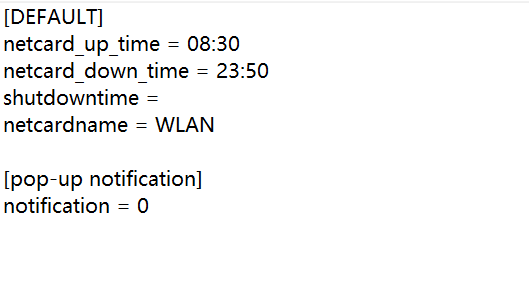
(1)所有配置均在配置文件配置
(2)时间格式00:00






 扫一扫
扫一扫


 1814
1814

 被折叠的 条评论
为什么被折叠?
被折叠的 条评论
为什么被折叠?
 到【灌水乐园】发言





