


MAF 函数调用:让 .NET Agent 具备真实世界交互能力

一句话简介
通过 Function Calling (函数调用) 技术,让 Microsoft Agent Framework (MAF) 构建的 AI Agent 能够调用外部工具,突破大模型"知识截止"和"无法操作"的限制,实现实时数据查询和业务操作。
🎯 核心价值
✅ 突破 AI 限制:获取实时数据、执行实际操作、访问专业工具
✅ 原生 C# 集成:使用
[Description]特性标注普通方法即可✅ 智能自动调用:Agent 自动判断何时调用哪个工具
✅ 类型安全:编译时类型检查,避免运行时错误
💡 为什么需要 Function Calling?
AI 大模型虽然强大,但存在固有限制:
限制 | 问题 | 解决方案 |
|---|---|---|
❌ 知识截止 | 无法获取最新信息(天气、股价) | ✅ 调用实时 API |
❌ 无法操作 | 不能执行实际操作(发邮件、查库) | ✅ 调用业务函数 |
❌ 计算能力 | 复杂计算可能不准确 | ✅ 调用专业工具 |
Function Calling 让 Agent 如虎添翼!
🔧 工作原理
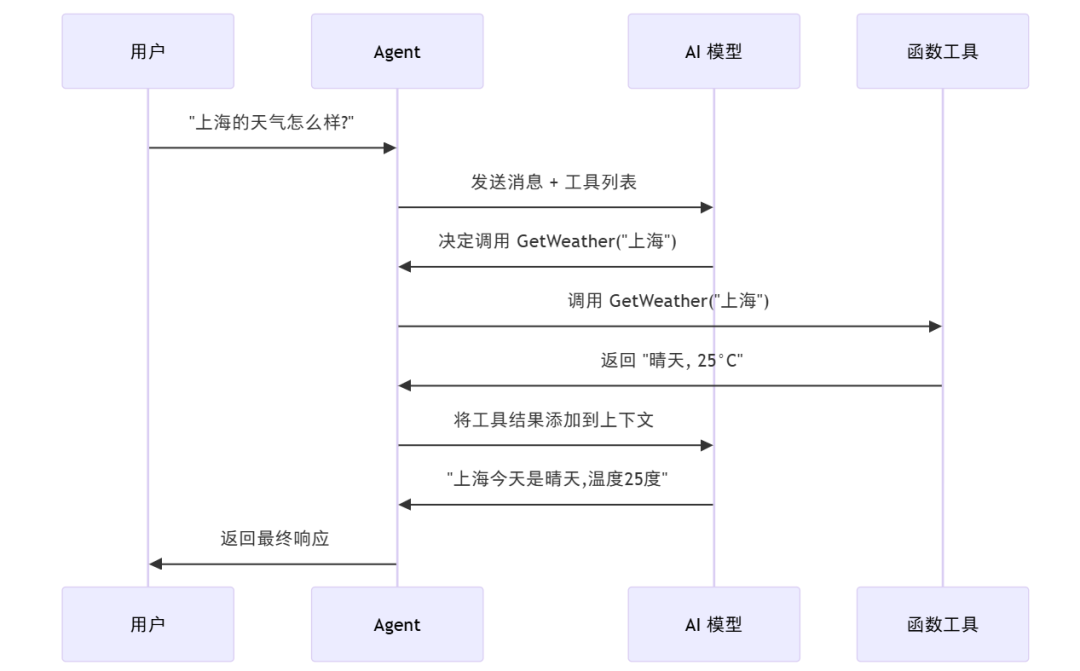
关键步骤:
工具注册 → 2. 意图识别 → 3. 参数提取 → 4. 函数执行 → 5. 结果整合
🚀 快速上手:三步创建带工具的 Agent
步骤 1:定义函数工具
使用 [Description] 特性标注普通 C# 方法:
[Description("查询指定城市的当前天气信息,包括天气状况和温度")]
string GetWeather(
    [Description("要查询天气的城市名称,例如: 北京、上海、深圳")] string city)
{
    var weatherData = new Dictionary<string, (string condition, int temperature)>
    {
        ["北京"] = ("晴天", 15),
        ["上海"] = ("多云", 20),
        ["深圳"] = ("阴天", 25)
    };

    return weatherData.TryGetValue(city, out var weather)
        ? $"{city}的天气: {weather.condition}, 温度: {weather.temperature}°C"
        : $"暂无{city}的天气信息";
}
核心要点:
🔧 函数描述要清晰,帮助 AI 理解何时调用
🔧 每个参数都要添加描述说明
🔧 返回值建议使用
string(AI 容易理解)
步骤 2:创建 Agent 并注册工具
var chatClient = AIClientHelper.GetDefaultChatClient();

// 将 C# 方法转换为 AI 工具
var weatherTool = AIFunctionFactory.Create(GetWeather);

// 创建 Agent 并注册工具
AIAgent weatherAssistant = chatClient.CreateAIAgent(
    instructions: "你是专业的天气助手。询问天气时使用 GetWeather 工具查询实时信息。",
    name: "WeatherAssistant",
    tools: [weatherTool]
);
步骤 3:测试自动工具调用
// 测试 1:明确的天气查询 → Agent 自动调用工具
var response1 = await weatherAssistant.RunAsync("上海的天气怎么样?");
// 输出:上海今天是多云,温度20度

// 测试 2:不需要工具 → Agent 直接回答
var response2 = await weatherAssistant.RunAsync("你好,你是谁?");
// 输出:你好!我是天气助手...

// 测试 3:多城市对比 → Agent 自动调用两次工具
var response3 = await weatherAssistant.RunAsync("北京和深圳哪个天气更好?");
✅ Agent 自动判断何时使用工具,无需手动干预!
🧵 多工具 + 多轮对话:构建智能旅行助手
场景:旅行规划助手
定义多个工具函数:
// 工具 1:景点推荐
[Description("推荐指定城市的热门旅游景点")]
string GetAttractions([Description("城市名称")] string city) { ... }

// 工具 2:美食推荐
[Description("推荐指定城市的特色美食")]
string GetLocalFood([Description("城市名称")] string city) { ... }

// 工具 3:酒店价格
[Description("查询指定城市的酒店平均价格")]
string GetHotelPrice([Description("城市名称")] string city) { ... }
创建多工具 Agent + Thread
AIAgent travelAssistant = chatClient.CreateAIAgent(
    instructions: "你是专业的旅行顾问,使用工具查询景点、美食和酒店信息。",
    name: "TravelAssistant",
    tools: [
        AIFunctionFactory.Create(GetWeather),
        AIFunctionFactory.Create(GetAttractions),
        AIFunctionFactory.Create(GetLocalFood),
        AIFunctionFactory.Create(GetHotelPrice)
    ]
);

// 创建对话线程
AgentThread travelThread = travelAssistant.GetNewThread();
多轮对话测试
// 第一轮:初步咨询
var r1 = await travelAssistant.RunAsync("我想去杭州旅游,能给我一些建议吗?", travelThread);
// Agent 自动调用 GetAttractions("杭州")、GetWeather("杭州")

// 第二轮:深入询问(Agent 记住上下文)
var r2 = await travelAssistant.RunAsync("那边有什么好吃的?", travelThread);
// Agent 自动调用 GetLocalFood("杭州") - 记住了之前讨论的城市

// 第三轮:综合决策
var r3 = await travelAssistant.RunAsync("酒店价格怎么样?我预算不高。", travelThread);
// Agent 调用 GetHotelPrice("杭州") 并推荐经济型酒店
✅ Agent 在多轮对话中智能组合使用多个工具!
⚙️ ChatToolMode:精确控制工具调用行为
MAF 提供三种工具模式:
模式 | 说明 | 使用场景 |
|---|---|---|
Auto | Agent 自行判断(默认) | ✅ 大多数场景,推荐使用 |
Required | 必须至少调用一次工具 | 🔧 确保获取实时数据 |
None | 禁用所有工具 | 🚫 纯对话,不需要工具 |
配置示例
var agent = chatClient.CreateAIAgent(
    options: new ChatClientAgentOptions(
        instructions: "...",
        tools: [...]
    )
    {
        Name = "MyAgent",
        ChatOptions = new ChatOptions
        {
            ToolMode = ChatToolMode.Required  // 强制使用工具
        }
    }
);
效果对比
// Auto 模式:智能判断
var agentAuto = chatClient.CreateAIAgent(..., ToolMode.Auto);
await agentAuto.RunAsync("你好");  // 不调用工具,直接回答
await agentAuto.RunAsync("北京天气如何?");  // 自动调用工具

// Required 模式:强制使用
var agentRequired = chatClient.CreateAIAgent(..., ToolMode.Required);
await agentRequired.RunAsync("深圳怎么样?");  // 必须调用 GetWeather
💡 企业级最佳实践
✅ 函数定义规范
// ✅ 好的实践:清晰的描述 + 错误处理
[Description("查询指定城市的实时天气信息,包括天气状况、温度和湿度")]
string GetWeather([Description("城市名称,例如: 北京、上海")] string city)
{
    try
    {
        return CallWeatherAPI(city);
    }
    catch (Exception ex)
    {
        // 返回友好错误消息,而不是抛出异常
        return$"无法获取{city}的天气信息: {ex.Message}";
    }
}

// ❌ 不好的实践:模糊的描述
[Description("获取天气")]
string GetWeather(string city) { ... }
✅ Agent 配置规范
// ✅ 明确告知 Agent 何时使用工具
instructions: "你是天气助手。当用户询问天气时,使用 GetWeather 工具查询实时信息。"

// ❌ 不够明确
instructions: "你是助手。"
✅ 参数类型选择
推荐 ✅ | 说明 |
|---|---|
string, int, bool, enum | 基本类型,AI 容易理解 |
string返回值 | 最推荐,可读性强 |
异步方法 + 超时控制 | 避免长时间阻塞 |
避免 ❌ | 问题 |
|---|---|
复杂对象参数 | 序列化可能失败 |
抛出异常 | 应返回友好错误消息 |
返回大量数据 | 应返回摘要或分页 |
🎯 核心 API 总结
API | 功能 | 示例 |
|---|---|---|
AIFunctionFactory.Create(method) | 创建函数工具 | AIFunctionFactory.Create(GetWeather) |
[Description("...")] | 添加描述 | [Description("查询天气")] |
ChatOptions.ToolMode | 配置工具模式 | ToolMode = ChatToolMode.Auto |
chatClient.CreateAIAgent(tools: [...]) | 注册工具 | tools: [tool1, tool2] |
📊 MAF Function Calling 特点
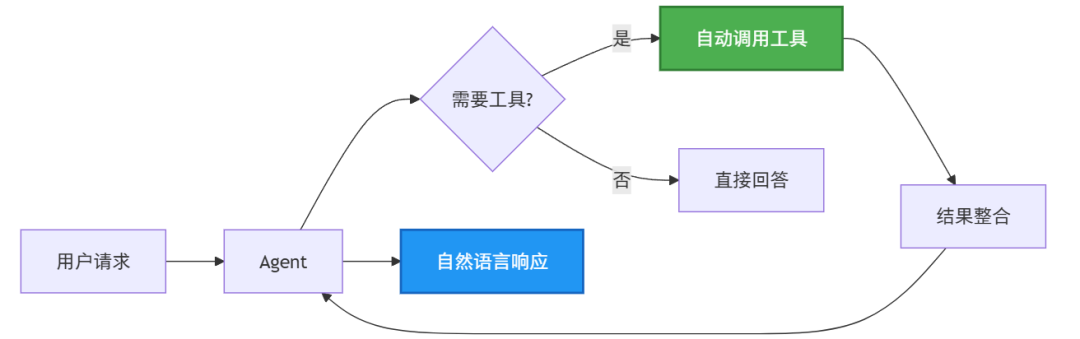
核心优势:
🤖 自动调用:Agent 智能判断何时调用工具
🔄 多轮调用:一次对话可调用多个工具
🧵 Thread 集成:工具调用历史自动保存
📝 类型安全:C# 方法,编译时检查
🎯 描述驱动:通过
[Description]让 AI 理解用途
🎯 总结
✅ Function Calling 原理:让 Agent 调用外部函数获取信息或执行操作
✅ 三步创建工具:定义函数 → 添加 Description → 注册到 Agent
✅ ChatToolMode 配置:Auto(推荐)、Required(强制)、None(禁用)
✅ 多工具 + Thread:支持多轮对话中智能组合使用多个工具
✅ 最佳实践:清晰描述、友好错误处理、快速响应、基本类型参数
如需获取文章配套完整代码,可扫码咨询领取。👇





 扫一扫
扫一扫


 771
771

 被折叠的 条评论
为什么被折叠?
被折叠的 条评论
为什么被折叠?
 到【灌水乐园】发言





