


本文的构建示例已在以下 Github 仓库中公开。
- GitHub - mjun0812/MLflow-Docker
官方文档如下。
- MLflow Documentation
- RustFS Documentation
引入背景
在机器学习项目中,我们需要在更改超参数、模型和数据集的同时进行各种实验。此时,通过引入可以高效比较结果的实验管理工具,我们可以专注于模型的开发。这类实验管理工具有 Tensorboard 和 Weight and Bias (wandb) 等多种,但如果着眼于无需将数据发送到外部即可使用的“本地部署(On-Premise)”这一点,选择并不多。因此,我打算尝试构建可以在本地构建的代表性平台 MLflow。
什么是 MLflow
MLflow 是一个开源的 MLOps 平台,支持以下 5 种场景:
- Tracking & Experiment Management: 管理实验结果并进行比较
- Model Registry: 进行机器学习模型的版本管理
- Model Deployment: 进行机器学习模型的服务化
- ML Library Integration: 与机器学习库集成
- Model Evaluation: 机器学习模型的性能评估
为了在这些场景中使用 MLflow,需要一个作为 backend store 保存参数的数据库,以及一个作为 artifact store 保存模型权重和日志文件等的对象文件存储。因此,这次我们将使用 Docker Compose 采用以下配置,完全在本地构建 MLflow。
- backend store: MySQL
- artifact store: RustFS
由于我主要使用进行实验管理的 Tracking Server,因此文章将以该部分为中心进行撰写,但其他场景应该也可以基于本次的构建示例进行使用。
架构图
这次我们将使用 Docker Compose,按以下配置构建 MLflow Server。
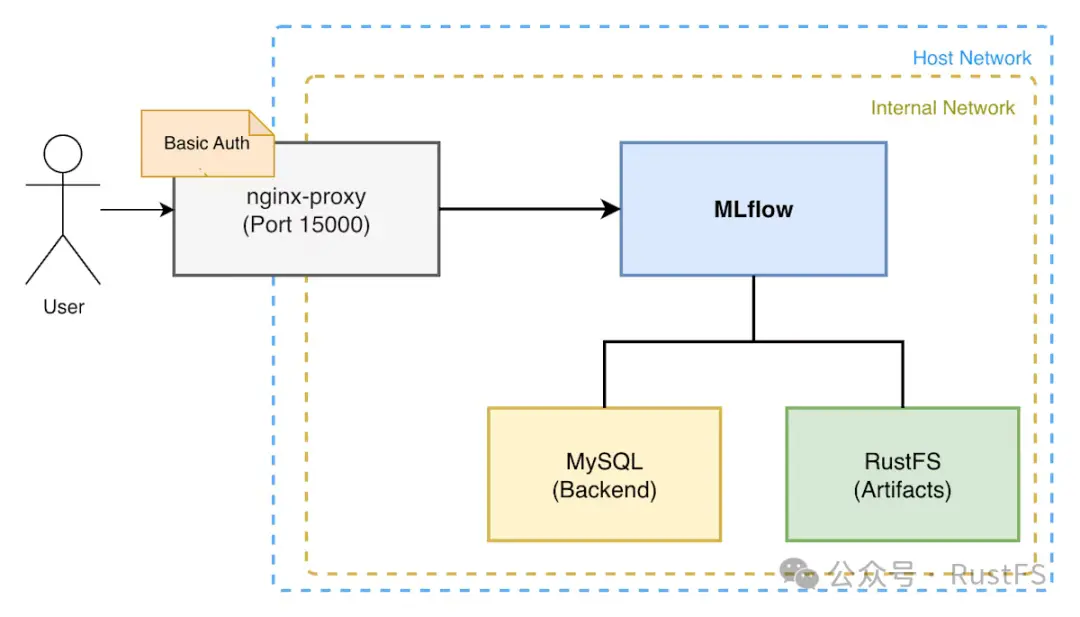
MLflow 的 Tracking Server 将实验参数和结果保存到 MySQL 数据库中,将 artifact 保存到 RustFS 中。此外,MLflow 的 WebUI 通过使用 Nginx Proxy 设置 Basic 认证,仅允许部分用户访问。
快速开始 (Quick Start)
如果想快速构建,请克隆以下 GitHub 仓库并按照 README.md 的步骤操作,或者执行以下命令。
git clone https://github.com/mjun0812/MLflow-Docker.git
cd MLflow-Docker
cp env.template .env
vim .env
编辑 .env 文件,指定监听域名和 MLflow 的版本。
# 指定监听域名。
# 如果仅为 localhost,则只能从本地访问。
VIRTUAL_HOST=localhost
# 如果想指定 MLflow 的版本,请在此处指定
# 如果不指定,将使用最新版
MLFLOW_VERSION=
(可选) 如果要设置 Basic 认证,请在 nginx/htpasswd/localhost 文件中设置用户名和密码。
htpasswd -c nginx/htpasswd/localhost [username]
接下来,执行以下命令进行镜像构建和容器启动。
docker compose up -d
这样,就可以通过 localhost:15000 访问 MLflow 的 WebUI 了。
如果从 Python 代码中使用 MLflow,请按如下方式操作。
import os

import mlflow

# 如果设置了 Basic 认证
os.environ["MLFLOW_TRACKING_USERNAME"] = "username"
os.environ["MLFLOW_TRACKING_PASSWORD"] = "password"

# 通过环境变量设置的情况
os.environ["MLFLOW_TRACKING_URI"] = "http://localhost:15000"

mlflow.set_tracking_uri("http://localhost:15000")
mlflow.set_experiment("example")

with mlflow.start_run():
  mlflow.log_param("param1", 1)
  mlflow.log_metric("metric1", 1)
构建详情
接下来,说明构建的详细信息。首先展示文件的整体结构,然后查看各容器的设置。在本文的示例中,我们通过启动以下容器进行构建。
- Nginx Proxy (jwilder/nginx-proxy)
- MLflow Server (自制 Dockerfile)
- MySQL
- RustFS
services:
  nginx-proxy:
    image:jwilder/nginx-proxy:latest
    restart:unless-stopped
    ports:
      -"15000:80"
    volumes:
      -./nginx/htpasswd:/etc/nginx/htpasswd
      -./nginx/conf.d/proxy.conf:/etc/nginx/conf.d/proxy.conf
      -/var/run/docker.sock:/tmp/docker.sock:ro
    networks:
      -mlflow-net

mlflow:
    build:
      context:.
      dockerfile:Dockerfile
      args:
        MLFLOW_VERSION:${MLFLOW_VERSION}
    expose:
      -"80"
    restart:unless-stopped
    depends_on:
      db:
        condition:service_healthy
      rustfs-init:
        condition:service_completed_successfully
    env_file:
      -.env
    environment:
      TZ:Asia/Tokyo
      VIRTUAL_HOST:"${VIRTUAL_HOST:-localhost}"
      MLFLOW_S3_ENDPOINT_URL:http://rustfs:9000
      AWS_ACCESS_KEY_ID:rustfs-mlflow
      AWS_SECRET_ACCESS_KEY:rustfs-mlflow
      MLFLOW_BACKEND_STORE_URI:mysql+mysqldb://mlflow:mlflow@db:3306/mlflow
    command:>
      mlflow server
      --backend-store-uri 'mysql+mysqldb://mlflow:mlflow@db:3306/mlflow'
      --artifacts-destination 's3://mlflow/artifacts'
      --serve-artifacts
      --host 0.0.0.0
      --port 80
    networks:
      -mlflow-net
      -mlflow-internal-net

db:
    image:mysql:latest
    restart:unless-stopped
    environment:
      MYSQL_USER:mlflow
      MYSQL_PASSWORD:mlflow
      MYSQL_ROOT_PASSWORD:mlflow
      MYSQL_DATABASE:mlflow
      TZ:Asia/Tokyo
    volumes:
      -./mysql/data:/var/lib/mysql
      -./mysql/my.cnf:/etc/mysql/conf.d/my.cnf
    healthcheck:
      test:["CMD","mysqladmin","ping","-h","localhost"]
      interval:5s
      timeout:10s
      retries:5
    networks:
      -mlflow-internal-net

rustfs:
    image:rustfs/rustfs:latest
    security_opt:
      -"no-new-privileges:true"
    # ports:
    #   - "9000:9000" # S3 API port
    environment:
      -RUSTFS_VOLUMES=/data/rustfs
      -RUSTFS_ADDRESS=0.0.0.0:9000
      -RUSTFS_CONSOLE_ENABLE=false
      -RUSTFS_EXTERNAL_ADDRESS=:9000
      -RUSTFS_CORS_ALLOWED_ORIGINS=*
      -RUSTFS_ACCESS_KEY=rustfs-mlflow
      -RUSTFS_SECRET_KEY=rustfs-mlflow
      -RUSTFS_OBS_LOGGER_LEVEL=info
      # Object Cache
      -RUSTFS_OBJECT_CACHE_ENABLE=true
      -RUSTFS_OBJECT_CACHE_TTL_SECS=300
    volumes:
      -./rustfs:/data/rustfs
    restart:unless-stopped
    healthcheck:
      test:["CMD","sh","-c","curl -f http://localhost:9000/health"]
      interval:30s
      timeout:10s
      retries:3
      start_period:40s
    networks:
      -mlflow-internal-net
      # - mlflow-net

rustfs-init:
    image:amazon/aws-cli:latest
    depends_on:
      rustfs:
        condition:service_healthy
    environment:
      -AWS_ACCESS_KEY_ID=rustfs-mlflow
      -AWS_SECRET_ACCESS_KEY=rustfs-mlflow
      -AWS_DEFAULT_REGION=us-east-1
      -AWS_REGION=us-east-1
    entrypoint:/bin/sh
    command:-c"aws --endpoint-url http://rustfs:9000 s3api create-bucket --bucket mlflow || true"
    restart:"no"
    networks:
      -mlflow-internal-net

# RustFS volume permissions fixer service
volume-permission-helper:
    image:alpine
    volumes:
      -./rustfs:/data
    command:>
      sh -c "
        chown -R 10001:10001 /data &&
        echo 'Volume Permissions fixed' &&
        exit 0
      "
    restart:"no"

networks:
mlflow-net:
    driver:bridge
mlflow-internal-net:
    internal:true
nginx-proxy
Nginx Proxy 用于通过 Nginx 代理 MLflow 的 WebUI。这里使用的 jwilder/nginx-proxy Docker 镜像,几乎不需要编写 Nginx 配置文件,只需在 compose.yml 中进行描述、挂载特定卷并编辑环境变量,即可建立带有 Basic 认证的 Nginx Proxy。
nginx-proxy:
  image:jwilder/nginx-proxy:latest
restart:unless-stopped
ports:
    -"15000:80"
volumes:
    -./nginx/htpasswd:/etc/nginx/htpasswd
    -./nginx/conf.d/proxy.conf:/etc/nginx/conf.d/proxy.conf
    -/var/run/docker.sock:/tmp/docker.sock:ro
networks:
    -mlflow-net
这次想要代理的服务只有 MLflow Server 一个,所以使用 nginx-proxy 看起来有些过头,但因为它只需配置文件放置即可轻松切换监听域名的指定和 Basic 认证的开启/关闭,所以我们使用了它。首先,作为 nginx 的整体设置,在 nginx/conf.d/proxy.conf 中添加以下设置。
client_max_body_size 100g;
这是为了应对 MLflow Server 发送的文件尺寸较大的情况,以便能够发送巨大的文件。接下来,在 mlflow 容器的环境变量 VIRTUAL_HOST 中描述监听域名的指定和 Basic 认证的设置。
mlflow:
  expose:
    - "80"
  environment:
    VIRTUAL_HOST: "example.com,localhost"
该环境变量的值可以用逗号分隔指定多个域名。此外,通过 expose 指定想要代理的端口。这里 expose 指定的端口会映射到 nginx-proxy 的端口,因此在 nginx-proxy 侧按如下方式指定端口。
nginx-proxy:
  ports:
    - "15000:80"
这样,就可以从外部通过 example.com:15000 和 localhost:15000 访问 MLflow 的 WebUI 了。如果设置 Basic 认证,请在挂载到 nginx-proxy 卷的 nginx/htpasswd 文件中设置用户名和密码。此时,Basic 认证的文件名应与域名相同。
cd nginx/htpasswd
htpasswd -c example.com [username]
cp example.com localhost
这样,就可以从 example.com 和 localhost 访问 MLflow 的 WebUI 了。即使更改监听域名或不再需要 Basic 认证,nginx 的配置文件也会在容器启动时更新,因此无需手动更改。
MLflow
MLflow Server 使用以下 Dockerfile 和 compose.yml 进行构建。可以通过环境变量 MLFLOW_VERSION 指定 MLflow 的版本。如果不指定,将使用最新版。由于 MLflow 使用 SQLAlchemy 连接 DB,因此需要适配 DB 的驱动程序,即 MySQL 的客户端库 mysqlclient。此外,为了访问 S3 兼容的对象文件存储 RustFS,还需要安装 boto3。
FROM python:3.13

ARG MLFLOW_VERSION=""

RUN if [ -n "$MLFLOW_VERSION" ]; then \
        pip install --no-cache-dir mlflow=="$MLFLOW_VERSION" mysqlclient boto3; \
    else \
        pip install --no-cache-dir mlflow mysqlclient boto3; \
    fi
在容器内执行 mlflow server 命令来启动 MLflow Server。这里,通过 --backend-store-uri 选项指定 MySQL 的连接信息,通过 --artifacts-destination 选项指定 RustFS 内的存储桶和文件夹路径。此外,通过 --serve-artifacts 选项,让 artifact 从运行 MLflow Server 的容器保存到 RustFS。如果没有此设置,客户端将直接访问 S3 并保存 artifact。
mlflow:
  build:
    context:.
    dockerfile:Dockerfile
    args:
      MLFLOW_VERSION:${MLFLOW_VERSION}
expose:
    -"80"
restart:unless-stopped
depends_on:
    db:
      condition:service_healthy
    rustfs-init:
      condition:service_completed_successfully
env_file:
    -.env
environment:
    TZ:Asia/Tokyo
    VIRTUAL_HOST:"${VIRTUAL_HOST:-localhost}"
    MLFLOW_S3_ENDPOINT_URL:http://rustfs:9000
    AWS_ACCESS_KEY_ID:rustfs-mlflow
    AWS_SECRET_ACCESS_KEY:rustfs-mlflow
    MLFLOW_BACKEND_STORE_URI:mysql+mysqldb://mlflow:mlflow@db:3306/mlflow
command:>
    mlflow server
    --backend-store-uri 'mysql+mysqldb://mlflow:mlflow@db:3306/mlflow'
    --artifacts-destination 's3://mlflow/artifacts'
    --serve-artifacts
    --host 0.0.0.0
    --port 80
networks:
    -mlflow-net
    -mlflow-internal-net
RustFS
RustFS 由仅在启动时运行的 rustfs-init、volume-permission-helper 这 2 个容器,以及进行服务的容器 rustfs 共 3 个容器组成。
- rustfs-init: 用于在 RustFS 启动时创建存储桶的容器。
- volume-permission-helper: 用于修正 RustFS 卷权限的容器。当 RustFS 卷的权限不正确时运行。
- rustfs: RustFS 的容器。
rustfs:
  image:rustfs/rustfs:latest
security_opt:
    -"no-new-privileges:true"
# ports:
#   - "9000:9000" # S3 API port
environment:
    -RUSTFS_VOLUMES=/data/rustfs
    -RUSTFS_ADDRESS=0.0.0.0:9000
    -RUSTFS_CONSOLE_ENABLE=false
    -RUSTFS_EXTERNAL_ADDRESS=:9000
    -RUSTFS_CORS_ALLOWED_ORIGINS=*
    -RUSTFS_ACCESS_KEY=rustfs-mlflow
    -RUSTFS_SECRET_KEY=rustfs-mlflow
    -RUSTFS_OBS_LOGGER_LEVEL=info
    # Object Cache
    -RUSTFS_OBJECT_CACHE_ENABLE=true
    -RUSTFS_OBJECT_CACHE_TTL_SECS=300
volumes:
    -./rustfs:/data/rustfs
restart:unless-stopped
healthcheck:
    test:["CMD","sh","-c","curl -f http://localhost:9000/health"]
    interval:30s
    timeout:10s
    retries:3
    start_period:40s
networks:
    -mlflow-internal-net
    # - mlflow-net

rustfs-init:
image:amazon/aws-cli:latest
depends_on:
    rustfs:
      condition:service_healthy
environment:
    -AWS_ACCESS_KEY_ID=rustfs-mlflow
    -AWS_SECRET_ACCESS_KEY=rustfs-mlflow
    -AWS_DEFAULT_REGION=us-east-1
    -AWS_REGION=us-east-1
entrypoint:/bin/sh
command:-c"aws --endpoint-url http://rustfs:9000 s3api create-bucket --bucket mlflow || true"
restart:"no"
networks:
    -mlflow-internal-net

# RustFS volume permissions fixer service
volume-permission-helper:
image:alpine
volumes:
    -./rustfs:/data
command:>
    sh -c "
      chown -R 10001:10001 /data &&
      echo 'Volume Permissions fixed' &&
      exit 0
    "
restart:"no"
在上面的示例中,RustFS 的 WebUI 被禁用了,但根据需要,可以按如下方式设置并启用它。
nginx-proxy:
  ports:
    -"15001:9001"

rustfs:
image:rustfs/rustfs:latest
security_opt:
    -"no-new-privileges:true"
ports:
    # - "9000:9000" # S3 API port
# 追记 Nginx Proxy 的设置
expose:
    -"9001"
environment:
    # 指定监听域名
    -VIRTUAL_HOST=example.com,localhost

    -RUSTFS_VOLUMES=/data/rustfs
    -RUSTFS_ADDRESS=0.0.0.0:9000
    -RUSTFS_EXTERNAL_ADDRESS=:9000
    -RUSTFS_CORS_ALLOWED_ORIGINS=*
    -RUSTFS_ACCESS_KEY=rustfs-mlflow
    -RUSTFS_SECRET_KEY=rustfs-mlflow
    -RUSTFS_OBS_LOGGER_LEVEL=info

    # 追记 WebUI 的设置
    -RUSTFS_CONSOLE_ADDRESS=0.0.0.0:9001
    -RUSTFS_CONSOLE_ENABLE=true
    -RUSTFS_CONSOLE_CORS_ALLOWED_ORIGINS=*

    # Object Cache
    -RUSTFS_OBJECT_CACHE_ENABLE=true
    -RUSTFS_OBJECT_CACHE_TTL_SECS=300
volumes:
    -./rustfs:/data/rustfs
restart:unless-stopped
healthcheck:
    test:["CMD","sh","-c","curl -f http://localhost:9000/health"]
    interval:30s
    timeout:10s
    retries:3
    start_period:40s
networks:
    -mlflow-internal-net
在上述设置中,可以通过 example.com:15001 和 localhost:15001 访问 RustFS 的 WebUI。
迁移到 RustFS 的方法
将数据迁移到 RustFS 时,使用 MinIO 开发的 mc 命令非常方便。
mc 命令具有存储桶镜像 (rsync) 功能,因此可以使用它轻松迁移数据。
- 确保可以访问迁移源和迁移目标双方的 S3 兼容存储。
- 使用
--net host启动 MinIO Client (mc) 容器。
docker run --rm -it --net host --entrypoint sh minio/mc
- 在容器内,设置迁移源和迁移目标的连接信息。
# 迁移源
mc alias set src http://host.docker.internal:10000 <ACCESS_KEY> <SECRET_KEY>
# 迁移目标
mc alias set dst http://host.docker.internal:9000 <ACCESS_KEY> <SECRET_KEY>
- 使用 mc mirror 命令复制数据。
mc mirror src/mlflow/artifacts dst/mlflow/artifacts





 扫一扫
扫一扫


 1463
1463

 被折叠的 条评论
为什么被折叠?
被折叠的 条评论
为什么被折叠?
 到【灌水乐园】发言





