


 本文详细介绍了 Tengine 的下载、解压及安装过程,并提供了具体的配置参数说明。同时,深入讲解了 Nginx 的工作原理、配置文件的编辑方法,包括 worker 进程数调整、配置文件的热更新、异步非阻塞特性等。此外,还介绍了如何通过 Nginx 实现负载均衡,包括代理转发、轮询策略、会话一致性共享等关键配置。
在 tengine.tao.org 上可以下载tengine 步骤 解压 然后通过 ./configure --prefix=/opt/tengine-2.1.0 --sbin-path=/opt/tengine-2.1.0/sbin/nginx --conf-path=/opt/tengine-2.1.0/conf/nginx.conf --error-log-path=/var/log/nginx/error.log --http-log-path=/var/log/nginx/access.log
--pid-path=/var/run/nginx/nginx.pid
--lock-path=/var/lock/nginx.lock
--user=nginx
--group=nginx
--with-http_ssl_module
--with-http_flv_module
--with-http_stub_status_module
--with-http_gzip_static_module
--http-client-body-temp-path=/var/tmp/nginx/client/
--http-proxy-temp-path=/var/tmp/nginx/proxy/
--http-fastcgi-temp-path=/var/tmp/nginx/fcgi/
--http-uwsgi-temp-path=/var/tmp/nginx/uwsgi
--http-scgi-temp-path=/var/tmp/nginx/scgi
--with-pcre
去执行安装 并配置路径信息
本人目前 还没装上tengine 
但是明明路径是配过的 明天再看 等解答
问题是因为我解压后的路径和./configure 中配置的路径冲突,所以cp文件一致
conf/nginx.conf nginx的配置文件 可以修改worker的工作数量 sbin/nginx -s reload 可以在不重启的情况下重新加载配置文件
每个worker都是单线程运行的 异步非阻塞
看文档 nginx的配置信息 可以在location /baidu{ proxy_pass http://192.168.100.101/ } 配置转发
配置upstream 名字{ server ip:port; server ip:port;} 配置多个服务器
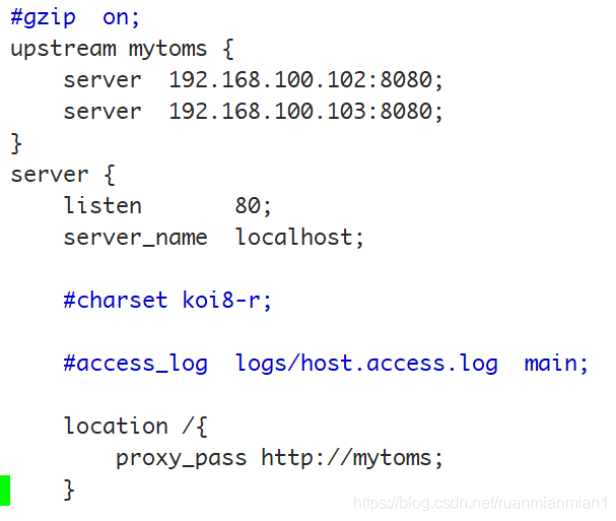 使node1 可以轮训访问node2 node3 上的tomcat
session 的一致性 共享session 专门管理session的软件 所有服务器 去这个软件上获取session信息 memcached 缓存服务,可以和tomcat整合,帮助tomcat共享管理session
安装memcached 配置tomcat 可以实现在node1的web下 完成对node2 node3 的轮询访问





 扫一扫
扫一扫


 319
319

 被折叠的 条评论
为什么被折叠?
被折叠的 条评论
为什么被折叠?
 到【灌水乐园】发言





