


1. word选项 --- 高级 --- 将图片插入/粘贴为: 嵌入型
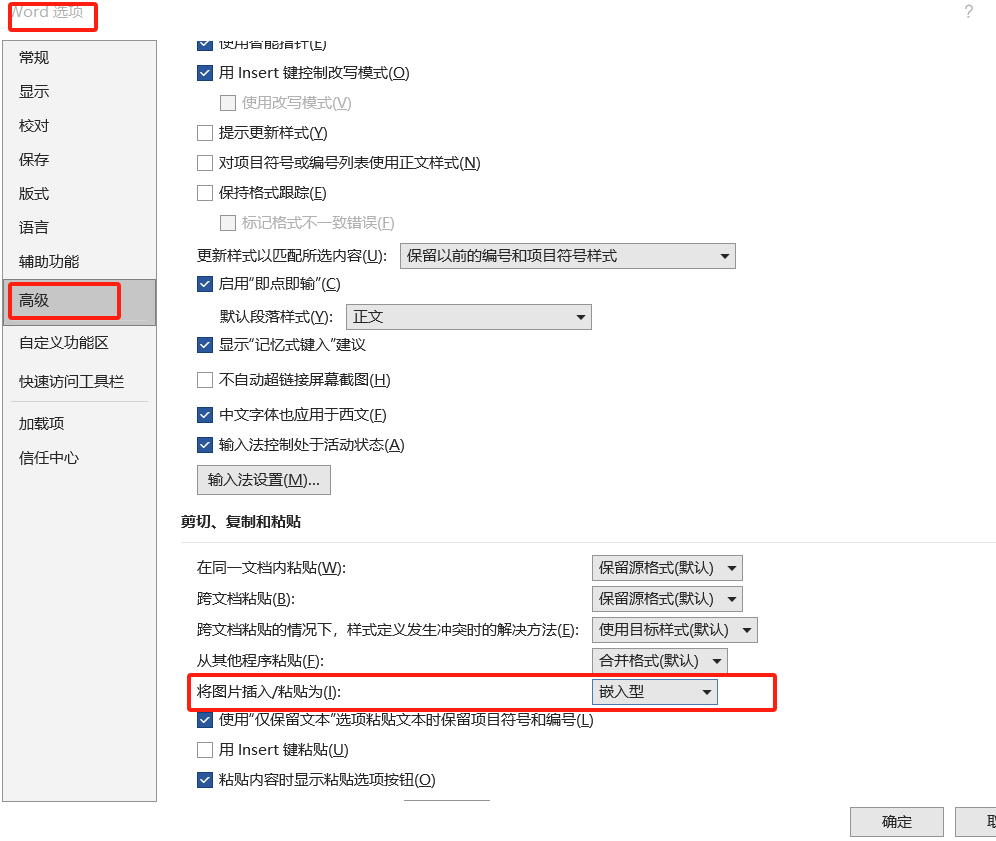
2. 设置好页面边距(根据要图片想要的大小)
3. 插入图片选择多张插入word中
4. 手动调整一张图片大小至理想大小,确认长宽(例如 宽:20,高:29)
5. Alt + F11调出VB脚本窗口,选择 插入---模块 调出 脚本编辑框。复制以下内容:
Sub ResizeAllEmbeddedImages()
    Dim img As InlineShape
    For Each img In ActiveDocument.InlineShapes
        img.LockAspectRatio = msoTrue  '锁定纵横比
        img.Width = CentimetersToPoints(20)  '设置宽度为12厘米(可自定义):ml-citation{ref="6" data="citationList"}
        img.Height = CentimetersToPoints(29)
    Next img
End Sub
按F5运行脚本,完成批量设置大小的任务。





 扫一扫
扫一扫


 3497
3497

 被折叠的 条评论
为什么被折叠?
被折叠的 条评论
为什么被折叠?
 到【灌水乐园】发言





