



文章目录
一.Vue3基础知识
1.Vue3的优势
- 更容易维护:组合式api,更好的TypeScript支持
- 更快的速度:重写diff算法,模板编译优化,更高效的组件初始化
- 更小的(打包)体积:良好的TreeShaking,按需引入
- 更优的数据响应式:Proxy
Proxy对对象进行数据劫持,当对象中新增或删除属性,不影响Proxy对于对象的数据劫持,
而Vue2不能获取到新增属性
2.选项式API和组合式API
- vue2是选项式api,
data,methods,computed,watch就是一个个选项
如:要实现功能A,需要在data,methods,或其他选项中都写进功能A的相关代码,这就是选项式api的特点和不足
- vue3则将功能A的数据声明,计算属性和方法的提供放到了一起,是为组合式api(代码的组合性很高,可以任意放进同一个组件中去)
示例:点击按钮让数字+1
vue2:data+methods
vue3:
    使用调用方法的方式来声明数据:
    	const count=ref{0}//从vue引入ref
    点击调用函数的时候同时实现自增功能:
    	const addCount=()=>count.value++
3.使用create-vue创建Vue3项目
create-vue是是vue官方的新的脚手架工具,底层是vite构建工具
vue2的官方脚手架是Vue-CLI,它的底层是webpack
vue3的官方脚手架是create-vue,它的底层是vite,
vite是当前使用广泛的构建工具,为开发提供极速响应
- 前提环境条件:16.0以上的
node.js - 创建命令:
npm init vue@latest
踩坑:遇到了node和vite版本不兼容的报错,解决方法是把node升级到高版本
4.vue3项目目录和关键文件介绍
vite.config.js:项目的配置文件–基于vite的配置package.json:项目包文件–核心依赖项变为了vue3和vitemain.js:入口文件–createApp函数创建应用实例App.vue:根组件–SFC单文件组件script-template-style
vue3对比vue2的项目文件,有了如下变化:
    1.脚本script和模板template顺序调整
    2.模板template不再要求唯一根元素
    3.脚本script添加setup标识支持组合式api
main.js对创建进行了封装
vue2–new Vue({}).mount('#app')
vue3–import{createApp}from 'vue';createApp(App).mount(#app)
----创建vue3实例
----设置挂载点在index.html中的div id="app"上
对其他的创建也进行了封装:createRouter(),createstore()
第一次运行vue3项目,会弹出插件警告,如何处理?
-
改插件配置:禁用
Vetur,安装和启用Vue-offical插件 -
重启vscode
5.vue3不用对导入的组件进行注册
import导入后,可以直接在template中用:<HelloWorld></HelloWorld>,省略了注册组件
components:{
	HelloWorld
}
二.组合式API的语法学习
1.setup选项
setup选项是组合式api的入口
写法
和钩子一样写成一个函数:setup(){},里面放组合式api,然后return
或者使用语法糖:把setup写在script标签中,<script setup></script>
特点
-
执行时机:比beforeCreate还要早
-
在setup函数中this是undefined,因此vue3不用纠结this指向
-
使用:可以在setup中提供数据和函数,但必须return才能在模板{{}}中使用
<script>
export default {
  setup() {
    console.log("我是setup",this);
    const msg="hello Vue3"
    const showMsg=()=>{
      console.log("showMsg:",msg);
    }
    return{
      msg,
      showMsg
    }
  },
  beforeCreate() {
    console.log('我是beforeCreate');
    // this.showMsg()
  }
}
</script>
<template>
  <h1>{{msg}}</h1>
  <button @click="showMsg">获取</button>
</template>
语法糖
上例可以把原始script标签改写成<script setup></script>,就不需要export default+return暴露属性和方法了
<script setup>
const msg = "hello Vue3";
const showMsg = () => {
  console.log(msg);
};
</script>
<template>
  <h1>{{ msg }}</h1>
  <button @click="showMsg">获取</button>
</template>
2.reactive和ref函数
2.1.reactive()
- 作用
接收对象类型的数据参数传入,并返回一个响应式对象
- 核心步骤
从vue中按需导入reactive,在执行函数中包一层reactive
<script setup>
import {reactive} from 'vue'
const state=reactive({
  count:1
})
const addCount=()=>{
  state.count++
}
</script>
<template>
  <h1>{{ state.count }}</h1>
  <button @click="addCount">增加</button>
</template>
2.2.ref()
- 作用:接受简单类型或对象类型的数据传入,并返回响应式对象
- 步骤:同上
- 本质
在原有数据基础上,在外面包了一层对象,成为复杂类型,从而变成响应式的,然后可以借助reactive()来实现响应式
- 访问数据:在script中访问要
.value,在template中不需要
<script setup>
import {ref} from 'vue'
const count=ref(1)//简单类型的数据
const addCount=()=>{
  count.value++
}
</script>
<template>
  <h1>{{ count }}</h1>
  <button @click="addCount">增加</button>
</template>
- 推荐:只用ref()
3.computed
computed的功能和vue2一样,仅修改了写法
- 步骤
按需导入computed函数,执行函数在回调参数中return一个基于响应式数据来做计算的值,并用一个变量在前面接收
import { computed,ref } from "vue"
const list= ref([1,2,3,4,5])
const computedList=computed(()=>{
    return list.value.filter(item=>item>3)
})
4.watch
watch功能完全一样,写法也变成了函数的写法:
- 单个数据侦听
watch(count,(newVal,oldVal)=>{
	console.log(newVal,oldVal)
})
- 多个数据侦听
watch([count.name],(newVal,oldVal)=>{
	console.log(newVal,oldVal)
})
watch的属性immediate
在侦听器创建时,立即触发回调,响应式数据变化后继续执行回调
const username=ref("张三")
const userage=ref(18)
const changeName=()=>{
  username.value="李四"
}
const changeAge=()=>{
  userage.value++
}
watch([username,userage],(newVal,oldVal)=>{
  console.log(newVal,oldVal);
},{//注意后面是一个对象不是一个回调
  immediate:true,
})
watch的属性deep
使用deep对对象进行深度监视
const user=ref({
  name:"张三",
  age:18
})
const changeAge=()=>{
 user.value.age++
}
watch(user,(newVal,oldVal)=>{
  console.log(newVal,oldVal);
},{
  immediate:true,
  deep:true
})
//如果不加deep:只有name和age都改变时才会watch到,仅仅age++不行
精确侦听对象的某个属性
上例中,user任意属性的改变都会触发watch,若要求仅age改变时才会触发watch监听,
在不开启deep的前提下如何监听对象的属性?
const changeAge=()=>{
 user.value.age++
}
watch(()=>user.value.age,(newVal,oldVal)=>{
  console.log(newVal,oldVal)
},{
  immediate:true,
  // deep:true
})
//此时name属性发生改变不会触发watch
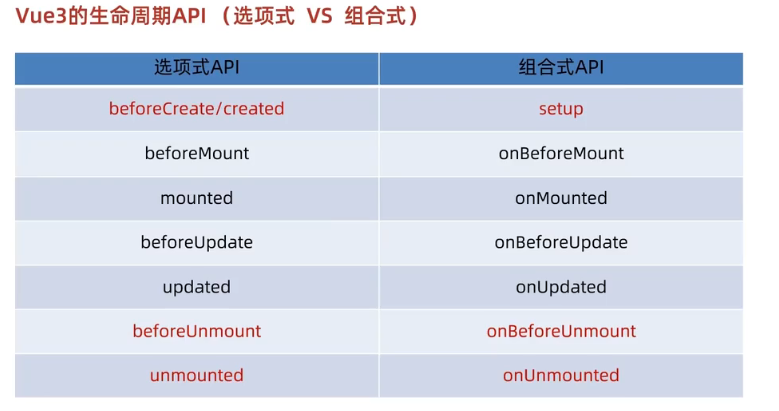
5.生命周期函数
在组合式 API 中,所有的生命周期钩子都以 onXxx 的形式存在,并且需要按需导入
import { onBeforeMount, onMounted } from 'vue';
export default {
  setup() {
    onBeforeMount(() => {
      console.log('Component is about to be mounted');
    });
    onMounted(() => {
      console.log('Component has been mounted');
    });
  }
};
6.父子通信
6.1.父传子:父给子绑定属性,子通过props接收
//父组件
<script setup>
import SonCom from "@/components/son-com.vue"
</script>
<template>
  我是父组件
  <SonCom msg="hello"></SonCom>
</template>

//子组件
<script setup>
const props=defineProps({
  msg:String
})
</script>
<template>
  <div>我是子组件:{{ msg }}</div>
</template>
6.2.子传父:父给子占位符绑定自定义事件,子通过emit方法触发该事件
(注意没有$符号,因为setup中没有this)
//子组件
<script setup>
const props=defineProps({
  msg:String
})
const emit=defineEmits(['getMsg'])
const sendMsg=()=>{
  emit('getMsg','world')
}
</script>
<template>
  <div>我是子组件:{{ msg }}</div>
  <button @click="sendMsg">点击改变msg</button>
</template>

//父组件
<script setup>
import SonCom from "@/components/son-com.vue"
import { ref } from "vue"
const msg=ref("hello")
const getMessage=(son_msg)=>{
    console.log("子传父回来的msg:",son_msg)//world
    msg.value=son_msg
}
</script>
<template>
  我是父组件
  <SonCom :msg="msg" @getMsg="getMessage"></SonCom>
</template>
效果:子组件通过子传父传值,成功改变父传子传过来并在子组件渲染的msg
6.3.defineProps和defineEmits
编译器宏是编译阶段的一个标识,实际编译器解析时,遇到该标识会进行编译转换,转换后生成props属性和emits方法
我理解成是把props和$emits封装起来,然后直接调用就行了
7.模板引用----ref标识
模板引用:通过ref标识获取真实DOM对象或组件实例对象
7.1.vue3中如何使用ref获取DOM对象?
import {ref} from 'vue'
//1.调用ref函数生成一个ref对象
const myRef=ref(null)
onMounted(()=>{//用钩子函数,确保渲染完了
  //3.通过ref对象.value即能访问到绑定的元素
  console.log("获取输入框中的内容:",myRef.value.value);
  myRef.value.focus()
})

<!-- 模板引用 -->
//2.通过ref标识绑定ref对象到标签
<input type="text" ref="myRef" value="hi Vue3">
7.2.vue3中如何使用ref获取组件实例对象?
//父组件
//1.调用ref函数生成一个ref对象
const testRef=ref(null)
const getCom=()=>{
	////3.通过ref对象.value即能访问到绑定的元素
    console.log("我是组件实例对象:",testRef.value.testCount);
}
//2.通过ref标识绑定ref对象到标签
<TestCom ref="testRef"></TestCom>
<button @click="getCom">获取组件实例对象</button>

//子组件:TestCom.vue
<script setup>
import {ref} from 'vue'
  const testCount=ref("10086")
  defineExpose({//指定哪些属性和方法允许访问
    testCount,
})
</script>
defineExpose:script setup语法糖在默认情况下组件内部的属性和方法并不开放给父组件
通过defineExpose编译宏指定哪些属性和方法允许访问
8.provide和inject实现跨层级共享数据
- 作用和场景:
顶层组件向任意底层组件传递数据,实现跨层组件通信(有端联想:eventBus,vuex)
- 语法:
顶层组件使用provide函数提供数据,
底层组件使用inject函数获取数据
顶层:provide('key',数据)
底层:const msg=inject('key')
- 底层组件如何修改数据?
顶层:把能修改数据的方法传递给底层组件
底层:先接收,再调用
9.Vue3.3新特性:defineOptions
当setup出现后,name等配置项不能再在setup()同级函数中配置,于是官方推出了defineOptions,来完成这一需求,避免写两个script(一个原生,一个script setup)
10.Vue3.3新特性:defineModel
简化v-model,快速实现双向绑定
在vue3中,自定义使用v-model相当于传递一个modelValue属性,同时触发update:modelValue事件
<Child v-model='isVisible'>
//相当于
<Child :modelValue="isVisible" @update:modelValue="isVisible=$event">
这样的写法相当麻烦,需要先定义props和emits,若要修改数值,还要手动调用emit函数
- 示例:(使用
v-model)
父:
import MyInput from "子组件"
import {ref} from 'vue'
const txt=ref('1123')

<MyInput v-model="txt"></MyInput>
{{txt}}

子:
<script setup>
const props = defineProps({
  modelValue:String
})
const emit=defineEmits(['undate:modelValue'])
</script>
<template>
  <input type="text"
  :value="modelValue"
  @input="e=>emit('undate:modelValue',e.target.value)"
  >
</template>
- 示例修改:(使用
defineModel)
//子组件
<script setup>
import {defineModel} from 'vue'
const modelValue=defineModel()
modelValue.value++//子组件可以改父组件传过来的数据
// const props = defineProps({
//   modelValue:String
// })
// const emit=defineEmits(['undate:modelValue'])
</script>
<template>
  <!-- <input type="text"
  :value="modelValue"
  @input="e=>emit('undate:modelValue',e.target.value)"
  > -->
  <input type="text"
  :value="modelValue"
  @input="e=>modelValue=e.target.value"
  >
</template>
三.Pinia的介绍和使用
1.什么是pinia
vue最新状态管理工具,是Vuex的替代品
特点:
- 提供更简单的api,去掉了mutations(或者说合并进了actions中)
- 提供符合组合式风格的api,和vue3的语法统一
- 去掉了modules的概念,每一个store都是一个独立模块
- 配合ts更加友好,提供可靠的类型推断
综上.pinia只剩3个核心概念----state,getters,actions
所以,actions既支持同步又支持异步,也能修改state
2.如何在Vue项目中添加Pinia
(在实际开发项目中,是在创建项目的同时自动添加的)
如何手动添加?
- 使用Vite创建一个空Vue3项目:
npm init vue@latest - 按照官方文档,安装
pinia到项目中
3.pinia中的action异步写法
异步action函数的写法和在组件中获取异步数据的写法完全一致
示例:在Pinia中获取频道列表数据,并把数据渲染app组件的模板中
接口地址:http://geek.itheima.net/v1_0/channels
步骤:
- 安装
axios,以便后续发起请求 - 新建
store/channel.js
//store/channel.js
import {defineStore} from "pinia"
export const useChannelStore=defineStore('channel',()=>{
    //声明数据+声明操作数据的方法+声明getters等等 ,最后return
    //声明数据
    const channelList=([])//类似vuex的state
    //声明操作数据的方法
    const getList=async ()={//类似vuex的mutations+actions
        //支持异步
        const {data:{data}}=await axios .get('http://geek.itheima.net/v1_0/channels')
        //console.log(res)
        channelList.value=data.channels
    }
})
- 在页面中调用:直接在
App.vue中调用
import {usechannelStore} from "@/store/channel.js"
const counterStore = useChannelstore()

<button @click="channelStore.getList">获取
ui>li v-for='item in channelStore.channelList :key="item.id" {{item.name}}
4.pinia的storeToRefs方法
使用场景
- 引出问题
上例中
const counterStore = useChannelstore()

{{channel.count}}
{{channel.msg}}
不能对counterStore进行解构,写成
const counterStore = useChannelstore()
const { count,msg } = counterStore
{{count}}
{{msg}}
结果:数据丢失响应式(不能响应添加按钮的+1+1)
- 解决方式:使用
storeToRefs包一层
import { storeToRefs} from 'pinia'
const channelStore = useChannelstore()
const { count,msg } =storeToRefs(channelStore)
- 出现原因分析
//复制官网>使用store

虽然我们前面定义了一个store,但是我们使用script setup调用useStore()或使用setup()函数调用之前,
store实例是不会被创建的
store是一个使用reactive包装的对象,这意味着不需要在getters后面写.value
原理
storeToRefs包一层再解构,不会失去响应式,是因为它为每一个响应式属性创建引用
当你只是用store的状态而不调用任何action时它非常有用
你可以直接从store中解构action,因为他们也被绑定到store上
方法可以直接解构,因为不用它们作响应式处理
<button @click="channelStore.getList">获取

改成:
const { count,msg } =storeToRefs(channelStore)//属性包
const { count,msg } =channelStore//方法不用
<button @click="getList">获取
5.pinia 的调试
控制台>Vue>Pinia
6.pinia的持久化插件(有官方文档)
插件名:pinia.plugin.persitedstate
安装命令:npm i pinia.plugin.persitedstate
使用
//main.js
import persist form 'pinia.plugin.persitedstate'
...
app.use(createPinia().use(persist))
在store中开启:persist.true,给需要做持久化的模块加上persist:true即可
写在哪里?
- 在选项式的store中,这句话跟state,actions,getters并列
- 在组合式的store中,在第三个参数的位置写这句话
//store/index/js
export const useStore =defineStore(
    'counter',//这也是存在本地的唯一标识
     ()=>{

      },
      persist:true//写在这里
)
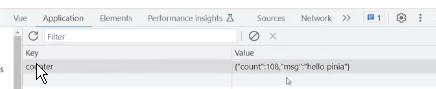
效果:刷新数据不会初始化,已存本地
用法一:修改本地唯一标识
//persist:true//写在这里
persist:{
    key:'myCounter'
}
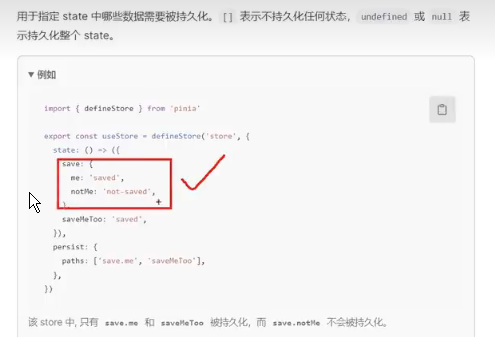
用法二:从对整个store持久化,改为对某一项数据持久化
//persist:true//写在这里
persist:{
    key:'myCounter',
    paths:['count']
}





 扫一扫
扫一扫


 2608
2608

 被折叠的 条评论
为什么被折叠?
被折叠的 条评论
为什么被折叠?
 到【灌水乐园】发言





