



Dify 知识库操作源码解析
知识库操作
数据表
接口
| 接口 | 名字 | 功能描述 | 请求示例 | 源码位置 | 请求参数 |
|---|---|---|---|---|---|
| POST /datasets | 创建空知识库 | 创建空知识库 | curl --location --request POST 'http://127.0.0.1:5001/v1/datasets' \--header 'Authorization: Bearer {api_key}' \--header 'Content-Type: application/json' \--data-raw '{"name": "name"}' | api/controllers/console/datasets/datasets.py | 详情 |
| GET /datasets | 知识库列表 | 知识库列表 | curl --location --request GET 'http://127.0.0.1:5001/v1/datasets?page=1&limit=20' \--header 'Authorization: Bearer {api_key}' | api/controllers/console/datasets/datasets.py | |
| DELETE /datasets/{dataset_id} | 删除知识库 | 删除知识库 | curl --location --request DELETE 'http://127.0.0.1:5001/console/api/datasets/{dataset_id}--header 'Authorization: Bearer {api_key}' | 位置 | |
| POST /datasets/init | 上传文件创建知识库 | 上传文件创建知识库 | 位置 |
创建
方式一:先创建空知识库,再上传文件
创建空知识库
代码流程
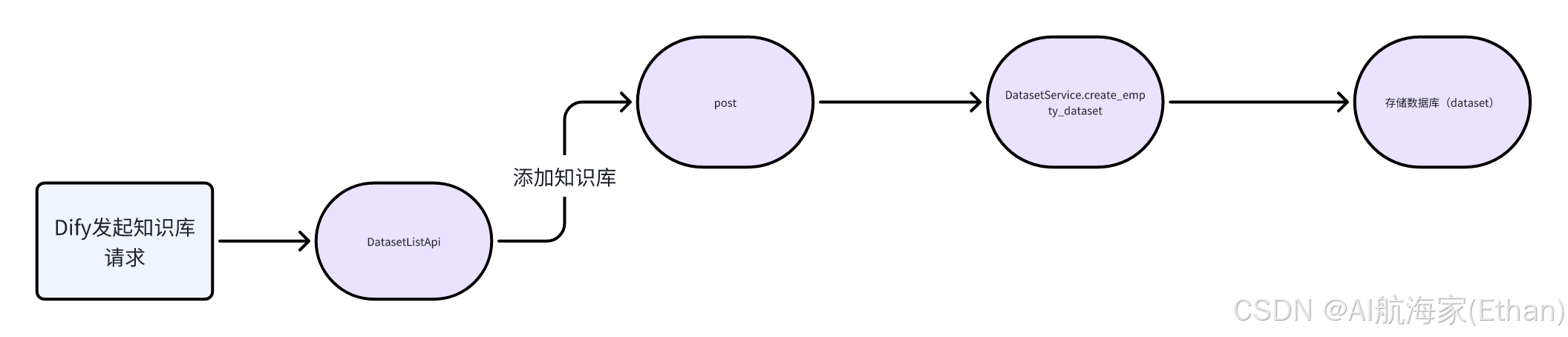
[!TIP]
主要流程就是收集参数 insert 数据表(dataset)中
DatasetListApi-post:处理参数,保存至数据库

create_empty_dataset:保存将创建的知识库方法

请求参数
# 知识库的详细信息
knowledge_base = {
    # 知识库的唯一ID
    "id": "cbd8a746-a9ab-4d79-8337-99d4ac989691",

    # 知识库的名称
    "name": "测试知识库",

    # 描述,这里没有提供
    "description": None,

    # 知识库的提供商
    "provider": "vendor",

    # 权限设置,只对我可见
    "permission": "only_me",

    # 数据源类型,未指定
    "data_source_type": None,

    # 索引技术,未指定
    "indexing_technique": None,

    # 关联的应用数量
    "app_count": 0,

    # 文档数量
    "document_count": 0,

    # 文档总词数
    "word_count": 0,

    # 创建者的唯一ID
    "created_by": "c17d706d-6418-4ca0-9ba5-34b43bb7e32c",

    # 创建时间的时间戳
    "created_at": 1719337063,

    # 最后更新者的唯一ID
    "updated_by": "c17d706d-6418-4ca0-9ba5-34b43bb7e32c",

    # 最后更新时间的时间戳
    "updated_at": 1719337063,

    # 嵌入模型信息,未指定
    "embedding_model": None,

    # 嵌入模型提供商,未指定
    "embedding_model_provider": None,

    # 是否有可用的嵌入模型,未指定
    "embedding_available": None,

    # 检索模型配置
    "retrieval_model_dict": {
        # 搜索方法,语义搜索
        "search_method": "semantic_search",

        # 是否启用重排序
        "reranking_enable": False,

        # 重排序模型信息
        "reranking_model": {
            # 重排序提供商名称
            "reranking_provider_name": "",

            # 重排序模型名称
            "reranking_model_name": ""
        },

        # 返回的顶部结果数量
        "top_k": 2,

        # 是否启用分数阈值
        "score_threshold_enabled": False,

        # 分数阈值,未指定
        "score_threshold": None
    },

    # 标签列表,目前为空
    "tags": []
}
方法二:上传文件直接创建默认知识库
逻辑流程图
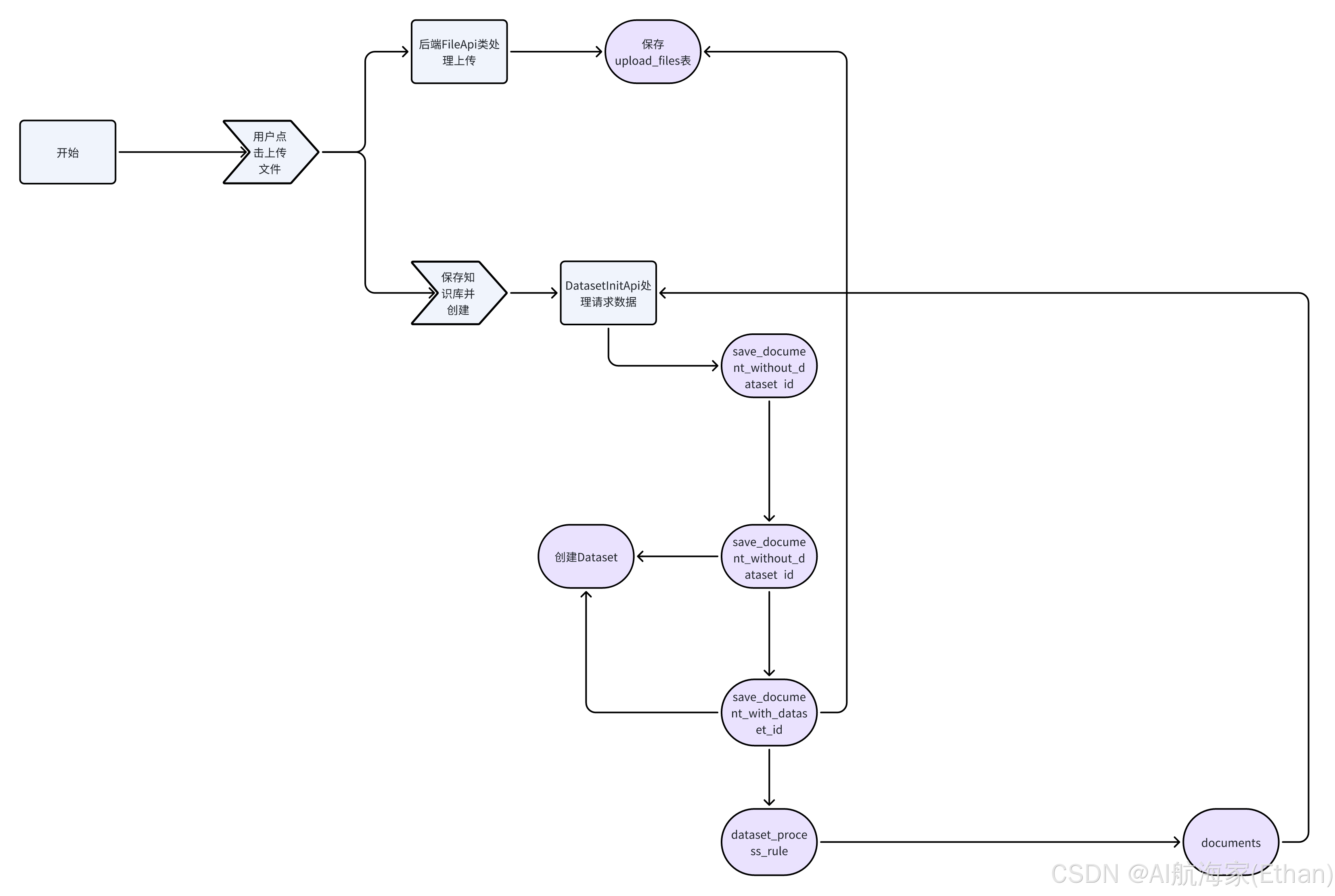
上传文件接口
位置:api/controllers/console/datasets/file.py

upload_file 代码逻辑:校验文件类型最终保存在/api/storage/upload_files 文件夹中
def upload_file(file: FileStorage, user: Union[Account, EndUser], only_image: bool = False) -> UploadFile:
    # 获取文件名和扩展名
    filename = file.filename
    extension = file.filename.split('.')[-1]
    # 如果文件名过长,截断并保留扩展名
    if len(filename) > 200:
        filename = filename.split('.')[0][:200] + '.' + extension
    # 根据配置获取允许的文件类型
    etl_type = dify_config.ETL_TYPE
    allowed_extensions = UNSTRUCTURED_ALLOWED_EXTENSIONS + IMAGE_EXTENSIONS if etl_type == 'Unstructured' \
        else ALLOWED_EXTENSIONS + IMAGE_EXTENSIONS
    # 检查文件类型是否在允许的范围内
    if extension.lower() not in allowed_extensions:
        raise UnsupportedFileTypeError()
    elif only_image and extension.lower() not in IMAGE_EXTENSIONS:
        raise UnsupportedFileTypeError()

    #  # 读取文件内容
    file_content = file.read()

    # 获取文件大小
    file_size = len(file_content)
    # 设置文件大小限制,图片文件和非图片文件有不同的限制
    if extension.lower() in IMAGE_EXTENSIONS:
        file_size_limit = dify_config.UPLOAD_IMAGE_FILE_SIZE_LIMIT * 1024 * 1024
    else:
        file_size_limit = dify_config.UPLOAD_FILE_SIZE_LIMIT * 1024 * 1024
    # 检查文件大小是否超过限制
    if file_size > file_size_limit:
        message = f'File size exceeded. {file_size} > {file_size_limit}'
        raise FileTooLargeError(message)

    # 生成文件的唯一UUID
    file_uuid = str(uuid.uuid4())
    # 确定当前租户ID
    if isinstance(user, Account):
        current_tenant_id = user.current_tenant_id
    else:
        # end_user
        current_tenant_id = user.tenant_id
    # 构建文件在存储系统中的路径
    file_key = 'upload_files/' + current_tenant_id + '/' + file_uuid + '.' + extension

    #  # 保存文件到存储系统
    storage.save(file_key, file_content)

    #  # 创建UploadFile模型实例,并填充必要的字段
    upload_file = UploadFile(
        tenant_id=current_tenant_id,
        storage_type=dify_config.STORAGE_TYPE,
        key=file_key,
        name=filename,
        size=file_size,
        extension=extension,
        mime_type=file.mimetype,
        created_by_role=('account' if isinstance(user, Account) else 'end_user'),
        created_by=user.id,
        created_at=datetime.datetime.now(datetime.timezone.utc).replace(tzinfo=None),
        used=False,
        hash=hashlib.sha3_256(file_content).hexdigest()
    )

    db.session.add(upload_file)
    db.session.commit()

    return upload_file
知识库创建
DatasetInitApi-post:主要逻辑校验整理参数交给 DocumentService.save_document_without_dataset_id
代码地址:api/controllers/console/datasets/datasets_document.py
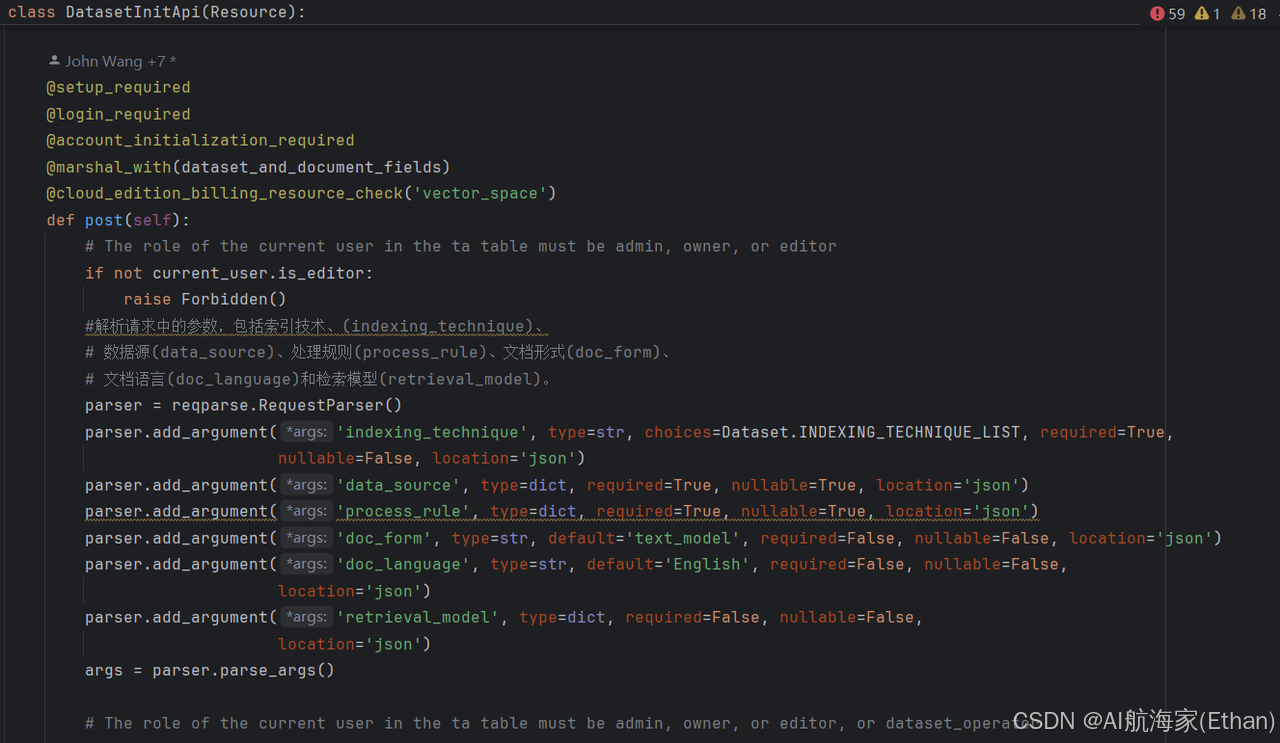
这些参数对应了前端创建知识库时的参数配置信息:
indexing_technique:索引方式,提供了两种方式:[ ‘high_quality’, ‘economy’ ],其中高质量会使用 Embedding 模型做向量索引
data_source:数据源,前端上传文档之后的文件 id,用于原始文档获取
process_rule:数据的前处理规则配置
doc_form:文档格式
doc_language:文档语言
retrieval_model:检索模型,用于设置检索时搜索方式、各种参数
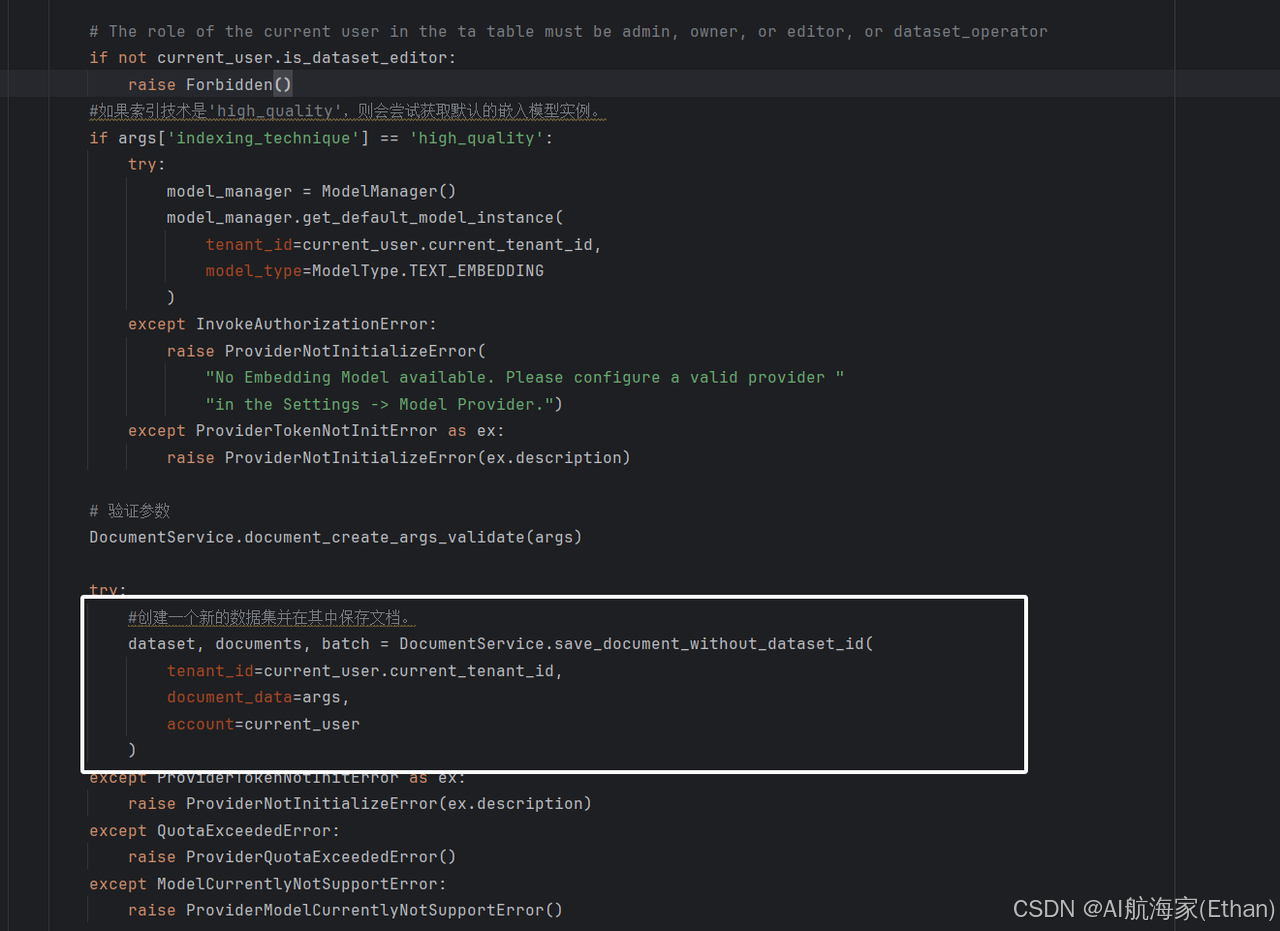
DatasetInitApi 类是一个资源类,它继承自 Resource 类。在这个类中,定义了一个 post 方法,这个方法对应 HTTP 的 POST 请求。
post 方法的主要功能是初始化一个数据集。首先检查用户是否已经设置、登录并完成了初始化。然后,它会检查用户是否有足够的权限来创建一个新的向量空间。
在 post 方法中,首先通过 reqparse.RequestParser() 解析请求中的参数,包括索引技术(indexing_technique)、数据源(data_source)、处理规则(process_rule)、文档形式(doc_form)、文档语言(doc_language)和检索模型(retrieval_model)。
如果索引技术是’high_quality’,则会尝试获取默认的嵌入模型实例。如果获取失败,会抛出相应的错误。然后,它会验证请求参数是否有效。如果参数有效,它会调用 DocumentService.save_document_without_dataset_id 方法来创建一个新的数据集并在其中保存文档。
最后,它会返回一个包含新创建的数据集、文档和批次信息的响应。
- save_document_without_dataset_id
1.验证租户信息 然后各种校验:是否开启账单、是否有上传文章限制、是否超过批量上传限制。接着判断索引技术模型 接着构造 Dataset 入库,这里的 Dataset 就是知识库的信息总览,包含了该知识库的 embedding 模型信息、检索模型等信息
@staticmethod
def save_document_without_dataset_id(tenant_id: str, document_data: dict, account: Account):
    # 获取租户的特性配置
    features = FeatureService.get_features(current_user.current_tenant_id)

    # 如果账单功能已启用,则检查文档上传限制
    if features.billing.enabled:
        count = 0
        if document_data["data_source"]["type"] == "upload_file":
            upload_file_list = document_data["data_source"]["info_list"]['file_info_list']['file_ids']
            count = len(upload_file_list)
        elif document_data["data_source"]["type"] == "notion_import":
            notion_info_list = document_data["data_source"]['info_list']['notion_info_list']
            for notion_info in notion_info_list:
                count = count + len(notion_info['pages'])
        elif document_data["data_source"]["type"] == "website_crawl":
            website_info = document_data["data_source"]['info_list']['website_info_list']
            count = len(website_info['urls'])
        # 检查是否超过批量上传限制
        batch_upload_limit = int(dify_config.BATCH_UPLOAD_LIMIT)
        if count > batch_upload_limit:
            raise ValueError(f"You have reached the batch upload limit of {batch_upload_limit}.")

        # 检查文档上传配额
        DocumentService.check_documents_upload_quota(count, features)
    # 初始化嵌入模型和数据集绑定信息
    embedding_model = None
    dataset_collection_binding_id = None
    retrieval_model = None
    # 如果索引技术要求高质量,则获取默认的嵌入模型实例
    if document_data['indexing_technique'] == 'high_quality':
        model_manager = ModelManager()
        embedding_model = model_manager.get_default_model_instance(
            tenant_id=current_user.current_tenant_id,
            model_type=ModelType.TEXT_EMBEDDING
        )
        # 获取与嵌入模型关联的数据集集合绑定
        dataset_collection_binding = DatasetCollectionBindingService.get_dataset_collection_binding(
            embedding_model.provider,
            embedding_model.model
        )
        dataset_collection_binding_id = dataset_collection_binding.id
        # 设置检索模型,优先使用文档数据中的模型,否则使用默认模型
        if document_data.get('retrieval_model'):
            retrieval_model = document_data['retrieval_model']
        else:
            default_retrieval_model = {
                'search_method': RetrievalMethod.SEMANTIC_SEARCH.value,
                'reranking_enable': False,
                'reranking_model': {
                    'reranking_provider_name': '',
                    'reranking_model_name': ''
                },
                'top_k': 2,
                'score_threshold_enabled': False
            }
            retrieval_model = default_retrieval_model
    #  # 创建数据集实例
    dataset = Dataset(
        tenant_id=tenant_id,
        name='',
        data_source_type=document_data["data_source"]["type"],
        indexing_technique=document_data["indexing_technique"],
        created_by=account.id,
        embedding_model=embedding_model.model if embedding_model else None,
        embedding_model_provider=embedding_model.provider if embedding_model else None,
        collection_binding_id=dataset_collection_binding_id,
        retrieval_model=retrieval_model
    )
    # 将数据集添加到数据库会话并刷新以获取ID
    db.session.add(dataset)
    db.session.flush()
    #.....
2.调用 save_document_with_dataset_id 构造 document 以及启动异步处理任务
@staticmethod
def save_document_without_dataset_id(tenant_id: str, document_data: dict, account: Account):
    #.......
    # 保存文档并获取文档列表、批次信息
    documents, batch = DocumentService.save_document_with_dataset_id(dataset, document_data, account)
    # 截断文档名称以适应显示
    cut_length = 18
    cut_name = documents[0].name[:cut_length]
    dataset.name = cut_name + '...'

    # 更新数据集描述
    dataset.description = 'useful for when you want to answer queries about the ' + documents[0].name
    db.session.commit()

    # 返回数据集、文档列表和批次信息
    return dataset, documents, batch
通过调试得到 document_data 一个示例数据如下所示:
{
        'indexing_technique': 'high_quality',
        'data_source': {
                'type': 'upload_file',
                'info_list': {
                        'data_source_type': 'upload_file',
                        'file_info_list': {
                                'file_ids': ['6f393937-d0ec-41b3-a6cb-56f38081eb94']
                        }
                }
        },
        'process_rule': {
                'rules': {},
                'mode': 'automatic'
        },
        'duplicate': True,
        'original_document_id': None,
        'doc_form': 'text_model',
        'doc_language': 'Chinese',
        'retrieval_model': {
                'search_method': 'semantic_search',
                'reranking_enable': False,
                'reranking_model': {
                        'reranking_provider_name': '',
                        'reranking_model_name': ''
                },
                'top_k': 2,
                'score_threshold_enabled': False,
                'score_threshold': None
        }
}
最后将 Dataset,document_data,account 传入 save_document_with_dataset_id 中创建数据集文件
save_document_with_dataset_id
_总结来说就是 保存文档到指定数据集 Document ,并处理各种数据源类型,包括上传文件、Notion 导入和网站抓取 _
1.构造 Document 入库,这里的 Document 是知识库中的单个文档(我们创建知识库的时候可以上传多个文档),也就是一个 Dataset 实际上包含了多个 Document,Document 的信息就包含了文档信息以及数据处理相关的参数
2.启动异步索引任务,针对知识库中的每个文档创建索引
@staticmethod
def save_document_with_dataset_id(
    dataset: Dataset, document_data: dict,
    account: Account, dataset_process_rule: Optional[DatasetProcessRule] = None,
    created_from: str = 'web'
):
    _"""_
_       保存文档到指定数据集,并处理各种数据源类型,包括上传文件、Notion导入和网站抓取。_

_       :param dataset: 数据集对象。_
_       :param document_data: 包含文档数据和元数据的字典。_
_       :param account: 用户账户对象。_
_       :param dataset_process_rule: 可选的数据集处理规则对象。_
_       :param created_from: 创建文档的来源,例如 'web'。_
_       :return: 一个包含已保存文档的列表和批次标识符的元组。_
_       """_
_    _# 验证并处理文档数量限制
    features = FeatureService.get_features(current_user.current_tenant_id)

    if features.billing.enabled:
        if 'original_document_id' not in document_data or not document_data['original_document_id']:
            count = 0
            if document_data["data_source"]["type"] == "upload_file":
                upload_file_list = document_data["data_source"]["info_list"]['file_info_list']['file_ids']
                count = len(upload_file_list)
            elif document_data["data_source"]["type"] == "notion_import":
                notion_info_list = document_data["data_source"]['info_list']['notion_info_list']
                for notion_info in notion_info_list:
                    count = count + len(notion_info['pages'])
            elif document_data["data_source"]["type"] == "website_crawl":
                website_info = document_data["data_source"]['info_list']['website_info_list']
                count = len(website_info['urls'])
            batch_upload_limit = int(dify_config.BATCH_UPLOAD_LIMIT)
            if count > batch_upload_limit:
                raise ValueError(f"You have reached the batch upload limit of {batch_upload_limit}.")

            DocumentService.check_documents_upload_quota(count, features)

    #  # 更新数据集的数据源类型
    if not dataset.data_source_type:
        dataset.data_source_type = document_data["data_source"]["type"]
    # 设置索引技术
    if not dataset.indexing_technique:
        if 'indexing_technique' not in document_data \
            or document_data['indexing_technique'] not in Dataset.INDEXING_TECHNIQUE_LIST:
            raise ValueError("Indexing technique is required")

        dataset.indexing_technique = document_data["indexing_technique"]
        if document_data["indexing_technique"] == 'high_quality':
            # 获取模型管理器实例
            model_manager = ModelManager()
            # 获取默认的文本嵌入模型实例
            embedding_model = model_manager.get_default_model_instance(
                tenant_id=current_user.current_tenant_id,
                model_type=ModelType.TEXT_EMBEDDING
            )
            # 设置数据集的嵌入模型和提供商信息
            dataset.embedding_model = embedding_model.model
            dataset.embedding_model_provider = embedding_model.provider
            # 获取与嵌入模型绑定的数据集集合绑定
            dataset_collection_binding = DatasetCollectionBindingService.get_dataset_collection_binding(
                embedding_model.provider,
                embedding_model.model
            )
            # 设置数据集的集合绑定ID
            dataset.collection_binding_id = dataset_collection_binding.id
            # 如果数据集的检索模型未设置,则设置默认的检索模型配置
            if not dataset.retrieval_model:
                default_retrieval_model = {
                    'search_method': RetrievalMethod.SEMANTIC_SEARCH.value,
                    'reranking_enable': False,
                    'reranking_model': {
                        'reranking_provider_name': '',
                        'reranking_model_name': ''
                    },
                    'top_k': 2,
                    'score_threshold_enabled': False
                }
                # 使用文档数据中的检索模型配置覆盖默认配置,如果存在的话
                dataset.retrieval_model = document_data.get('retrieval_model') if document_data.get(
                    'retrieval_model'
                ) else default_retrieval_model
    # 初始化文档列表和批次标识符
    documents = []
    batch = time.strftime('%Y%m%d%H%M%S') + str(random.randint(100000, 999999))

    # 根据document_data是否存在"original_document_id"字段判断是否更新已有文档
    if document_data.get("original_document_id"):
        document = DocumentService.update_document_with_dataset_id(dataset, document_data, account)
        documents.append(document)
    else:
        #如果没有,则需要创建或者更新数据集规则
        if not dataset_process_rule:
            process_rule = document_data["process_rule"]

            # 根据process_rule的模式创建DatasetProcessRule实例
            if process_rule["mode"] == "custom":
                dataset_process_rule = DatasetProcessRule(
                    dataset_id=dataset.id,
                    mode=process_rule["mode"],
                    rules=json.dumps(process_rule["rules"]),
                    created_by=account.id
                )
            elif process_rule["mode"] == "automatic":
                dataset_process_rule = DatasetProcessRule(
                    dataset_id=dataset.id,
                    mode=process_rule["mode"],
                    rules=json.dumps(DatasetProcessRule.AUTOMATIC_RULES),
                    created_by=account.id
                )
            # 将新创建的DatasetProcessRule添加到数据库会话中
            db.session.add(dataset_process_rule)
            db.session.commit()
        # 获取数据集中文档的位置信息
        position = DocumentService.get_documents_position(dataset.id)
        document_ids = []
        duplicate_document_ids = []
        if document_data["data_source"]["type"] == "upload_file":
            # 获取文件ID列表
            upload_file_list = document_data["data_source"]["info_list"]['file_info_list']['file_ids']
            for file_id in upload_file_list:
                # 查询文件信息
                file = db.session.query(UploadFile).filter(
                    UploadFile.tenant_id == dataset.tenant_id,
                    UploadFile.id == file_id
                ).first()

                # raise error if file not found
                if not file:
                    raise FileNotExistsError()
                # 文件名和数据源信息
                file_name = file.name
                data_source_info = {
                    "upload_file_id": file_id,
                }
                # # 检查是否允许导入重复文档
                if document_data.get('duplicate', False):
                    document = Document.query.filter_by(
                        dataset_id=dataset.id,
                        tenant_id=current_user.current_tenant_id,
                        data_source_type='upload_file',
                        enabled=True,
                        name=file_name
                    ).first()
                    if document:
                        # 更新现有文档
                        document.dataset_process_rule_id = dataset_process_rule.id
                        document.updated_at = datetime.datetime.utcnow()
                        document.created_from = created_from
                        document.doc_form = document_data['doc_form']
                        document.doc_language = document_data['doc_language']
                        document.data_source_info = json.dumps(data_source_info)
                        document.batch = batch
                        document.indexing_status = 'waiting'
                        db.session.add(document)
                        documents.append(document)
                        duplicate_document_ids.append(document.id)
                        continue
                # 创建新文档
                document = DocumentService.build_document(
                    dataset, dataset_process_rule.id,
                    document_data["data_source"]["type"],
                    document_data["doc_form"],
                    document_data["doc_language"],
                    data_source_info, created_from, position,
                    account, file_name, batch
                )
                db.session.add(document)
                db.session.flush()


                document_ids.append(document.id)
                documents.append(document)
                position += 1
        # 处理Notion导入数据源
        elif document_data["data_source"]["type"] == "notion_import":
            # 获取Notion信息列表
            notion_info_list = document_data["data_source"]['info_list']['notion_info_list']
            # 初始化已存在的Notion页面ID列表
            exist_page_ids = []
            # 初始化已存在的文档字典,键为Notion页面ID,值为文档ID
            exist_document = {}
            # 查询已存在的Notion导入类型的文档
            documents = Document.query.filter_by(
                dataset_id=dataset.id,
                tenant_id=current_user.current_tenant_id,
                data_source_type='notion_import',
                enabled=True
            ).all()
            if documents:
                for document in documents:
                    # 解析数据源信息
                    data_source_info = json.loads(document.data_source_info)
                    exist_page_ids.append(data_source_info['notion_page_id'])
                    exist_document[data_source_info['notion_page_id']] = document.id
            # 遍历Notion信息列表
            for notion_info in notion_info_list:
                # 获取工作空间ID
                workspace_id = notion_info['workspace_id']
                # 查询数据源绑定信息
                data_source_binding = DataSourceOauthBinding.query.filter(
                    db.and_(
                        DataSourceOauthBinding.tenant_id == current_user.current_tenant_id,
                        DataSourceOauthBinding.provider == 'notion',
                        DataSourceOauthBinding.disabled == False,
                        DataSourceOauthBinding.source_info['workspace_id'] == f'"{workspace_id}"'
                    )
                ).first()
                if not data_source_binding:
                    # 如果数据源绑定不存在,抛出错误
                    raise ValueError('Data source binding not found.')
                # 遍历Notion页面
                for page in notion_info['pages']:
                    # 如果页面ID不在已存在的页面ID列表中
                    if page['page_id'] not in exist_page_ids:
                        # 创建数据源信息字典
                        data_source_info = {
                            "notion_workspace_id": workspace_id,
                            "notion_page_id": page['page_id'],
                            "notion_page_icon": page['page_icon'],
                            "type": page['type']
                        }
                        # 创建新文档
                        document = DocumentService.build_document(
                            dataset, dataset_process_rule.id,
                            document_data["data_source"]["type"],
                            document_data["doc_form"],
                            document_data["doc_language"],
                            data_source_info, created_from, position,
                            account, page['page_name'], batch
                        )
                        db.session.add(document)
                        db.session.flush()
                        document_ids.append(document.id)
                        documents.append(document)
                        position += 1
                    else:
                        exist_document.pop(page['page_id'])
            # # 删除未被选择的文档
            if len(exist_document) > 0:
                clean_notion_document_task.delay(list(exist_document.values()), dataset.id)
        # 处理网站抓取数据源
        elif document_data["data_source"]["type"] == "website_crawl":
            # 获取网站信息
            website_info = document_data["data_source"]['info_list']['website_info_list']
            urls = website_info['urls']
            # 遍历URL列表
            for url in urls:
                data_source_info = {
                    'url': url,
                    'provider': website_info['provider'],
                    'job_id': website_info['job_id'],
                    'only_main_content': website_info.get('only_main_content', False),
                    'mode': 'crawl',
                }
                if url.length > 255:
                    document_name = url[:200] + '...'
                else:
                    document_name = url
                # 创建新文档
                document = DocumentService.build_document(
                    dataset, dataset_process_rule.id,
                    document_data["data_source"]["type"],
                    document_data["doc_form"],
                    document_data["doc_language"],
                    data_source_info, created_from, position,
                    account, document_name, batch
                )
                db.session.add(document)
                db.session.flush()
                document_ids.append(document.id)
                documents.append(document)

                position += 1
        # 提交数据库会话,确保所有更改被持久化
        db.session.commit()

        #  # 触发异步任务,对新创建或更新的文档进行索引
        if document_ids:
            document_indexing_task.delay(dataset.id, document_ids)
        if duplicate_document_ids:
            duplicate_document_indexing_task.delay(dataset.id, duplicate_document_ids)

    return documents, batch
RAG
duplicate_document_indexing_task.delay(dataset.id, duplicate_document_ids)
启动异步索引任务,针对知识库中的每个文档创建索引
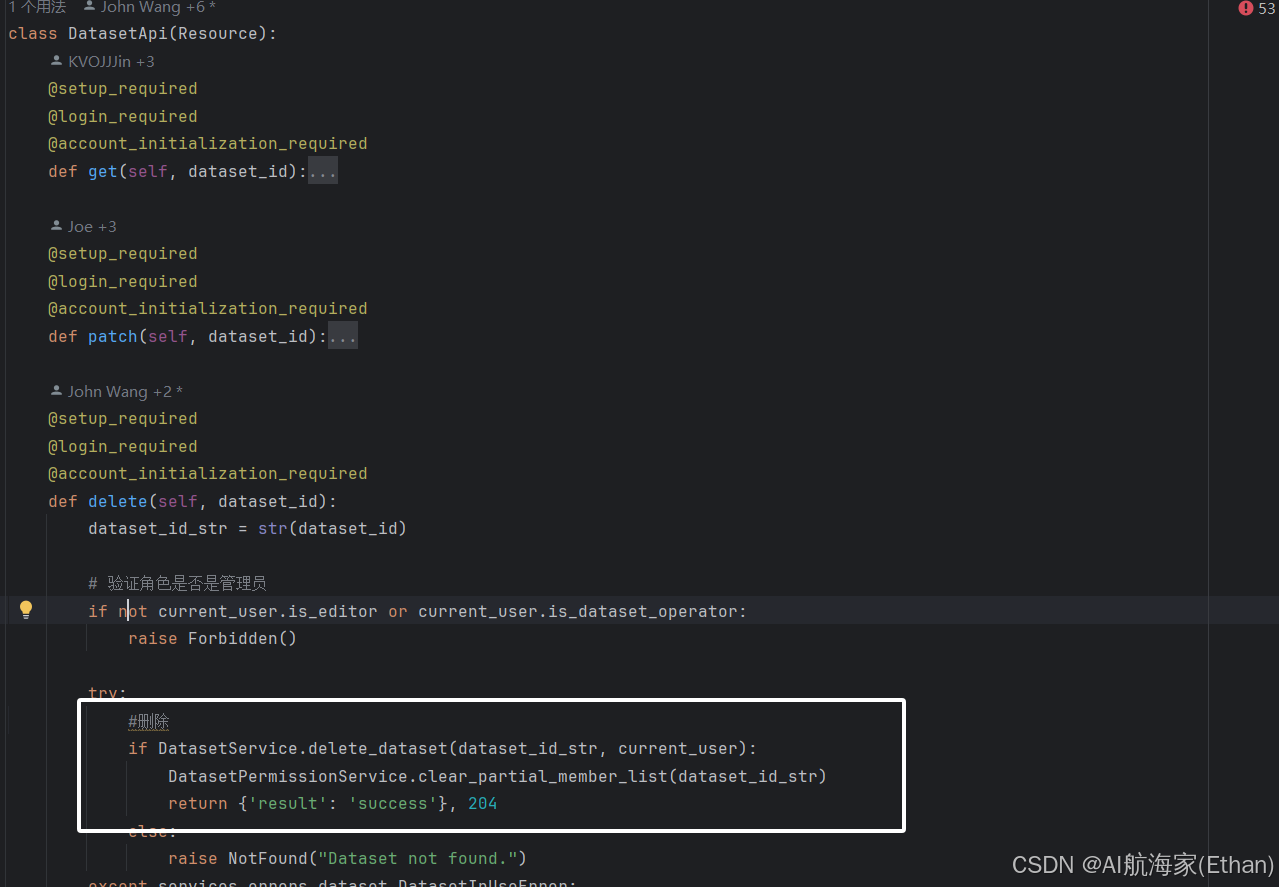
删除
DatasetApi-delete
位置:api/controllers/console/datasets/datasets.py





 扫一扫
扫一扫


 2289
2289

 被折叠的 条评论
为什么被折叠?
被折叠的 条评论
为什么被折叠?
 到【灌水乐园】发言





