





 本文解决了在使用Django 2.2.6版本时遇到的URL配置错误问题,详细解释了path函数的参数作用及正确配置方法。
近段在学习python(《python 从入门到实战》),由于现有django版本较高,为2.2.6,有很多与书中不一样的地方,在运行中出现了一个错误,如下图: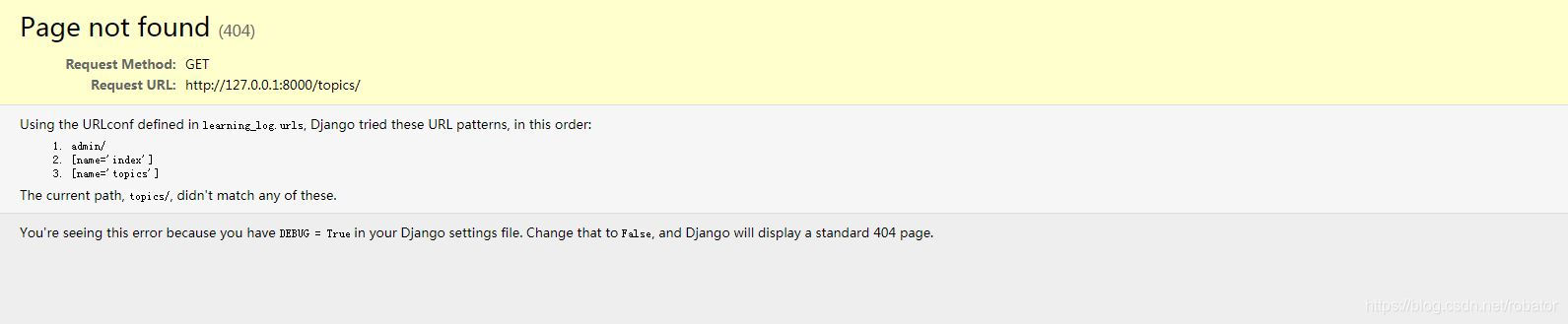
而learning_logs/urls.py代码如下
from django.urls import path
from . import views
app_name='learning_logs'
urlpatterns = [
#Home page
path('',views.index,name='index'),
path('',views.topics,name='topics'),
]
这里已经添加了topics,而且learning_logs/views.py 也已添加了topics 函数。出现此错误的原因在于path 函数的第一个参数为空。path 函数如下:
path(route,view,[kwargs],[name])
其中前2个参数为必选,后两个可选
(1)path() argument: route
route is a string that contains a URL pattern. When processing a request, Django starts at the first pattern in urlpatterns and makes its way down the list, comparing the requested URL against each pattern until it finds one that matches.
Patterns don’t search GET and POST parameters, or the domain name. For example, in a request to https://www. example.com/myapp/, the URLconf will look for myapp/. In a request to https://www.example.com/ myapp/?page=3, the URLconf will also look for myapp/.
(2)path() argument: view
When Django finds a matching pattern, it calls the specified view function with an HttpRequest object as the first argument and any “captured” values from the route as keyword arguments. We’ll give an example of this in a bit.
(3)path() argument: kwargs
Arbitrary keyword arguments can be passed in a dictionary to the target view. We aren’t going to use this feature of Django in the tutorial.
(4)path() argument: name
Naming your URL lets you refer to it unambiguously from elsewhere in Django, especially from within templates. This powerful feature allows you to make global changes to the URL patterns of your project while only touching a single file. When you’re comfortable with the basic request and response flow, read part 2 of this tutorial to start working with the database
1、path()参数:route
    route 是一个匹配URL的准则(类似正则表达式)。当Django响应一个请求时,它会从urlpatterns的第一项开始,按顺序依次匹配列表中的项,直到找到匹配的项。
    这些准则不会匹配GET和POST参数或域名。例如,URLconf在处理请求https://www.example.com/myapp/时,它会尝试匹配myapp/。处理请求https://www.example.com/myapp/?page=3 时,也只会尝试匹配 myapp/。
2、path()参数:view
    当 Django 找到了一个匹配的准则,就会调用这个特定的视图函数,并传入一个HttpRequest对象作为第一个参数,被“捕获”的参数以关键字参数的形式传入。
3、path()参数:kwargs
    任意个关键字参数可以作为一个字典传递给目标视图函数。
4、path()参数:name
    为你的URL取名能使你在 Django 的任意地方唯一地引用它,尤其是在模板中。这个有用的特性允许你只改一个文件就能全局地修改某个URL模式。
所以第一个参数为空,只会匹配默认网址,即127.0.0.1:8000/,连127.0.0.1:8000/index也打不开,因为没有url路由,需将learning_logs/urls.py 改为如下:
from django.urls import path
from . import views
app_name='learning_logs'
urlpatterns = [
#Home page
path('',views.index,name='index'),
path('topics/',views.topics,name='topics'),
]
修改后可以正常访问了






 扫一扫
扫一扫


 2813
2813


 到【灌水乐园】发言



