


 文章介绍了如何使用C#将Windows注册表的键值导出为YAML格式,包括定义数据结构、读取和创建子键、保存值等内容,最后展示了完整导入注册表的示例。
写在前面
通常用下面的代码就可以将导出的注册表文件 test.reg,静默导入到注册表中。
Process process = Process.Start("regedit.exe", "/s test.reg");
process.WaitForExit();
由于后续的业务需要做统一的管理,所以采用了自定义的数据结构来做序列化;上篇做了导出到yaml的介绍,文中有定义了具体的yaml持久化数据结构,本文就不做敷述了;详细内容参照:
相关代码
        private void CreateRegistryKey()
        {
            var targetKey = "MongoDB";
            var targetDir = Path.Combine(AppDomain.CurrentDomain.BaseDirectory, "key_files");
            var targetFile = Path.Combine(targetDir, $"{targetKey}.yml");
            if (File.Exists(targetFile))
            {
                var controlSet001Key = RegistryHelper.GetRegistryKey(@"SYSTEM\ControlSet001\Services");
                var content = File.ReadAllText(targetFile);
                var keyItem = YamlHelper.Deserialize<KeyItem>(content);
                if (keyItem != null)
                {
                    TryCreateKeyValue(controlSet001Key, keyItem);
                }
                controlSet001Key.Close();
            }
        }

        private void TryCreateKeyValue(RegistryKey parentKey, KeyItem keyItem)
        {
            if (keyItem.Type == 0) // 0 is key not value
            {
                RegistryKey targetKeyItem = parentKey.OpenSubKey(keyItem.Name, true);
                if (targetKeyItem == null)
                {
                    targetKeyItem = parentKey.CreateSubKey(keyItem.Name);
                }
                if (keyItem.Children != null && keyItem.Children.Count > 0)
                {
                    foreach (var item in keyItem.Children)
                    {
                        TryCreateKeyValue(targetKeyItem, item);
                    }
                }
                targetKeyItem.Close();
            }
            else
            {
                parentKey.SetValue(keyItem.Name, keyItem.Value, (RegistryValueKind)keyItem.Type);
            }
        }
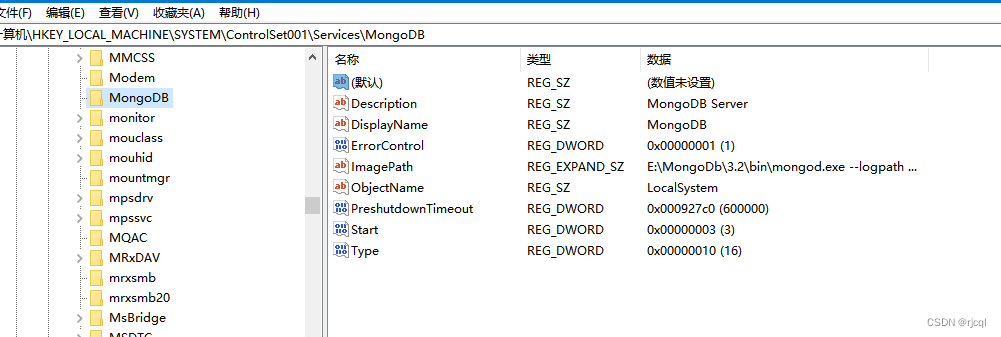
执行代码后yaml文件中的键值完整的导入到注册表中





 扫一扫
扫一扫


 670
670


 到【灌水乐园】发言



