


前言
JD-GUI是一款轻量级的 Java 反编译工具,对于一些没有源码的 Jar 包,直接拖进去就可以反编译源码,十分的方便。
在 MacOS 还是 Mojave 的时候,JD-GUI(下载地址)使用一切正常。
(apkTool下载地址 https://bitbucket.org/iBotPeaches/apktool/downloads/?tab=downloads )
(jd-gui git 代码下载地址: GitHub - renhaijun/jd-gui: A standalone Java Decompiler GUI )
当系统升级到 BigSur 和 Monterey 的时候,打开 JD-GUI 就会提示找不到 JDK 环境。(即使你的电脑已经存在 JDK 环境并且配置了环境变量,依然会提示找不到 JDK 环境)
大致错误提示如下:
ERROR launching 'JD-GUI'
No suitable Java version found on your system!
This program requires Java 1.8+
Make sure you install the required Java version.
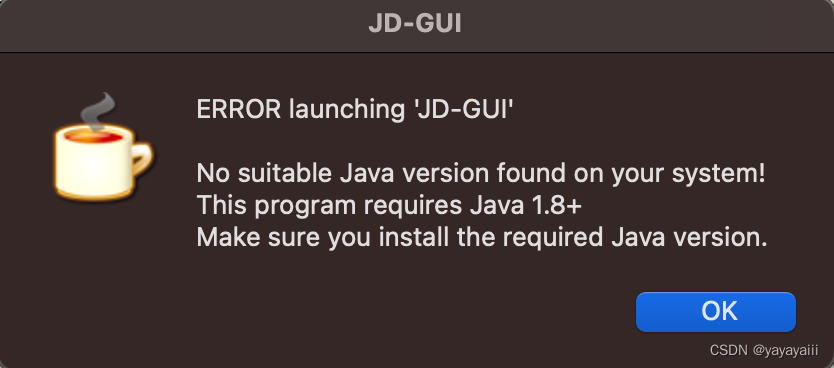
我们需要替换 JD-GUI 程序文件里一个脚本文件,参考步骤如下:
-
先将下载下来的 jd-gui-osx-1.6.6.tar 解压,然后将 JD-GUI.app 文件拷贝到 Applications 目录下(下载地址: https://github.com/java-decompiler/jd-gui/releases/download/v1.6.6/jd-gui-osx-1.6.6.tar )
-
右击 JD-GUI.app 点击显示包内容
显示包内容

3、将 Contents/MacOS/universalJavaApplicationStub.sh 文件的内容替换为 https://github.com/tofi86/universalJavaApplicationStub/blob/v3.2.0/src/universalJavaApplicationStub 中的内容(或者从下面复制出来),保存。
注意:确保本地已存在 Java 环境
此时,再次打开 JD-GUI.app,则可以正常运行了。
universalJavaApplicationStub.sh文件内容
#!/bin/bash
##################################################################################
# #
# universalJavaApplicationStub #
# #
# A BASH based JavaApplicationStub for Java Apps on Mac OS X #
# that works with both Apple's and Oracle's plist format. #
# #
# Inspired by Ian Roberts stackoverflow answer #
# at http://stackoverflow.com/a/17546508/1128689 #
# #
# @author Tobias Fischer #
# @url https://github.com/tofi86/universalJavaApplicationStub #
# @date 2021-02-21 #
# @version 3.2.0 #
# #
##################################################################################
# #
# The MIT License (MIT) #
# #
# Copyright (c) 2014-2021 Tobias Fischer #
# #
# Permission is hereby granted, free of charge, to any person obtaining a copy #
# of this software and associated documentation files (the "Software"), to deal #
# in the Software without restriction, including without limitation the rights #
# to use, copy, modify, merge, publish, distribute, sublicense, and/or sell #
# copies of the Software, and to permit persons to whom the Software is #
# furnished to do so, subject to the following conditions: #
# #
# The above copyright notice and this permission notice shall be included in all #
# copies or substantial portions of the Software. #
# #
# THE SOFTWARE IS PROVIDED "AS IS", WITHOUT WARRANTY OF ANY KIND, EXPRESS OR #
# IMPLIED, INCLUDING BUT NOT LIMITED TO THE WARRANTIES OF MERCHANTABILITY, #
# FITNESS FOR A PARTICULAR PURPOSE AND NONINFRINGEMENT. IN NO EVENT SHALL THE #
# AUTHORS OR COPYRIGHT HOLDERS BE LIABLE FOR ANY CLAIM, DAMAGES OR OTHER #
# LIABILITY, WHETHER IN AN ACTION OF CONTRACT, TORT OR OTHERWISE, ARISING FROM, #
# OUT OF OR IN CONNECTION WITH THE SOFTWARE OR THE USE OR OTHER DEALINGS IN THE #
# SOFTWARE. #
# #
##################################################################################
# function 'stub_logger()'
#
# A logger which logs to the macOS Console.app using the 'syslog' command
#
# @param1 the log message
# @return void
################################################################################
function stub_logger() {
syslog -s -k \
Facility com.apple.console \
Level Notice \
Sender "$(basename "$0")" \
Message "[$$][${CFBundleName:-$(basename "$0")}] $1"
}
# set the directory abspath of the current
# shell script with symlinks being resolved
############################################
PRG=$0
while [ -h "$PRG" ]; do
ls=$(ls -ld "$PRG")
link=$(expr "$ls" : '^.*-> \(.*\)$' 2>/dev/null)
if expr "$link" : '^/' 2> /dev/null >/dev/null; then
PRG="$link"
else
PRG="$(dirname "$PRG")/$link"
fi
done
PROGDIR=$(dirname "$PRG")
stub_logger "[StubDir] $PROGDIR"
# set files and folders
############################################
# the absolute path of the app package
cd "$PROGDIR"/../../ || exit 11
AppPackageFolder=$(pwd)
# the base path of the app package
cd .. || exit 12
AppPackageRoot=$(pwd)
# set Apple's Java folder
AppleJavaFolder="${AppPackageFolder}"/Contents/Resources/Java
# set Apple's Resources folder
AppleResourcesFolder="${AppPackageFolder}"/Contents/Resources
# set Oracle's Java folder
OracleJavaFolder="${AppPackageFolder}"/Contents/Java
# set Oracle's Resources folder
OracleResourcesFolder="${AppPackageFolder}"/Contents/Resources
# set path to Info.plist in bundle
InfoPlistFile="${AppPackageFolder}"/Contents/Info.plist
# set the default JVM Version to a null string
JVMVersion=""
JVMMaxVersion=""
# function 'plist_get()'
#
# read a specific Plist key with 'PlistBuddy' utility
#
# @param1 the Plist key with leading colon ':'
# @return the value as String or Array
############################################################### 最低0.47元/天 解锁文章






 扫一扫
扫一扫


 被折叠的 条评论
为什么被折叠?
被折叠的 条评论
为什么被折叠?
 到【灌水乐园】发言





