



 用户面临一个从Wonderware Intouch应用导出的29MB文本文件,包含对象描述、动作和脚本,需要进行分析。他们寻求一个工具来解析文本,设置规则并生成关系的可视化表示,类似调用堆栈。提供的SPL代码示例展示了如何处理和解析日志文件,将其转换为结构化数据并导出结果。
【问题】
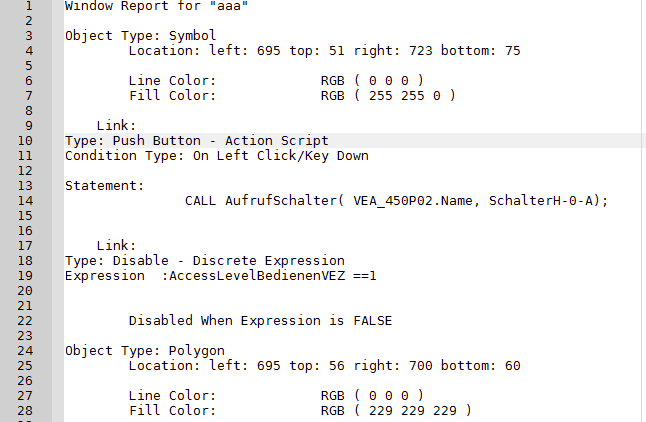
I got a 29MB text dump from an visualization application (Wonderware Intouch) containing objects, their descriptions, actions and scripts which I have to analyze. I'm looking for a tool (Windows or Linux) to parse this text, set up some rules and generate a visual representation of relations (quasi a call stack). Bonus points if the result allows me to navigate through the base text.
Anybody have an idea? Thanks in advance!
【回答】
每条记录一行,把这样的文本解析成结构化数据很容易,如果记录由数量不定的多行组成,就需要先将文本按标记拆成多条记录,然后对每条记录用正则表达式匹配,过程会复杂许多。SPL适合处理这样的日志,下面的代码适合你的文件结构:
| A | |
| 1 | =file("e:\\reportXXX.log").read() |
| 2 | =A1.split("Object Type:").delete(1) |
| 3 | =A2.regex("(.+)[\\s\\S]+left: (.+)[\\s\\S]+top: (.+)[\\s\\S]+right: (.+)[\\s\\S]+bottom: (.+)[\\s\\S]+Line Color:\\t\\t(.+)[\\s\\S]+Fill Color:\\t\\t(.+)[\\S\\s]+Link:(.+)[\\s\\S]+Type: (.+)[\\s\\S]+Condition Type: (.+)[\\s\\S]+Statement:\\s+(.+)[\\s\\S]+Link:(.+)[\\s\\S]+Type: (.+)[ \\s(\\S]+Expression : (.+)";ObjectType,left,top,right,bottom,lineColor,fillColor,ojbectLink,type,conditionType,statement,statementLink,statementType,lastExpress) |
| 4 | =file("e:\\result.txt").export@t(A3) |
A1:读取日志文件内容并以字符串形式返回。
A2:将文本内容按标记"Object Type:"拆分成多条记录,并丢弃第一条记录。
A3:对每条记录用正则表达式匹配,找出完整的记录。
A4:将A3结果导出到result.txt。
有时日志文件太大,必须分批读取,分批解析,开发难度因此会显著提高。由于记录的行数不定,一批数据中总会出现半条记录的情况,处理起来会更加复杂。SPL也适合处理这种不定行的大日志。





 扫一扫
扫一扫


 686
686

 被折叠的 条评论
为什么被折叠?
被折叠的 条评论
为什么被折叠?
 到【灌水乐园】发言





