


 在使用wkhtmltopdf将网页转换为PDF时,遇到无法访问本地文件及样式表的问题,本文介绍了解决方案,即通过添加--enable-local-file-access和--allow参数来允许访问本地资源。
使用的 wkhtmltopdf wkhtmltox-0.12.6-1.centos7.aarch64.rpm
转换的时候wkhtmltopdf 报错信息:
Warning: Blocked access to file /home/xxx/apache-tomcat-8.5.47/webapps1/xxx/WEB-INF/classes/images/service/logo_zr.png
Warning: Blocked access to file /home/xxx/apache-tomcat-8.5.47/webapps1/xxx/WEB-INF/classes/images/service/level2.png
Warning: Blocked access to file /home/xxx/apache-tomcat-8.5.47/webapps1/xxx/WEB-INF/classes/images/service/over_zr.png
Warning: Failed to load /home/xxx/apache-tomcat-8.5.47/webapps1/xxx/WEB-INF/classes/static/css/service/pdf.css (ignore)
Error: Failed to load about:blank, with network status code 301 and http status code 0 - Protocol "about" is unknown
Error: Failed to load about:blank, with network status code 301 and http status code 0 - Protocol "about" is unknown
Error: Failed to load about:blank, with network status code 301 and http status code 0 - Protocol "about" is unknown
解决方案: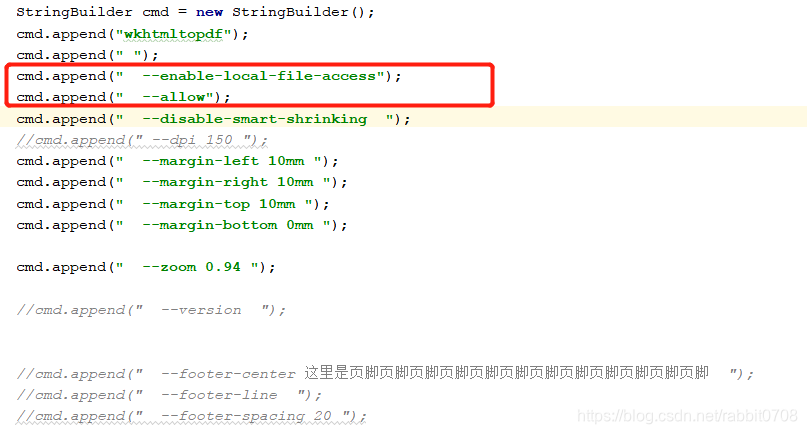
添加:这个两个参数 --enable-local-file-access --allow 而且要放在 wkhtmltopdf 命令之后其他命令之前。
========================================================================================
如果centos7上安装了wkhtmltox-0.12.5-1.centos7.x86_64.rpm,则可以不用添加 这个两个参数 --enable-local-file-access --allow





 扫一扫
扫一扫


 1545
1545

 被折叠的 条评论
为什么被折叠?
被折叠的 条评论
为什么被折叠?
 到【灌水乐园】发言





