


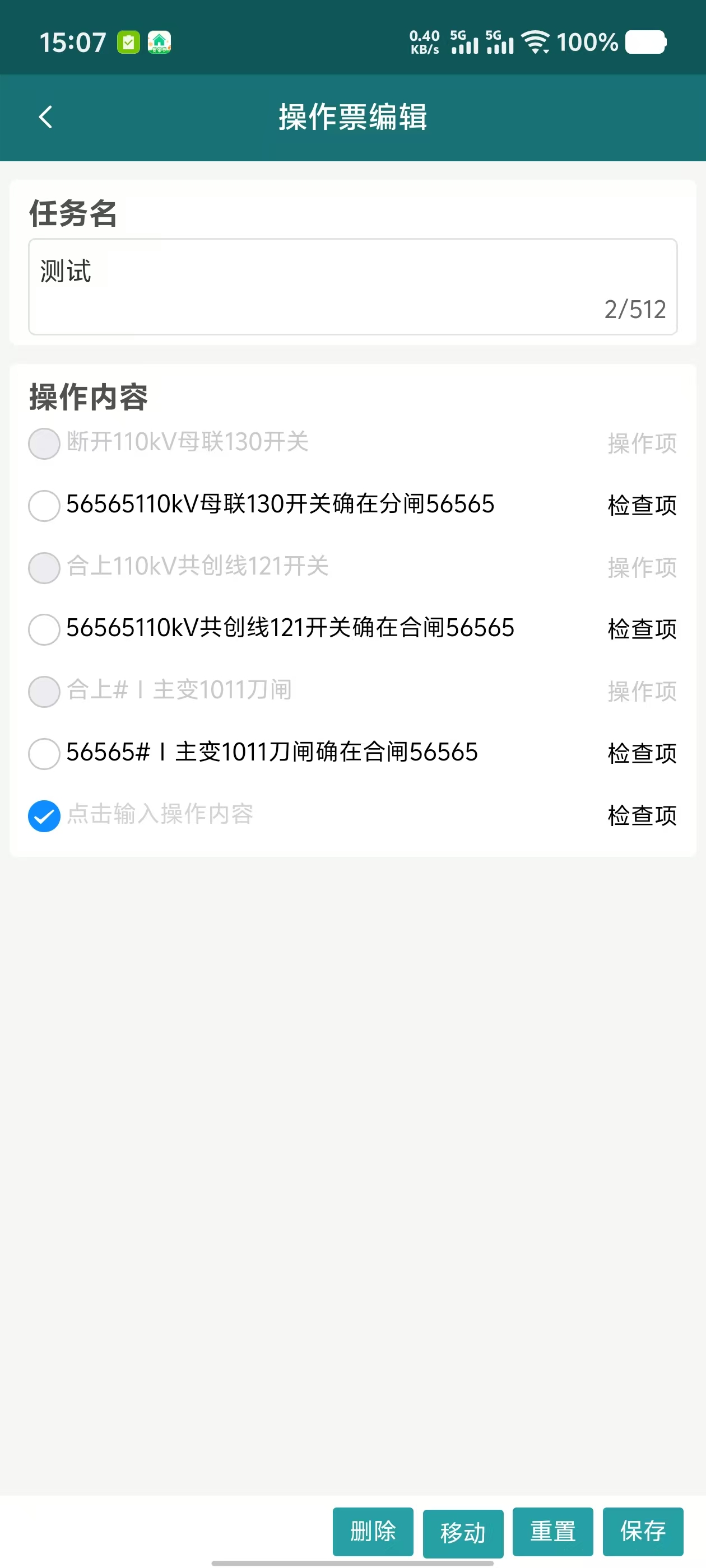
1、首先,这是我页面的全部代码,编辑页面
这个页面的功能点是详情编辑,里面有查找/替换,追加,重置,保存等功能。
<template>
<view class="pss-details-edit" ref="containerRef">
<view class="pss-details-top">
<view class="item-title">任务名</view>
<uv-textarea class="m-t-10" v-model="title" placeholder="请输入内容"></uv-textarea>
<view v-if="title === ''" class="c-red m-t-10 font-14">任务名不能为空</view>
</view>
<view class="bodyContainer">
<view class="title-text">操作内容</view>
<!-- 动态渲染列表 -->
<view class="content-list">
<uv-checkbox-group v-model="radioValue" placement="column" iconPlacement="left" @change="changeRadio">
<uv-row v-for="(item, index) in operateList" :key="item.id" class="flex m-b-10 m-l-5">
<!-- <uv-row class="flex justify-between"> -->
<uv-checkbox :name="item.id" :disabled="item.isChecked" shape="circle">
</uv-checkbox>
<uv-col span="8.5" class="" :class="{ 'c-gray-c7': item.isChecked }">
<view v-if="!item.isAdd" @click="addItemContent(item)">
<view class="content-text">
<block v-if="!isSearching || index !== currentHighlightIndex">
<text>{{ item.content }}</text>
</block>
<block v-else>
<text>{{ item.content.slice(0, currentHighlightListIndex) }}</text>
<text class="highlight-text">{{ item.content.slice(currentHighlightListIndex,
currentHighlightListIndex + findValue.length)}}</text>
<text>{{ item.content.slice(currentHighlightListIndex +
findValue.length)}}</text>
</block>
</view>
</view>
<view v-else class="c-gray-c7" @click="addItemContent(item)">
点击输入操作内容
</view>
</uv-col>
<uv-col span="1"></uv-col>
<uv-col span="2.5" :class="{ 'c-gray-c7': item.isChecked }">{{ item.type }}</uv-col>
<!-- </uv-row> -->
</uv-row>
</uv-checkbox-group>
</view>
</view>
<!-- 固定底部按钮容器(根据status决定是否显示) -->
<view class="fixed-btn-container">
<uv-row align="center" class="btn-row flex-end" v-if="!isReplace">
<uv-col span="auto" class="btn-item" v-if="showDelButton">
<uv-button color="#339ca3" type="default" size="normal" @click="delItem">删除</uv-button>
</uv-col>
<uv-col span="auto" class="btn-item" v-if="showDelButton">
<uv-button color="#339ca3" type="default" size="normal" @click="moveItem">移动</uv-button>
<view style="position: relative;bottom: 34px;right: 0;" class="more-btn">
<zsk-popover :showSelector="showMoveBtnRef" placement="top" @close="showMoveBtnRef = false">
<view style="padding:0 24rpx;">
<view class="select-item flex-row justify-between" v-for="(item, index) in moveItemData"
:key="index" @click="changeMoveItem(item)"
:class="{ 'disabled': shouldDisableMove(item) }"
:style="{ cursor: shouldDisableMove(item) ? 'not-allowed' : 'pointer' }"
:disabled="shouldDisableMove(item)">
<text>{{ item.label }}</text>
<!-- <uv-line class="m-tb-10"></uv-line> -->
</view>
</view>
</zsk-popover>
</view>
</uv-col>
<uv-col span="auto" class="btn-item" v-if="!showDelButton">
<uv-button color="#339ca3" type="default" size="normal" @click="findReplace">查找/替换</uv-button>
</uv-col>
<uv-col span="auto" class="btn-item" v-if="!showDelButton">
<uv-button color="#339ca3" type="default" size="normal" @click="addItem">追加</uv-button>
</uv-col>
<uv-col span="auto" class="btn-item">
<uv-button color="#339ca3" type="default" size="normal" @click="resetBtn">重置</uv-button>
</uv-col>
<uv-col span="auto" class="btn-item">
<uv-button color="#339ca3" type="default" size="normal" @click="saveBtn">保存</uv-button>
</uv-col>
</uv-row>
<view v-else>
<uv-row>查找内容:<uv-input placeholder="请输入内容" border="bottom" v-model="findValue"></uv-input></uv-row>
<uv-row>替换内容:<uv-input placeholder="请输入内容" border="bottom" v-model="replaceValue"></uv-input></uv-row>
<uv-row class="flex-end m-t-5">
<uv-col span="auto" class="btn-item">
<uv-button type="primary" size="normal" :disabled="findValue == ''" :plain="true"
@click="findPrev">上一处</uv-button>
</uv-col>
<uv-col span="auto" class="btn-item m-l-5">
<uv-button type="primary" size="normal" :disabled="findValue == ''" :plain="true"
@click="findNext(lastTwoIndex)">下一处</uv-button>
</uv-col>
<uv-col span="auto" class="btn-item m-l-5">
<uv-button type="primary" :disabled="replaceValue == '' || findValue == ''" size="normal"
:plain="true" @click="repalceCurrent">替换</uv-button>
</uv-col>
<uv-col span="auto" class="btn-item m-l-5">
<uv-button type="primary" :disabled="replaceValue == '' || findValue == ''" size="normal"
:plain="true" @click="repalceAll">全部替换</uv-button>
</uv-col>
<uv-col span="auto" class="btn-item m-l-5">
<uv-button type="primary" size="normal" :plain="true" @click="closeReplace">关闭</uv-button>
</uv-col>
</uv-row>
</view>
</view>
<uv-modal class="pss-modal-box" ref="cancelTicketRef" title="提示" showCancelButton @confirm="confirm"
@cancel="cancel">
<view class="flex-column flex text-c c-f5 font-14">
<view class="">
{{ cancelContent }}
</view>
<view>确定作废吗?</view>
</view>
</uv-modal>
<uv-modal class="pss-modal-box" ref="resetTicketRef" title="提示" showCancelButton @confirm="reset"
@cancel="cancel">
<view class="flex-column flex text-c c-f5 font-14">
<view class="">
{{ cancelContent }}
</view>
<view>确定重置吗?</view>
</view>
</uv-modal>
<uv-modal class="pss-modal-box" ref="delOperateRef" title="提示" showCancelButton @confirm="del" @cancel="cancel">
<view class="flex-column flex text-c c-f5 font-14">
<view class="">
{{ cancelContent }}
</view>
<view>确定删除吗?</view>
</view>
</uv-modal>
<!-- 保存 -->
<uv-toast ref="toastRef"></uv-toast>
<!-- 追加内容弹窗 -->
<uv-modal class="pss-modal-box" ref="addItemRef" title="编辑操作内容" showCancelButton @confirm="addItemContentModel"
@cancel="cancel">
<view class="add-item-content">
<uv-textarea v-model="addContent" border="none" placeholder="请输入操作内容"></uv-textarea>
</view>
</uv-modal>
<!-- 替换内容弹窗error -->
<uv-notify ref="notifyRef"></uv-notify>
<uv-notify ref="notifyReplace" message="全部替换成功" type="success"></uv-notify>
</view>
<view class="flex-container">
<customComponent v-if="formConfig && formFields" :form-config="formConfig" :form-fields="formFields"
:is-read-only="true" @formDataChange="handleFormDataChange" />
</view>
</template>
<script setup>
import { ref, nextTick, reactive, watch, onMounted } from 'vue';
import { onLoad } from '@dcloudio/uni-app'
import ticketApi from '@/api/operation/pss/index'
import zskPopover from '@/components/zsk-popover.vue'
import loading from "@/uni_modules/z-paging/components/z-paging/js/modules/loading";
import { error } from "@/uni_modules/uv-ui-tools/libs/function";
import sysApi from '@/api/system/index.js';
const title = ref('')
const cancelTicketRef = ref(null)
const cancelContent = ref("")
const resetTicketRef = ref(null)
const toastRef = ref(null)
const addItemRef = ref(null)
const notifyRef = ref(null)
const addContent = ref('')
const radioValue = ref('')
const ticketId = ref('');
// 查找/替换
const isReplace = ref(false)
const findValue = ref('')
const replaceValue = ref('')
const currentEditItem = ref(null)
const currentHighlightIndex = ref(-1)
const currentHighlightListIndex = ref([])
const highlightItems = ref([])
const isSearching = ref(false)
const lastTwoIndex = ref([])
const notifyReplace = ref(null)
// 删除和移动
const delOperateRef = ref(null)
const selectedItems = ref([]);
const moveItemData = ref([
{ value: 1, label: '移首行' },
{ value: 2, label: '上移' },
{ value: 3, label: '下移' },
{ value: 4, label: '移尾行' },
])
const editForm = reactive({
id: '',
inspectionItemsJson: '',
taskName: ''
})
const showDelButton = ref(false);
const showMoveBtnRef = ref(false);
const formConfig = ref(null);
const formFields = ref(null);
onLoad(options => {
const eventChannel = getCurrentPages().pop().getOpenerEventChannel();
eventChannel.on('receiveDetailFormVO', (detailFormVO) => {
console.log('接收到的 detailFormVO:', detailFormVO);
// ============================自定义表单=========================
if (!detailFormVO.variables.length) {
console.log("没有数据!!!!!!!!!!!!!!!!!!!!!!!!!!!!!!!!!!!!!!!!!!!!!!!!!!!!!!!!!!!");
sysApi.getOperateForm().then(response => {
if (response.code === 0) {
const { conf, fields } = response.data;
console.log(response.data);
formConfig.value = JSON.parse(conf);
formFields.value = fields.map(field => JSON.parse(field));
}
return;
});
}
// 尝试将 fromJson 转为数组
// const fromJsonArray = JSON.parse(detailFormVO);
// 定义一个响应式变量来存储转换后的数组
const fromJsonData = ref(detailFormVO);
const { id, variables } = fromJsonData.value; // 假设 fromJsonData 是一个响应式对象;
formConfig.value = id; // 这个值暂时没用
formFields.value = variables.map(variable => {
return {
...variable,
title: variable.label, // 将 label 映射为 title
};
});
// ============================自定义表单=========================
// 在这里可以使用接收到的数据
});
ticketId.value = options.id
fetchDetail(ticketId.value)
})
const fetchDetail = async (id) => {
try {
loading.value = true
ticketApi.getDetail(ticketId.value).then(res => {
console.log("res:-------------", res)
// 根据实际接口返回结构调整
if (res.code === 0) {
title.value = res.data.taskName;
operateList.value = JSON.parse(res.data.inspectionItemsJson)
} else {
uni.showToast({
title: err.message || '请求失败',
icon: 'none'
})
}
});
} catch (err) {
error.value = err.message
uni.showToast({
title: err.message || '请求失败',
icon: 'none'
})
} finally {
loading.value = false
}
}
const operateList = ref([]);
const containerRef = ref(null);
// 设置背景色
// const setBackgroundColor = () => {
// // 使用 uni-app 的方式设置页面背景色
// uni.setBackgroundColor({
// backgroundColor: '#f6f6f5',
// backgroundColorTop: '#f6f6f5',
// backgroundColorBottom: '#f6f6f5'
// });
// }
onMounted(() => {
// setBackgroundColor();
nextTick(() => {
const containerNode = containerRef.value?.$el || containerRef.value; // 处理 Vue3 的 ref 可能返回组件实例
if (containerNode?.parentNode?.parentNode) {
const grandParent = containerNode.parentNode.parentNode;
grandParent.style.backgroundColor = "#f6f6f5";
}
});
});
// 保存操作
const saveBtn = () => {
editForm.id = ticketId.value
editForm.taskName = title.value
console.log("1111111111", operateList.value)
editForm.inspectionItemsJson = JSON.stringify(operateList.value)
ticketApi.updateTicket(editForm).then(res => {
if (res.code === 0) {
uni.showToast({
title: '保存成功',
icon: 'none'
})
setTimeout(() => {
uni.redirectTo({
url: '/pages/operation/pss/childs/details?id=' + ticketId.value,
});
}, 100);
} else {
uni.showToast({
title: err.message || '请求失败',
icon: 'none'
})
}
})
}
// 重置弹出框
const resetBtn = () => {
resetTicketRef.value.open()
console.log('重置')
}
// 移动弹出框
const moveItem = () => {
showMoveBtnRef.value = true
}
// 检查是否可以禁用移动操作
const shouldDisableMove = (moveItem) => {
if (selectedItems.value.length === 0) return true;
const minIndex = Math.min(...selectedItems.value.map(item => operateList.value.findIndex(op => op.id === item.id)));
const maxIndex = Math.max(...selectedItems.value.map(item => operateList.value.findIndex(op => op.id === item.id)));
switch (moveItem.value) {
case 1: // 移首行
case 2: // 上移
return minIndex === 0;
case 3: // 下移
case 4: // 移尾行
return maxIndex === operateList.value.length - 1;
default:
return false;
}
};
// 移动操作项
const changeMoveItem = (item) => {
if (shouldDisableMove(item)) return;
const selectedIndices = selectedItems.value.map(selected => operateList.value.findIndex(op => op.id === selected.id)).sort((a, b) => a - b);
switch (item.value) {
case 1: // 移首行
const itemsToMoveToStart = selectedIndices.map(index => operateList.value[index]);
operateList.value = [
...itemsToMoveToStart,
...operateList.value.filter((_, index) => !selectedIndices.includes(index))
];
break;
case 2: // 上移
selectedIndices.forEach(index => {
if (index > 0) {
[operateList.value[index - 1], operateList.value[index]] = [operateList.value[index], operateList.value[index - 1]];
}
});
break;
case 3: // 下移
selectedIndices.slice().reverse().forEach(index => {
if (index < operateList.value.length - 1) {
[operateList.value[index], operateList.value[index + 1]] = [operateList.value[index + 1], operateList.value[index]];
}
});
break;
case 4: // 移尾行
const itemsToMoveToEnd = selectedIndices.map(index => operateList.value[index]);
operateList.value = [
...operateList.value.filter((_, index) => !selectedIndices.includes(index)),
...itemsToMoveToEnd
];
break;
}
};
// 重置操作
const reset = () => {
// operateList.value = [...iniOperateList.value];
// operateList.value.forEach(item => {
// if (item.isRest == 1) {
// operateList.value.splice(operateList.value.indexOf(item), 1)
// }
// })
ticketApi.getDetail(ticketId.value).then(res => {
console.log("res:-------------", res)
// 根据实际接口返回结构调整
if (res.code === 0) {
title.value = res.data.taskName;
operateList.value = JSON.parse(res.data.inspectionItemsJson)
} else {
uni.showToast({
title: err.message || '请求失败',
icon: 'none'
})
}
});
// 清空 radioValue
radioValue.value = '';
// 清空选中项
selectedItems.value = [];
showDelButton.value = false;
console.log(operateList.value)
console.log(title.value)
}
// 删除提示框打开
const delItem = () => {
delOperateRef.value.open()
}
// 删除操作
const del = () => {
// 遍历 selectedItems 数组,找到对应的项并从 operateList 中删除
selectedItems.value.forEach(item => {
const index = operateList.value.findIndex(op => op.id === item.id);
if (index !== -1) {
operateList.value.splice(index, 1);
}
});
// 清空选中项
selectedItems.value = [];
// 清空 radioValue
radioValue.value = '';
showDelButton.value = false;
}
// 复选框勾选change事件
const changeRadio = (id) => {
console.log(id)
selectedItems.value = operateList.value.filter(item => id.includes(item.id));
console.log(selectedItems.value)
}
// 监听 selectedItems 的变化来更换按钮显示
watch(selectedItems, (newValue) => {
if (newValue.length > 0) {
console.log('1111');
showDelButton.value = true;
} else {
showDelButton.value = false;
}
}, { deep: true });
// 追加内容
const addItem = () => {
// 找出当前 operateList 中的最大 id
const maxId = operateList.value.reduce((max, item) => Math.max(max, item.id), 0);
operateList.value.push({
id: maxId + 1,
content: "",
type: "检查项",
isChecked: false,
isAdd: true,
isRest: 1
})
// 清空 radioValue
radioValue.value = '';
console.log(operateList.value)
}
// 修改内容
const addItemContent = (item) => {
// 判断是否是替换/查找
if (isReplace.value) {
notifyRef.value.show({
top: 10,
type: 'error',
color: '#fff',
bgColor: '#ff905f',
message: '正在查找/替换,请先关闭再编辑',
duration: 1000 * 3,
fontSize: '20rpx',
safeAreaInsetTop: true
})
return
}
if (!item.isChecked) {
addContent.value = item.content
// 保存当前编辑的项
currentEditItem.value = item
addItemRef.value.open(item)
}
}
const addItemContentModel = () => {
if (currentEditItem.value) {
// 更新当前编辑项的内容
currentEditItem.value.content = addContent.value
// 更新 isAdd 状态
currentEditItem.value.isAdd = false
}
// 清空输入框
addContent.value = ''
// 清空当前编辑项
currentEditItem.value = null
// 关闭弹窗
addItemRef.value.close()
}
// 查找/替换
const findReplace = () => {
isReplace.value = true
}
const isFirstReplace = ref(true);
const repalceCurrent = () => {
if (currentHighlightIndex.value === -1 || currentHighlightListIndex.value === -1) {
// 检查是否还有匹配项
if (checkIfMatchesExist()) {
findNext(lastTwoIndex);
} else {
notifyRef.value.show({
top: 10,
type: 'info',
color: '#fff',
bgColor: '#ff976a',
message: '无法找到文本:' + findValue.value,
duration: 1000 * 3,
fontSize: '20rpx',
safeAreaInsetTop: true
});
return;
}
}
// 进行替换操作
const item = operateList.value[currentHighlightIndex.value];
const keyword = findValue.value;
const startIndex = currentHighlightListIndex.value;
const endIndex = startIndex + keyword.length;
item.content = item.content.slice(0, startIndex) + replaceValue.value + item.content.slice(endIndex);
// 检查是否还有匹配项
const hasMoreMatches = checkIfMatchesExist();
if (!hasMoreMatches) {
notifyReplace.value.show();
// 取消全部高亮
currentHighlightIndex.value = -1;
currentHighlightListIndex.value = -1;
isSearching.value = false;
return;
}
// 尝试查找下一个匹配项
findNext(lastTwoIndex);
};
// 检查是否还有匹配项的函数
const checkIfMatchesExist = () => {
const keyword = findValue.value.toLowerCase();
for (let i = 0; i < operateList.value.length; i++) {
if (operateList.value[i].isChecked) continue;
const content = operateList.value[i].content.toLowerCase();
if (content.includes(keyword)) {
return true;
}
}
return false;
};
const repalceAll = () => {
if (!checkIfMatchesExist()) {
notifyRef.value.show({
top: 10,
type: 'info',
color: '#fff',
bgColor: '#ff976a',
message: '无法找到文本:' + findValue.value,
duration: 1000 * 3,
fontSize: '30rpx',
safeAreaInsetTop: true
});
return;
}
const keyword = findValue.value;
const regex = new RegExp(keyword, 'g'); // 使用全局替换
operateList.value.forEach((item) => {
if (!item.isChecked) {
item.content = item.content.replace(regex, replaceValue.value);
}
});
notifyReplace.value.show();
};
const findPrev = () => {
if (!findValue.value) return;
isSearching.value = true;
const keyword = findValue.value.toLowerCase();
// 从下往上查找匹配项
let foundIndex = -1;
let foundListIndex = -1;
let startIndex = operateList.value.length - 1;
let startListIndex = 0;
if (currentHighlightIndex.value !== -1) {
startIndex = currentHighlightIndex.value;
const content = operateList.value[startIndex].content.toLowerCase();
const regex = new RegExp(keyword, 'gi');
let matches = [];
let match;
while ((match = regex.exec(content)) !== null) {
matches.push(match.index);
}
const currentMatchIndex = matches.findIndex(idx => idx === currentHighlightListIndex.value);
if (currentMatchIndex > 0) {
startListIndex = matches[currentMatchIndex - 1];
foundIndex = startIndex;
foundListIndex = startListIndex;
} else {
startIndex--;
}
}
// 第一次查找范围
if (foundIndex === -1) {
for (let i = startIndex; i >= 0; i--) {
if (operateList.value[i].isChecked) continue;
const content = operateList.value[i].content.toLowerCase();
const regex = new RegExp(keyword, 'gi');
let matches = [];
let match;
while ((match = regex.exec(content)) !== null) {
matches.push(match.index);
}
if (matches.length > 0) {
foundIndex = i;
foundListIndex = matches[matches.length - 1];
break;
}
}
}
// 如果第一次查找没有找到,从列表末尾重新查找
if (foundIndex === -1 || foundListIndex === -1) {
for (let i = operateList.value.length - 1; i > startIndex; i--) {
if (operateList.value[i].isChecked) continue;
const content = operateList.value[i].content.toLowerCase();
const regex = new RegExp(keyword, 'gi');
let matches = [];
let match;
while ((match = regex.exec(content)) !== null) {
matches.push(match.index);
}
if (matches.length > 0) {
foundIndex = i;
foundListIndex = matches[matches.length - 1];
break;
}
}
}
if (foundIndex !== -1 && foundListIndex !== -1) {
currentHighlightIndex.value = foundIndex;
currentHighlightListIndex.value = foundListIndex;
// 强制更新视图
nextTick(() => {
operateList.value = [...operateList.value];
});
} else {
notifyRef.value.show({
type: 'error',
message: '未找到匹配内容',
duration: 2000
});
}
}
const findNext = (lastTwoIndex) => {
console.log(lastTwoIndex)
if (!findValue.value) return;
isSearching.value = true;
const keyword = findValue.value.toLowerCase();
// 从上往下查找匹配项
let foundIndex = -1;
let foundListIndex = -1;
let startIndex = 0;
let startItemIndex = 0;
if (lastTwoIndex.value) { // 非第一次查询
startItemIndex = lastTwoIndex.value[0];
if (lastTwoIndex.value[2] !== keyword) { // 关键字改变
startItemIndex = 0;
} else {
startIndex = lastTwoIndex.value[1] + keyword.length;
}
}
// 第一次查找范围
for (let i = startItemIndex; i < operateList.value.length; i++) {
if (operateList.value[i].isChecked) continue;
const content = operateList.value[i].content.toLowerCase();
const regex = new RegExp(keyword, 'gi');
regex.lastIndex = i === startItemIndex ? startIndex : 0;
let match;
while ((match = regex.exec(content)) !== null) {
foundIndex = i;
foundListIndex = match.index;
break;
}
if (foundIndex !== -1) {
break;
}
}
// 如果第一次查找没有找到,从列表开头重新查找
if (foundIndex === -1 || foundListIndex === -1) {
for (let i = 0; i < startItemIndex; i++) {
if (operateList.value[i].isChecked) continue;
const content = operateList.value[i].content.toLowerCase();
const regex = new RegExp(keyword, 'gi');
regex.lastIndex = 0;
let match;
while ((match = regex.exec(content)) !== null) {
foundIndex = i;
foundListIndex = match.index;
break;
}
if (foundIndex !== -1) {
break;
}
}
}
if (foundIndex !== -1 && foundListIndex !== -1) {
currentHighlightIndex.value = foundIndex;
currentHighlightListIndex.value = foundListIndex;
lastTwoIndex.value = [foundIndex, foundListIndex, keyword];
// 强制更新视图
nextTick(() => {
operateList.value = [...operateList.value];
});
} else {
notifyRef.value.show({
type: 'error',
message: '未找到匹配内容',
duration: 2000
});
}
}
const closeReplace = () => {
isReplace.value = false;
findValue.value = '';
replaceValue.value = '';
currentHighlightIndex.value = -1;
highlightItems.value = [];
isSearching.value = false;
isFirstReplace.value = true; // 重置第一次替换标志
};
</script>
<style lang="scss">
.highlight {
background-color: #ffeb3b;
padding: 2rpx 4rpx;
border-radius: 4rpx;
}
.highlight-current {
background-color: #ff9800;
color: #fff;
padding: 2rpx 4rpx;
border-radius: 4rpx;
font-weight: bold;
}
.pss-details-edit {
padding-top: 20rpx;
background-color: #f6f6f4;
.pss-details-top {
background-color: #fff;
border-radius: 10rpx;
padding: 20rpx;
margin: 0px 10rpx;
.item-title {
font-weight: bold;
font-size: 22rpx;
}
.item-info {
display: flex;
font-size: 12px;
color: #999;
}
}
.bodyContainer {
background-color: white;
margin: 10rpx;
border-radius: 10rpx;
padding: 10rpx 0 10rpx 0;
.title-text {
font-size: 22rpx;
font-weight: bold;
margin: 10rpx 20rpx;
}
.content-list {
margin: 10rpx 15rpx;
}
}
.fixed-btn-container {
position: fixed;
right: 0rpx;
left: 0rpx;
bottom: 0rpx;
// width: 100%;
padding: 10rpx 20rpx;
background-color: #fff;
// border-radius: 10rpx;
.btn-row {
gap: 20rpx;
}
.fix-bottom {}
.more-btn {
width: 100px !important;
.select-item {
border-bottom: 1px solid #ccc;
text-align: center;
padding: 10rpx 0;
}
.select-item.disabled {
color: #ccc;
pointer-events: none;
}
.select-item:last-child {
border-bottom: none;
}
}
}
:deep(.uv-modal__content) {
display: flex;
flex-direction: column !important;
}
}
.flex-container {
background-color: #f6f6f4;
display: flex;
flex-direction: column;
min-height: 500rpx;
}
.content-text {
word-break: break-all;
.highlight-text {
background-color: #ff9800;
color: #ffffff;
padding: 4rpx 8rpx;
border-radius: 4rpx;
}
}
</style>
2、我们现在来看查找和替换功能
点击查找替换,显示查找内容,输入内容可以在文章上一处,下一处进行查找。
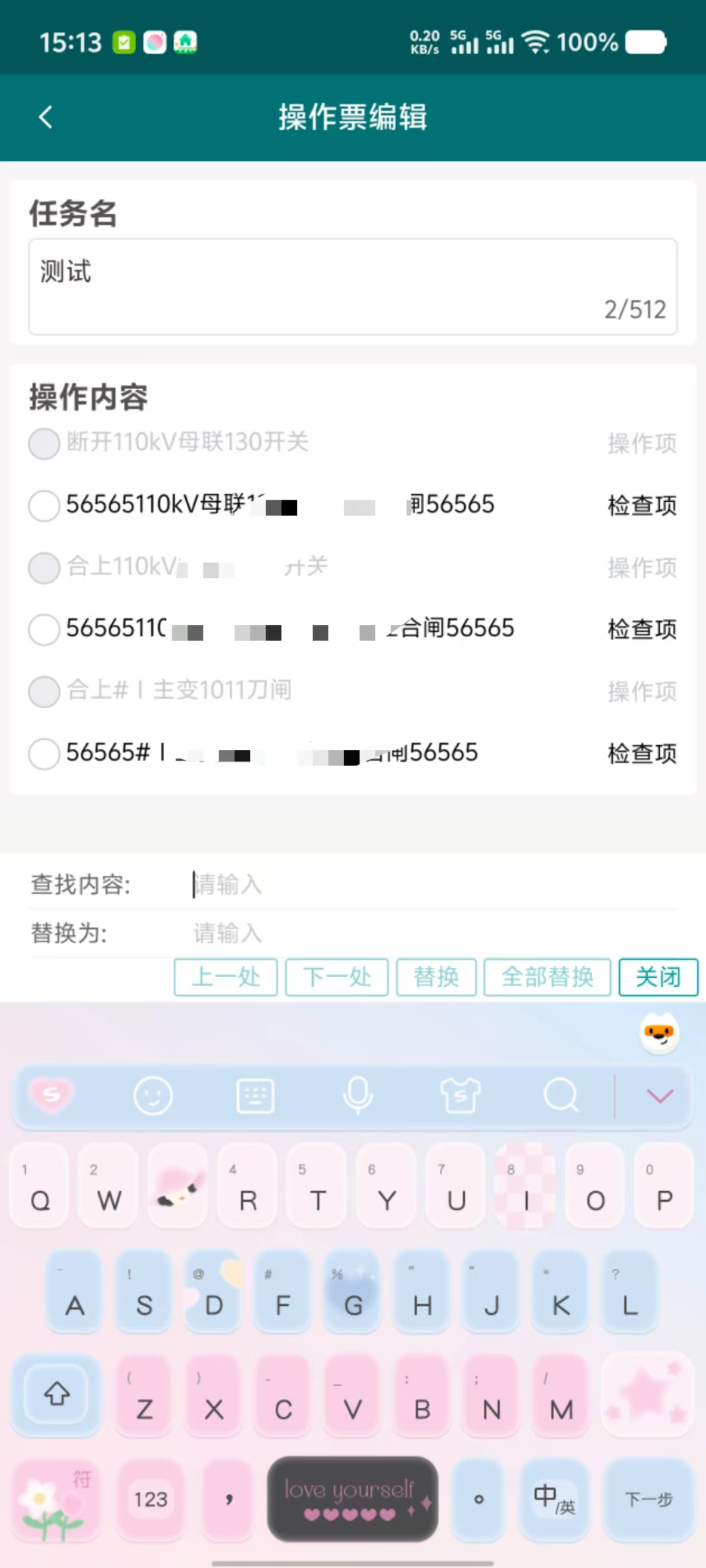
代码在这里,这个代码是页面上的代码
(1)页面部分
<view v-else>
                <uv-row>查找内容:<uv-input placeholder="请输入内容" border="bottom" v-model="findValue"></uv-input></uv-row>
                <uv-row>替换内容:<uv-input placeholder="请输入内容" border="bottom" v-model="replaceValue"></uv-input></uv-row>
                <uv-row class="flex-end m-t-5">
                    <uv-col span="auto" class="btn-item">
                        <uv-button type="primary" size="normal" :disabled="findValue == ''" :plain="true"
                            @click="findPrev">上一处</uv-button>
                    </uv-col>
                    <uv-col span="auto" class="btn-item m-l-5">
                        <uv-button type="primary" size="normal" :disabled="findValue == ''" :plain="true"
                            @click="findNext(lastTwoIndex)">下一处</uv-button>
                    </uv-col>
                    <uv-col span="auto" class="btn-item m-l-5">
                        <uv-button type="primary" :disabled="replaceValue == '' || findValue == ''" size="normal"
                            :plain="true" @click="repalceCurrent">替换</uv-button>
                    </uv-col>
                    <uv-col span="auto" class="btn-item m-l-5">
                        <uv-button type="primary" :disabled="replaceValue == '' || findValue == ''" size="normal"
                            :plain="true" @click="repalceAll">全部替换</uv-button>
                    </uv-col>
                    <uv-col span="auto" class="btn-item m-l-5">
                        <uv-button type="primary" size="normal" :plain="true" @click="closeReplace">关闭</uv-button>
                    </uv-col>
                </uv-row>
            </view>
(2)功能代码,点击移动,查找上一处
// 移动操作项
const changeMoveItem = (item) => {
    if (shouldDisableMove(item)) return;

    const selectedIndices = selectedItems.value.map(selected => operateList.value.findIndex(op => op.id === selected.id)).sort((a, b) => a - b);

    switch (item.value) {
        case 1: // 移首行
            const itemsToMoveToStart = selectedIndices.map(index => operateList.value[index]);
            operateList.value = [
                ...itemsToMoveToStart,
                ...operateList.value.filter((_, index) => !selectedIndices.includes(index))
            ];
            break;
        case 2: // 上移
            selectedIndices.forEach(index => {
                if (index > 0) {
                    [operateList.value[index - 1], operateList.value[index]] = [operateList.value[index], operateList.value[index - 1]];
                }
            });
            break;
        case 3: // 下移
            selectedIndices.slice().reverse().forEach(index => {
                if (index < operateList.value.length - 1) {
                    [operateList.value[index], operateList.value[index + 1]] = [operateList.value[index + 1], operateList.value[index]];
                }
            });
            break;
        case 4: // 移尾行
            const itemsToMoveToEnd = selectedIndices.map(index => operateList.value[index]);
            operateList.value = [
                ...operateList.value.filter((_, index) => !selectedIndices.includes(index)),
                ...itemsToMoveToEnd
            ];
            break;
    }
};
const findPrev = () => {
    if (!findValue.value) return;
    isSearching.value = true;
    const keyword = findValue.value.toLowerCase();

    // 从下往上查找匹配项
    let foundIndex = -1;
    let foundListIndex = -1;
    let startIndex = operateList.value.length - 1;
    let startListIndex = 0;

    if (currentHighlightIndex.value !== -1) {
        startIndex = currentHighlightIndex.value;
        const content = operateList.value[startIndex].content.toLowerCase();
        const regex = new RegExp(keyword, 'gi');
        let matches = [];
        let match;
        while ((match = regex.exec(content)) !== null) {
            matches.push(match.index);
        }
        const currentMatchIndex = matches.findIndex(idx => idx === currentHighlightListIndex.value);
        if (currentMatchIndex > 0) {
            startListIndex = matches[currentMatchIndex - 1];
            foundIndex = startIndex;
            foundListIndex = startListIndex;
        } else {
            startIndex--;
        }
    }

    // 第一次查找范围
    if (foundIndex === -1) {
        for (let i = startIndex; i >= 0; i--) {
            if (operateList.value[i].isChecked) continue;
            const content = operateList.value[i].content.toLowerCase();
            const regex = new RegExp(keyword, 'gi');
            let matches = [];
            let match;
            while ((match = regex.exec(content)) !== null) {
                matches.push(match.index);
            }
            if (matches.length > 0) {
                foundIndex = i;
                foundListIndex = matches[matches.length - 1];
                break;
            }
        }
    }

    // 如果第一次查找没有找到,从列表末尾重新查找
    if (foundIndex === -1 || foundListIndex === -1) {
        for (let i = operateList.value.length - 1; i > startIndex; i--) {
            if (operateList.value[i].isChecked) continue;
            const content = operateList.value[i].content.toLowerCase();
            const regex = new RegExp(keyword, 'gi');
            let matches = [];
            let match;
            while ((match = regex.exec(content)) !== null) {
                matches.push(match.index);
            }
            if (matches.length > 0) {
                foundIndex = i;
                foundListIndex = matches[matches.length - 1];
                break;
            }
        }
    }

    if (foundIndex !== -1 && foundListIndex !== -1) {
        currentHighlightIndex.value = foundIndex;
        currentHighlightListIndex.value = foundListIndex;
        // 强制更新视图
        nextTick(() => {
            operateList.value = [...operateList.value];
        });
    } else {
        notifyRef.value.show({
            type: 'error',
            message: '未找到匹配内容',
            duration: 2000
        });
    }
}```
(3)功能代码,查找下一处
const findNext = (lastTwoIndex) => {
console.log(lastTwoIndex)
if (!findValue.value) return;
isSearching.value = true;
const keyword = findValue.value.toLowerCase();
// 从上往下查找匹配项
let foundIndex = -1;
let foundListIndex = -1;
let startIndex = 0;
let startItemIndex = 0;

if (lastTwoIndex.value) { // 非第一次查询
    startItemIndex = lastTwoIndex.value[0];
    if (lastTwoIndex.value[2] !== keyword) { // 关键字改变
        startItemIndex = 0;
    } else {
        startIndex = lastTwoIndex.value[1] + keyword.length;
    }
}

// 第一次查找范围
for (let i = startItemIndex; i < operateList.value.length; i++) {
    if (operateList.value[i].isChecked) continue;
    const content = operateList.value[i].content.toLowerCase();
    const regex = new RegExp(keyword, 'gi');
    regex.lastIndex = i === startItemIndex ? startIndex : 0;

    let match;
    while ((match = regex.exec(content)) !== null) {
        foundIndex = i;
        foundListIndex = match.index;
        break;
    }

    if (foundIndex !== -1) {
        break;
    }
}

// 如果第一次查找没有找到,从列表开头重新查找
if (foundIndex === -1 || foundListIndex === -1) {
    for (let i = 0; i < startItemIndex; i++) {
        if (operateList.value[i].isChecked) continue;
        const content = operateList.value[i].content.toLowerCase();
        const regex = new RegExp(keyword, 'gi');
        regex.lastIndex = 0;

        let match;
        while ((match = regex.exec(content)) !== null) {
            foundIndex = i;
            foundListIndex = match.index;
            break;
        }

        if (foundIndex !== -1) {
            break;
        }
    }
}

if (foundIndex !== -1 && foundListIndex !== -1) {
    currentHighlightIndex.value = foundIndex;
    currentHighlightListIndex.value = foundListIndex;
    lastTwoIndex.value = [foundIndex, foundListIndex, keyword];
    // 强制更新视图
    nextTick(() => {
        operateList.value = [...operateList.value];
    });
} else {
    notifyRef.value.show({
        type: 'error',
        message: '未找到匹配内容',
        duration: 2000
    });
}
}
(4)替换和全部替换功能
const repalceCurrent = () => {
    if (currentHighlightIndex.value === -1 || currentHighlightListIndex.value === -1) {
        // 检查是否还有匹配项
        if (checkIfMatchesExist()) {
            findNext(lastTwoIndex);
        } else {
            notifyRef.value.show({
                top: 10,
                type: 'info',
                color: '#fff',
                bgColor: '#ff976a',
                message: '无法找到文本:' + findValue.value,
                duration: 1000 * 3,
                fontSize: '20rpx',
                safeAreaInsetTop: true
            });
            return;
        }
    }

    // 进行替换操作
    const item = operateList.value[currentHighlightIndex.value];
    const keyword = findValue.value;
    const startIndex = currentHighlightListIndex.value;
    const endIndex = startIndex + keyword.length;
    item.content = item.content.slice(0, startIndex) + replaceValue.value + item.content.slice(endIndex);


    // 检查是否还有匹配项
    const hasMoreMatches = checkIfMatchesExist();
    if (!hasMoreMatches) {
        notifyReplace.value.show();
        // 取消全部高亮
        currentHighlightIndex.value = -1;
        currentHighlightListIndex.value = -1;
        isSearching.value = false;
        return;
    }
    // 尝试查找下一个匹配项
    findNext(lastTwoIndex);
};
const repalceAll = () => {
    if (!checkIfMatchesExist()) {
        notifyRef.value.show({
            top: 10,
            type: 'info',
            color: '#fff',
            bgColor: '#ff976a',
            message: '无法找到文本:' + findValue.value,
            duration: 1000 * 3,
            fontSize: '30rpx',
            safeAreaInsetTop: true
        });
        return;
    }
    const keyword = findValue.value;
    const regex = new RegExp(keyword, 'g'); // 使用全局替换
    operateList.value.forEach((item) => {
        if (!item.isChecked) {
            item.content = item.content.replace(regex, replaceValue.value);
        }
    });
    notifyReplace.value.show();
};
(5)重置功能
// 重置操作
const reset = () => {
    // operateList.value = [...iniOperateList.value];
    // operateList.value.forEach(item => {
    //     if (item.isRest == 1) {
    //         operateList.value.splice(operateList.value.indexOf(item), 1)
    //     }
    // })
    ticketApi.getDetail(ticketId.value).then(res => {
        console.log("res:-------------", res)
        // 根据实际接口返回结构调整
        if (res.code === 0) {
            title.value = res.data.taskName;
            operateList.value = JSON.parse(res.data.inspectionItemsJson)
        } else {
            uni.showToast({
                title: err.message || '请求失败',
                icon: 'none'
            })
        }
    });
    // 清空 radioValue
    radioValue.value = '';
    // 清空选中项
    selectedItems.value = [];
    showDelButton.value = false;
    console.log(operateList.value)
    console.log(title.value)
}
以上就是我们这个页面的大致操作,其中包含移动,替换,重置等功能操作。





 扫一扫
扫一扫


 被折叠的 条评论
为什么被折叠?
被折叠的 条评论
为什么被折叠?
 到【灌水乐园】发言





