


 这篇博客详细介绍了如何在Vue中使用Ant Design的<a-table>组件实现分页功能。通过设置`:pagination`属性并结合data中的pagination对象,实现了页面大小选择和页码切换。同时,在methods中定义了`pageSizeChange`和`pageChange`方法来处理分页事件,动态更新数据。在获取列表数据后,将数据和总条数更新到state中,确保分页信息的正确显示。
1、<a-table></a-table>标签中添加属性 :pagination="pagination"
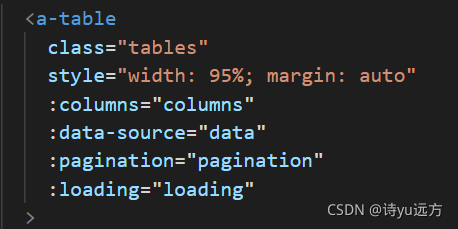
2、data中设置pagination和total
data(){
    return {
        totai:0, //总条数
        pagination: {
            current: 1,//页码
            pageSize: 10,//条数
            showSizeChanger: true,
            total: this.total,
            pageSizeOptions: ['5', '10', '20', '30', '40', '100'],
            showTotal: (total) => `共 ${total} 条数据`,
            onShowSizeChange: this.pageSizeChange,
            onChange: this.pageChange,
          },
    }
}
3、methods 方法中
methods:{
    pageSizeChange(val, pageNum) {
      this.loading = true
      this.pagination.pageSize = pageNum
      this.pagination.current = 1
      const params = {
        rows: this.pagination.pageSize,
        page: this.pagination.current,
      }
      this.getTemplateLibraryList(params)   //获取列表数据
    },
    pageChange(page, val) {
      this.loading = true
      this.pagination.current = page
      const params = {
        rows: this.pagination.pageSize,
        page: this.pagination.current,
      }
      this.getTemplateLibraryList(params) //获取列表数据
    },
}
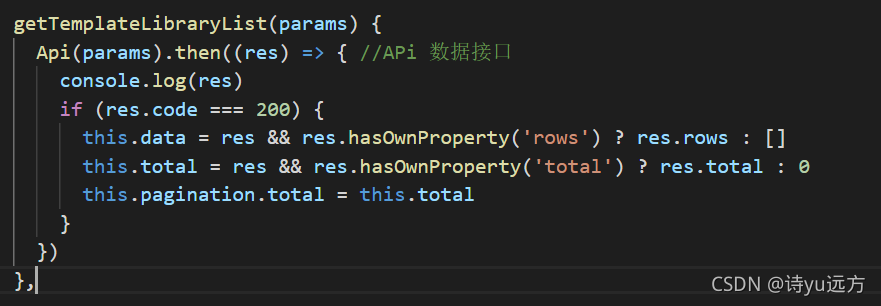
4、获取列表数据后
this.data = res && res.hasOwnProperty('rows') ? res.rows : []
this.total = res && res.hasOwnProperty('total') ? res.total : 0
this.pagination.total = this.total





 扫一扫
扫一扫


 5928
5928

 被折叠的 条评论
为什么被折叠?
被折叠的 条评论
为什么被折叠?
 到【灌水乐园】发言





