



1. React集成Azure需要用到两个依赖包
    npm i @azure/msal-browser
    npm i @azure/msal-react
本地开发使用的版本
    "@azure/msal-browser": "^4.13.2",
    "@azure/msal-react": "^3.0.13",
2. msalConfig配置文件
import { LogLevel } from '@azure/msal-browser';

/**
* Configuration object to be passed to MSAL instance on creation.
* For a full list of MSAL.js configuration parameters, visit:
* https://github.com/AzureAD/microsoft-authentication-library-for-js/blob/dev/lib/msal-browser/docs/configuration.md
*/

export const msalConfig = {
  auth: {
    clientId: ' 应用程序(客户端) ID', // 对应图1
    authority: 'https://login.microsoftonline.com/目录(租户) ID/oauth2/v2.0/authorize',// 对应图1
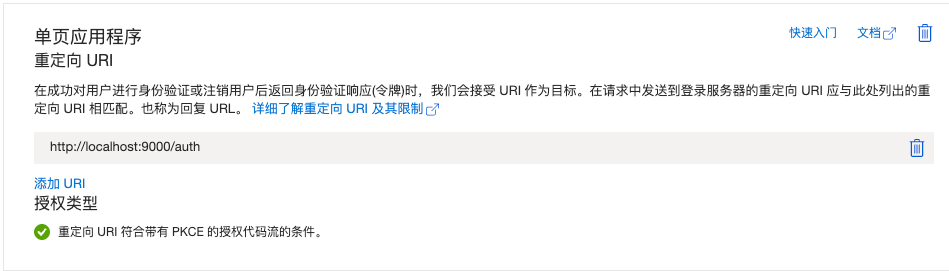
    redirectUri: 'http://localhost:9000/auth', //重定向地址  需要在平台上设置  图2
    postLogoutRedirectUri: '/', // Indicates the page to navigate after logout.
    navigateToLoginRequestUrl: false, // If "true", will navigate back to the original request location before processing the auth code response.
  },
  cache: {
    cacheLocation: 'sessionStorage', // Configures cache location. "sessionStorage" is more secure, but "localStorage" gives you SSO between tabs.
    storeAuthStateInCookie: false, // Set this to "true" if you are having issues on IE11 or Edge
  },
  system: {
    loggerOptions: {
      loggerCallback: (level, message, containsPii) => {
        if (containsPii) {
          return;
        }
        switch (level) {
          case LogLevel.Error:
            console.error(message);
            return;
          case LogLevel.Info:
            console.info(message);
            return;
          case LogLevel.Verbose:
            console.debug(message);
            return;
          case LogLevel.Warning:
            console.warn(message);
            return;
          default:
            return;
        }
      },
    },
  },
};

/**
* Scopes you add here will be prompted for user consent during sign-in.
* By default, MSAL.js will add OIDC scopes (openid, profile, email) to any login request.
* For more information about OIDC scopes, visit:
* https://docs.microsoft.com/en-us/azure/active-directory/develop/v2-permissions-and-consent#openid-connect-scopes
*/
export const loginRequest = {
  scopes: ["openid", "profile", "User.Read"] // 请求的权限范围
};

/**
* An optional silentRequest object can be used to achieve silent SSO
* between applications by providing a "login_hint" property.
*/
// export const silentRequest = {
//     scopes: ["openid", "profile"],
//     loginHint: "example@domain.net"
// };
图1:
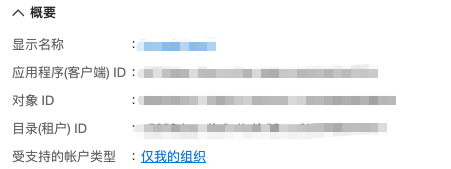
图2:
3.主页面配置(在入口文件进行配置)
import React from 'react';
import { MsalProvider } from '@azure/msal-react';
import * as msal from "@azure/msal-browser";
import { msalConfig } from '../msalConfig';

/**
* MSAL should be instantiated outside of the component tree to prevent it from being re-instantiated on re-renders.
* For more, visit: https://github.com/AzureAD/microsoft-authentication-library-for-js/blob/dev/lib/msal-react/docs/getting-started.md
*/
const msalInstance = new msal.PublicClientApplication(msalConfig);

// Default to using the first account if no account is active on page load
if (!msalInstance.getActiveAccount() && msalInstance.getAllAccounts().length > 0) {
  // Account selection logic is app dependent. Adjust as needed for different use cases.
  msalInstance.setActiveAccount(msalInstance.getActiveAccount()[0]);
}

// Listen for sign-in event and set active account
msalInstance.addEventCallback((event) => {
  if (event.eventType === msal.EventType.LOGIN_SUCCESS && event.payload.account) {
    const account = event.payload.account;
    msalInstance.setActiveAccount(account);
  }
});

const Layout = ({ children }) => <MsalProvider instance={msalInstance}>{children}</MsalProvider>;

export default Layout;
4.实现登录退出
import {
  MsalProvider,
  AuthenticatedTemplate,
  useMsal,
  UnauthenticatedTemplate,
} from "@azure/msal-react";
import { loginRequest } from "../msalConfig";

export default ({ }) => {

  const handleLoginRedirect = () => {
    console.log("handleLoginRedirect", REDIRECT_URI)
    window.location.href = `${REDIRECT_URI}`;
    instance.loginRedirect(loginRequest).catch((error) => console.log(error));
  };

  const handleLogoutRedirect = () => {
   instance.logoutRedirect().catch((error) => console.log(error));
  };

  return (
    <>

         <a onClick={handleLoginRedirect} className="login">
           登录
         </a>
         <a onClick={handleLogoutRedirect} className="login">
           退出
         </a>

    </>
  );
};
4.登陆重定向到http://localhost:9000/auth地址
import { useEffect } from 'react'
import { useLocation, history } from 'umi';
import { Result, Button, Spin, Space } from 'antd'
import { useDispatch } from 'umi'
import { useMsal } from "@azure/msal-react";
import { store } from '@dzo/utils'

export default ({ }) => {
  const dispatch = useDispatch()
  const { instance } = useMsal();

  const location = useLocation()
  const { accessToken, code, msg } = location.query


  useEffect(() => {
    instance.handleRedirectPromise().then(async response => {
      // 添加显式检查
      if (response && response.account) {
        // 确保获取到有效token
        if (response.accessToken) {
          store.set("accessToken", response.accessToken)
          window.location.href = "/"
          // 正常处理用户数据
        } else {
          // 手动触发token获取
          const tokenResponse = await msalInstance.acquireTokenSilent({
            account: response.account,
            scopes: ["User.Read"]
          });
          console.log("tokenResponse", tokenResponse)
        }
      }
    }).catch(error => {
      console.error("完整错误:", error);

      // 特殊处理跨域错误
      if (error.errorMessage.includes("AADSTS9002326")) {
        // 强制重新登录
        msalInstance.loginRedirect(loginRequest);
      }
    });
  }, [instance]);

  return  <Spin tip="请耐心等待...."></Spin>

}
5.验证token是否可以调用成功
// 使用http client
GET https://graph.microsoft.com/v1.0/me
content-type:application/json
Authorization:Bearer `accessToken`
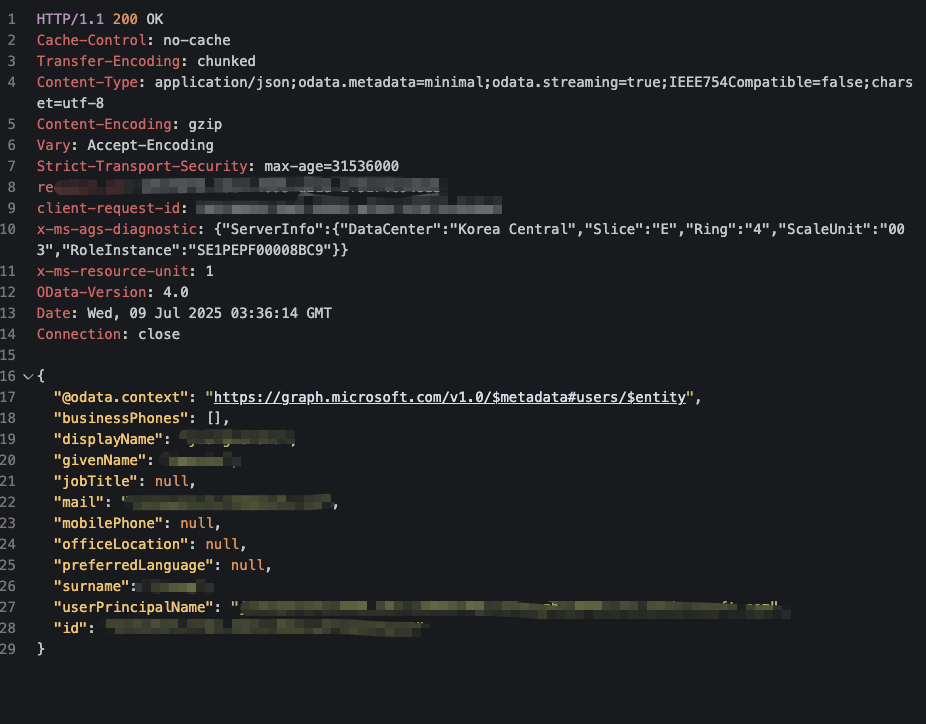
居然成功了





 扫一扫
扫一扫


 1697
1697

 被折叠的 条评论
为什么被折叠?
被折叠的 条评论
为什么被折叠?
 到【灌水乐园】发言





