


一、shushuJava 实例 foreach循环使用
foreach语句是java5的新特征之一,在遍历数组、集合方面,foreach为开发人员提供了极大的方便。
foreach 语法格式如下:
for(元素类型t 元素变量x : 遍历对象obj){
     引用了x的java语句;
}
以下实例演示了 for 和 foreach循环使用:
public class Main {
    public static void main(String[] args) {
        int[] intary = { 1,2,3,4};
        forDisplay(intary);
        foreachDisplay(intary);
    }
    public static void forDisplay(int[] a){
        System.out.println("使用 for 循环数组");
        for (int i = 0; i < a.length; i++) {
            System.out.print(a[i] + " ");
        }
        System.out.println();
    }
    public static void foreachDisplay(int[] data){
        System.out.println("使用 foreach 循环数组");
        for (int a  : data) {
            System.out.print(a+ " ");
        }
    }
}
以上代码运行输出结果为:
ArrayList: [1, 2, 3, 4]
更新 ArrayList: 10 20 30 40
二、JavaScript forEach() 方法
forEach() 方法用于调用数组的每个元素,并将元素传递给回调函数。
注意: forEach() 对于空数组是不会执行回调函数的。
<button onclick="numbers.forEach(myFunction)">点我</button>
<p id="demo"></p>

<script>
demoP = document.getElementById("demo");
var numbers = [4, 9, 16, 25];

function myFunction(item, index) {
    demoP.innerHTML = demoP.innerHTML + "index[" + index + "]: " + item + "<br>";
}
</script>
输出结果为 :
index[0]: 4
index[1]: 9
index[2]: 16
index[3]: 25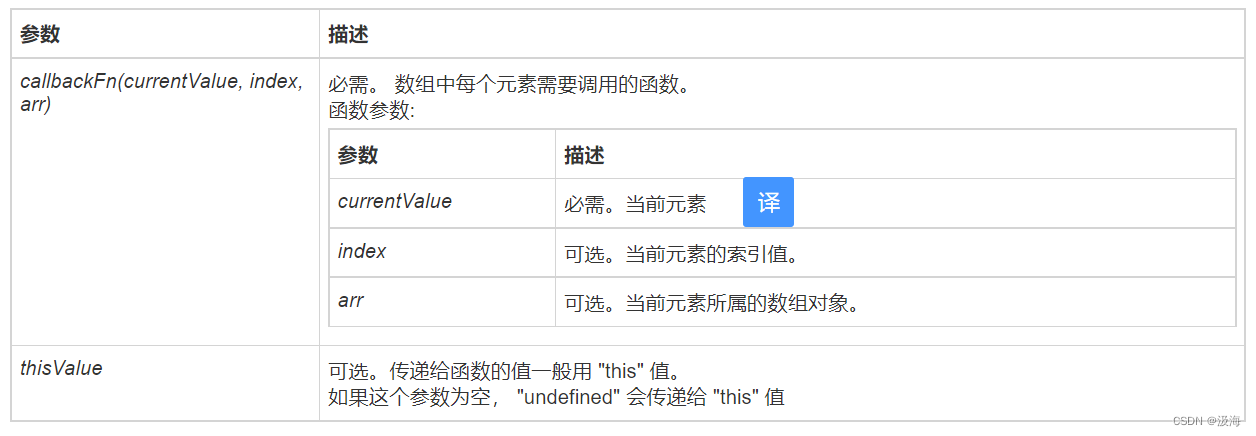
其他形式的语法格式:
// 箭头函数
forEach((element) => { /* … */ })
forEach((element, index) => { /* … */ })
forEach((element, index, array) => { /* … */ })

// 回调函数
forEach(callbackFn)
forEach(callbackFn, thisArg)

// 内联回调函数
forEach(function(element) { /* … */ })
forEach(function(element, index) { /* … */ })
forEach(function(element, index, array){ /* … */ })
forEach(function(element, index, array) { /* … */ }, thisArg)
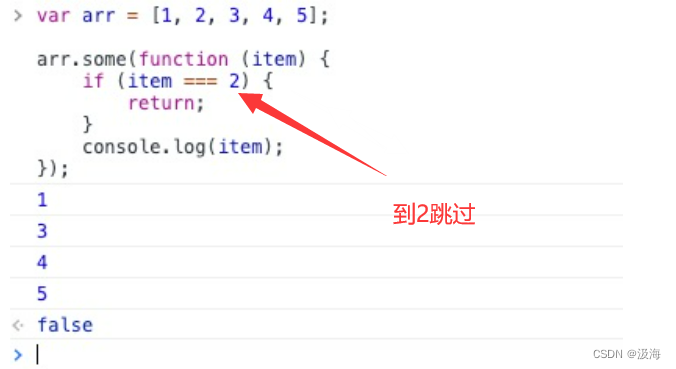
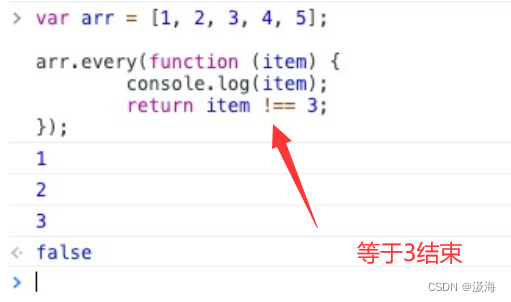
forEach() 本身是不支持的 continue 与 break 语句的,我们可以通过 some 和 every 来实现。
使用 return 语句实现 continue 关键字的效果:
1.continue:
var arr = [1, 2, 3, 4, 5];

arr.forEach(function (item) {
    if (item === 3) {
        return;
    }
    console.log(item);
});
var arr = [1, 2, 3, 4, 5];

arr.some(function (item) {
        if (item === 2) {
                return;  // 不能为 return false
        }
        console.log(item);
});
2.break:
var arr = [1, 2, 3, 4, 5];

arr.every(function (item) {
        console.log(item);
        return item !== 3;
}); 






 扫一扫
扫一扫


 1104
1104

 被折叠的 条评论
为什么被折叠?
被折叠的 条评论
为什么被折叠?
 到【灌水乐园】发言





