


 文章详细介绍了如何初始化一个Webpack项目,包括安装必要的依赖如webpack、webpack-cli、typescript、ts-loader等,创建package.json和tsconfig.json文件,配置webpack.config.js以处理TypeScript文件,并引入了babel-loader以支持旧浏览器,同时使用html-webpack-plugin生成HTML,webpack-dev-server启动开发服务器,以及clean-webpack-plugin清理打包目录。
生成package.json
npm init -y
开发依赖
cnpm i -D webpack webpack-cli typescript ts-loader
创建webpack.config.js
创建/src/index.ts
// 引入一个包
const path =require('path')

module.exports={
    // 指定程序的路口文件
    entey:"./src/index.ts",

    // 指定打包文件的目录
    output:{
         // 指定打包文件的目录
        path:path.resolve(__dirname,'dist'),
        // 打包后文件的文件名
        filename:"bundle.js"

    },
    // 指定webpack打包时要的模块
    module:{
        rules:[
          {
              // test指定规则生效的文件
              test:/\.ts$/,
              use:'ts-loader',
            //   要排除的文件
            exclude:/node_modules/
          }
        ]
    }

}
在根目录下创建tsconfig.json
{"compilerOptions": {
    "module": "ES2015",
    "target": "ES2015",
    "strict": true
}}
在pack.json中添加 “build”:“webpack”,作用是使用build命令来执行webpack
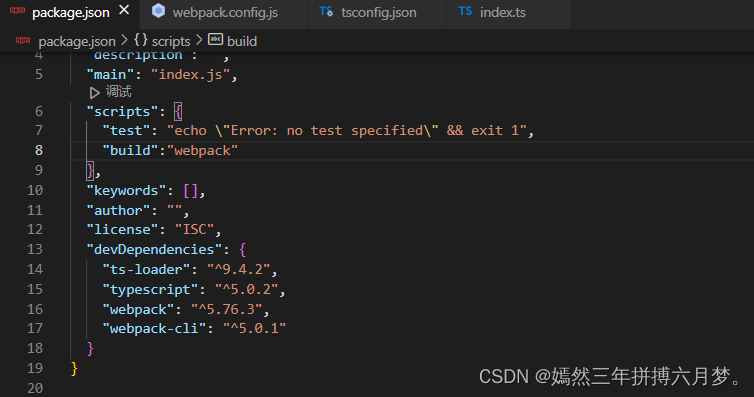
npm run build
下载自定义html
cnpm i -D html-webpack-plugin
下载webpack服务器
cnpm i -D webpack-dev-server
清除dist目录中的东西自动清除打包目录
cnpm i -D clean-webpack-plugin
总结
webpack.config.json
// 引入一个包
const path = require("path");
// 引入删除dist目录下的插件
const {CleanWebpackPlugin }=require("clean-webpack-plugin")
// 引入html 插件
const HtmlWebpackPlugin=require('html-webpack-plugin')
module.exports = {
    // 指定程序的路口文件
    entry: "./src/index.ts",
         // 指定打包文件的目录
         output: {
         // 指定打包文件的目录
         path: path.resolve(__dirname, "dist"),
              // 打包后文件的文件名
 filename: "bundle.js",
  // 不使用箭头函数
  environment: {
    arrowFunction: false
}

    },
    // 指定webpack打包时要的模块
    module: {
        rules: [
            {
              // test指定规则生效的文件
              test: /\.ts$/,
                use: [
                    // 配置babel
                    {
                      // 指定加载器
                      loader: "babel-loader",
                      // 设置babel
                      options: {
                          // 设置预定义的环境
                          presets: [
                              [
                                  // 指定环境的插件
                                  "@babel/preset-env",
                                  // 配置信息
                                  {
                                      // 要兼容的目标浏览器
                                      targets: {
                                          "chrome": "58",
                                          "ie": "11"
                                      },
                                      // 指定 corejs 的版本
                                      "corejs": "3",
                                      // 使用 corejs 的方法 usage:表示按需加载
                                      "useBuiltIns": "usage"
                                  }
                              ]
                          ]
                      }
                  }
                 , "ts-loader"
                ],
            //   要排除的文件
            exclude: /node_modules/
            }
        ]
    },
    plugins:[
      // 使用html插件
      new HtmlWebpackPlugin({
        // 自定义html模板
        template:'./src/index.html'
      }),
      new CleanWebpackPlugin()
    ],
  // 用来设置引用模块
  resolve:{
    // 告诉webpack以js/ts结尾的文件可以模块化引入
    extensions:['.ts','js']
  }

}
package.json
{
  "name": "tswebpack",
  "version": "1.0.0",
  "description": "",
  "main": "index.js",
  "scripts": {
    "test": "echo \"Error: no test specified\" && exit 1",
    "build": "webpack",
    "start": "webpack server --open chrome.exe"
  },
  "keywords": [],
  "author": "",
  "license": "ISC",
  "devDependencies": {
    "@babel/core": "^7.21.3",
    "@babel/preset-env": "^7.20.2",
    "babel-loader": "^9.1.2",
    "clean-webpack-plugin": "^4.0.0",
    "core-js": "^3.29.1",
    "html-webpack-plugin": "^5.5.0",
    "ts-loader": "^9.4.2",
    "typescript": "^5.0.2",
    "webpack": "^5.74.0",
    "webpack-cli": "^4.10.0",
    "webpack-dev-server": "^4.13.1"
  }
}
tsconfig.json
{"compilerOptions": {
    "module": "ES2015",
    "target": "ES2015",
    "strict": true
}}





 扫一扫
扫一扫


 1927
1927

 被折叠的 条评论
为什么被折叠?
被折叠的 条评论
为什么被折叠?
 到【灌水乐园】发言





