



效果图:::
视频链接:https://live.youkuaiyun.com/v/283424
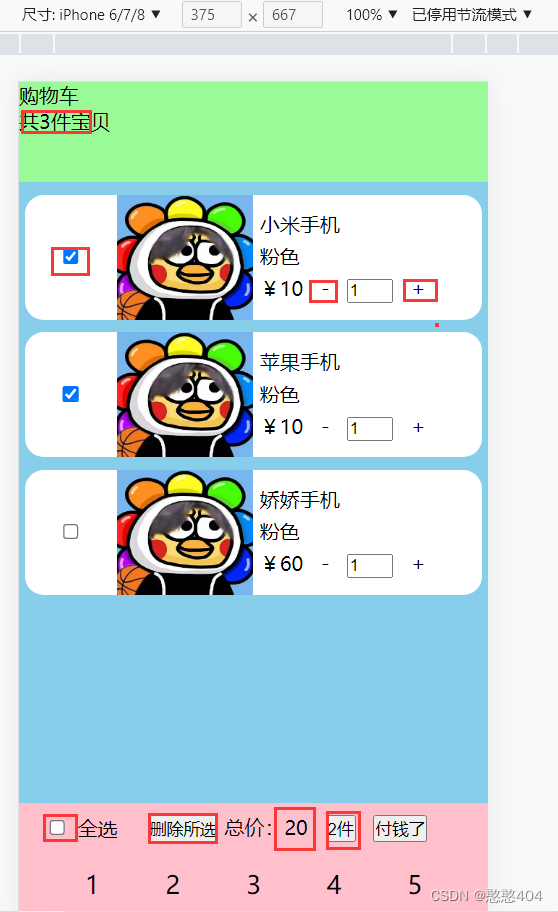
App.vue
<script>
// 1. 引入组件
import MyHeader from './components/MyHeader.vue'
import MyGoods from './components/MyGoods.vue'
import MyFooter from './components/MyFooter.vue'
// es6导出使用:写js时候都需要携带
export default {
  components: {
    MyHeader,
    MyGoods,
    MyFooter
  },
  data() {
    return {
      list: [
        { id: 1, img: 'https://inews.gtimg.com/newsapp_bt/0/9680744078/1000', title: '小米手机', num: 1, price: 10, isDone: true },
        { id: 2, img: 'https://inews.gtimg.com/newsapp_bt/0/9680744078/1000', title: '苹果手机', num: 1, price: 10, isDone: true },
        { id: 3, img: 'https://inews.gtimg.com/newsapp_bt/0/9680744078/1000', title: '娇娇手机', num: 1, price: 60, isDone: false }
      ]
    }
  },
  methods: {
    // 加加
    fuMethod(index) {
      // console.log(index);
      this.list[index].num++; // 单向数据流,你的list变化了,导致子组件中props自动更新
    },
    // 减减
    fuadd(index) {
      console.log(index);
      this.list[index].num--
    },
    // 单选
    isFuChange(ind) {
      // 取反状态赋值
      this.list[ind].isDone = !this.list[ind].isDone
    },

    // 全选
    inputHandle(e) {
      console.log(e);
      this.list.forEach(item => item.isDone = e);
    },
    // 删除所选商品
    dellist() {
      // 直接覆盖实现
      this.list = this.list.filter(item => item.isDone != true)
      // 删除id实现(7个可以改变原始数据的方法)
      // this.list.filter(item => item.isDone == true).forEach(item=>this.list.splice(item.id,1))
    }
  },
  computed: {
    // 总件数
    numsum() {
      return this.list.reduce((prev, item) => prev += item.num, 0)
    },
    // 总价
    summoney() {
      return this.list.filter(item => item.isDone == true).reduce((prev, item) => prev += item.num * item.price, 0)
    },
    // 选中总件数
    checknumSum() {
      return this.list.filter(item => item.isDone === true).reduce((prev, item) => prev += item.num, 0)
      // 选中类型条数(不用这个)
      // return this.list.filter(item => item.isDone == true).length
    },
    // 单选全选则全选,(反选)计算属性
    isDo() {
      return this.list.every(item => item.isDone == true)
    },
  }
}
</script>

<template>
  <!-- 使用组件 -->
  <header>
    <my-header :numsum="numsum"></my-header>
  </header>

  <main>
    <my-goods v-for="(item, index) in list" :key="item.id"
        :img="item.img"
        :title="item.title"
        :num="item.num"
        :price="item.price"
        :isDone="item.isDone"
        :index="index"
        @my-click="fuMethod"
        @mysub='fuadd'
        @ischange="isFuChange"
    ></my-goods>
  </main>

  <footer>
    <MyFooter
        :summoney="summoney"
        :nums="checknumSum"
        :isDo="isDo"
        @handle="inputHandle"
        @dellist="dellist"
    ></MyFooter>
  </footer>
</template>

<style scoped>
header {
  height: .8rem;
  background-color: palegreen;
}

footer {
  /* height: .8.1rem; */
  background-color: palegreen;
}

main {
  flex: 1;
  overflow: auto;
  background-color: skyblue;
}
</style>
MyGoods.vue
<script>
export default {
data() {
return {
}
},
props: ['img', 'title', 'num', 'price', 'check"','index', 'isDone' ],
emits:['myClick','mysub','ischange'],
methods: {
ziMethod() {
this.$emit('myClick', this.index)
},
// isZiChange() {
// this.$emit('ischange', this.index)
// },
}
}
</script>
<template>
<!-- 内容区域 -->
<div class="main">
<!-- 单选 -->
<input type="checkbox" :checked="isDone" @change="$emit('ischange',index)">
<!-- <input type="checkbox" v-model="ccc" @change="isZiChange"> -->
<img :src="img">
<div>
<p>{{ title }}</p>
<p>粉色</p>
<p>
¥<span>{{ price }}</span>
<span @click="$emit('mysub',index)"> - </span>
<input type="text" :value="num">
<span @click="ziMethod"> + </span>
</p>
</div>
</div>
</template>
<style scoped>
/* 内容区自适应其他不动 */
.main {
height: 100px;
margin: .1rem .05rem;
background-color: white;
display: flex;
align-items: center;
border-radius: 15px;
}
.main input {
width: 20%;
}
.main img {
display: block;
width: 30%;
height: 100%;
}
.main div {
width: 50%;
}
.main div p {
margin: .05rem;
width: 100%;
}
.main div p:nth-child(1) {
display: block;
overflow: hidden;
text-overflow: ellipsis;
/* 作为弹性伸缩盒子模型显示 */
display: -webkit-box;
/* 设置伸缩盒子的子元素排列方式--从上到下垂直排列 */
-webkit-box-orient: vertical;
/* 显示的行 */
-webkit-line-clamp: 2;
}
</style>
Myheader.vue
<script>
    export default{
        props:['numsum']
    }
</script>
<template>
    <header>
        <div>购物车</div>
        <div>共{{ numsum }}件宝贝</div>
    </header>
</template>
<style scoped>
/*  */
header {
    height: .44rem;
    background-color: rgb(226, 218, 219);
}
</style>
MyFooter.vue
<template>
<!-- 底部 -->
<ul class="footer">
<!-- 全选 -->
<!-- 实现1::: -->
<!-- v-on 中 $event.target.checked用于获取input状态 -->
<!-- <li><input type="checkbox" :checked="isDo" @change="$emit('handle', $event.target.checked)"> 全选</li> -->
<!-- 实现2 ,记得底下写isDo状态-->
<li><input type="checkbox" :checked="isDo" v-model="zhuangtai" @change="$emit('handle', zhuangtai)"> 全选</li>
<li>
<button @click="$emit('dellist')">删除所选</button>
总价:{{ summoney }}
<button>{{ nums }}件</button>
<button @click="money">付钱了</button>
</li>
<br>
</ul>
<div class="footer2 footer">
<span>1</span>
<span>2</span>
<span>3</span>
<span>4</span>
<span>5</span>
</div>
</template>
<script>
export default {
data() {
return {
zhuangtai:'',
}
},
props: ['summoney', 'nums', 'isDo',],
emits: ['handle','dellist' ],
methods: {
// childClick() {
// this.$emit('Handle', this.currentValue)
// }
money(){
alert(`一共${this.summoney}多少钱`)
}
}
}
</script>
<style scoped>
/* */
.footer {
height: .4rem;
background-color: pink;
display: flex;
justify-content: space-evenly;
align-items: center;
}
.bg {
background-color: aquamarine;
}
#reduce {
width: 100px;
height: 100px;
}
.footer2 {
height: 50px;
display: flex;
justify-content: space-evenly;
align-items: center;
font-size: 20px;
}
</style>





 扫一扫
扫一扫


 6541
6541

 被折叠的 条评论
为什么被折叠?
被折叠的 条评论
为什么被折叠?
 到【灌水乐园】发言





