





基础环境:
jdk 21,python3.11
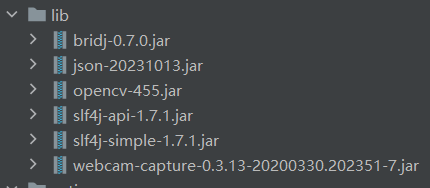
使用的jar包
models文件夹存放的是用于人脸识别的模型文件,facedata文件夹存放的是人脸注册后的个人面部信息文件,这些json文件也是被用于人脸登录
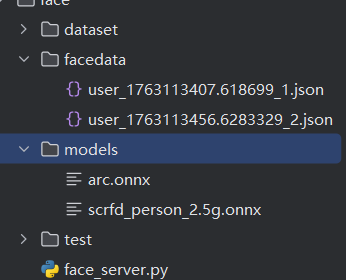
face_server
在我们的虚拟环境中使用
uvicorn face_server:app --host 0.0.0.0 --port 8000
命令即可启动python服务
# -*- coding: utf-8 -*-
import cv2
import base64
import numpy as np
import time
import onnxruntime as ort
from fastapi import FastAPI
from pydantic import BaseModel
import json
import os

FACE_DIR = "facedata"
os.makedirs(FACE_DIR, exist_ok=True)

app = FastAPI()


face_cascade = cv2.CascadeClassifier(
    cv2.data.haarcascades + "haarcascade_frontalface_default.xml"
)

# ArcFace 模型加载

arcface_session = ort.InferenceSession(
    "models/arc.onnx",
    providers=['CPUExecutionProvider']

)


def preprocess_face(img):
    img = cv2.resize(img, (112, 112))
    img = img[:, :, ::-1]  # BGR -> RGB
    img = np.transpose(img, (2, 0, 1))  # HWC -> CHW
    img = np.expand_dims(img, axis=0).astype(np.float32)
    img = (img - 127.5) / 128.0
    return img

def get_embedding(face_img):
    # face_img 原始 BGR → RGB
    img = cv2.cvtColor(face_img, cv2.COLOR_BGR2RGB)

    # resize 到 112×112(因为你的模型输入 shape 是 112,112,3)
    img = cv2.resize(img, (112, 112))

    # 转 float32
    img = img.astype(np.float32) / 255.0

    # 标准化(InsightFace ArcFace 默认预处理)
    img = (img - 0.5) / 0.5

    # NHWC → 扩 batch
    input_blob = np.expand_dims(img, axis=0)  # shape = (1,112,112,3)

    # 模型推理(输入名必须是 input_1)
    embedding = arcface_session.run(
        None, {"input_1": input_blob}
    )[0][0]  # 取 batch 的第 0 个

    return embedding


def cosine_similarity(a, b):
    """
    计算两个向量的余弦相似度
    返回值范围: [-1, 1]
    """
    try:
        a = np.array(a, dtype=np.float32)
        b = np.array(b, dtype=np.float32)

        # 确保向量维度相同
        if a.shape != b.shape:
            min_len = min(len(a), len(b))
            a = a[:min_len]
            b = b[:min_len]

        dot_product = np.dot(a, b)
        norm_a = np.linalg.norm(a)
        norm_b = np.linalg.norm(b)

        if norm_a == 0 or norm_b == 0:
            return 0.0

        similarity = dot_product / (norm_a * norm_b)

        # 确保结果在有效范围内(由于浮点误差可能略超出)
        similarity = np.clip(similarity, -1.0, 1.0)

        return float(similarity)

    except Exception as e:
        print(f"Cosine similarity calculation error: {e}")
        return 0.0

class ImageData(BaseModel):
    image_base64: str


@app.post("/detect_face")
def detect_face(data: ImageData):
    img_bytes = base64.b64decode(data.image_base64)
    img_array = np.frombuffer(img_bytes, dtype=np.uint8)
    img = cv2.imdecode(img_array, cv2.IMREAD_COLOR)

    if img is None:
        return {"success": False, "message": "no see image"}

    gray = cv2.cvtColor(img, cv2.COLOR_BGR2GRAY)
    faces = face_cascade.detectMultiScale(gray, scaleFactor=1.1, minNeighbors=5)

    return {"success": True, "face_detected": len(faces) > 0}


@app.post("/register")
def register(data: ImageData):
    img_bytes = base64.b64decode(data.image_base64)
    img_array = np.frombuffer(img_bytes, dtype=np.uint8)
    img = cv2.imdecode(img_array, cv2.IMREAD_COLOR)

    gray = cv2.cvtColor(img, cv2.COLOR_BGR2GRAY)
    faces = face_cascade.detectMultiScale(gray, 1.1, 5)

    if len(faces) == 0:
        return {
            "success": False,
            "message": "no see face"
        }

    (x, y, w, h) = faces[0]
    face_crop = img[y:y + h, x:x + w]

    emb = get_embedding(face_crop)
    emb_list = emb.tolist()

    # 保存 embedding 到 facedata/
    # 自动生成一个编号
    files = os.listdir(FACE_DIR)
    user_id = len(files) + 1
    n = time.time()


    filepath = os.path.join(FACE_DIR, f"user_{n}_{user_id}.json")

    with open(filepath, "w", encoding="utf-8") as f:
        json.dump({"id": user_id, "embedding": emb_list}, f)

    return {
        "success": True,
        "user_id": user_id,
        "file": filepath,
        "embedding": emb_list
    }
# 3. 人脸登录(Java 传两个 embedding 做比对)
class CompareData(BaseModel):
    emb1: list
    emb2: list

@app.post("/compare")
def compare(data: CompareData):
    emb1 = np.array(data.emb1)
    emb2 = np.array(data.emb2)
    sim = cosine_similarity(emb1, emb2)
    print(sim)

    return {
        "success": True,
        "similarity": sim,
        "match": sim > 0.4
    }

@app.post("/extract")
def extract_face(data: ImageData):
    img_bytes = base64.b64decode(data.image_base64)
    img_array = np.frombuffer(img_bytes, dtype=np.uint8)
    img = cv2.imdecode(img_array, cv2.IMREAD_COLOR)

    emb = get_embedding(img)
    if emb is None:
        return {"success": False, "message": "无法提取人脸 embedding"}

    return {
        "success": True,
        "embedding": emb.tolist(),
    }
Java 人脸注册代码
package UI;

import javax.swing.*;
import java.awt.*;
import java.io.*;
import java.net.HttpURLConnection;
import java.net.URL;
import java.util.Base64;

import com.github.sarxos.webcam.Webcam;
import com.github.sarxos.webcam.WebcamPanel;
import com.github.sarxos.webcam.WebcamResolution;
import org.json.JSONObject;

public class FaceRegisterFrame extends JFrame {

    private static Webcam webcam;

    public FaceRegisterFrame() {
        setTitle("人脸注册");
        setSize(800, 600);
        setDefaultCloseOperation(JFrame.EXIT_ON_CLOSE);
        setLocationRelativeTo(null);

        webcam = Webcam.getDefault();
        webcam.setViewSize(WebcamResolution.VGA.getSize());
        webcam.open();

        WebcamPanel panel = new WebcamPanel(webcam);
        panel.setFPSDisplayed(true);
        panel.setMirrored(true);

        add(panel, BorderLayout.CENTER);

        JButton btn = new JButton("拍照并注册");
        btn.addActionListener(e -> {
            try {
                handleFaceRegister();
            } catch (Exception ex) {
                ex.printStackTrace();
                JOptionPane.showMessageDialog(this, "注册失败:" + ex.getMessage());
            }
        });

        add(btn, BorderLayout.SOUTH);
    }

    private void handleFaceRegister() throws Exception {

        Image image = webcam.getImage();
        if (image == null) {
            JOptionPane.showMessageDialog(this, "无法获取摄像头图像");
            return;
        }

        ByteArrayOutputStream baos = new ByteArrayOutputStream();
        javax.imageio.ImageIO.write((java.awt.image.RenderedImage) image, "jpg", baos);
        String base64Image = Base64.getEncoder().encodeToString(baos.toByteArray());

        JSONObject json = new JSONObject();
        json.put("image_base64", base64Image);

        String response = sendPost("http://127.0.0.1:8000/register", json.toString());
        JSONObject res = new JSONObject(response);

        if (!res.getBoolean("success")) {
            JOptionPane.showMessageDialog(this, "注册失败:" + res.optString("message"));
            return;
        }

        JOptionPane.showMessageDialog(this, "人脸注册成功!");

        webcam.close();
        this.dispose();
        new LoginFrame().setVisible(true);
    }

    private String sendPost(String urlStr, String jsonData) throws Exception {
        URL url = new URL(urlStr);
        HttpURLConnection conn = (HttpURLConnection) url.openConnection();

        conn.setRequestMethod("POST");
        conn.setDoOutput(true);
        conn.setRequestProperty("Content-Type", "application/json");

        OutputStream os = conn.getOutputStream();
        os.write(jsonData.getBytes());
        os.flush();
        os.close();

        BufferedReader br = new BufferedReader(new InputStreamReader(conn.getInputStream()));
        StringBuilder response = new StringBuilder();
        String line;

        while ((line = br.readLine()) != null) {
            response.append(line);
        }

        br.close();
        return response.toString();
    }

    public static void startFaceRegisterUI() {
        SwingUtilities.invokeLater(() -> new FaceRegisterFrame().setVisible(true));
    }
}
人脸登录代码
package UI;

import javax.swing.*;
import java.awt.*;
import java.io.*;
import java.net.HttpURLConnection;
import java.net.URL;
import java.util.Base64;

import com.github.sarxos.webcam.Webcam;
import com.github.sarxos.webcam.WebcamPanel;
import com.github.sarxos.webcam.WebcamResolution;
import org.json.JSONObject;

public class FaceLoginFrame extends JFrame {

    private static Webcam webcam;

    public FaceLoginFrame() {
        setTitle("人脸登录");
        setSize(800, 600);
        setDefaultCloseOperation(JFrame.EXIT_ON_CLOSE);
        setLocationRelativeTo(null);

        webcam = Webcam.getDefault();
        webcam.setViewSize(WebcamResolution.VGA.getSize());
        webcam.open();

        WebcamPanel panel = new WebcamPanel(webcam);
        panel.setFPSDisplayed(true);
        panel.setMirrored(true);

        add(panel, BorderLayout.CENTER);

        JButton btn = new JButton("拍照并登录");
        btn.addActionListener(e -> {
            try {
                handleFaceLogin();
            } catch (Exception ex) {
                ex.printStackTrace();
                JOptionPane.showMessageDialog(this, "识别失败:" + ex.getMessage());
            }
        });

        add(btn, BorderLayout.SOUTH);
    }

    private void handleFaceLogin() throws Exception {

        // 拍照
        Image image = webcam.getImage();
        if (image == null) {
            JOptionPane.showMessageDialog(this, "无法获取摄像头图像");
            return;
        }

        // 转 JPEG → Base64
        ByteArrayOutputStream baos = new ByteArrayOutputStream();
        javax.imageio.ImageIO.write((java.awt.image.RenderedImage) image, "jpg", baos);
        String base64Image = Base64.getEncoder().encodeToString(baos.toByteArray());

        // 1. 拿到当前登录者 embedding
        JSONObject json = new JSONObject();
        json.put("image_base64", base64Image);

        String regRes = sendPost("http://127.0.0.1:8000/extract", json.toString());
        JSONObject regObj = new JSONObject(regRes);

        if (!regObj.getBoolean("success")) {
            JOptionPane.showMessageDialog(this, "无法识别人脸:" + regObj.optString("message"));
            return;
        }
        //查看返回的数据
        System.out.println(regObj);
        //{"success":true,"embedding":[-0.08035051077604294,0.080394446849823,0.03667460009455681,-0.287853866815567,0.0230522

        var loginEmbedding = regObj.getJSONArray("embedding");

        // 2. 从 facedata/ 目录读取所有用户 embedding
        File faceDir = new File("D:/pydemo/pythonProject/face/facedata");
        File[] files = faceDir.listFiles();

        if (files == null || files.length == 0) {
            JOptionPane.showMessageDialog(this, "系统中无注册用户!");
            return;
        }

        // 3. 遍历所有用户,向 Python /compare 比对
        for (File f : files) {
            String content = new String(java.nio.file.Files.readAllBytes(f.toPath()));
            JSONObject userJson = new JSONObject(content);
            var userEmbedding = userJson.getJSONArray("embedding");

            // 构造比对数据
            JSONObject compareData = new JSONObject();
            compareData.put("emb1", loginEmbedding);
            compareData.put("emb2", userEmbedding);

            String compareRes = sendPost("http://127.0.0.1:8000/compare", compareData.toString());
            JSONObject cmpObj = new JSONObject(compareRes);

            if (cmpObj.getBoolean("match")) {

                double sim = cmpObj.getDouble("similarity");

                JOptionPane.showMessageDialog(this,
                        "人脸登录成功!相似度:" + sim);

                webcam.close();
                this.dispose();
//                new LoginFrame().setVisible(true);
                new BookManagerSystemHome().setVisible(true);
                return;
            }
        }

        JOptionPane.showMessageDialog(this, "未找到匹配的人脸,登录失败!");
    }

    private String sendPost(String urlStr, String jsonData) throws Exception {

        URL url = new URL(urlStr);
        HttpURLConnection conn = (HttpURLConnection) url.openConnection();

        conn.setRequestMethod("POST");
        conn.setDoOutput(true);
        conn.setRequestProperty("Content-Type", "application/json");

        OutputStream os = conn.getOutputStream();
        os.write(jsonData.getBytes());
        os.flush();
        os.close();

        BufferedReader br = new BufferedReader(new InputStreamReader(conn.getInputStream()));
        StringBuilder response = new StringBuilder();
        String line;

        while ((line = br.readLine()) != null) {
            response.append(line);
        }

        br.close();
        return response.toString();
    }

    public static void startFaceLoginUI() {
        SwingUtilities.invokeLater(() -> new FaceLoginFrame().setVisible(true));
    }
}
该程序识别精度不高,仅供参考
免责声明
本文部分代码或内容由AI生成,仅供学习和参考用途。作者不对其准确性、完整性或适用性作任何保证。读者应自行验证代码的可行性,并在生产环境中谨慎使用。因使用本文内容而产生的任何风险或损失,作者概不负责。






 扫一扫
扫一扫


 4588
4588

 被折叠的 条评论
为什么被折叠?
被折叠的 条评论
为什么被折叠?
 到【灌水乐园】发言





