


源码介绍
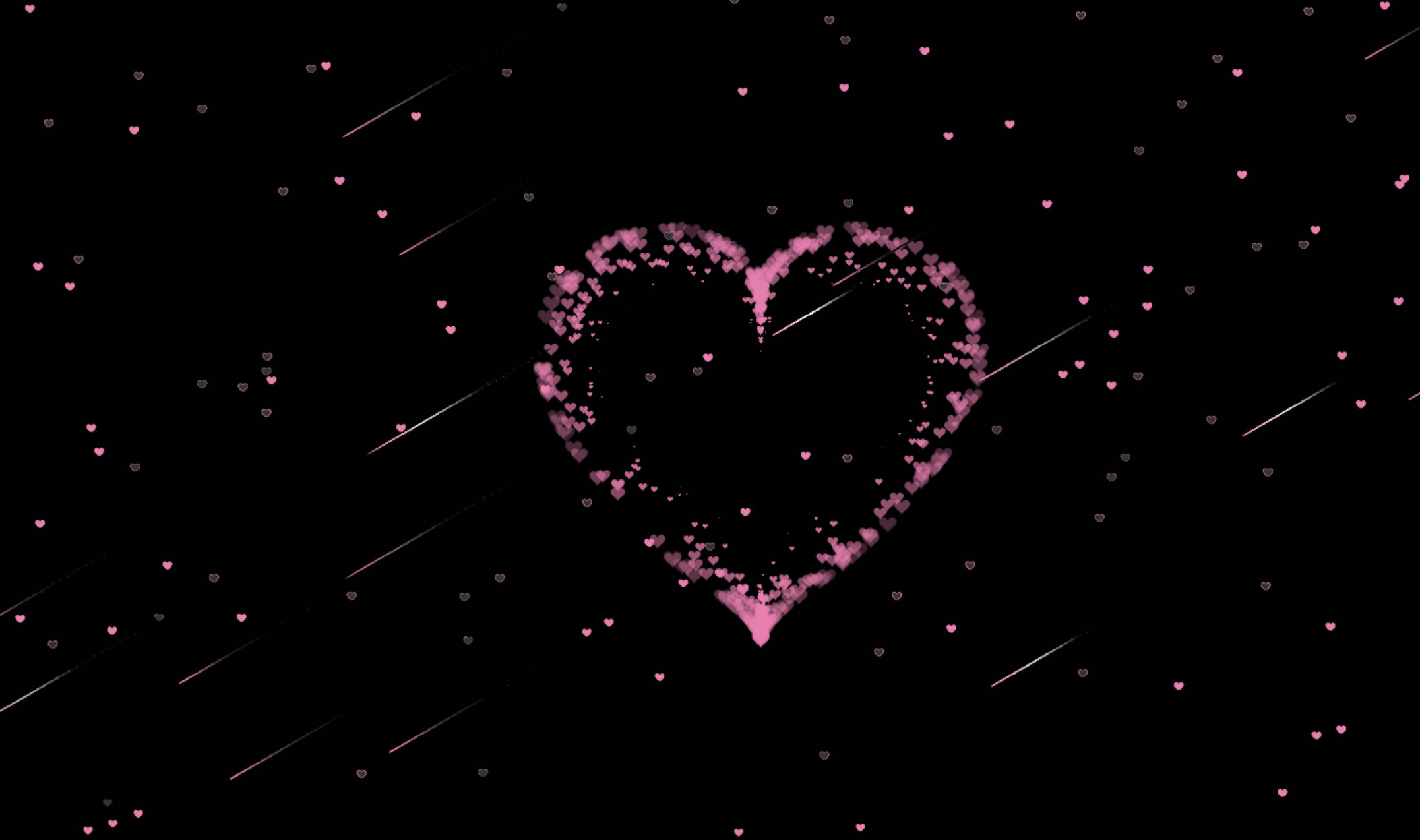
爱心流星雨背景_超好看
源码使用
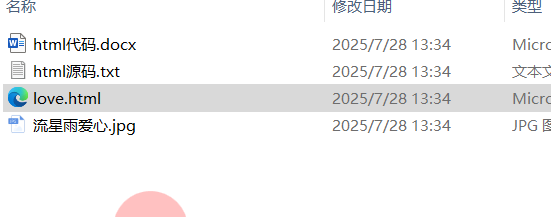
下载解压安装包,双击【love.html】
源码下载
源码展示
<!doctype html>
<html>
<head>
<meta charset="utf-8">
<title>爱心❤FJ</title>

<style >
html, body {
  height: 100%;
  padding: 0;
  margin: 0;
  background-color: black;
}
canvas {
  position: absolute;
  width: 100%;
  height: 100%;

}</style>
</head>
<body>
 <a href="https://mp.weixin.qq.com/s/oxLqXBcLCT8ij67DjkW2kw" style="position: fixed; top: 5%; right: 10px; width: 30px; height: 30px; z-index: 1000; background: #696969; border-radius: 50%; padding: 1.0px; text-align: center; color: #ddd; text-decoration: none; line-height: 30px; font-size: 11px;">制作</a>
<a href="https://pan.quark.cn/s/3344d23e48a8" style="position: fixed; top: 20%; right: 10px; width: 30px; height: 30px; z-index: 997; background: #696969; border-radius: 50%; padding: 1.0px; text-align: center; color: #ddd; text-decoration: none; line-height: 30px; font-size: 11px;">源码</a>
 <a href="https://drive.uc.cn/s/4819fdecb8a24" style="position: fixed; top: 15%; right: 10px; width: 30px; height: 30px; z-index: 998; background: #696969; border-radius: 50%; padding: 1.0px; text-align: center; color: #ddd; text-decoration: none; line-height: 30px; font-size: 11px;">代码</a>
 <a href="https://pan.xunlei.com/s/VNlDcB3ABz0oNSOEv5mpSE_tA1?pwd=97rw#" style="position: fixed; top: 10%; right: 10px; width: 30px; height: 30px; z-index: 999; background: #696969; border-radius: 50%; padding: 1.0px; text-align: center; color: #ddd; text-decoration: none; line-height: 30px; font-size: 11px;">合集</a>
<a href="https://shop1619956412.v.weidian.com/?userid=1619956412&spider_token=2720" style="position: fixed; top: 25%; right: 10px; width: 30px; height: 30px; z-index: 996; background: #696969; border-radius: 50%; padding: 1.0px; text-align: center; color: #ddd; text-decoration: none; line-height: 30px; font-size: 11px;">红包</a>


<canvas id="pinkboard"></canvas>
 <canvas id="stars"></canvas>
<script>
var context;

            var arr = new Array();
            var starCount = 800;

            var rains = new Array();
            var rainCount =20;

            //初始化画布及context
            function init(){
                //获取canvas
                var stars = document.getElementById("stars");
                windowWidth = window.innerWidth; //当前的窗口的高度
                stars.width=windowWidth;
                stars.height=window.innerHeight;
                //获取context
                context = stars.getContext("2d");
            }

            //创建一个星星对象
            var Star = function (){
                this.x = windowWidth * Math.random();//横坐标
                this.y = 5000 * Math.random();//纵坐标
                this.text="❤";//文本
                this.color  = "#ea80b0";//颜色

                //产生随机颜色
                this.getColor=function(){

                    var _r = Math.random();

                    if(_r<0.5){
                        this.color = "#333";
                    }else{
                        this.color = "#ea80b0";
                    }

                }

                //初始化
                this.init=function(){
                    this.getColor();
                }
                //绘制
                this.draw=function(){
                    context.fillStyle=this.color;
                    context.fillText(this.text,this.x,this.y);
                }

            }


            //页面加载的时候
            window.onload = function() {

                init();
                //画星星
                for (var i=0;i<starCount;i++) {
                    var star = new Star();
                    star.init();
                    star.draw();
                    arr.push(star);
                }

                //画流星
                for (var i=0;i<rainCount;i++) {
                    var rain = new MeteorRain();
                    rain.init();
                    rain.draw();
                    rains.push(rain);
                }

                playStars();//绘制闪动的星星
                playRains();//绘制流星


            }

             //星星闪起来
            function playStars(){
                for (var n = 0; n < starCount; n++){
                    arr[n].getColor();
                    arr[n].draw();
                }

                setTimeout("playStars()",100);
            }

  var MeteorRain = function(){
            this.x = -1;
            this.y = -1;
            this.length = -1;//长度
            this.angle = 30; //倾斜角度
            this.width = -1;//宽度
            this.height = -1;//高度
            this.speed = 1;//速度
            this.offset_x = -1;//横轴移动偏移量
            this.offset_y = -1;//纵轴移动偏移量
            this.alpha = 1; //透明度
            this.color1 = "#ea80b0";//流星的色彩
            this.color2 = "";  //流星的色彩

    this.init = function () //初始化
    {
        this.getPos();
        this.alpha = 1;//透明度
        this.getRandomColor();
        //最小长度,最大长度
        var x = Math.random() * 80 + 150;
        this.length = Math.ceil(x);
//                  x = Math.random()*10+30;
        this.angle = 30; //流星倾斜角
        x = Math.random()+0.5;
        this.speed = Math.ceil(x); //流星的速度
        var cos = Math.cos(this.angle*3.14/180);
        var sin = Math.sin(this.angle*3.14/180) ;
        this.width = this.length*cos ;  //流星所占宽度
        this.height = this.length*sin ;//流星所占高度
        this.offset_x = this.speed*cos ;
        this.offset_y = this.speed*sin;
    }


    this.getRandomColor = function (){
        var a = Math.ceil(255-240* Math.random());
        //中段颜色
        this.color1 = "rgba("+a+","+a+","+a+",1)";
        //结束颜色
        this.color2 = "black";
    }

    this.countPos = function ()//
    {
        //往左下移动,x减少,y增加
        this.x = this.x - this.offset_x;
        this.y = this.y + this.offset_y;
    }

    this.getPos = function () //
    {
        //横坐标200--1200

        this.x = Math.random() * window.innerWidth; //窗口高度
        //纵坐标小于600
        this.y = Math.random() * window.innerHeight;  //窗口宽度
    }
    this.draw = function () //绘制一个流星的函数
    {
        context.save();
        context.beginPath();
        context.lineWidth = 1; //宽度
        context.globalAlpha = this.alpha; //设置透明度
        //创建横向渐变颜色,起点坐标至终点坐标
        var line = context.createLinearGradient(this.x, this.y,
            this.x + this.width,
            this.y - this.height);


        //分段设置颜色
        line.addColorStop(0, "#ea80b0");
        line.addColorStop(0.3, this.color1);
        line.addColorStop(0.6, this.color2);
        context.strokeStyle = line;
        //起点
        context.moveTo(this.x, this.y);
        //终点
        context.lineTo(this.x + this.width, this.y - this.height);
        context.closePath();
        context.stroke();
        context.restore();
    }
    this.move = function(){
        //清空流星像素
        var x = this.x+this.width-this.offset_x;
        var y = this.y-this.height;
        context.clearRect(x-3,y-3,this.offset_x+5,this.offset_y+5);
//                  context.strokeStyle="red";
//                  context.strokeRect(x,y-1,this.offset_x+1,this.offset_y+1);
        //重新计算位置,往左下移动
        this.countPos();
        //透明度增加
        this.alpha -= 0.002;
        //重绘
        this.draw();
    }

}

//绘制流星
function playRains(){

    for (var n = 0; n < rainCount; n++){
        var rain = rains[n];
        rain.move();//移动
        if(rain.y>window.innerHeight){//超出界限后重来
            context.clearRect(rain.x,rain.y-rain.height,rain.width,rain.height);
            rains[n] = new MeteorRain();
            rains[n].init();
        }
    }
    setTimeout("playRains()",2);
}


/*
 * Settings
 */
var settings = {
  particles: {
    length:   500, // maximum amount of particles
    duration:   2, // particle duration in sec
    velocity: 100, // particle velocity in pixels/sec
    effect: -0.75, // play with this for a nice effect
    size:      20, // particle size in pixels
  },
};

/*
 * RequestAnimationFrame polyfill by Erik M?ller
 */
(function()
    {
        var b=0;
        var c=["ms","moz","webkit","o"];
        for(var a=0;a<c.length&&!window.requestAnimationFrame;++a)
            {window.requestAnimationFrame=window[c[a]+"RequestAnimationFrame"];window.cancelAnimationFrame=window[c[a]+"CancelAnimationFrame"]||window[c[a]+"CancelRequestAnimationFrame"]}
            if(!window.requestAnimationFrame)
                {window.requestAnimationFrame=function(h,e)
                    {var d=new Date().getTime();var f=Math.max(0,16-(d-b));var g=window.setTimeout(function(){h(d+f)},f);b=d+f;return g}}if(!window.cancelAnimationFrame){window.cancelAnimationFrame=function(d){clearTimeout(d)}}}());

/*
 * Point class
 */
var Point = (function() {
  function Point(x, y) {
    this.x = (typeof x !== 'undefined') ? x : 0;
    this.y = (typeof y !== 'undefined') ? y : 0;
  }
  Point.prototype.clone = function() {
    return new Point(this.x, this.y);
  };
  Point.prototype.length = function(length) {
    if (typeof length == 'undefined')
      return Math.sqrt(this.x * this.x + this.y * this.y);
    this.normalize();
    this.x *= length;
    this.y *= length;
    return this;
  };
  Point.prototype.normalize = function() {
    var length = this.length();
    this.x /= length;
    this.y /= length;
    return this;
  };
  return Point;
})();


/*
 * Particle class
 */
var Particle = (function() {
  function Particle() {
    this.position = new Point();
    this.velocity = new Point();
    this.acceleration = new Point();
    this.age = 0;
  }
  Particle.prototype.initialize = function(x, y, dx, dy) {
    this.position.x = x;
    this.position.y = y;
    this.velocity.x = dx;
    this.velocity.y = dy;
    this.acceleration.x = dx * settings.particles.effect;
    this.acceleration.y = dy * settings.particles.effect;
    this.age = 0;
  };
  Particle.prototype.update = function(deltaTime) {
    this.position.x += this.velocity.x * deltaTime;
    this.position.y += this.velocity.y * deltaTime;
    this.velocity.x += this.acceleration.x * deltaTime;
    this.velocity.y += this.acceleration.y * deltaTime;
    this.age += deltaTime;
  };
  Particle.prototype.draw = function(context, image) {
    function ease(t) {
      return (--t) * t * t + 1;
    }
    var size = image.width * ease(this.age / settings.particles.duration);
    context.globalAlpha = 1 - this.age / settings.particles.duration;
    context.drawImage(image, this.position.x - size / 2, this.position.y - size / 2, size, size);
  };
  return Particle;
})();

/*
 * ParticlePool class
 */
var ParticlePool = (function() {
  var particles,
      firstActive = 0,
      firstFree   = 0,
      duration    = settings.particles.duration;

  function ParticlePool(length) {
    // create and populate particle pool
    particles = new Array(length);
    for (var i = 0; i < particles.length; i++)
      particles[i] = new Particle();
  }
  ParticlePool.prototype.add = function(x, y, dx, dy) {
    particles[firstFree].initialize(x, y, dx, dy);

    // handle circular queue
    firstFree++;
    if (firstFree   == particles.length) firstFree   = 0;
    if (firstActive == firstFree       ) firstActive++;
    if (firstActive == particles.length) firstActive = 0;
  };
  ParticlePool.prototype.update = function(deltaTime) {
    var i;

    // update active particles
    if (firstActive < firstFree) {
      for (i = firstActive; i < firstFree; i++)
        particles[i].update(deltaTime);
    }
    if (firstFree < firstActive) {
      for (i = firstActive; i < particles.length; i++)
        particles[i].update(deltaTime);
      for (i = 0; i < firstFree; i++)
        particles[i].update(deltaTime);
    }

    // remove inactive particles
    while (particles[firstActive].age >= duration && firstActive != firstFree) {
      firstActive++;
      if (firstActive == particles.length) firstActive = 0;
    }


  };
  ParticlePool.prototype.draw = function(context, image) {
    // draw active particles
    if (firstActive < firstFree) {
      for (i = firstActive; i < firstFree; i++)
        particles[i].draw(context, image);
    }
    if (firstFree < firstActive) {
      for (i = firstActive; i < particles.length; i++)
        particles[i].draw(context, image);
      for (i = 0; i < firstFree; i++)
        particles[i].draw(context, image);
    }
  };
  return ParticlePool;
})();

/*
 * Putting it all together
 */
(function(canvas) {
  var context = canvas.getContext('2d'),
      particles = new ParticlePool(settings.particles.length),
      particleRate = settings.particles.length / settings.particles.duration, // particles/sec
      time;

  // get point on heart with -PI <= t <= PI
  function pointOnHeart(t) {
    return new Point(
      160 * Math.pow(Math.sin(t), 3),
      130 * Math.cos(t) - 50 * Math.cos(2 * t) - 20 * Math.cos(3 * t) - 10 * Math.cos(4 * t) + 25
    );
  }

  // creating the particle image using a dummy canvas
  var image = (function() {
    var canvas  = document.createElement('canvas'),
        context = canvas.getContext('2d');
    canvas.width  = settings.particles.size;
    canvas.height = settings.particles.size;
    // helper function to create the path
    function to(t) {
      var point = pointOnHeart(t);
      point.x = settings.particles.size / 2 + point.x * settings.particles.size / 350;
      point.y = settings.particles.size / 2 - point.y * settings.particles.size / 350;
      return point;
    }
    // create the path
    context.beginPath();
    var t = -Math.PI;
    var point = to(t);
    context.moveTo(point.x, point.y);
    while (t < Math.PI) {
      t += 0.01; // baby steps!
      point = to(t);
      context.lineTo(point.x, point.y);
    }
    context.closePath();
    // create the fill
    context.fillStyle = '#ea80b0';
    context.fill();
    // create the image
    var image = new Image();
    image.src = canvas.toDataURL();
    return image;
  })();

  // render that thing!
  function render() {
    // next animation frame
    requestAnimationFrame(render);

    // update time
    var newTime   = new Date().getTime() / 1000,
        deltaTime = newTime - (time || newTime);
    time = newTime;

    // clear canvas
    context.clearRect(0, 0, canvas.width, canvas.height);

    // create new particles
    var amount = particleRate * deltaTime;
    for (var i = 0; i < amount; i++) {
      var pos = pointOnHeart(Math.PI - 2 * Math.PI * Math.random());
      var dir = pos.clone().length(settings.particles.velocity);
      particles.add(canvas.width / 2 + pos.x, canvas.height / 2 - pos.y, dir.x, -dir.y);
    }

    // update and draw particles
    particles.update(deltaTime);
    particles.draw(context, image);
  }

  // handle (re-)sizing of the canvas
  function onResize() {
    canvas.width  = canvas.clientWidth;
    canvas.height = canvas.clientHeight;
  }
  window.onresize = onResize;

  // delay rendering bootstrap
  setTimeout(function() {
    onResize();
    render();
  }, 10);
})(document.getElementById('pinkboard'));

</script>

</body>
</html>






 扫一扫
扫一扫


 被折叠的 条评论
为什么被折叠?
被折叠的 条评论
为什么被折叠?
 到【灌水乐园】发言





