


一、Redux
Redux 的基本原理可以用一个简单的比喻来理解:
Redux 就像一个严格的“银行系统”,你的钱(State)不能随便改,必须按照固定流程(Action → Reducer → Store)来操作,确保每一步都可追踪。
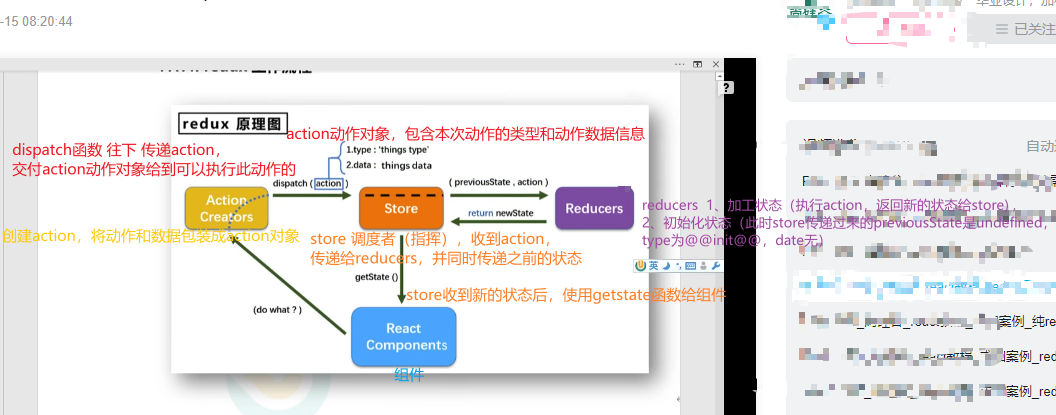
1. Redux 的三大核心原则
(1) 单一数据源(Single Source of Truth)
-
所有状态(State)存在一个全局 Store 里,而不是分散在各个组件。
-
比如:用户信息、购物车数据、主题设置都放在
store.getState()里。
(2) State 是只读的(State is Read-Only)
-
不能直接修改 State,必须通过
dispatch(action)来申请修改。 -
类似银行不能随便拿钱,必须填申请表(Action)。
(3) 修改必须用纯函数(Changes via Pure Reducers)
-
Reducer 是一个纯函数,接收旧 State 和 Action,返回新 State。
-
类似银行柜员(Reducer)按规则处理你的申请(Action),返回新余额(State)。
2. Redux 的核心概念
(1) Action(动作)
-
描述“发生了什么”,是一个普通的 JS 对象,必须包含
type字段。 -
例如:
{ type: "ADD_TODO", text: "Learn Redux" }  // 添加任务
{ type: "INCREMENT", amount: 1 }           // 计数器+1
(2) Reducer(处理器)
-
纯函数,接收当前 State 和 Action,返回新 State。
-
禁止直接修改 State,必须返回新对象(Immutable 原则)。
-
示例:
function counterReducer(state = 0, action) {
  switch (action.type) {
    case "INCREMENT":
      return state + 1;  // 返回新值,而不是修改 state
    case "DECREMENT":
      return state - 1;
    default:
      return state;     // 默认返回原 state
  }
}
(3) Store(仓库)
-
全局唯一,通过
createStore(reducer)创建。 -
核心方法:
-
store.getState()—— 获取当前 State。 -
store.dispatch(action)—— 触发 Action 修改 State。 -
store.subscribe(callback)—— 监听 State 变化(React-Redux 已封装,一般不用手动调)。
-
(4) Dispatch(派发)
-
唯一修改 State 的方式:
store.dispatch({ type: "INCREMENT" })。
3. Redux 的工作流程
[组件] --dispatch(action)--> [Reducer] --返回新State--> [Store] --通知--> [组件更新]
-
组件触发 Action(比如按钮点击
dispatch({ type: "INCREMENT" }))。 -
Reducer 处理 Action,生成新 State。
-
Store 更新 State,并通知所有订阅者(如 React 组件)。
-
组件通过 useSelector 获取新 State,重新渲染。
4. 为什么 Redux 要这样设计?
(1) 可预测性(Predictable)
-
所有 State 变化通过 Action 记录,可以回溯调试(如 Redux DevTools)。
(2) 易于维护
-
业务逻辑集中在 Reducer,而不是散落在各个组件。
(3) 适合协作
-
团队统一修改 State 的规范,避免直接修改造成混乱。
5. 简单代码示例(纯 Redux,无 React)
// 1. 定义 Reducer
function counterReducer(state = 0, action) {
  switch (action.type) {
    case "INCREMENT":
      return state + 1;
    case "DECREMENT":
      return state - 1;
    default:
      return state;
  }
}

// 2. 创建 Store
const { createStore } = require("redux");
const store = createStore(counterReducer);

// 3. 监听 State 变化
store.subscribe(() => {
  console.log("当前状态:", store.getState());
});

// 4. 触发 Action
store.dispatch({ type: "INCREMENT" }); // 输出: 当前状态: 1
store.dispatch({ type: "DECREMENT" }); // 输出: 当前状态: 0
6. Redux vs 直接修改 State
| 场景 | 直接修改 State(如 React useState) | Redux |
|---|---|---|
| 数据来源 | 组件内部状态 | 全局 Store |
| 修改方式 | 直接 setState(newValue) | dispatch(action) → Reducer 处理 |
| 适用场景 | 局部状态(如按钮禁用) | 全局状态(如用户登录、购物车) |
7. 总结
-
Redux 是一个严格的“状态管理银行”,修改数据必须走流程:
Action → Reducer → Store → 组件更新。 -
核心思想:
-
单一数据源(Store)。
-
只读 State + 通过 Action 修改。
-
Reducer 是纯函数,返回新 State。
-
-
React-Redux 只是帮 React 组件更方便地连接 Redux。
二、React-Redux
1. React-Redux 是什么?
React-Redux 是 Redux 的官方 React 绑定库,用于在 React 应用中更方便地管理 全局状态(State)。
-
Redux 本身是一个独立的状态管理库,但 React 组件不能直接访问 Redux Store。
-
React-Redux 提供了
Provider和useSelector/connect方法,让 React 组件可以 读取和修改 Redux 的状态。
简单理解:
-
Redux 是仓库(Store),存放所有数据。
-
React-Redux 是快递员(Provider + Hooks),帮 React 组件 取数据(useSelector) 和 改数据(useDispatch)。
2. 核心概念
(1) Provider(数据提供者)
-
用
<Provider store={store}>包裹整个 React 应用,这样所有子组件都能访问 Redux Store。
import { Provider } from "react-redux";
import store from "./store";

function App() {
  return (
    <Provider store={store}>
      <MyComponent />
    </Provider>
  );
}
(2) useSelector(取数据)
-
从 Redux Store 中 读取状态(类似
useState,但数据来自 Redux)。
import { useSelector } from "react-redux";

function Counter() {
  const count = useSelector((state) => state.counter); // 取出 counter 数据
  return <div>Count: {count}</div>;
}
(3) useDispatch(改数据)
-
用于 触发 Redux Action(修改数据)。
import { useDispatch } from "react-redux";
import { increment } from "./actions";

function Button() {
  const dispatch = useDispatch();
  return <button onClick={() => dispatch(increment())}>+1</button>;
}
3. 完整示例(计数器 App)
(1) Redux Store 定义
// store.js
import { createStore } from "redux";

// 初始状态
const initialState = { counter: 0 };

// Reducer(管理数据变化) action包含type、data
function counterReducer(state = initialState, action) {
  switch (action.type) {
    case "INCREMENT":
      return { counter: state.counter + 1 };
    case "DECREMENT":
      return { counter: state.counter - 1 };
    default:
      return state;
  }
}

// 创建 Store
const store = createStore(counterReducer);
export default store;
(2) React 组件
// Counter.jsx
import { useSelector, useDispatch } from "react-redux";

function Counter() {
  const count = useSelector((state) => state.counter);
  const dispatch = useDispatch();

  return (
    <div>
      <h1>Count: {count}</h1>
      <button onClick={() => dispatch({ type: "INCREMENT" })}>+1</button>
      <button onClick={() => dispatch({ type: "DECREMENT" })}>-1</button>
    </div>
  );
}

export default Counter;
(3) 入口文件
// App.jsx
import { Provider } from "react-redux";
import store from "./store";
import Counter from "./Counter";

function App() {
  return (
    <Provider store={store}>
      <Counter />
    </Provider>
  );
}

export default App;
4. 工作流程
-
组件触发 Action(如点击按钮
dispatch({ type: "INCREMENT" }))。 -
Reducer 处理 Action,返回新 State。
-
React-Redux 通知组件,
useSelector自动获取最新数据并重新渲染。
[组件] --dispatch(action)--> [Redux Store] --新state--> [组件更新]
5. 为什么用 React-Redux?
-
解决 Props 层层传递问题(不用一直
props往下传)。 -
全局状态共享(如用户登录信息、主题设置)。
-
数据变化自动更新 UI(Redux + React-Redux 自动管理渲染)。
6. 对比纯 Redux 和 React-Redux
| 功能 | 纯 Redux | React-Redux |
|---|---|---|
| 读取 State | store.getState() | useSelector(state => state.xxx) |
| 修改 State | store.dispatch(action) | useDispatch() + dispatch(action) |
| 监听变化 | store.subscribe(手动更新) | 自动监听,组件自动渲染 |
7. 总结
-
React-Redux = Redux + React 绑定工具(让 Redux 更好用在 React 中)。
-
核心三件套:
-
<Provider store>(提供数据) -
useSelector(取数据) -
useDispatch(改数据)
-
-
适用场景:全局状态管理(如用户登录态、购物车数据)。





 扫一扫
扫一扫


 574
574

 被折叠的 条评论
为什么被折叠?
被折叠的 条评论
为什么被折叠?
 到【灌水乐园】发言





