



 该文描述了如何创建Redis集群的文件目录结构,包括使用Bash脚本生成配置文件,并利用模板文件`redis-cluster.tmpl`定制配置。然后,它展示了如何用DockerCompose来启动和配置多个Redis服务,每个服务都有特定的端口映射和数据卷挂载,以实现集群和持久化。最后,`docker-compose.yml`文件定义了所有必要的服务及其依赖关系。
1.创建文件目录
#!/usr/bin/env bash
for port in `seq 6371 6376`; do \
  mkdir -p ${port}/conf \
  && PORT=${port} envsubst < redis-cluster.tmpl > ${port}/conf/redis.conf \
  && mkdir -p ${port}/data;\
done
sh文件增加可执行权限 chmod +x a.sh
文件结构
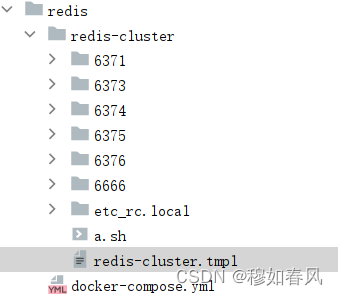
2.编写redis-cluster.tmpl
port 6379
requirepass 1234
masterauth 1234
protected-mode no
daemonize no
appendonly yes
cluster-enabled yes
cluster-config-file nodes.conf
cluster-node-timeout 15000
cluster-announce-ip 192.168.121.135
cluster-announce-port 6379
cluster-announce-bus-port 16379
注释
port 6379                             # 容器内端口
requirepass 1234                      # 密码
masterauth 1234                       # 认证密码
protected-mode no                     # 关闭保护模式
daemonize no                          # 开启后台模式
appendonly yes                        # 开启持久化
cluster-enabled yes                   # 开启集群模式
cluster-config-file nodes.conf        # 集群配置文件
cluster-node-timeout 15000            # 节点超时时间
cluster-announce-ip 192.168.121.135   # 主机IP地址
cluster-announce-port 6379            # 外部映射端口
cluster-announce-bus-port 16379       # 开启集群总线端口,值=cluster-announce-port +10000
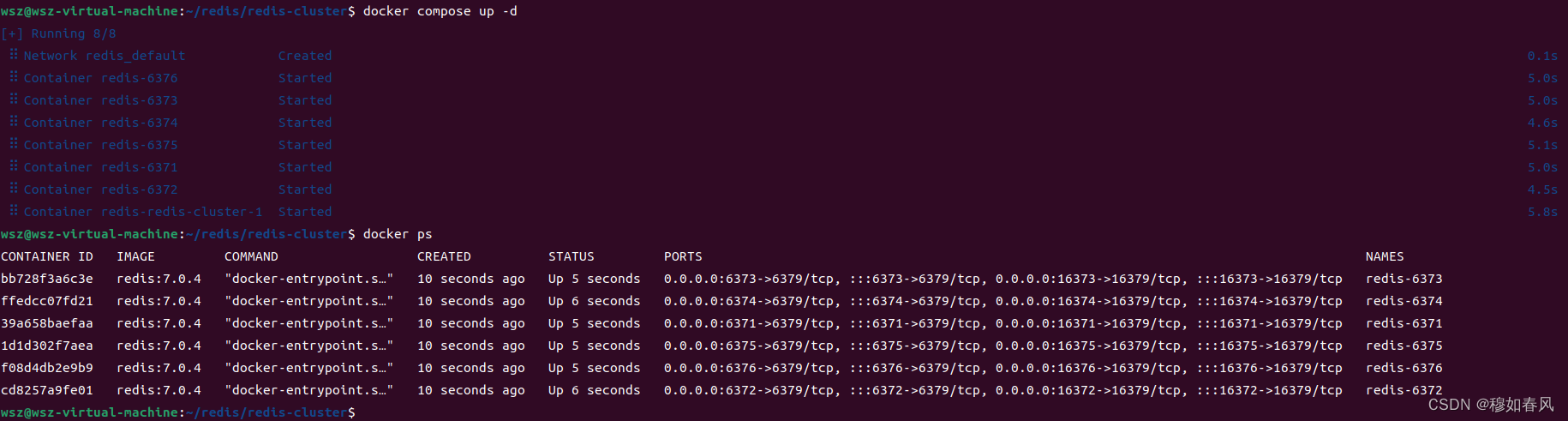
3.docker compose 文件撰写
# 描述 Compose 文件的版本信息
version: "3.8"

# 定义服务,可以多个
services:
  redis-cluster:
    image: redis:7.0.4
    command: redis-cli -a 1234  --cluster create 192.168.121.135:6371 192.168.121.135:6372 192.168.121.135:6373 192.168.121.135:6374 192.168.121.135:6375 192.168.121.135:6376 --cluster-replicas 1  --cluster-yes
    depends_on:
      - redis-6371
      - redis-6372
      - redis-6373
      - redis-6374
      - redis-6375
      - redis-6376
  redis-6371: # 服务名称
    image: redis:7.0.4 # 创建容器时所需的镜像
    container_name: redis-6371 # 容器名称
    restart: always # 容器总是重新启动
    ports:
      - 6371:6379
      - 16371:16379
    volumes: # 数据卷,目录挂载
      - ./redis-cluster/etc_rc.local:/etc/rc.local
      - ./redis-cluster/6371/conf/redis.conf:/etc/redis/redis.conf
      - ./redis-cluster/6371/data:/data
    command: redis-server /etc/redis/redis.conf # 覆盖容器启动后默认执行的命令

  redis-6372:
    image: redis:7.0.4
    container_name: redis-6372
    ports:
      - 6372:6379
      - 16372:16379
    volumes:
      - ./redis-cluster/etc_rc.local:/etc/rc.local
      - ./redis-cluster/6372/conf/redis.conf:/etc/redis/redis.conf
      - ./redis-cluster/6372/data:/data
    command: redis-server /etc/redis/redis.conf

  redis-6373:
    image: redis:7.0.4
    container_name: redis-6373
    ports:
      - 6373:6379
      - 16373:16379
    volumes:
      - ./redis-cluster/etc_rc.local:/etc/rc.local
      - ./redis-cluster/6373/conf/redis.conf:/etc/redis/redis.conf
      - ./redis-cluster/6373/data:/data
    command: redis-server /etc/redis/redis.conf

  redis-6374:
    image: redis:7.0.4
    container_name: redis-6374
    ports:
      - 6374:6379
      - 16374:16379
    volumes:
      - ./redis-cluster/etc_rc.local:/etc/rc.local
      - ./redis-cluster/6374/conf/redis.conf:/etc/redis/redis.conf
      - ./redis-cluster/6374/data:/data
    command: redis-server /etc/redis/redis.conf

  redis-6375:
    image: redis:7.0.4
    container_name: redis-6375
    ports:
      - 6375:6379
      - 16375:16379
    volumes:
      - ./redis-cluster/etc_rc.local:/etc/rc.local
      - ./redis-cluster/6375/conf/redis.conf:/etc/redis/redis.conf
      - ./redis-cluster/6375/data:/data
    command: redis-server /etc/redis/redis.conf

  redis-6376:
    image: redis:7.0.4
    container_name: redis-6376
    ports:
      - 6376:6379
      - 16376:16379
    volumes:
      - ./redis-cluster/etc_rc.local:/etc/rc.local
      - ./redis-cluster/6376/conf/redis.conf:/etc/redis/redis.conf
      - ./redis-cluster/6376/data:/data
    command: redis-server /etc/redis/redis.conf





 扫一扫
扫一扫


 2176
2176

 被折叠的 条评论
为什么被折叠?
被折叠的 条评论
为什么被折叠?
 到【灌水乐园】发言





