



 本文详细介绍了Java集合框架中的ArrayList、LinkedList、Vector、Stack、HashSet、LinkedHashSet和TreeSet等类的特性与使用方法,包括增删改查、遍历、排序和比较器。还探讨了泛型、迭代器和比较器在集合操作中的应用,以及内在的Comparable和Comparator接口的实现。此外,文章通过实例展示了如何在实际编程中安全有效地操作集合数据。
集合
含义
- 集合是Java API所提供的一系列类,可以用于动态存放多个对象 (集合只能存对象)
- 集合与数组的不同在于,集合是大小可变的序列,而且元素类型可以不受限定,但只能是引用类型。(集合中不能放基本数据类型,但可以放基本数据类型的包装类)
- 集合类全部支持泛型,是一种数据安全的用法。
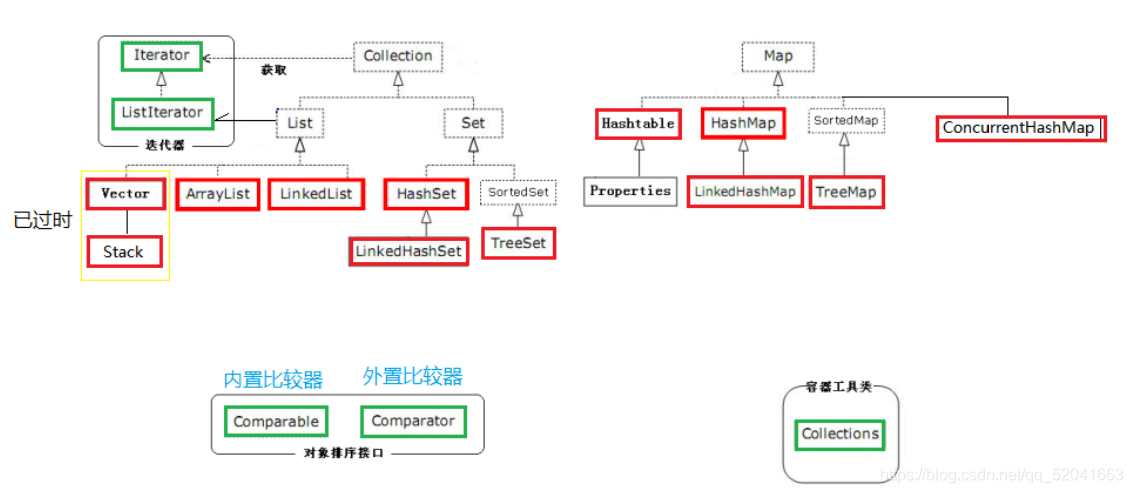
Collection接口
List接口
List中的方法在其实现类中的使用方法都相同
特点:有序且有重复(因为List接口中添加了许多针对下标操作的方法)
实现类:
- ArrayList
- LinkedList
- Vector
- Stack
ArrayList集合
public static void main(String[] args) {
    	/**
	* 知识点:使用ArrayList方法 + 泛型
	*
	* 泛型:数据安全的作法,规定集合应该存储什么样的数据类型
	*/

    ArrayList<String> list = new ArrayList<>();

    //添加元素
    list.add("张三");
    list.add("李四");
    list.add("王五");
    list.add("韩信");
    list.add("张良");

    //获取元素的个数
    int size = list.size();
    System.out.println("获取元素的个数:" + size);//5

    //设置指定下标上的元素
    list.set(1, "孙尚香");

    //获取指定下标上的元素
    String elment = list.get(1);
    System.out.println("获取指定下标上的元素:" + elment);//孙尚香

    //在指定下标上插入元素
    list.add(1, "黄忠");

    ArrayList<String> newList1 = new ArrayList<>();
    Collections.addAll(newList1, "aaa","bbb","ccc","xyz");//利用集合工具类进行批量添加
    list.addAll(newList1);//将新集合中所有的元素添加到指定集合的末尾

    ArrayList<String> newList2 = new ArrayList<>();
    Collections.addAll(newList2, "ddd","eee","fff");//利用集合工具类进行批量添加
    list.addAll(3, newList2);//将新集合中所有的元素添加到指定集合上指定下标的位置

    //清空集合中所有的元素
    //list.clear();

    System.out.println("判断集合中是否包含某个元素:" + list.contains("bbb"));//true

    ArrayList<String> newList3 = new ArrayList<>();
    Collections.addAll(newList3, "eee","ddd","fff","ggg");//利用集合工具类进行批量添加
    System.out.println("判断集合中是否包含某个集合中所有元素:" + list.containsAll(newList3));//false

    int index = list.indexOf("韩信");
    System.out.println("获取元素在集合中的下标:" + index);

    boolean empty = list.isEmpty();//有元素-false 没有元素-true
    System.out.println("判断集合中是否没有元素:" + empty);//false

    //删除
    list.remove(3);//依据下标删除元素
    list.remove("eee");//依据元素删除元素

    //删除 - 去交集
    ArrayList<String> newList4 = new ArrayList<>();
    Collections.addAll(newList4, "fff","aaa","bbb","xxx");//利用集合工具类进行批量添加
    list.removeAll(newList4);

    //保留交集
    ArrayList<String> newList5 = new ArrayList<>();
    Collections.addAll(newList5, "111","222","bbb","eee","ccc","yyy");//利用集合工具类进行批量添加
    list.retainAll(newList5);

    //替换指定下标上的元素
    list.set(2, "亚瑟");

    //获取开始下标(包含)到结束下标(不包含)的元素,返回新的集合
    List<String> subList = list.subList(1, 3);

    //将集合转换为数组
    Object[] array = subList.toArray();
    System.out.println(Arrays.toString(array));

    System.out.println("-------------");

    //遍历 - for
    for (int i = 0; i < list.size(); i++) {
        System.out.println(list.get(i));
    }

    System.out.println("-------------");

    //遍历 - foreach
    for (String element : list) {
        System.out.println(element);
    }

    System.out.println("-------------");

    //遍历 - Iterator迭代器
    Iterator<String> it = list.iterator();//获取Iterator迭代器对象
    while(it.hasNext()){//判断是否有可迭代的元素
        String e = it.next();//返回下一个元素
        System.out.println(e);
    }

    System.out.println("-------------");

    //遍历 - ListIterator迭代器
    ListIterator<String> listIterator = list.listIterator();//获取ListIterator迭代器对象
    while(listIterator.hasNext()){//判断是否有可迭代的元素
        String e = listIterator.next();//返回下一个元素
        System.out.println(e);
    }
}
LinkedList集合
调用方法和ArrayList相同,但LinkedList添加了队列模式和栈模式
public static void main(String[] args) {
    /**
	* 知识点:队列模式
	*
	* 特点:先进先出
	*/

    LinkedList<String> list = new LinkedList<>();
    list.add("aaa");
    list.add("bbb");
    list.add("ccc");
    list.add("ddd");

    //取出顺序与存入顺序相同
    while(!list.isEmpty()){
        String first = list.removeFirst();
        System.out.println(first);
    }
    System.out.println("数组中元素的个数为:" + list.size());//0

}
public static void main(String[] args) { /** * 知识点:LinkedList 栈模式 * * 特点:先进后出 */ LinkedList<String> list = new LinkedList<>(); list.add("1"); list.add("2"); list.add("3"); list.add("4"); list.add("5"); //取出顺序与存入顺序相反 while(!list.isEmpty()){ //删除最后一个元素,并返回 String element = list.removeLast(); System.out.println(element); } System.out.println("集合中元素的个数:" + list.size());//0 }
Vector集合
Vector调用实现List接口的方法,与上面集合中方法的使用相同,是线程安全的集合。
了解:Vector是元老级别的集合类,在JDK1.0开始。JDK1.2开始才推出集合框架的概念,考虑到当时很多程序员习惯使用Vector,就让Vector多实现了List接口,这样才将其保留下来
知识点:Vector老的方法
public static void main(String[] args) {
    /**
	* 知识点:Vector老的方法,功能和List中的方法一样
	*/
    Vector<String> v = new Vector<>();
    //添加
    v.addElement("张三");
    v.addElement("李四");
    v.addElement("王五");
    v.addElement("赵六");
    //删除
    v.removeElement("李四");
    //遍历
    Enumeration<String> elements = v.elements();
    while (elements.hasMoreElements()) {
        String string = (String) elements.nextElement();
        System.out.println(string);
    }
}
Stack集合
Vector的子类
public static void main(String[] args) {
    /**
	* 知识点:Stack
	* 特点:栈模式 - 先进后出
	*/

    Stack<String> stack = new Stack<>();

    //添加元素 - 将元素压入栈顶
    stack.push("1");
    stack.push("2");
    stack.push("3");
    stack.push("4");
    stack.push("5");

    System.out.println("距离栈顶的位置(从1开始):" + stack.search("2"));//4

    //取出顺序与存入顺序相反
    while(!stack.empty()){
        //获取栈顶第一个元素,并返回	因为不取出元素,所以是死循环
        //String element = stack.peek();

        //删除栈顶第一个元素,并返回
        String element = stack.pop();
        System.out.println(element);
    }

    System.out.println("栈里元素个数:" + stack.size());//0
}
Set接口
特点:无序且没有重复
实现类:
- HashSet(无序、无重复)
- LinkedHashSet(有序,无重复)
- TreeSet(可对集合中元素排序)
HashSet集合
HashSet方法的使用
public class HashSetTest {

	public static void main(String[] args) {
		/**
		 * 知识点:使用HashSet方法
		 *
		 * 特点:去重+无序
		 */

		HashSet<String> set = new HashSet<>();

		//添加元素
		set.add("黄忠");
		set.add("马超");
		set.add("张飞");
		set.add("关羽");
		set.add("张良");

		//获取元素的个数
		int size = set.size();
		System.out.println("获取元素的个数:" + size);//5

		HashSet<String> newSet1 = new HashSet<>();
		Collections.addAll(newSet1, "aaa","bbb","ccc","刘备");//利用集合工具类进行批量添加
		set.addAll(newSet1);//将新集合中所有的元素添加到指定集合的末尾

		//清空集合中所有的元素
		//set.clear();

		System.out.println("判断集合中是否包含某个元素:" + set.contains("张良"));//true

		HashSet<String> newSet2 = new HashSet<>();
		Collections.addAll(newSet2, "eee","ddd","fff","ggg");//利用集合工具类进行批量添加
		System.out.println("判断集合中是否包含某个集合中所有元素:" + set.containsAll(newSet2));//false

		boolean empty = set.isEmpty();//有元素-false 没有元素-true
		System.out.println("判断集合中是否没有元素:" + empty);//false

		//删除
		set.remove("张飞");//依据元素删除元素

		//删除 - 去交集
		HashSet<String> newSet3 = new HashSet<>();
		Collections.addAll(newSet3, "fff","aaa","bbb","xxx");//利用集合工具类进行批量添加
		set.removeAll(newSet3);

		//保留交集
		HashSet<String> newSet4 = new HashSet<>();
		Collections.addAll(newSet4, "周瑜","曹操","张良","诸葛亮","关羽","yyy");//利用集合工具类进行批量添加
		set.retainAll(newSet4);

		//将集合转换为数组
		Object[] array = set.toArray();
		System.out.println(Arrays.toString(array));

		System.out.println("-------------");

		//遍历 - foreach
		for (String element : set) {
			System.out.println(element);
		}

		System.out.println("-------------");

		//遍历 - Iterator迭代器
		Iterator<String> it = set.iterator();//获取Iterator迭代器对象
		while(it.hasNext()){//判断是否有可迭代的元素
			String e = it.next();//返回下一个元素
			System.out.println(e);
		}

	}
}
LinkedHashSet集合
特点:去重+有序 (输出的顺序与添加的顺序一致)
方法的使用与 HashSet 相同
TreeSet集合
自然排序
public static void main(String[] args) {
 	/**
		 * 知识点:TreeSet排序
   		 *
		 * 需求:创建两个TreeSet对象,分别存Integer、String
		 *
		 * TreeSet:自然排序(根据不同的类型,选择不同排序规则)
		 *
		 * TreeSet存Integer:数字排序
		 * TreeSet存String:字典排序
		 */

    TreeSet<Integer> set1 = new TreeSet<>();
    set1.add(5);//Integer.valueOf(5);自动装箱
    set1.add(1);//Integer.valueOf(1);
    set1.add(4);//Integer.valueOf(4);
    set1.add(2);//Integer.valueOf(2);
    set1.add(6);//Integer.valueOf(6);
    set1.add(3);//Integer.valueOf(3);
    set1.add(3);//Integer.valueOf(3);
    for (Integer integer : set1) {
        System.out.println(integer);
    }
    System.out.println("-----");

    TreeSet<String> set2 = new TreeSet<>();
    set2.add("c");
    set2.add("d");
    set2.add("a");
    set2.add("b");
    for (String string : set2) {
        System.out.println(string);
    }
}
Comparable - 内置比较器
实体类:继承Comparable接口,重写 compareTo方法
public class Student implements Comparable<Student>{

	private String name;
	private char sex;
	private int age;
	private String classId;
	private String id;

	public Student() {
	}

	public Student(String classId, String id) {
		this.classId = classId;
		this.id = id;
	}

	public Student(String name, char sex, int age, String classId, String id) {
		this.name = name;
		this.sex = sex;
		this.age = age;
		this.classId = classId;
		this.id = id;
	}

	public String getName() {
		return name;
	}

	public void setName(String name) {
		this.name = name;
	}

	public char getSex() {
		return sex;
	}

	public void setSex(char sex) {
		this.sex = sex;
	}

	public int getAge() {
		return age;
		}

	public void setAge(int age) {
		this.age = age;
	}

		public String getClassId() {
		return classId;
	}

	public void setClassId(String classId) {
		this.classId = classId;
	}

	public String getId() {
		return id;
	}

	public void setId(String id) {
		this.id = id;
	}

	@Override
	public boolean equals(Object obj) {
		if(this == obj){
			return true;
		}
		if(obj instanceof Student){
			Student stu = (Student) obj;
			if(this.classId.equals(stu.classId) && this.id.equals(stu.id)){
				return true;
			}
		}
		return false;
	}

	@Override
	public String toString() {
		return name + "\t" + sex + "\t" + age + "\t" + classId + "\t" + id;
	}

	//比较规则
	//需求:按照年龄排序
	@Override
	public int compareTo(Student o) {
		return this.age - o.age;//升序
	}
}
测试类
public static void main(String[] args) {
    /**
	* 需求:创建TreeSet对象,存储Student
	*
	* Comparable - 内置比较器
	*/

    TreeSet<Student> set = new TreeSet<>();

	    set.add(new Student("aa", '男', 26, "2107", "001"));
    set.add(new Student("bb", '女', 31, "2107", "002"));
    set.add(new Student("cc", '男', 29, "2107", "003"));
    set.add(new Student("dd", '女', 26, "2107", "004"));
    set.add(new Student("ee", '男', 33, "2107", "005"));
    set.add(new Student("aaa", '男', 29, "2107", "006"));
    set.add(new Student("bbb", '女', 34, "2107", "007"));
    set.add(new Student("ccc", '男', 26, "2107", "008"));
    set.add(new Student("aaaa", '男', 29, "2107", "009"));
    set.add(new Student("bbbb", '女', 25, "2108", "001"));
    set.add(new Student("cccc", '男', 27, "2108", "002"));
    set.add(new Student("dddd", '女', 24, "2108", "003"));
    set.add(new Student("eeee", '男', 24, "2108", "004"));
    set.add(new Student("ffff", '女', 29, "2108", "005"));
    set.add(new Student("hhhh", '男', 29, "2108", "006"));

    for (Student stu : set) {
        System.out.println(stu);
    }
}
Comparator - 外置比较器
创建匿名内部类实现Comparator接口,重写compare方法
public static void main(String[] args) {
       /**
	* 需求:创建TreeSet对象,存储Student,按照名字长度排序,长度一致按照年龄排序
	*
	* Comparator - 外置比较器
	*/

    TreeSet<Student> set = new TreeSet<>(new Comparator<Student>() {

        @Override
        public int compare(Student o1, Student o2) {
            if(o1.equals(o2)){
                return 0;
            }
            if(o1.getName().length() != o2.getName().length()){
                return o1.getName().length() - o2.getName().length();
            }
            if(o1.getAge() != o2.getAge()){
                return o1.getAge() - o2.getAge();
            }
            return 1;
        }
    });

    set.add(new Student("aa", '男', 26, "2107", "001"));
    set.add(new Student("bb", '女', 31, "2107", "002"));
    set.add(new Student("cccc", '男', 27, "2108", "002"));
    set.add(new Student("dddd", '女', 24, "2108", "003"));
    set.add(new Student("eeee", '男', 24, "2108", "004"));
    set.add(new Student("cc", '男', 29, "2107", "003"));
    set.add(new Student("aaa", '男', 29, "2107", "006"));
    set.add(new Student("bbb", '女', 34, "2107", "007"));
    set.add(new Student("dd", '女', 26, "2107", "004"));
    set.add(new Student("ccc", '男', 26, "2107", "008"));
    set.add(new Student("aaaa", '男', 29, "2107", "009"));
   set.add(new Student("bbbb", '女', 25, "2108", "001"));
 	set.add(new Student("ee", '男', 33, "2107", "005"));
   set.add(new Student("ffff", '女', 29, "2108", "005"));
    set.add(new Student("hhhh", '男', 29, "2108", "006"));

    for (Student stu : set) {
        System.out.println(stu);
	    }
}
泛型
含义:数据安全的做法
泛型限定:
? 表示什么类型都可以
? extends A 表示元素必须是A类或A的子类
? super A 表示元素必须是A类或A的父类
迭代器
含义:遍历集合中的元素
分类:Iterator 和 ListIterator
Iterator 和 ListIterator 区别
- Iterator :Collection接口下所有的实现类都可以获取的迭代器,可以在遍历时删除元素: iterator.remove();
- ListIterator :List接口下所有的实现类可以获取的迭代器,可以在遍历时删除、替换、添加元素,也可以指定下标开始遍历,还可以倒序遍历
public static void main(String[] args) {

    ArrayList<String> list = new ArrayList<>();
	//向ArrayList 中添加元素("aaa","bbb","ccc","ddd")
    list.add("aaa");
    list.add("bbb");
    list.add("ccc");
    list.add("ddd");

    //遍历到bbb时,替换该元素
    ListIterator<String> it = list.listIterator();
    while (it.hasNext()) {
        String next = it.next();
        if (next.equals("bbb")) {
            it.set("xxx");
        }
    }

    //遍历到bbb时,添加元素
    ListIterator<String> it = list.listIterator();
    while (it.hasNext()) {
        String next = it.next();
        if (next.equals("bbb")) {
            it.add("xyz");
        }
    }

    //从bbb开始遍历(指定下标开始遍历)
    ListIterator<String> it = list.listIterator(1);
    while (it.hasNext()) {
        String next = it.next();
        System.out.println(next);
    }

    //倒序输出
    ListIterator<String> it = list.listIterator(list.size());
    while (it.hasPrevious()) {
        String previous = it.previous();
        System.out.println(previous);
    }
}
比较器接口
作用:排序时使用
分类:
内置比较器:Comparable - compareTo()
外置比较器:Comparator - compare()
使用场景:
内置比较器:对象要想存入TreeSet、TreeMap中,对象所属的类必须要实现内置比较器,重写 compareTo 方法
外置比较器:当内置比较的规则不满足现在的需求,但又不能改动内置比较器规则时,实现Comparator 接口,重写 compare 方法
优先级别:外置比较器 > 内置比较器





 扫一扫
扫一扫


 2590
2590

 被折叠的 条评论
为什么被折叠?
被折叠的 条评论
为什么被折叠?
 到【灌水乐园】发言





