this.form = Object.assign({}, row)中使用el-checkbox遇到的坑

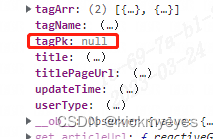
在Vue应用中遇到渲染错误,由于使用`Object.assign`拷贝对象时,`form`的`tagPk`属性变为`null`。在`doEdit`方法中,从服务端获取标签数据后,需要确保`tagPk`重新赋值为数组以避免问题。更新`tagArr`后,需将`tagPk`重置为数组形式,以保持组件正确绑定。

Error in render: "TypeError: Cannot read properties of null (reading 'length…
原因 使用 this.form = Object.assign({}, row)进行拷贝的时候,form已经不是初始化定义的form了,
赋值成null,需要重新赋值回数组行式

在这里插入图片描述

<el-checkbox-group v-model="form.tagPk">
	<el-checkbox v-for="(item,index) in form.tagArr" :key="index" :label="item.pk">{{ item.xxx }}</el-checkbox>
</el-checkbox-group>

return{
	form: {
          tagPk: [],
          tagArr: [],
      },
}

doEdit(row){
  this.form = Object.assign({}, row)
  console.log(this.form)
  label().then(res => {
    this.form.tagArr = res.data.labelList
    //此处需要将属性重新赋值成数组行式,因为拷贝导致属性变成了null
    this.form.tagPk = []
    console.log(this.form)
  }).catch(err => {
    console.log(err);
  })
  this.editPushArticle = true;
},
<template> <div class="app-container"> <el-form :model="queryParams" ref="queryForm" size="small" :inline="true" v-show="showSearch" label-width="68px"> <el-form-item label="编号" prop="number"> <el-input v-model="queryParams.number" placeholder="请输入编号" clearable @keyup.enter.native="handleQuery" /> </el-form-item> <el-form-item label="名称" prop="name"> <el-input v-model="queryParams.name" placeholder="请输入名称" clearable @keyup.enter.native="handleQuery" /> </el-form-item> <el-form-item label="状态" prop="status"> <el-select v-model="queryParams.status" placeholder="请选择状态" clearable> <el-option v-for="dict in dict.type.mdm_common_status_list" :key="dict.value" :label="dict.label" :value="dict.value" /> </el-select> </el-form-item> <el-form-item> <el-button type="primary" icon="el-icon-search" size="mini" @click="handleQuery">搜索</el-button> <el-button icon="el-icon-refresh" size="mini" @click="resetQuery">重置</el-button> </el-form-item> </el-form> <el-row :gutter="10" class="mb8"> <el-col :span="1.5"> <el-button type="primary" plain icon="el-icon-plus" size="mini" @click="handleAdd" v-hasPermi="['mdm:mdmMaterialType:add']" >新增</el-button> </el-col> <el-col :span="1.5"> <el-button type="info" plain icon="el-icon-upload2" size="mini" @click="handleImport" v-hasPermi="['mdm:mdmMaterialType:import']" >导入</el-button> </el-col> <el-col :span="1.5"> <el-button type="warning" plain icon="el-icon-download" size="mini" @click="handleExport" v-hasPermi="['mdm:mdmMaterialType:export']" >导出</el-button> </el-col> <el-col :span="1.5"> <el-button type="info" plain icon="el-icon-sort" size="mini" @click="toggleExpandAll" >展开/折叠</el-button> </el-col> <right-toolbar :showSearch.sync="showSearch" @queryTable="getList"></right-toolbar> </el-row> <el-table v-if="refreshTable" v-loading="loading" :data="mdmMaterialTypeList" row-key="id" :default-expand-all="isExpandAll" :tree-props="{children: 'children', hasChildren: 'hasChildren'}" > <el-table-column label="名称" align="left" prop="name" /> <el-table-column label="编号" prop="number" /> <!-- <el-table-column label="父ID" align="center" prop="parentId" />--> <el-table-column label="状态" align="center" prop="status"> <template slot-scope="scope"> <dict-tag :options="dict.type.mdm_common_status_list" :value="scope.row.status"/> </template> </el-table-column> <el-table-column label="创建时间" align="center" prop="createTime" /> <!-- <el-table-column label="图标" align="center" prop="icon" />--> <!-- <el-table-column label="命名规则" align="center" prop="namingrule" />--> <el-table-column label="操作" align="center" class-name="small-padding fixed-width"> <template slot-scope="scope"> <el-button size="mini" type="text" icon="el-icon-edit" @click="handleUpdate(scope.row)" v-hasPermi="['mdm:mdmMaterialType:edit']" >修改</el-button> <el-button size="mini" type="text" icon="el-icon-plus" @click="handleAdd(scope.row)" v-hasPermi="['mdm:mdmMaterialType:add']" >新增</el-button> <el-button size="mini" type="text" icon="el-icon-delete" @click="handleDelete(scope.row)" v-hasPermi="['mdm:mdmMaterialType:remove']" >删除</el-button> </template> </el-table-column> </el-table> <!-- 添加或修改物料类型对话框 --> <el-dialog :title="title" :visible.sync="open" width="500px" append-to-body> <el-form ref="form" :model="form" :rules="rules" label-width="80px"> <el-form-item label="名称" prop="name"> <el-input v-model="form.name" placeholder="请输入名称" /> </el-form-item> <el-form-item label="编号" prop="number"> <el-input v-model="form.number" placeholder="请输入编号" /> </el-form-item> <el-form-item label="父ID" prop="parentId"> <treeselect v-model="form.parentId" :options="mdmMaterialTypeOptions" :normalizer="normalizer" placeholder="请选择父ID" /> </el-form-item> <el-form-item label="图标" prop="icon"> <el-input v-model="form.icon" placeholder="请输入图标" /> </el-form-item> <el-form-item label="命名规则" prop="namingrule"> <el-input v-model="form.namingrule" placeholder="请输入命名规则" /> </el-form-item> <el-form-item label="状态" prop="status"> <el-radio-group v-model="form.status"> <el-radio v-for="dict in dict.type.mdm_common_status_list" :key="dict.value" :label="dict.value" >{{dict.label}}</el-radio> </el-radio-group> </el-form-item> </el-form> <div slot="footer" class="dialog-footer"> <el-button type="primary" @click="submitForm">确 定</el-button> <el-button @click="cancel">取 消</el-button> </div> </el-dialog> <!-- 用户导入对话框 --> <el-dialog :title="upload.title" :visible.sync="upload.open" width="400px" append-to-body> <el-upload ref="upload" :limit="1" accept=".xlsx, .xls" :headers="upload.headers" :action="upload.url + '?updateSupport=' + upload.updateSupport" :disabled="upload.isUploading" :on-progress="handleFileUploadProgress" :on-success="handleFileSuccess" :auto-upload="false" drag > <i class="el-icon-upload"></i> <div class="el-upload__text">将文件拖到此处,或点击上传</div> <div class="el-upload__tip text-center" slot="tip"> <div class="el-upload__tip" slot="tip"> <el-checkbox v-model="upload.updateSupport" /> 是否更新已经存在的用户数据 </div> <span>仅允许导入xls、xlsx格式文件。</span> <el-link type="primary" :underline="false" style="font-size:12px;vertical-align: baseline;" @click="importTemplate">下载模板</el-link> </div> </el-upload> <div slot="footer" class="dialog-footer"> <el-button type="primary" @click="submitFileForm">确 定</el-button> <el-button @click="upload.open = false">取 消</el-button> </div> </el-dialog> </div> </template> <script> import { listMdmMaterialType, getMdmMaterialType, delMdmMaterialType, addMdmMaterialType, updateMdmMaterialType } from "@/api/mdm/mdmMaterialType"; import Treeselect from "@riophae/vue-treeselect"; import "@riophae/vue-treeselect/dist/vue-treeselect.css"; import { getToken } from "@/utils/auth"; export default { name: "MdmMaterialType", dicts: ['mdm_common_status_list'], components: { Treeselect }, data() { return { // 遮罩层 loading: true, // 显示搜索条件 showSearch: true, // 物料类型表格数据 mdmMaterialTypeList: [], // 物料类型树选项 mdmMaterialTypeOptions: [], // 弹出层标题 title: "", // 是否显示弹出层 open: false, // 是否展开,默认全部展开 isExpandAll: true, // 重新渲染表格状态 refreshTable: true, // 查询参数 queryParams: { number: null, name: null, parentId: null, status: null, icon: null, namingrule: null }, // 表单参数 form: {}, // 表单校验 rules: { number: [ { required: true, message: "编号不能为空", trigger: "blur" } ], parentId: [ { required: true, message: "父ID不能为空", trigger: "blur" } ], }, // 导入参数 upload: { // 是否显示弹出层(导入) open: false, // 弹出层标题(导入) title: "", // 是否禁用上传 isUploading: false, // 是否更新已经存在的用户数据 updateSupport: 0, // 设置上传的请求头部 headers: { Authorization: "Bearer " + getToken() }, // 上传的地址 url: process.env.VUE_APP_BASE_API + "/mdm/mdmMaterialType/importData" }, }; }, created() { this.getList(); }, methods: { /** 查询物料类型列表 */ getList() { this.loading = true; listMdmMaterialType(this.queryParams).then(response => { this.mdmMaterialTypeList = this.handleTree(response.data, "id", "parentId"); this.loading = false; }); }, /** 转换物料类型数据结构 */ normalizer(node) { if (node.children && !node.children.length) { delete node.children; } return { id: node.id, label: node.name, children: node.children }; }, /** 查询物料类型下拉树结构 */ getTreeselect() { listMdmMaterialType().then(response => { this.mdmMaterialTypeOptions = []; const data = { id: 0 ,name: '顶级节点', children: [] }; data.children = this.handleTree(response.data, "id", "parentId"); this.mdmMaterialTypeOptions.push(data); }); }, // 取消按钮 cancel() { this.open = false; this.reset(); }, // 表单重置 reset() { this.form = { id: null, number: null, name: null, parentId: null, status: null, createBy: null, createTime: null, updateBy: null, updateTime: null, icon: null, namingrule: null }; this.resetForm("form"); }, /** 搜索按钮操作 */ handleQuery() { this.getList(); }, /** 重置按钮操作 */ resetQuery() { this.resetForm("queryForm"); this.handleQuery(); }, /** 新增按钮操作 */ handleAdd(row) { this.reset(); this.getTreeselect(); if (row != null && row.id) { this.form.parentId = row.id; } else { this.form.parentId = 0; } this.open = true; this.title = "添加物料类型"; }, /** 展开/折叠操作 */ toggleExpandAll() { this.refreshTable = false; this.isExpandAll = !this.isExpandAll; this.$nextTick(() => { this.refreshTable = true; }); }, /** 修改按钮操作 */ handleUpdate(row) { this.reset(); this.getTreeselect(); if (row != null) { this.form.parentId = row.parentId; } getMdmMaterialType(row.id).then(response => { this.form = response.data; this.open = true; this.title = "修改物料类型"; }); }, /** 提交按钮 */ submitForm() { this.$refs["form"].validate(valid => { if (valid) { if (this.form.id != null) { updateMdmMaterialType(this.form).then(response => { this.$modal.msgSuccess("修改成功"); this.open = false; this.getList(); }); } else { addMdmMaterialType(this.form).then(response => { this.$modal.msgSuccess("新增成功"); this.open = false; this.getList(); }); } } }); }, /** 删除按钮操作 */ handleDelete(row) { this.$modal.confirm('是否确认删除物料类型编号为"' + row.id + '"的数据项?').then(function() { return delMdmMaterialType(row.id); }).then(() => { this.getList(); this.$modal.msgSuccess("删除成功"); }).catch(() => {}); }, /** 导出按钮操作 */ handleExport() { this.download('mdm/mdmMaterialType/export', { ...this.queryParams }, `material_type_${new Date().getTime()}.xlsx`) }, /** 导入按钮操作 */ handleImport() { this.upload.title = "导入物料类型"; this.upload.open = true; }, /** 下载模板操作 */ importTemplate() { this.download('mdm/mdmMaterialType/importTemplate', { }, `materialtype_template_${new Date().getTime()}.xlsx`) }, // 文件上传中处理 handleFileUploadProgress(event, file, fileList) { this.upload.isUploading = true; }, // 文件上传成功处理 handleFileSuccess(response, file, fileList) { this.upload.open = false; this.upload.isUploading = false; this.$refs.upload.clearFiles(); this.$alert("<div style='overflow: auto;overflow-x: hidden;max-height: 70vh;padding: 10px 20px 0;'>" + response.msg + "</div>", "导入结果", { dangerouslyUseHTMLString: true }); this.getList(); }, // 提交上传文件 submitFileForm() { this.$refs.upload.submit(); } } }; </script> 上面学习的语法 和代码格式 ,把这块点从迁移vue2 到 vue3
07-08
<template> <div class="app-container"> <el-table :data="rolesList" style="width: 100%; margin-top: 30px" border> <el-table-column align="center" label="收费学段" width="220"> <template slot-scope="scope"> {{ scope.row.sfxd }} </template> </el-table-column> <el-table-column align="center" label="学校" width="220"> <template slot-scope="scope"> {{ scope.row.xx }} </template> </el-table-column> <el-table-column align="center" label="类型" width="220"> <template slot-scope="scope"> {{ scope.row.lx }} </template> </el-table-column> <el-table-column align="center" label="项目名称" width="220"> <template slot-scope="scope"> {{ scope.row.xmmc }} </template> </el-table-column> <el-table-column align="center" label="项目状态" width="220"> <template slot-scope="scope"> {{ scope.row.xmzt }} </template> </el-table-column> <el-table-column align="center" label="金额(元/人)" width="220"> <template slot-scope="scope"> {{ scope.row.je }} </template> </el-table-column> <el-table-column align="center" label="状态" width="220"> <template slot-scope="scope"> {{ scope.row.zt }} </template> </el-table-column> <el-table-column align="center" label="开始时间" width="220"> <template slot-scope="scope"> {{ scope.row.kssj }} </template> </el-table-column> </el-table> <el-dialog :visible.sync="dialogVisible" :title="dialogType === 'edit' ? 'Edit Role' : 'New Role'" > <el-form :model="role" label-width="80px" label-position="left"> <el-form-item label="Name"> <el-input v-model="role.name" placeholder="Role Name" /> </el-form-item> <el-form-item label="Desc"> <el-input v-model="role.description" :autosize="{ minRows: 2, maxRows: 4 }" type="textarea" placeholder="Role Description" /> </el-form-item> <el-form-item label="Menus"> <el-tree ref="tree" :check-strictly="checkStrictly" :data="routesData" :props="defaultProps" show-checkbox node-key="path" class="permission-tree" /> </el-form-item> </el-form> <div style="text-align: right"> <el-button type="danger" @click="dialogVisible = false"> {{ $t("permission.cancel") }} </el-button> <el-button type="primary" @click="confirmRole"> {{ $t("permission.confirm") }} </el-button> </div> </el-dialog> </div> </template> <script> import path from "path"; import { deepClone } from "@/utils"; import { getRoutes, getRoles, addRole, deleteRole, updateRole, } from "@/api/role"; import i18n from "@/lang"; const defaultRole = { key: "", name: "", description: "", routes: [], }; export default { data() { return { role: Object.assign({}, defaultRole), routes: [], rolesList: [ { sfxd: "小学", xx: "中兴小学", lx: "基础", xmmc: "餐费", xmzt: "进行中", je: "20", zt: "启用", kssj: "2025-01-01", }, { sfxd: "小学", xx: "实验小学", lx: "基础", xmmc: "书本费", xmzt: "进行中", je: "360", zt: "启用", kssj: "2025-01-01", }, ], dialogVisible: false, dialogType: "new", checkStrictly: false, defaultProps: { children: "children", label: "title", }, }; }, computed: { routesData() { return this.routes; }, }, created() { // Mock: get all routes and roles list from server // this.getRoutes(); // this.getRoles(); }, methods: { async getRoutes() { const res = await getRoutes(); this.serviceRoutes = res.data; const routes = this.generateRoutes(res.data); this.routes = this.i18n(routes); }, async getRoles() { const res = await getRoles(); this.rolesList = res.data; }, i18n(routes) { const app = routes.map((route) => { route.title = i18n.t(`route.${route.title}`); if (route.children) { route.children = this.i18n(route.children); } return route; }); return app; }, // Reshape the routes structure so that it looks the same as the sidebar generateRoutes(routes, basePath = "/") { const res = []; for (let route of routes) { // skip some route if (route.hidden) { continue; } const onlyOneShowingChild = this.onlyOneShowingChild( route.children, route ); if (route.children && onlyOneShowingChild && !route.alwaysShow) { route = onlyOneShowingChild; } const data = { path: path.resolve(basePath, route.path), title: route.meta && route.meta.title, }; // recursive child routes if (route.children) { data.children = this.generateRoutes(route.children, data.path); } res.push(data); } return res; }, generateArr(routes) { let data = []; routes.forEach((route) => { data.push(route); if (route.children) { const temp = this.generateArr(route.children); if (temp.length > 0) { data = [...data, ...temp]; } } }); return data; }, handleAddRole() { this.role = Object.assign({}, defaultRole); if (this.$refs.tree) { this.$refs.tree.setCheckedNodes([]); } this.dialogType = "new"; this.dialogVisible = true; }, handleEdit(scope) { this.dialogType = "edit"; this.dialogVisible = true; this.checkStrictly = true; this.role = deepClone(scope.row); this.$nextTick(() => { const routes = this.generateRoutes(this.role.routes); this.$refs.tree.setCheckedNodes(this.generateArr(routes)); // set checked state of a node not affects its father and child nodes this.checkStrictly = false; }); }, handleDelete({ $index, row }) { this.$confirm("Confirm to remove the role?", "Warning", { confirmButtonText: "Confirm", cancelButtonText: "Cancel", type: "warning", }) .then(async () => { await deleteRole(row.key); this.rolesList.splice($index, 1); this.$message({ type: "success", message: "Delete succed!", }); }) .catch((err) => { console.error(err); }); }, generateTree(routes, basePath = "/", checkedKeys) { const res = []; for (const route of routes) { const routePath = path.resolve(basePath, route.path); // recursive child routes if (route.children) { route.children = this.generateTree( route.children, routePath, checkedKeys ); } if ( checkedKeys.includes(routePath) || (route.children && route.children.length >= 1) ) { res.push(route); } } return res; }, async confirmRole() { const isEdit = this.dialogType === "edit"; const checkedKeys = this.$refs.tree.getCheckedKeys(); this.role.routes = this.generateTree( deepClone(this.serviceRoutes), "/", checkedKeys ); if (isEdit) { await updateRole(this.role.key, this.role); for (let index = 0; index < this.rolesList.length; index++) { if (this.rolesList[index].key === this.role.key) { this.rolesList.splice(index, 1, Object.assign({}, this.role)); break; } } } else { const { data } = await addRole(this.role); this.role.key = data.key; this.rolesList.push(this.role); } const { description, key, name } = this.role; this.dialogVisible = false; this.$notify({ title: "Success", dangerouslyUseHTMLString: true, message: ` <div>Role Key: ${key}</div> <div>Role Name: ${name}</div> <div>Description: ${description}</div> `, type: "success", }); }, // reference: src/view/layout/components/Sidebar/SidebarItem.vue onlyOneShowingChild(children = [], parent) { let onlyOneChild = null; const showingChildren = children.filter((item) => !item.hidden); // When there is only one child route, the child route is displayed by default if (showingChildren.length === 1) { onlyOneChild = showingChildren[0]; onlyOneChild.path = path.resolve(parent.path, onlyOneChild.path); return onlyOneChild; } // Show parent if there are no child route to display if (showingChildren.length === 0) { onlyOneChild = { ...parent, path: "", noShowingChildren: true }; return onlyOneChild; } return false; }, }, }; </script> <style lang="scss" scoped> .app-container { .roles-table { margin-top: 30px; } .permission-tree { margin-bottom: 30px; } } </style> 这套代码也是一样 按照去前面的样式结构 加入搜索和分页功能
08-24
<template> <div class="app-container"> <!--物料类型数据 --> <el-row :gutter="20"> <el-col :span="4" :xs="24"> <div class="head-container"> <el-input v-model="materiaTypelName" placeholder="请输入物料类型名称" clearable size="small" prefix-icon="el-icon-search" style="margin-bottom: 20px" /> </div> <div class="head-container"> <el-tree :data="typeOptions" :props="defaultProps" :expand-on-click-node="false" :filter-node-method="filterNode" ref="tree" default-expand-all highlight-current @node-click="handleNodeClick" /> </div> </el-col> <el-col :span="20" :xs="24"> <el-form :model="queryParams" ref="queryForm" size="small" :inline="true" v-show="showSearch" label-width="68px"> <el-form-item label="编号" prop="number"> <el-input v-model="queryParams.number" placeholder="请输入编号" clearable @keyup.enter.native="handleQuery" /> </el-form-item> <el-form-item label="名称" prop="name"> <el-input v-model="queryParams.name" placeholder="请输入名称" clearable @keyup.enter.native="handleQuery" /> </el-form-item> <el-form-item label="状态" prop="status"> <el-select v-model="queryParams.status" placeholder="请选择状态" clearable> <el-option v-for="dict in dict.type.mdm_common_status_list" :key="dict.value" :label="dict.label" :value="dict.value" /> </el-select> </el-form-item> <el-form-item> <el-button type="primary" icon="el-icon-search" size="mini" @click="handleQuery">搜索</el-button> <el-button icon="el-icon-refresh" size="mini" @click="resetQuery">重置</el-button> </el-form-item> </el-form> <el-row :gutter="10" class="mb8"> <el-col :span="1.5"> <el-button type="primary" plain icon="el-icon-plus" size="mini" @click="handleAdd" v-hasPermi="['mdm:typeAttr:add']" >新增 </el-button> </el-col> <el-col :span="1.5"> <el-button type="success" plain icon="el-icon-edit" size="mini" :disabled="single" @click="handleUpdate" v-hasPermi="['mdm:typeAttr:edit']" >修改 </el-button> </el-col> <el-col :span="1.5"> <el-button type="danger" plain icon="el-icon-delete" size="mini" :disabled="multiple" @click="handleDelete" v-hasPermi="['mdm:typeAttr:remove']" >删除 </el-button> </el-col> <el-col :span="1.5"> <el-button type="warning" plain icon="el-icon-download" size="mini" @click="handleExport" v-hasPermi="['mdm:typeAttr:export']" >导出 </el-button> </el-col> <el-col :span="1.5"> <el-button type="info" plain icon="el-icon-upload2" size="mini" @click="handleImport" v-hasPermi="['mdm:typeAttr:import']" >导入</el-button> </el-col> <el-col :span="1.5"> <el-button type="warning" plain icon="el-icon-download" size="mini" @click="handleUrlUpdate" v-hasPermi="['mdm:mdmMaterialType:edit']" >编辑命名规则 </el-button> </el-col> <right-toolbar :showSearch.sync="showSearch" @queryTable="getList"></right-toolbar> </el-row> <el-table v-loading="loading" :data="typeAttrList" @selection-change="handleSelectionChange"> <el-table-column type="selection" width="45" align="center" fixed/> <el-table-column label="编号" align="center" prop="number"/> <el-table-column label="名称" align="center" prop="name"/> <el-table-column label="类型名称" align="center" prop="typemgrName" width="140"/> <el-table-column label="类型编号" align="center" prop="typemgrNum" width="140"/> <el-table-column label="字段类型" align="center" prop="dataType"> <template slot-scope="scope"> <dict-tag :options="dict.type.mdm_common_column_type" :value="scope.row.dataType"/> </template> </el-table-column> <el-table-column label="文本最大长度" align="center" prop="length" width="120"/> <el-table-column label="数值最大值" align="center" prop="maxVal" width="120"/> <el-table-column label="数值最小值" align="center" prop="minVal" width="120"/> <el-table-column label="默认值" align="center" prop="defaultVal"/> <!-- <el-table-column label="合法值列表" align="center" prop="validList" width="120"/>--> <el-table-column label="枚举ID" align="center" prop="enumerateId"/> <el-table-column label="枚举表" align="center" prop="enumerateTable"/> <el-table-column label="单位" align="center" prop="unit"/> <el-table-column label="是否必填" align="center" prop="isNull"> <template slot-scope="scope"> <dict-tag :options="dict.type.mdm_common_flag_list" :value="scope.row.isNull"/> </template> </el-table-column> <el-table-column label="弹窗编辑器ID" align="center" prop="popupEditId" width="120"/> <el-table-column label="URL地址" align="center" prop="href"/> <el-table-column label="是否可查询" align="center" prop="isQuery" width="120"> <template slot-scope="scope"> <dict-tag :options="dict.type.mdm_common_flag_list" :value="scope.row.isQuery"/> </template> </el-table-column> <el-table-column label="是否表单显示" align="center" prop="isShowForm" width="120"> <template slot-scope="scope"> <dict-tag :options="dict.type.mdm_common_flag_list" :value="scope.row.isShowForm"/> </template> </el-table-column> <el-table-column label="是否列表显示" align="center" prop="isShowList" width="120"> <template slot-scope="scope"> <dict-tag :options="dict.type.mdm_common_flag_list" :value="scope.row.isShowList"/> </template> </el-table-column> <el-table-column label="是否只读" align="center" prop="isReadOnly"> <template slot-scope="scope"> <dict-tag :options="dict.type.mdm_common_flag_list" :value="scope.row.isReadOnly"/> </template> </el-table-column> <el-table-column label="表单排序" align="center" prop="orderNum"/> <el-table-column label="是否支持排序" align="center" prop="sortFlag" width="120"> <template slot-scope="scope"> <dict-tag :options="dict.type.mdm_common_flag_list" :value="scope.row.sortFlag"/> </template> </el-table-column> <el-table-column label="数值是否有公差" align="center" prop="isTolerance" width="120"> <template slot-scope="scope"> <dict-tag :options="dict.type.mdm_common_flag_list" :value="scope.row.isTolerance"/> </template> </el-table-column> <el-table-column label="正则表达式校验" align="center" prop="regularCheck" width="120"/> <el-table-column label="状态" align="center" prop="status"> <template slot-scope="scope"> <dict-tag :options="dict.type.mdm_common_status_list" :value="scope.row.status"/> </template> </el-table-column> <el-table-column label="合法值" align="center" prop="validStr" width="150"/> <el-table-column label="操作" align="center" class-name="small-padding fixed-width" width="220" fixed="right"> <template slot-scope="scope"> <el-button size="mini" type="text" icon="el-icon-edit" @click="handleUpdate(scope.row)" v-hasPermi="['mdm:typeAttr:edit']" >修改 </el-button> <el-button size="mini" type="text" icon="el-icon-delete" @click="handleDelete(scope.row)" v-hasPermi="['mdm:typeAttr:remove']" >删除 </el-button> <el-button size="mini" type="text" icon="el-icon-edit" @click="eidtValid(scope.row)" v-hasPermi="['mdm:typeAttr:remove']" >编辑合法值 </el-button> </template> </el-table-column> </el-table> <pagination v-show="total>0" :total="total" :page.sync="queryParams.pageNum" :limit.sync="queryParams.pageSize" @pagination="getList" /> <!-- 添加或修改属性规则对话框 --> <el-dialog :title="title" :visible.sync="open" width="850px" append-to-body destroy-on-close> <el-form ref="form" :model="form" :rules="rules" label-width="120px" label-position="right"> <!-- 基本信息 --> <el-row> <el-col :span="12"> <el-form-item label="编号" prop="number"> <el-input v-model="form.number" placeholder="请输入编号" style="width: 240px"/> </el-form-item> </el-col> <el-col :span="12"> <el-form-item label="名称" prop="name"> <el-input v-model="form.name" placeholder="请输入名称" style="width: 240px"/> </el-form-item> </el-col> </el-row> <el-row> <el-col :span="12"> <el-form-item label="类型ID" prop="typemgrId"> <!-- <el-input v-model="form.typemgrId" placeholder="请输入类型ID" style="width: 240px"/>--> <treeselect v-model="form.typemgrId" :options="typeOptions" :show-count="true" placeholder="请选择物料类型" style="width: 240px"/> </el-form-item> </el-col> <el-col :span="12"> <el-form-item label="字段类型" prop="dataType"> <el-select v-model="form.dataType" placeholder="请选择字段类型" style="width: 240px"> <el-option v-for="dict in dict.type.mdm_common_column_type" :key="dict.value" :label="dict.label" :value="dict.value" ></el-option> </el-select> </el-form-item> </el-col> </el-row> <!-- 数值与文本配置 --> <el-row> <el-col :span="12"> <el-form-item label="文本最大长度" prop="length"> <el-input v-model="form.length" placeholder="请输入文本最大长度" style="width: 240px"/> </el-form-item> </el-col> <el-col :span="12"> <el-form-item label="数值最大值" prop="maxVal"> <el-input v-model="form.maxVal" placeholder="请输入数值最大值" style="width: 240px"/> </el-form-item> </el-col> </el-row> <el-row> <el-col :span="12"> <el-form-item label="数值最小值" prop="minVal"> <el-input v-model="form.minVal" placeholder="请输入数值最小值" style="width: 240px"/> </el-form-item> </el-col> <el-col :span="12"> <el-form-item label="默认值" prop="defaultVal"> <el-input v-model="form.defaultVal" placeholder="请输入默认值" style="width: 240px"/> </el-form-item> </el-col> </el-row> <el-row> <el-col :span="12"> <el-form-item label="枚举ID" prop="enumerateId"> <el-input v-model="form.enumerateId" placeholder="请输入枚举ID" style="width: 240px"/> </el-form-item> </el-col> <el-col :span="12"> <el-form-item label="正则表达式校验" prop="regularCheck"> <el-input v-model="form.regularCheck" placeholder="请输入正则表达式校验" style="width: 240px"/> </el-form-item> </el-col> </el-row> <el-row> <el-col :span="12"> <el-form-item label="枚举表" prop="enumerateTable"> <el-input v-model="form.enumerateTable" placeholder="请输入枚举表" style="width: 240px"/> </el-form-item> </el-col> <el-col :span="12"> <el-form-item label="单位" prop="unit"> <el-input v-model="form.unit" placeholder="请输入单位" style="width: 240px"/> </el-form-item> </el-col> </el-row> <!-- 状态与布尔选项 --> <el-row> <el-col :span="12"> <el-form-item label="是否必填" prop="isNull"> <el-select v-model="form.isNull" placeholder="请选择是否必填" style="width: 240px"> <el-option v-for="dict in dict.type.mdm_common_flag_list " :key="dict.value" :label="dict.label" :value="dict.value" ></el-option> </el-select> </el-form-item> </el-col> <el-col :span="12"> <el-form-item label="是否可查询" prop="isQuery"> <el-select v-model="form.isQuery" placeholder="请选择是否可查询" style="width: 240px"> <el-option v-for="dict in dict.type.mdm_common_flag_list " :key="dict.value" :label="dict.label" :value="dict.value" ></el-option> </el-select> </el-form-item> </el-col> </el-row> <el-row> <el-col :span="12"> <el-form-item label="是否表单显示" prop="isShowForm"> <el-select v-model="form.isShowForm" placeholder="请选择是否表单显示" style="width: 240px"> <el-option v-for="dict in dict.type.mdm_common_flag_list " :key="dict.value" :label="dict.label" :value="dict.value" ></el-option> </el-select> </el-form-item> </el-col> <el-col :span="12"> <el-form-item label="是否列表显示" prop="isShowList"> <el-select v-model="form.isShowList" placeholder="请选择是否列表显示" style="width: 240px"> <el-option v-for="dict in dict.type.mdm_common_flag_list" :key="dict.value" :label="dict.label" :value="dict.value" ></el-option> </el-select> </el-form-item> </el-col> </el-row> <el-row> <el-col :span="12"> <el-form-item label="是否只读" prop="isReadOnly"> <el-select v-model="form.isReadOnly" placeholder="请选择是否只读" style="width: 240px"> <el-option v-for="dict in dict.type.mdm_common_flag_list" :key="dict.value" :label="dict.label" :value="dict.value" ></el-option> </el-select> </el-form-item> </el-col> <el-col :span="12"> <el-form-item label="是否支持排序" prop="sortFlag"> <el-select v-model="form.sortFlag" placeholder="请选择是否支持排序" style="width: 240px"> <el-option v-for="dict in dict.type.mdm_common_flag_list" :key="dict.value" :label="dict.label" :value="dict.value" ></el-option> </el-select> </el-form-item> </el-col> </el-row> <el-row> <el-col :span="12"> <el-form-item label="数值是否有公差" prop="isTolerance"> <el-select v-model="form.isTolerance" placeholder="请选择数值是否有公差" style="width: 240px"> <el-option v-for="dict in dict.type.mdm_common_flag_list" :key="dict.value" :label="dict.label" :value="dict.value" ></el-option> </el-select> </el-form-item> </el-col> <el-col :span="12"> <el-form-item label="表单排序" prop="orderNum"> <el-input v-model="form.orderNum" placeholder="请输入表单排序" style="width: 240px"/> </el-form-item> </el-col> </el-row> <!-- 高级设置 --> <el-row> <el-col :span="12"> <el-form-item label="弹窗编辑器ID" prop="popupEditId"> <el-input v-model="form.popupEditId" placeholder="请输入弹窗编辑器ID" style="width: 240px"/> </el-form-item> </el-col> <el-col :span="12"> <el-form-item label="URL地址" prop="href"> <el-input v-model="form.href" placeholder="请输入URL地址" style="width: 240px"/> </el-form-item> </el-col> </el-row> <!-- <!– 枚举与校验 –> <el-row> <el-col :span="24"> <el-form-item label="合法值列表" prop="validList"> <!–<el-input v-model="form.validList" placeholder="请输入合法值列表" style="width: 240px"/>–> <el-table :data="validDataList" v-loading="validLoading" ref="validTable" @selection-change="handleValidSelectionChange"> <el-table-column type="selection" width="55" align="center" /> <el-table-column label="字典编码" align="center" prop="dictCode" /> <el-table-column label="字典标签" align="center" prop="dictLabel"> <template slot-scope="scope"> <span v-if="scope.row.listClass == '' || scope.row.listClass == 'default'">{{scope.row.dictLabel}}</span> <el-tag v-else :type="scope.row.listClass == 'primary' ? '' : scope.row.listClass">{{scope.row.dictLabel}}</el-tag> </template> </el-table-column> <el-table-column label="字典键值" align="center" prop="dictValue" /> </el-table> </el-form-item> </el-col> </el-row>--> <el-row> <el-col :span="12"> <el-form-item label="状态" prop="status"> <el-radio-group v-model="form.status"> <el-radio v-for="dict in dict.type.mdm_common_status_list" :key="dict.value" :label="dict.value" >{{ dict.label }} </el-radio> </el-radio-group> </el-form-item> </el-col> </el-row> </el-form> <div slot="footer" class="dialog-footer"> <el-button type="primary" @click="submitForm">确 定</el-button> <el-button @click="cancel">取 消</el-button> </div> </el-dialog> </el-col> </el-row> <!-- 合法值列表对话框 --> <el-dialog :title="validtitle" :visible.sync="validOpen" width="650px" append-to-body> <el-row :gutter="10" class="mb8"> <el-col :span="1.5"> <el-button type="primary" plain icon="el-icon-plus" size="mini" @click="handleValidAdd" v-hasPermi="['mdm:validlist:add']" >新增 </el-button> </el-col> <el-col :span="1.5"> <el-button type="success" plain icon="el-icon-edit" size="mini" :disabled="validsingle" @click="handleValidUpdate" v-hasPermi="['mdm:validlist:edit']" >修改 </el-button> </el-col> <el-col :span="1.5"> <el-button type="danger" plain icon="el-icon-delete" size="mini" :disabled="validMultiple" @click="handleValidDeleteBtn" v-hasPermi="['mdm:validlist:remove']" >删除 </el-button> </el-col> </el-row> <el-table v-loading="validTableLoading" :data="validlistList" @selection-change="handleValidSelectionChange"> <el-table-column type="selection" width="55" align="center"/> <!-- <el-table-column label="ID" align="center" prop="id" />--> <el-table-column label="合法值名称" align="center" prop="name"/> <el-table-column label="排序" align="center" prop="orderNum"/> <el-table-column label="操作" align="center" class-name="small-padding fixed-width"> <template slot-scope="scope"> <el-button size="mini" type="text" icon="el-icon-edit" @click="handleValidUpdate(scope.row)" v-hasPermi="['mdm:validlist:edit']" >修改 </el-button> <el-button size="mini" type="text" icon="el-icon-delete" @click="handleValidDelete(scope.row)" v-hasPermi="['mdm:validlist:remove']" >删除 </el-button> </template> </el-table-column> </el-table> <div slot="footer" class="dialog-footer"> <el-button type="primary" @click="validSubmitForm">关 闭</el-button> <!-- <el-button @click="validCancel">取 消</el-button>--> </div> </el-dialog> <!-- 添加或修改合法值列表对话框 --> <el-dialog :title="validAddtitle" :visible.sync="validAddOpen" width="500px" append-to-body> <el-form ref="validform" :model="validform" :rules="validRules" label-width="80px"> <el-form-item label="合法值名称" prop="name" label-width="95px"> <el-input v-model="validform.name" placeholder="请输入合法值名称"/> </el-form-item> <el-form-item label="排序" prop="orderNum" label-width="95px"> <el-input v-model="validform.orderNum" placeholder="请输入排序"/> </el-form-item> </el-form> <div slot="footer" class="dialog-footer"> <el-button type="primary" @click="validAddSubmitForm">确 定</el-button> <el-button @click="validAddCancel">取 消</el-button> </div> </el-dialog> <!-- 修改命名规则对话框--> <el-dialog title="修改命名规则" :visible.sync="openUrledit" width="500px" append-to-body> <el-form ref="urlform" :model="urlform" :rules="UrlEditrules" label-width="80px"> <el-form-item label="命名规则" prop="namingrule"> <el-input v-model="urlform.namingrule" placeholder="请输入命名规则" /> </el-form-item> </el-form> <div slot="footer" class="dialog-footer"> <el-button type="primary" @click="submitFormNamingrule">确 定</el-button> <el-button @click="cancelSubmitUrlEdit">取 消</el-button> </div> </el-dialog> <!-- 用户导入对话框 --> <el-dialog :title="upload.title" :visible.sync="upload.open" width="400px" append-to-body> <el-upload ref="upload" :limit="1" accept=".xlsx, .xls" :headers="upload.headers" :action="upload.url + '?updateSupport=' + upload.updateSupport" :disabled="upload.isUploading" :on-progress="handleFileUploadProgress" :on-success="handleFileSuccess" :auto-upload="false" drag > <i class="el-icon-upload"></i> <div class="el-upload__text">将文件拖到此处,或点击上传</div> <div class="el-upload__tip text-center" slot="tip"> <div class="el-upload__tip" slot="tip"> <el-checkbox v-model="upload.updateSupport" /> 是否更新已经存在的用户数据 </div> <span>仅允许导入xls、xlsx格式文件。</span> <el-link type="primary" :underline="false" style="font-size:12px;vertical-align: baseline;" @click="importTemplate">下载模板</el-link> </div> </el-upload> <div slot="footer" class="dialog-footer"> <el-button type="primary" @click="submitFileForm">确 定</el-button> <el-button @click="upload.open = false">取 消</el-button> </div> </el-dialog> </div> </template> <script> import {listTypeAttr, getTypeAttr, delTypeAttr, addTypeAttr, updateTypeAttr} from "@/api/mdm/typeAttr"; import { listMdmMaterialType, getMdmMaterialType, delMdmMaterialType, addMdmMaterialType, updateMdmMaterialType } from "@/api/mdm/mdmMaterialType"; import {treeselect} from "@/api/mdm/mdmMaterialType"; import Treeselect from "@riophae/vue-treeselect"; import "@riophae/vue-treeselect/dist/vue-treeselect.css"; import {listData, getData, delData, addData, updateData} from "@/api/system/dict/data"; import {listValidlist, getValidlist, delValidlist, addValidlist, updateValidlist} from "@/api/mdm/validlist"; import { getToken } from "@/utils/auth"; export default { name: "TypeAttr", dicts: ['mdm_common_flag_list', 'mdm_common_status_list', 'mdm_common_column_type'], components: {Treeselect}, data() { return { // 遮罩层 loading: true, // 选中数组 ids: [], // 非单个禁用 single: true, // 非多个禁用 multiple: true, // 显示搜索条件 showSearch: true, // 总条数 total: 0, // 属性规则表格数据 typeAttrList: [], // 弹出层标题 title: "", // 是否显示弹出层 open: false, // 查询参数 queryParams: { pageNum: 1, pageSize: 10, number: null, name: null, typemgrId: null, dataType: null, length: null, maxVal: null, minVal: null, defaultVal: null, validList: null, enumerateId: null, enumerateTable: null, unit: null, isNull: null, popupEditId: null, href: null, isQuery: null, isShowForm: null, isShowList: null, isReadOnly: null, orderNum: null, sortFlag: null, isTolerance: null, regularCheck: null, status: null, }, // 表单参数 form: {}, // 表单校验 rules: { number: [ {required: true, message: "编号不能为空", trigger: "blur"} ], name: [ {required: true, message: "名称不能为空", trigger: "blur"} ], typemgrId: [ {required: true, message: "类型ID不能为空", trigger: "blur"} ], dataType: [ {required: true, message: "字段类型不能为空", trigger: "change"} ], }, validRules: { name: [ {required: true, message: "名称不能为空", trigger: "blur"} ], }, defaultProps: { children: "children", label: "label" }, typeOptions: undefined, materiaTypelName: undefined, //合法值列表字典值 validDataList: undefined, validDataListTotal: undefined, validLoading: true, // treeselectOptions: [], selectedValues: [],// 存储当前选中的 dictValue 数组 isInitSelection: false, validtitle: "", validOpen: false, validform: {}, // 合法值列表表格数据 validlistList: [], validTableLoading: true, validAddOpen: false, validAddtitle: "", //选中的属性ID selectedAttrId: null, //选中的属性行 selectedAttrRow: null, validIds: [], validMultiple: true, validsingle: false, openUrledit:false, urlform:{}, UrlEditrules:{}, // 导入参数 upload: { // 是否显示弹出层(导入) open: false, // 弹出层标题(导入) title: "", // 是否禁用上传 isUploading: false, // 是否更新已经存在的用户数据 updateSupport: 0, // 设置上传的请求头部 headers: { Authorization: "Bearer " + getToken() }, // 上传的地址 url: process.env.VUE_APP_BASE_API + "/mdm/typeAttr/importData" }, }; }, watch: { // 根据名称筛选部门树 materiaTypelName(val) { this.$refs.tree.filter(val); } }, created() { this.getList(); this.getTreeselect() }, methods: { /** 查询属性规则列表 */ getList() { this.loading = true; listTypeAttr(this.queryParams).then(response => { this.typeAttrList = response.rows; this.total = response.total; this.loading = false; }); }, // 取消按钮 cancel() { this.open = false; this.reset(); }, // 表单重置 reset() { this.form = { id: null, number: null, name: null, typemgrId: null, dataType: null, length: null, maxVal: null, minVal: null, defaultVal: null, validList: null, enumerateId: null, enumerateTable: null, unit: null, isNull: null, popupEditId: null, href: null, isQuery: null, isShowForm: null, isShowList: null, isReadOnly: null, orderNum: null, sortFlag: null, isTolerance: null, regularCheck: null, status: null, createBy: null, createTime: null, updateBy: null, updateTime: null }; this.resetForm("form"); }, resetRrlform(){ this.urlform ={ id: null, number: null, name: null, parentId: null, status: null, createBy: null, createTime: null, updateBy: null, updateTime: null, icon: null, namingrule: null } this.resetForm("urlform"); }, /** 搜索按钮操作 */ handleQuery() { this.queryParams.pageNum = 1; this.getList(); }, /** 重置按钮操作 */ resetQuery() { this.resetForm("queryForm"); this.handleQuery(); }, // 多选框选中数据 handleSelectionChange(selection) { this.ids = selection.map(item => item.id) this.single = selection.length !== 1 this.multiple = !selection.length }, /** 新增按钮操作 */ handleAdd() { this.reset(); this.getTreeselect(); this.open = true; this.title = "添加属性规则"; // this.getValidList() }, /** 修改按钮操作 */ handleUpdate(row) { this.reset(); const id = row.id || this.ids getTypeAttr(id).then(response => { this.form = response.data; // this.form = {}; // this.$set(this, 'form', response.data); // 强制设置响应式 console.log("点击修改按钮后:") console.log(this.form.validList) this.open = true; this.title = "修改属性规则"; // this.getValidList(); // this.$nextTick().then(() => { // this.initDefaultSelection() // }) }); }, /** 提交按钮 */ submitForm() { this.$refs["form"].validate(valid => { if (valid) { if (this.form.id != null) { updateTypeAttr(this.form).then(response => { this.$modal.msgSuccess("修改成功"); this.open = false; this.getList(); }); } else { addTypeAttr(this.form).then(response => { this.$modal.msgSuccess("新增成功"); this.open = false; this.getList(); }); } } }); }, /** 删除按钮操作 */ handleDelete(row) { const ids = row.id || this.ids; this.$modal.confirm('是否确认删除属性规则编号为"' + ids + '"的数据项?').then(function () { return delTypeAttr(ids); }).then(() => { this.getList(); this.$modal.msgSuccess("删除成功"); }).catch(() => { }); }, /** 导出按钮操作 */ handleExport() { this.download('mdm/typeAttr/export', { ...this.queryParams }, `typeAttr_${new Date().getTime()}.xlsx`) }, // 筛选节点 filterNode(value, data) { if (!value) return true; return data.label.indexOf(value) !== -1; }, // 节点单击事件 handleNodeClick(data) { this.queryParams.typemgrId = data.id; this.handleQuery(); }, /** 查询物料类型树结构 */ getTreeselect() { treeselect().then(response => { const originalData = response.data; this.typeOptions = response.data; }); }, /** 查询字典数据列表 */ getValidList() { console.log("进入字典初始化") this.validLoading = true; const query = { pageNum: 1, pageSize: 1000, dictType: "mdm_validlist_dict", } listData(query).then(response => { this.validDataList = response.rows; this.validDataListTotal = response.total; // 数据加载完成后使用 nextTick 确保 DOM 已渲染表格 this.$nextTick(() => { this.initDefaultSelection(); // 安全地初始化选中 }); this.validLoading = false; }); }, initDefaultSelection() { this.isInitSelection = true; if (this.form.validList == null) { return } const table = this.$refs.validTable; const selectedArray = this.form.validList.split(','); console.log("初始化字典数据:"); console.log(selectedArray); // 根据唯一标识(如 dictCode)查找要选中的行 // 遍历数据,匹配需要默认选中的行 this.selectedValues = []; this.validDataList.forEach(row => { if (selectedArray.includes(row.dictValue)) { table.toggleRowSelection(row, true); this.selectedValues.push(row.dictValue); } }); // 初始化完成后恢复标志位 this.$nextTick(() => { this.isInitSelection = false; }); }, // handleValidSelectionChange(selection) { // console.log("进入选中方法"); // if (this.isInitSelection) { // return; // } // console.log("进入选中方法"); // // 更新选中项的 dictValue 到 selectedValues 并同步到 form.validList // this.selectedValues = selection.map(item => item.dictValue); // this.form.validList = this.selectedValues.join(','); // console.log("选中后:"); // console.log(this.form.validList); // }, // 编辑合法值 handleValidUpdate(row) { this.resetValidAddForm() const id = row.id || this.validIds getValidlist(id).then(response => { this.validform = response.data; this.validAddOpen = true; this.title = "修改合法值列表"; }); }, //编辑合法值按钮 eidtValid(row) { this.selectedAttrRow = row this.getValidDataList(row); }, //获取合法值列表 getValidDataList(row) { this.validOpen = true; this.title = "编辑合法值"; this.validTableLoading = true; const query = { pageNum: 1, pageSize: 1000, attributeId: row.id } listValidlist(query).then(response => { this.validlistList = response.rows; this.total = response.total; this.validTableLoading = false; }); }, validSubmitForm() { this.validOpen = false; }, //新增合法值按钮操作 handleValidAdd() { this.validAddOpen = true; this.validAddtitle = "添加合法值"; this.resetValidAddForm(); }, //确定添加合法值按钮操作 validAddSubmitForm() { this.validform.attributeId = this.selectedAttrRow.id this.$refs["validform"].validate(valid => { if (valid) { if (this.validform.id != null) { updateValidlist(this.validform).then(response => { this.$modal.msgSuccess("修改成功"); this.validAddOpen = false; this.getValidDataList(this.selectedAttrRow); }); } else { addValidlist(this.validform).then(response => { this.$modal.msgSuccess("新增成功"); this.validAddOpen = false; this.getValidDataList(this.selectedAttrRow); }); } } }); // this.resetValidAddForm() }, validAddCancel() { this.validAddOpen = false; this.resetValidAddForm(); }, // 表单重置 resetValidAddForm() { this.validform = { id: null, attributeId: null, name: null, orderNum: null, createBy: null, createTime: null, updateBy: null, updateTime: null }; this.resetForm("validform"); }, /** 删除合法值按钮操作 */ handleValidDeleteBtn() { const ids = this.validIds; this.$modal.confirm('是否确认删除合法值列表编号为"' + ids + '"的数据项?').then(function () { return delValidlist(ids); }).then(() => { this.getValidDataList(this.selectedAttrRow); this.$modal.msgSuccess("删除成功"); }).catch(() => { }); }, /** 删除单个合法值按钮操作 */ handleValidDelete(row) { const ids = row.id; this.$modal.confirm('是否确认删除合法值列表编号为"' + ids + '"的数据项?').then(function () { return delValidlist(ids); }).then(() => { this.getValidDataListByAttrId(row.attributeId); this.$modal.msgSuccess("删除成功"); }).catch(() => { }); }, //获取合法值列表 getValidDataListByAttrId(attrId) { const query = { pageNum: 1, pageSize: 1000, attributeId: attrId } listValidlist(query).then(response => { this.validlistList = response.rows; this.total = response.total; // this.validTableLoading = false; }); }, // 多选框选中数据 handleValidSelectionChange(selection) { this.validIds = selection.map(item => item.id) this.validsingle = selection.length !== 1 this.validMultiple = !selection.length }, handleUrlUpdate(){ // 1. 获取当前选中的节点 const currentNode = this.$refs.tree.getCurrentNode(); // 2. 检查是否选中了有效节点 if (!currentNode) { this.$message.warning("请先在左侧树中选择一个物料类型"); return; } // 3. 重置表单 this.resetRrlform(); // 4. 使用节点ID请求数据 getMdmMaterialType(currentNode.id).then(response => { this.urlform = response.data; this.openUrledit = true; }); }, submitFormNamingrule(){ this.$refs["urlform"].validate(valid => { if (valid) { if (this.urlform.id != null) { updateMdmMaterialType(this.urlform).then(response => { this.$modal.msgSuccess("修改成功"); this.openUrledit = false; }); } } }); }, cancelSubmitUrlEdit(){ this.openUrledit = false; this.resetRrlform(); }, /** 导入按钮操作 */ handleImport() { this.upload.title = "导入属性"; this.upload.open = true; }, /** 下载模板操作 */ importTemplate() { this.download('mdm/typeAttr/importTemplate', { }, `typeAttr_template_${new Date().getTime()}.xlsx`) }, // 文件上传中处理 handleFileUploadProgress(event, file, fileList) { this.upload.isUploading = true; }, // 文件上传成功处理 handleFileSuccess(response, file, fileList) { this.upload.open = false; this.upload.isUploading = false; this.$refs.upload.clearFiles(); this.$alert("<div style='overflow: auto;overflow-x: hidden;max-height: 70vh;padding: 10px 20px 0;'>" + response.msg + "</div>", "导入结果", { dangerouslyUseHTMLString: true }); this.getList(); }, // 提交上传文件 submitFileForm() { this.$refs.upload.submit(); } } }; </script> 改为 vue3 ,并生成完整代码 ,不可省略
07-09
下面代码修改页,将商品图片添加后,之前的商品图片变为对象[object Object]类型,修改为与添加商品图片一样的类型:<template> <div class="container"> <el-tabs type="border-card"> <el-tab-pane :label="title"> <el-form ref="form" :model="form" :rules="rules" label-width="120px"> <uploadForm label="介绍图片:" v-model="form.cover" name="cover" :rules="rules.cover" :disabled="Boolean(queryParams.type)" :limit="1"></uploadForm> <el-row> <el-col :span="12"> <el-form-item label="团购名称:" prop="name"> <el-input class="input" v-model="form.name" :disabled="Boolean(queryParams.type)" placeholder="请输入团购名称" /> </el-form-item> </el-col> <el-col :span="12"> <el-form-item label="自动截止:" prop="isAutoEnd"> <el-switch v-model="form.isAutoEnd" :disabled="Boolean(queryParams.type)" :active-value="true" :inactive-value="false" /> </el-form-item> </el-col> <el-col :span="12"> <el-form-item label="开始时间:" prop="startTime"> <el-date-picker clearable v-model="form.startTime" type="datetime" default-time="12:00:00" :disabled="Boolean(queryParams.type)" value-format="yyyy-MM-dd HH:mm:ss" placeholder="请选择活动开始时间"> </el-date-picker> </el-form-item> </el-col> <el-col :span="12"> <el-form-item label="截止时间:" prop="endTime"> <el-date-picker clearable v-model="form.endTime" type="datetime" default-time="12:00:00" value-format="yyyy-MM-dd HH:mm:ss" :disabled="Boolean(queryParams.type)" placeholder="请选择活动截止时间"> </el-date-picker> </el-form-item> </el-col> <el-col :span="12"> <el-form-item label="最大接龙人数" prop="maxJoinNum"> <el-input-number :disabled="Boolean(queryParams.type)" v-model="form.maxJoinNum" :precision="0" :step="1" :min="0"></el-input-number> </el-form-item> </el-col> <el-col :span="12"> <el-form-item label="最小成交金额" prop="minAmount"> <el-input-number :disabled="Boolean(queryParams.type)" v-model="form.minAmount" :precision="2" :step="0.1" :min="0"></el-input-number> </el-form-item> </el-col> <el-col :span="12"> <el-form-item label="提货地址:" prop="addressIds"> <el-select :disabled="Boolean(queryParams.type)" v-model="form.addressIds" filterable placeholder="请选择" multiple> <el-option v-for="item in addressoptions" :key="item.id" :label="item.addressName" :value="item.id"> </el-option> </el-select> </el-form-item> </el-col> <el-col :span="24"> <el-form-item label="团购内容" prop="detailInfo"> <UEditor v-model="form.detailInfo" ref="ueditor" :config="myConfig" :disabled="Boolean(queryParams.type)" /> </el-form-item> <!-- <el-form-item label="团购内容:" prop="detailInfo"> <el-input :disabled="Boolean(queryParams.type)" type="textarea" :rows="2" placeholder="请输入团购内容" :autosize="{ minRows: 4, maxRows: 8 }" v-model="form.detailInfo"></el-input> </el-form-item> --> </el-col> </el-row> <el-form-item label="其它信息:"> <el-checkbox-group v-model="form.selectedItemsOther" :disabled="Boolean(queryParams.type)"> <el-checkbox label="isGetRealName">真实姓名</el-checkbox> <el-checkbox label="isGetPhone">手机号码</el-checkbox> </el-checkbox-group> </el-form-item> <el-form-item label="功能选择:"> <el-checkbox-group v-model="form.selectedItemsFunction" :disabled="Boolean(queryParams.type)"> <el-checkbox label="isHideList">发布最新接龙列表</el-checkbox> <el-checkbox label="isHideOrderAmount">接龙金额仅创建人可见</el-checkbox> <el-checkbox label="canCancel">禁止用户取消订单</el-checkbox> </el-checkbox-group> </el-form-item> <div> <el-form-item label="商品信息:" prop="products"> <el-table :data="form.products"> <el-table-column label="商品名称" align="center"> <template slot-scope="{row,$index}"> <div style="padding-bottom: 15px;"> <el-form-item :prop="`products.${$index}.name`" :rules="[{ required: true, message: '请输入团购名称', trigger: ['change', 'blur'] }]"> <el-input :disabled="Boolean(queryParams.type)" v-model="form.products[$index].name" placeholder="请输入团购名称"></el-input> </el-form-item> </div> </template> </el-table-column> <el-table-column label="商品价格" align="center"> <template slot-scope="{row,$index}"> <div style="padding-bottom: 15px;"> <el-form-item :prop="`products.${$index}.price`" :rules="[{ required: true, message: '请输入商品价格', trigger: ['change', 'blur'] }]"> <el-input-number :precision="2" :step="0.1" :min="0" :disabled="Boolean(queryParams.type)" v-model="form.products[$index].price"></el-input-number> </el-form-item> </div> </template> </el-table-column> <el-table-column label="商品数量" align="center"> <template slot-scope="{row,$index}"> <div style="padding-bottom: 15px;"> <el-form-item :prop="`products.${$index}.totalNum`" :rules="[{ required: true, message: '请输入商品数量', trigger: ['change', 'blur'] }]"> <el-input-number :precision="0" :step="1" :min="1" :disabled="Boolean(queryParams.type)" v-model="form.products[$index].totalNum"></el-input-number> </el-form-item> </div> </template> </el-table-column> <el-table-column label="每单限制购买量" align="center"> <template slot-scope="{row,$index}"> <div style="padding-bottom: 15px;"> <el-form-item :prop="`products.${$index}.limitNum`" :rules="[{ required: true, message: '请输入每单限制购买量', trigger: ['change', 'blur'] }]"> <el-input-number :precision="0" :step="1" :min="1" :disabled="Boolean(queryParams.type)" v-model="form.products[$index].limitNum"></el-input-number> </el-form-item> </div> </template> </el-table-column> <el-table-column label="商品图片" align="center"> <template slot-scope="{row,$index}"> <div style="padding-bottom: 15px;"> <el-upload action class="avatar-uploader" :http-request="(obj) => selectPicUploadMaterial(obj, $index)" list-type="picture-card" :file-list="row.image" :disabled="Boolean(queryParams.type)" v-model="form.products[$index].image"> <i class="el-icon-plus avatar-uploader-icon"></i> </el-upload> </div> </template> </el-table-column> <!-- <el-table-column label="商品图片" align="center"> <template slot-scope="{row,$index}"> <div style="padding-bottom: 15px;"> <uploadForm label="" v-model="form.products[$index].image" :name="`products.${$index}.image`" :rules="[ { required: true, message: '请选择商品图片', trigger: ['change', 'blur'] } ]" :disabled="Boolean(queryParams.type)" :limit="3"></uploadForm> </div> </template> </el-table-column> --> <el-table-column v-if="!queryParams.type" label="操作" align="center" class-name="small-padding fixed-width" width="180"> <template slot-scope="scope"> <el-button @click="addproduct()"> 添加</el-button> <el-button type="danger" icon="el-icon-delete" :disabled="form.products.length <= 1" @click="removeRow(scope.$index)">删除</el-button> </template> </el-table-column> </el-table> </el-form-item> </div> </el-form> <!-- 修改/新增 --> <div class="dialog-footer"> <el-button v-if="!queryParams.type" type="primary" @click="submitForm">确 定</el-button> <el-button @click="handleBack">取 消</el-button> </div> </el-tab-pane> </el-tabs> </div> </template> <script> import { imgUrl } from '@/utils/request' import uploadForm from "@/components/uploadForm/index2.vue"; import { getISOTime, checkLongitudeValidator, checkPointIsNumber } from '@/utils/parsing' import { checkPhone } from '@/utils/validate' import mapView from '@/components/MapContainer/index.vue' import UEditor from '@/components/UEditor/ue' import { addGroupShop, editGroupBuy, getGroupBuyAddressPage, getGroupBuyDetail } from '@/api/solitaire/solitaire' import { uploadPic } from '@/api/activity/activity' import { onMounted, beforeDestroy } from 'vue' import { reset } from 'echarts/lib/visual/seriesColor' export default { components: { UEditor, mapView, uploadForm, }, onMounted() { }, data() { return { fileList: [], myConfig:{}, addressoptions: [], addressList: [], currentTime: new Date().toLocaleTimeString(), timer: null, // 第一个复选框组绑定值 // 第二个复选框组绑定值 selectedItemsFunction: [], checkList: ['选中且禁用', '复选框 A'], checked: true, // 单个复选框的绑定 dataList: [], title: "新增接龙", // 封面图片 selectImgUrl: '', queryParams: {}, currentImgIndex: 0, // 封面图片类型选择 imgDialogVisible: false, // 表单数据 form: { selectedItemsOther: [], selectedItemsFunction: [], addressIds: [], canCancel: 0, cover: [], detailInfo: null, endTime: null, id: 0, isAutoEnd: 0, isHideList: false, isHideOrderAmount: false, isJoin: 0, maxJoinNum: null, minAmount: null, name: "", products: [ { id: 0, image: [], limitNum: 0, name: "", parentId: 0, price: 0, soldNum: 0, totalNum: 0, } ], realEndTime: "", startTime: "", status: 0, }, // 表单校验 rules: { addressIds: [ { required: true, message: '请选择提货地址', trigger: ['change', 'blur'] } ], cover: [ { required: true, message: '请选择介绍图片', trigger: ['change', 'blur'] } ], name: [ { required: true, message: '请输入团购名称', trigger: 'change' } ], othermessage: [ { type: 'array', required: true, message: '请选择其它信息', trigger: 'change' } ], selectability: [ { type: 'array', required: true, message: '请选择功能', trigger: 'change' }, ], shopmessage: [ { required: true, message: '请输入商品信息', trigger: 'change' }, ], detailInfo: [ { required: true, message: '请输入团购内容', trigger: ['change', 'blur'] } ], maxJoinNum: [ { required: true, message: '请输入最大接龙人数', trigger: 'change' }, ], minAmount: [ { required: true, message: '最小成交金额不能为空', trigger: 'change' } ], endTime: [ { required: true, message: '结束时间必须选择', trigger: 'change' } ], startTime: [ { required: true, message: '开始时间不能为空', trigger: 'change' } ], description: [ { required: true, message: '活动开始内容不能为空', trigger: 'change' } ], address: [ { required: true, message: '地点不能为空', trigger: 'change' } ], conditionRequire: [ { required: true, message: '请输入条件说明', trigger: 'change' } ], // signStartDatetime: [ // { required: true, message: '报名开始时间必须选择', trigger: 'change' } // ], signEndDatetime: [ { required: true, message: '活动截止时间必须选择', trigger: 'change' } ], jobUserVOLists: [ { type: 'array', required: true, message: '请添加岗位需求', trigger: 'change' } ], }, // 图片前缀 cover: imgUrl, // //分页 column: { pageSize: null, pageNum: null }, // 队伍列表 // 岗位表单校验 jobRules: { jobName: [ { required: true, message: '请输入岗位名称', trigger: 'change' } ], jobCount: [ { required: true, message: '请输入岗位人数', trigger: 'change' } ], workHour: [ { required: true, message: '请输入工时', trigger: 'change' } ], pointPercent: [ { required: true, message: '请输入积分(每人每小时)', trigger: 'change' }, { validator: checkPointIsNumber, message: '积分必须为数字' } ], checkInTime: [ { required: true, message: '请输入签到时间', trigger: 'change' } ], checkOutTime: [ { required: true, message: '请输入签退时间', trigger: 'change' } ], checkLocation: [ { required: true, message: '请选择签到地点', trigger: 'change' } ] }, } }, created() { this.getAddressList() this.queryParams = this.$route.query; if (this.queryParams.id) { // 编辑 this.title = '修改接龙' console.log(Boolean(this.queryParams.type),'59') // this.isdisabled = true; getGroupBuyDetail(this.queryParams.id).then(res => { this.form = { ...res, cover: [{ url: res.cover }], isAutoEnd: res.isAutoEnd === 1 ? true : false, addressIds: res.addresses.map(n => (n.id)), selectedItemsOther: [], selectedItemsFunction: [], products: res.products.map((n) => { let imageArray ={}; if (n.image) { // 假设图片路径以逗号分隔 const imageUrls = n.image.split(','); imageArray = imageUrls.map(url => ({ url })); } return { ...n, image: imageArray } }) } console.log(this.form.isAutoEnd,'0000') if (res.isGetRealName === 1) { this.form.selectedItemsOther.push('isGetRealName') } if (res.isGetPhone === 1) { this.form.selectedItemsOther.push('isGetPhone') } if (res.isHideList ===0) { this.form.selectedItemsFunction.push('isHideList') } if (res.isHideOrderAmount === 1) { this.form.selectedItemsFunction.push('isHideOrderAmount') } if (res.canCancel === 1) { this.form.selectedItemsFunction.push('canCancel') } this.$nextTick(() => { if (this.$refs.ueditor) { this.$refs.ueditor.setContent(res.detailInfo); } }); }) } }, methods: { // selectPicUploadMaterial(obj) { // console.log(obj); // let fd = new FormData(); // 参数的格式是formData格式的 // fd.append('file', obj.file); // 参数 // uploadPic(fd, { modularName: 'ACTIVITY' }).then(res => { // console.log(res, '====='); // // 假设当前上传的图片是针对表格中最后一个商品 // const lastProduct = this.form.products[this.form.products.length - 1]; // if (!lastProduct.image) { // lastProduct.image = []; // } // lastProduct.image.push(res); // }); // console.log(this.form.products.image); // }, selectPicUploadMaterial(obj, index) { console.log(obj); let fd = new FormData(); // 参数的格式是formData格式的 fd.append('file', obj.file); // 参数 uploadPic(fd, { modularName: 'ACTIVITY' }).then(res => { console.log(res, '====='); const product = this.form.products[index]; if (!product.image) { product.image = []; } product.image.push(res); }); console.log(this.form.products[index].image); }, onMounted() { }, getAddressList() { getGroupBuyAddressPage().then(res => { console.log(res,'099') this.addressoptions = res.pageData }) }, beforeDestroy() { clearInterval(this.timer); }, addproduct() { this.form.products.push({ /* 初始化新商品 */ }); this.$nextTick(() => { this.$refs.form.validateField('products'); // 触发products字段校验 }); }, removeRow(index) { // 添加长度检查 if (this.form.products.length <= 1) { this.$message.warning('至少需要保留一个商品'); return; } this.form.products.splice(index, 1); this.$nextTick(() => { this.$refs.form.validateField('products'); }); }, handleProductAvatarChange(file) { if (!file || !file.raw) return; const reader = new FileReader(); reader.onload = (e) => { const img = new Image(); img.onload = () => { // 限制最大尺寸(合理值:800×600) const MAX_SIZE = 800; let width = img.width; let height = img.height; // 按比例缩放到最大尺寸 if (width > MAX_SIZE || height > MAX_SIZE) { const scale = Math.min(MAX_SIZE / width, MAX_SIZE / height); width *= scale; height *= scale; } // 画布压缩处理 const canvas = document.createElement('canvas'); const ctx = canvas.getContext('2d'); canvas.width = width; canvas.height = height; ctx.drawImage(img, 0, 0, width, height); // 关键优化:降低质量并生成更短Data URL this.form.products.image = canvas.toDataURL(file.type, 0.01); // 压缩质量65% }; img.src = e.target.result; }; reader.readAsDataURL(file.raw); }, handleAvatarChange(file) { if (!file || !file.raw) return; const reader = new FileReader(); reader.onload = (e) => { const img = new Image(); img.onload = () => { // 限制最大尺寸(合理值:800×600) const MAX_SIZE = 800; let width = img.width; let height = img.height; // 按比例缩放到最大尺寸 if (width > MAX_SIZE || height > MAX_SIZE) { const scale = Math.min(MAX_SIZE / width, MAX_SIZE / height); width *= scale; height *= scale; } // 画布压缩处理 const canvas = document.createElement('canvas'); const ctx = canvas.getContext('2d'); canvas.width = width; canvas.height = height; ctx.drawImage(img, 0, 0, width, height); // 关键优化:降低质量并生成更短Data URL this.form.cover = canvas.toDataURL(file.type, 0.01); // 压缩质量65% }; img.src = e.target.result; }; reader.readAsDataURL(file.raw); }, // 表单重置 reset() { this.form = { addressIds: [], cover: null, canCancel: 0, detailInfo: null, endTime: null, id: 0, isAutoEnd: 0, isGetPhone: 0, isGetRealName: 0, isHideList: 0, isHideOrderAmount: 0, isJoin: 0, maxJoinNum: 0, minAmount: 0, name: "", products: [ { id: 0, image: imgUrl, limitNum: 0, name: "", parentId: 0, price: 0, soldNum: 0, totalNum: 0 } ], realEndTime: "", startTime: "", status: 0, } }, // // 取消关闭弹窗 // closeDialog() { // this.currentImgIndex = 0 // this.selectImgUrl = '' // this.imgDialogVisible = false // }, // // 确认默认图片关闭弹窗 // submitPic() { // this.form.cover = this.selectImgUrl // this.imgDialogVisible = false // }, hasCommonValue(arr) { let seen = new Set(); // 用于存储已经遇到的值 for (let obj of arr) { for (let value of obj.jobUsers) { // 如果值已经存在于 set 中,返回 true if (seen.has(value.userId)) { return true; } // 将当前值加入 set seen.add(value.userId); } } return false; // 如果没有重复的值,返回 false }, /** 提交按钮 */ submitForm() { console.log(this.form, '000') this.form.detailInfo = this.$refs.ueditor.getContent(); let newForm = { addressIds: this.form.addressIds, canCancel: this.form.selectedItemsFunction.includes('canCancel') ? 1 : 0, cover: this.form.cover[0] && this.form.cover[0].url, detailInfo: this.form.detailInfo, endTime: this.form.endTime, id: this.form.id, isAutoEnd: this.form.isAutoEnd === true ? 1 : 0, isGetPhone: this.form.selectedItemsOther.includes('isGetPhone') ? 1 : 0, isGetRealName: this.form.selectedItemsOther.includes('isGetRealName') ? 1 : 0, isHideList: this.form.selectedItemsFunction.includes('isHideList') ? 0 : 1, isHideOrderAmount: this.form.selectedItemsFunction.includes('isHideOrderAmount') ? 1 : 0, isJoin: this.form.isJoin, maxJoinNum: this.form.maxJoinNum, minAmount: this.form.minAmount, name: this.form.name, products: this.form.products.map(item => { // const image = item.image || []; return { id: item.id, // image: image.map(img => img.url).join(','), image: item.image.join(','), limitNum: item.limitNum, name: item.name, parentId: item.parentId, price: item.price, soldNum: item.soldNum, totalNum: item.totalNum }; }), realEndTime: this.form.realEndTime, startTime: this.form.startTime, status: this.form.status, }; console.log(newForm, this.form.id) this.$refs['form'].validate(valid => { if (valid) { if (this.form.id) { editGroupBuy(newForm).then(response => { console.log(response, '00') this.$modal.msgSuccess('修改成功') this.$router.back(-1) }) } else { if (this.form.name != '' && this.form.cover != '') { addGroupShop(newForm).then(response => { console.log(response) this.$modal.msgSuccess('新增成功') this.$router.back(-1) }) } else { this.$modal.msgError('请完善信息') } } } }) }, handleBack() { this.$router.back(-1) }, // 新增时间段 changeStatus() { if (this.currentTime) { this.timer = setInterval(() => { this.currentTime = new Date().toLocaleTimeString(); console.log(this.currentTime, '90') }, 1000); } }, // 改变时间段的初始时间 changeStartTime(value, timeIndex) { console.log(this.form.jobUserVOLists[timeIndex].jobList) if (this.form.jobUserVOLists[timeIndex].jobList) { this.form.jobUserVOLists[timeIndex].jobList.forEach(item => { item.checkInTime = value if (item.checkOutTime && item.checkInTime) { item.workHour = getISOTime(item.checkInTime, item.checkOutTime) if (item.jobUsers) { item.jobUsers.forEach(itemson => { itemson.workHour = item.workHour itemson.point = parseInt(item.pointPercent) * item.workHour }) } } }) } }, // 改变时间段的初始时间 changeEndTime(value, timeIndex) { if (this.form.jobUserVOLists[timeIndex].jobList) { this.form.jobUserVOLists[timeIndex].jobList.forEach(item => { item.checkOutTime = value if (item.checkOutTime && item.checkInTime) { item.workHour = getISOTime(item.checkInTime, item.checkOutTime) if (item.jobUsers) { item.jobUsers.forEach(itemson => { itemson.workHour = item.workHour itemson.point = parseInt(item.pointPercent) * item.workHour }) } } }) } }, // 跳转 toPrck() { window.open('https://lbs.amap.com/tools/picker') }, } } </script> <style scoped> .container { background-color: #f5f5f5; padding: 1%; } .title_type { font-size: 24px; font-weight: 700; margin-bottom: 20px; } .dialog-footer { display: flex; flex-direction: row; justify-content: center; align-items: center; padding-bottom: 30px; } .avatar-uploader .el-upload { border: 1px solid #f8f3f3; border-radius: 6px; cursor: pointer; position: relative; overflow: hidden; } .avatar-uploader .el-upload:hover { border-color: #409EFF; } .avatar-uploader-icon { font-size: 28px; color: #8c939d; width: 120px; height: 120px; line-height: 120px; text-align: center; } .coverImage { width: 214px; height: 129px; border-radius: 6px; cursor: pointer; } .select_mask { position: absolute; z-index: 2; background-color: rgba(127, 125, 121, 0.5); text-align: center; top: 0; bottom: 0; left: 0; right: 0; width: 214px; height: 129px; display: flex; justify-content: center; align-items: center; } .avatar { width: 50px; height: 50px; display: block; } .margin-right-10 { margin-right: 10px; } .job_box { /* border: 1px solid #ccc; */ background-color: #F8F8F8; padding: 46px 10px 10px; margin-bottom: 10px; margin-left: 50px; border-radius: 10px; } </style>
最新发布
11-13
评论 1
添加红包

请填写红包祝福语或标题

红包个数最小为10个

红包金额最低5元

当前余额3.43前往充值 >
需支付:10.00
成就一亿技术人!
领取后你会自动成为博主和红包主的粉丝 规则
hope_wisdom
发出的红包
实付
使用余额支付
点击重新获取
扫码支付
钱包余额 0

抵扣说明:

1.余额是钱包充值的虚拟货币,按照1:1的比例进行支付金额的抵扣。
2.余额无法直接购买下载,可以购买VIP、付费专栏及课程。

余额充值