
Async异步处理【Springboot】

本文介绍了如何在SpringBoot中使用@Async注解实现异步处理,以提升用户体验。通过创建AsynController和AsyncService,设置@EnableAsync启动异步功能,实现了前端页面立即响应,而数据加载在后台进行,避免了用户等待。

简单实现异步处理

①. 先建立一个controller目录,再建一个AsynController.java

package com.gql.controller;

import com.gql.service.AsyncService;
import org.springframework.beans.factory.annotation.Autowired;
import org.springframework.web.bind.annotation.RequestMapping;
import org.springframework.web.bind.annotation.RestController;

/**
 * @author gql
 * @date 2021/11/26 - 23:04
 */
@RestController
public class AsyncController
{
    @Autowired
    AsyncService asyncService;
    @RequestMapping("/hello")
    public String hello(){
      asyncService.hello();
      return "ok";
    }
}

②.建立一个service目录,再建立一个AsynController.java

package com.gql.service;

import org.springframework.scheduling.annotation.Async;
import org.springframework.stereotype.Service;

/**
 * @author gql
 * @date 2021/11/26 - 23:03
 */
@Service
public class AsyncService {

    public void hello(){
        try {
            Thread.sleep(3000);
        } catch (InterruptedException e) {
            e.printStackTrace();

        }
        System.out.println("数据加载中");
    }

}

③ 启动项目

package com.gql;

import org.springframework.boot.SpringApplication;
import org.springframework.boot.autoconfigure.SpringBootApplication;
import org.springframework.scheduling.annotation.EnableAsync;
@SpringBootApplication
public class SpringbootAsyncApplication {

    public static void main(String[] args) {
        SpringApplication.run(SpringbootAsyncApplication.class, args);
    }

}

④ 效果

1.在三秒以后我们idea的console会显示
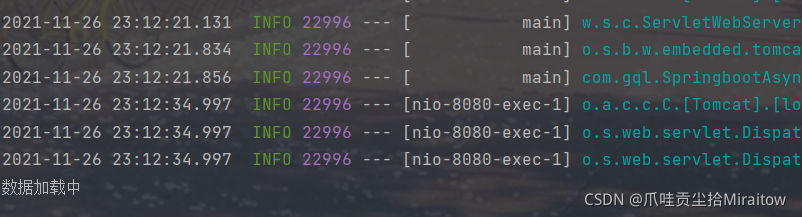
在这里插入图片描述

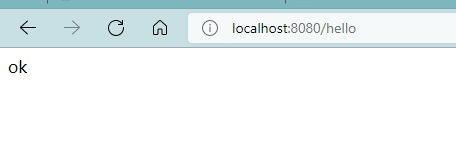
2.然后页面这时候三秒后也会显示

在这里插入图片描述
但是一般这样我们前端肯定会很难受啊,要等一会(线程等待)才能显示页面
所以就压有一个方法来解决这个问题,你访问localhost:8080/hello
会直接显示前端页面,但是我们的idea显示还是会在三秒以后才出现下面的画面
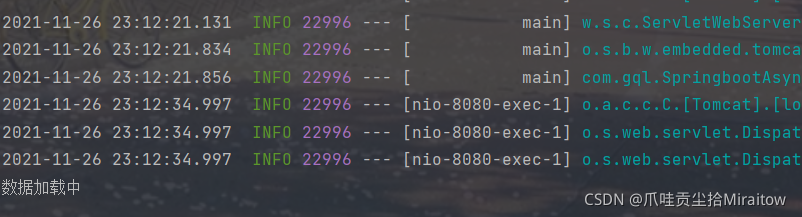
在这里插入图片描述
这是怎么实现的那,其实很简单
在我们调用的方法上面加入注解@Async

   @Async
    public void hello(){
        try {
            Thread.sleep(3000);
        } catch (InterruptedException e) {
            e.printStackTrace();

        }
        System.out.println("数据加载中");
    }

然后在我们启动的项目(主项目)里面加入@EnableAsync来开启异步注释功能

@EnableAsync
@SpringBootApplication
public class SpringbootAsyncApplication {

    public static void main(String[] args) {
        SpringApplication.run(SpringbootAsyncApplication.class, args);
    }

}

这样我们就可以,先出现前端ok页面(秒刷新),三秒后再idea的console才出现数据加载中
实现起来也是相当简单

Spring Boot 项目中使用 `@Async` 注解进行异步调用可按以下方式操作: #### 开启异步支持 在 Spring Boot 启动类上添加 `@EnableAsync` 注解,以此开启异步功能。示例代码如下: ```java import org.springframework.boot.SpringApplication; import org.springframework.boot.autoconfigure.SpringBootApplication; import org.springframework.scheduling.annotation.EnableAsync; @SpringBootApplication @EnableAsync public class YourApplication { public static void main(String[] args) { SpringApplication.run(YourApplication.class, args); } } ``` #### 在方法上添加 `@Async` 注解 在需要进行异步处理的方法上添加 `@Async` 注解。以下是不带返回值和带返回值的示例: **不带返回值的异步方法** ```java import org.slf4j.Logger; import org.slf4j.LoggerFactory; import org.springframework.scheduling.annotation.Async; import org.springframework.stereotype.Service; import com.alibaba.fastjson.JSONObject; @Service public class AsyncService { private static final Logger log = LoggerFactory.getLogger(AsyncService.class); @Async public void test1() throws InterruptedException { log.info("开始服务1计算"); JSONObject jsonObject = new JSONObject(); jsonObject.put("test1", "value1"); } } ``` **带返回值的异步方法** ```java import org.springframework.scheduling.annotation.Async; import org.springframework.stereotype.Service; import java.util.concurrent.Future; import java.util.concurrent.CompletableFuture; @Service public class AsyncService { @Async public Future<String> test2() { try { Thread.sleep(2000); } catch (InterruptedException e) { e.printStackTrace(); } return CompletableFuture.completedFuture("异步任务执行完成"); } } ``` #### 调用异步方法 在其他类中调用带有 `@Async` 注解的方法。 ```java import org.springframework.beans.factory.annotation.Autowired; import org.springframework.stereotype.Component; import java.util.concurrent.Future; @Component public class AsyncCaller { @Autowired private AsyncService asyncService; public void callAsyncMethods() { // 调用不带返回值的异步方法 asyncService.test1(); // 调用带返回值的异步方法 try { Future<String> result = asyncService.test2(); while (!result.isDone()) { Thread.sleep(100); } System.out.println(result.get()); } catch (Exception e) { e.printStackTrace(); } } } ``` #### 注意事项 Spring 在扫描 bean 的时候会扫描方法上是否包含 `@Async` 注解,如果包含,Spring 会为这个 bean 动态地生成一个子类(即代理类,proxy),代理类是继承原来那个 bean 的。当这个有注解的方法被调用时,实际上是由代理类来调用的,代理类在调用时增加异步作用。然而,如果这个有注解的方法是被同一个类中的其他方法调用的,那么该方法的调用并没有通过代理类,而是直接通过原来的那个 bean 也就是 `this.method`,所以就没有增加异步作用,即 `@Async` 注解无效 [^3]。
评论 5
成就一亿技术人!
拼手气红包6.0元
还能输入1000个字符
 
红包 添加红包
表情包 插入表情
 条评论被折叠 查看
添加红包

请填写红包祝福语或标题

红包个数最小为10个

红包金额最低5元

当前余额3.43前往充值 >
需支付:10.00
成就一亿技术人!
领取后你会自动成为博主和红包主的粉丝 规则
hope_wisdom
发出的红包

打赏作者

爪哇贡尘拾Miraitow

你的鼓励将是我创作的最大动力

¥1 ¥2 ¥4 ¥6 ¥10 ¥20
扫码支付:¥1
获取中
扫码支付

您的余额不足,请更换扫码支付或充值

打赏作者

实付
使用余额支付
点击重新获取
扫码支付
钱包余额 0

抵扣说明:

1.余额是钱包充值的虚拟货币,按照1:1的比例进行支付金额的抵扣。
2.余额无法直接购买下载,可以购买VIP、付费专栏及课程。

余额充值