





 本文介绍了如何使用不同的HTML标签来创建按钮、图片和表格等网页元素,并提供了实例代码。此外,还展示了如何通过添加特定的类来改变这些元素的外观。
1.按钮:
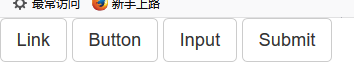
class="btn btn-default"
<!--按钮-->
<a class="btn btn-default" href="#" role="button">Link</a>
<button class="btn btn-default" type="submit">Button</button>
<input class="btn btn-default" type="button" value="Input">
<input class="btn btn-default" type="submit" value="Submit">
<hr/>
<!-- Standard button -->
<button type="button" class="btn btn-default">(默认样式Default</button>

<!-- Provides extra visual weight and identifies the primary action in a set of buttons -->
<button type="button" class="btn btn-primary">(首项Primary</button>

<!-- Indicates a successful or positive action -->
<button type="button" class="btn btn-success">(成功Success</button>

<!-- Contextual button for informational alert messages -->
<button type="button" class="btn btn-info">(一般信息)Info</button>

<!-- Indicates caution should be taken with this action -->
<button type="button" class="btn btn-warning">(警告Warning</button>

<!-- Indicates a dangerous or potentially negative action -->
<button type="button" class="btn btn-danger">(危险Danger</button>

<!-- Deemphasize a button by making it look like a link while maintaining button behavior -->
<button type="button" class="btn btn-link">(链接Link</button>

2. 图片:
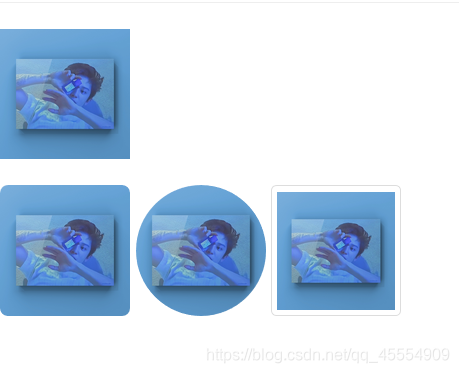
class=“img-responsive”:图片在任意尺寸都占100%
图片形状
- <img src="…" alt="…" class=“img-rounded”>:方形
- <img src="…" alt="…" class=“img-circle”> : 圆形
- <img src="…" alt="…" class=“img-thumbnail”> :相框
<img src="img/灿烈.jpg" class="img-responsive" width="100px">
<br/>
<img src="img/灿烈.jpg" class="img-rounded" width="100px">
<img src="img/灿烈.jpg" class="img-circle" width="100px">
<img src="img/灿烈.jpg" class="img-thumbnail" width="100px">
3. 表格
- table
- table-bordered
- table-hover
<table class="table table-bordered table-hover">
    <tr>
        <td>01</td>
        <td>朴灿烈</td>
        <td>男</td>
    </tr>

    <tr>
        <td>02</td>
        <td>张艺兴</td>
        <td>男</td>
    </tr>

    <tr>
        <td>03</td>
        <td>王一博</td>
        <td>男</td>
    </tr>
</table>

表单
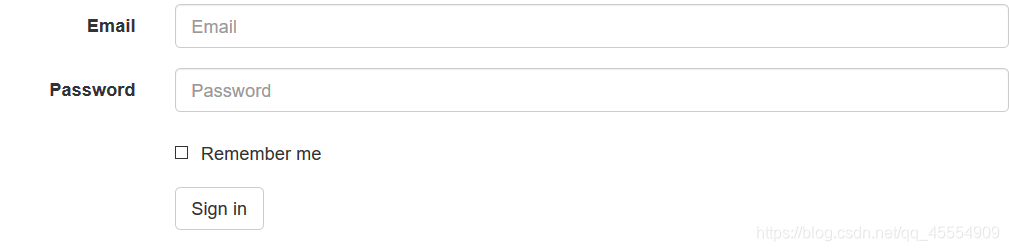
- 给表单项添加:class=“form-control”
<form class="form-horizontal">
    <div class="form-group">
        <label for="inputEmail3" class="col-sm-2 control-label">Email</label>
        <div class="col-sm-10">
            <input type="email" class="form-control" id="inputEmail3" placeholder="Email">
        </div>
    </div>
    <div class="form-group">
        <label for="inputPassword3" class="col-sm-2 control-label">Password</label>
        <div class="col-sm-10">
            <input type="password" class="form-control" id="inputPassword3" placeholder="Password">
        </div>
    </div>
    <div class="form-group">
        <div class="col-sm-offset-2 col-sm-10">
            <div class="checkbox">
                <label>
                    <input type="checkbox"> Remember me
                </label>
            </div>
        </div>
    </div>
    <div class="form-group">
        <div class="col-sm-offset-2 col-sm-10">
            <button type="submit" class="btn btn-default">Sign in</button>
        </div>
    </div>
</form>





 扫一扫
扫一扫


 1766
1766

 被折叠的 条评论
为什么被折叠?
被折叠的 条评论
为什么被折叠?
 到【灌水乐园】发言





