


 该博客介绍了一个利用Java Swing开发的职员信息管理系统,实现了员工信息的增删改查功能,并通过图形界面提供友好的用户体验。系统还集成了数据库(如MySQL),通过JDBC进行数据交互,确保账户和职员信息的安全存储。
职员信息管理系统
1.实现对职员信息的增、删、改、查。
要求:图形界面实现,界面美观。账户或职员的信息需要保存到文件或是数据库。
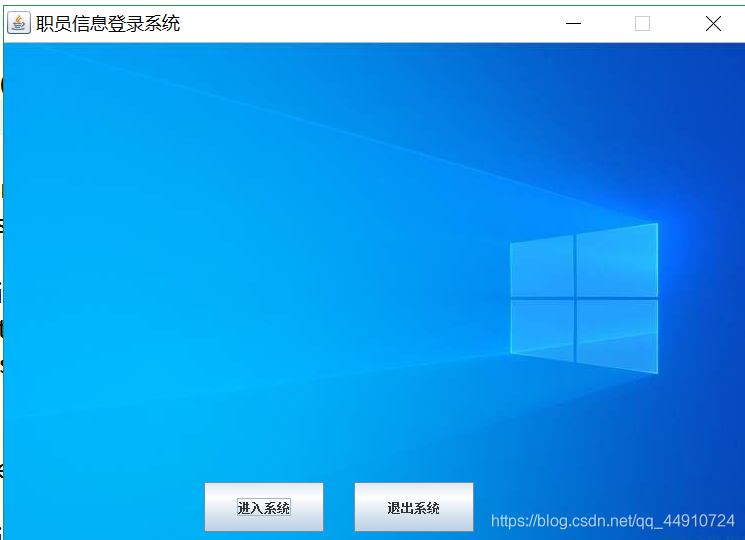
- 主界面
package StaffInforManagement;

import java.awt.BorderLayout;
import java.awt.event.ActionEvent;
import java.awt.event.ActionListener;
import javax.swing.ImageIcon;
import javax.swing.JButton;
import javax.swing.JFrame;
import javax.swing.JLabel;
import javax.swing.JPanel;

public class Main {


	public static void main(String[] args) {


		new WelcomeDemo();
	}
}
class WelcomeDemo extends JFrame{


	private JFrame window;
	private JButton enter,exit;
	private JLabel lb;
	private JPanel pEnter;
	public WelcomeDemo() {


		window=new JFrame("职员信息登录系统");
		window.setSize(750, 540);
		window.setLocationRelativeTo(null);
		window.setDefaultCloseOperation(JFrame.EXIT_ON_CLOSE);
		window.setLayout(null);
		window.setResizable(false);
		ImageIcon icon = new ImageIcon("img/timg.jpg");
		icon.setImage(icon.getImage().getScaledInstance((int)(icon.getIconWidth()),
				(int)(icon.getIconHeight()),0 ));
		lb=new JLabel(new ImageIcon("img/timg.jpg"));
		lb.setBounds(0, 0, (int)(icon.getIconWidth()), (int)(icon.getIconHeight()));
		window.add(lb,BorderLayout.NORTH);
		exit = new JButton("退出系统");
		enter=new JButton("进入系统");
		enter.setBounds(200,440,120,50);
		exit.setBounds(350, 440,120,50);
		window.add(enter);
		window.add(exit);
		addListened();
		window.setVisible(true);
	}

	public void addListened() {


		enter.addActionListener(new ActionListener() {


			@Override
			public void actionPerformed(ActionEvent e) {


					new SelectionFuncation();
					window.dispose();
			}
		});
		exit.addActionListener(new ActionListener() {


			@Override
			public void actionPerformed(ActionEvent arg0) {


				window.dispose();
			}
		});
	}
}
- 选择功能界面
package StaffInforManagement;
import java.awt.BorderLayout;
import java.awt.Container;
import java.awt.FlowLayout;
import java.awt.Font;
import java.awt.event.ActionEvent;
import java.awt.event.ActionListener;
import javax.swing.ImageIcon;
import javax.swing.JButton;
import javax.swing.JFrame;
import javax.swing.JLabel;
public class SelectionFuncation extends JFrame {
public SelectionFuncation() {
JFrame window = new JFrame("职员信息管理系统");
window.setSize(750, 540);
window.setLocationRelativeTo(null);
window.setDefaultCloseOperation(JFrame.EXIT_ON_CLOSE);
window.setLayout(null);
window.setResizable(false);
ImageIcon icon = new ImageIcon("img/timg.jpg");
icon.setImage(icon.getImage().getScaledInstance((int) (icon.getIconWidth()), (int) (icon.getIconHeight()), 0));
JLabel lb = new JLabel(new ImageIcon("img/timg.jpg"));
lb.setBounds(0, 0, (int) (icon.getIconWidth()), (int) (icon.getIconHeight()));
window.add(lb, BorderLayout.NORTH);
JButton b1 = new JButton("添加员工信息");
b1.setFont(new Font("宋体", Font.PLAIN, 30));
JButton b2 = new JButton("删除员工信息");
b2.setFont(new Font("宋体", Font.PLAIN, 30));
JButton b3 = new JButton("查询员工信息");
b3.setFont(new Font("宋体", Font.PLAIN, 30));
JButton b4 = new JButton("修改员工信息");
b4.setFont(new Font("宋体", Font.PLAIN, 30));
b1.setBounds(200, 60, 300, 70);
b2.setBounds(200, 160, 300, 70);
b3.setBounds(200, 260, 300, 70);
b4.setBounds(200, 360, 300, 70);
window.add(b1);
window.add(b2);
window.add(b3);
window.add(b4);
window.setVisible(true);
b1.addActionListener(new ActionListener() {
@Override
public  最低0.47元/天 解锁文章






 扫一扫
扫一扫


 6984
6984


 到【灌水乐园】发言



