


 本文深入探讨了Spring框架中的IoC(控制反转)和DI(依赖注入)概念,解释了它们的设计思想和作用。内容涵盖IoC的控制反转原理,DI的依赖关系,以及Spring如何通过注解实现对象的生命周期管理,如@PostConstruct和@PreDestroy。同时,详细阐述了Spring中的依赖注入方式,包括通过set方法、构造器注入和@Autowired注解的类型匹配与名称匹配。此外,还提到了@Value注解用于属性赋值,以及@ComponentScan的作用。
IoC是什么
Ioc—Inversion of Control,即“控制反转”,不是什么技术,而是一种设计思想。在Java开发中,Ioc意味着将你设计好的对象交给容器控制,而不是传统的在你的对象内部直接控制。如何理解好Ioc呢?理解好Ioc的关键是要明确“谁控制谁,控制什么,为何是反转(有反转就应该有正转了),哪些方面反转了”,那我们来深入分析一下:
●谁控制谁,控制什么:传统Java SE程序设计,我们直接在对象内部通过new进行创建对象,是程序主动去创建依赖对象;而IoC是有专门一个容器来创建这些对象,即由Ioc容器来控制对 象的创建;谁控制谁?当然是IoC 容器控制了对象;控制什么?那就是主要控制了外部资源获取(不只是对象包括比如文件等)。
●为何是反转,哪些方面反转了:有反转就有正转,传统应用程序是由我们自己在对象中主动控制去直接获取依赖对象,也就是正转;而反转则是由容器来帮忙创建及注入依赖对象;为何是反转?因为由容器帮我们查找及注入依赖对象,对象只是被动的接受依赖对象,所以是反转;哪些方面反转了?依赖对象的获取被反转了。
用图例说明一下,传统程序设计如图2-1,都是主动去创建相关对象然后再组合起来:
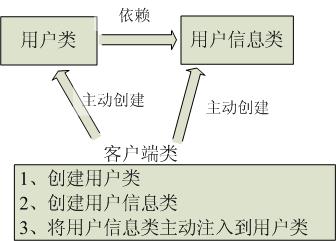
IoC和DI
DI—Dependency Injection,即“依赖注入”:组件之间依赖关系由容器在运行期决定,形象的说,即由容器动态的将某个依赖关系注入到组件之中。依赖注入的目的并非为软件系统带来更多功能,而是为了提升组件重用的频率,并为系统搭建一个灵活、可扩展的平台。通过依赖注入机制,我们只需要通过简单的配置,而无需任何代码就可指定目标需要的资源,完成自身的业务逻辑,而不需要关心具体的资源来自何处,由谁实现。
理解DI的关键是:“谁依赖谁,为什么需要依赖,谁注入谁,注入了什么”,那我们来深入分析一下:
●谁依赖于谁:当然是应用程序依赖于IoC容器;
●为什么需要依赖:应用程序需要IoC容器来提供对象需要的外部资源;
●谁注入谁:很明显是IoC容器注入应用程序某个对象,应用程序依赖的对象;
●注入了什么:就是注入某个对象所需要的外部资源(包括对象、资源、常量数据)。
Spring对象的生命周期
步骤:
1.对象的创建
2.初始化数据
3.调用方法,完成功能
4.销毁对象
核心:生命周期的方法是自动调用的
package com.jt.demo6;

import javax.annotation.PostConstruct;
import javax.annotation.PreDestroy;

public class User {
    //对象的创建
    public User(){
        System.out.println("对象创建成功");
    }
    //数据初始化
    @PostConstruct
    public void init(){
        System.out.println("属性赋值");
    }
    //进行业务调用---->手动调用
    public void hello(){
        System.out.println("学java");
    }
    //销毁方法
    @PreDestroy
    public void destory(){
        System.out.println("销毁");
    }

}
@postConstruc:标识初始化方法
@preDestory:标识销毁方法.
编辑测试类:
知识点: 容器的接口,没有提供关闭容器的操作. 如果需要关闭容器则使用实现类中的方法
package com.jt.demo6;

import org.springframework.context.ApplicationContext;
import org.springframework.context.annotation.AnnotationConfigApplicationContext;

public class TestUser {

        public static void main(String[] args) {
                AnnotationConfigApplicationContext context =
                        new AnnotationConfigApplicationContext(SpringConfig.class);
                User user = context.getBean(User.class);
                //调用业务方法
                user.hello();
                //如果需要执行销毁方法,则需要先关闭容器对象
                //思想:销毁动作是敏感行为,特殊处理 实现类中有关闭方法.
                context.close();
        }
}
Spring管理对象–@Component
package com.jt.demo6;

import org.springframework.stereotype.Component;

import javax.annotation.PostConstruct;
import javax.annotation.PreDestroy;


@Component  //前提:注释了@Bean
 * Spring自动为该注解标识的类通过反射实例化对象,交给Spring容器管理.
 *  Key: 类名首字母小写 user
 *  value: 反射的对象
 *  类似于@Bean注解
public class User {
    //对象的创建
    public User(){
        System.out.println("对象创建成功");
    }
    //数据初始话
    @PostConstruct
    public void init(){
        System.out.println("属性赋值");
    }
    //进行业务调用---->手动调用
    public void hello(){
        System.out.println("学java");
    }
    //销毁方法
    @PreDestroy
    public void destory(){
        System.out.println("销毁");
    }

}
@Compoent和@Bean的区别:
1.@Compoent是spring容器通过反射自动创建对象,@Bean是手动创建对象
2.@Compoent是标识类的,@Bean是标识配置类中的方法
3.@Compoent对象的id是类名首字母小写,@Bean对象的id是方法名
完整代码:
package com.jt.demo6;

import org.springframework.stereotype.Component;

import javax.annotation.PostConstruct;
import javax.annotation.PreDestroy;
@Component
public class User {
    //对象的创建
    public User(){
        System.out.println("对象创建成功");
    }
    //数据初始话
    @PostConstruct
    public void init(){
        System.out.println("属性赋值");
    }
    //进行业务调用---->手动调用
    public void hello(){
        System.out.println("学java");
    }
    //销毁方法
    @PreDestroy
    public void destory(){
        System.out.println("销毁");
    }

}
package com.jt.demo6;

import org.springframework.context.annotation.Bean;
import org.springframework.context.annotation.ComponentScan;
import org.springframework.context.annotation.Configuration;

@Configuration
@ComponentScan("com.jt.demo6")
public class SpringConfig {
    //@Bean
    //public User user(){
     //   return new User();
    //}

}
package com.jt.demo6;

import org.springframework.context.annotation.AnnotationConfigApplicationContext;

public class TestUser {
    public static void main(String[] args) {
        AnnotationConfigApplicationContext context=new AnnotationConfigApplicationContext(SpringConfig.class);
        User user=context.getBean(User.class);
        user.hello();
        context.close();

    }
}
注解说明
@ComponentScan:为了让Spring的注解生效. 需要单独使用包扫描注解.
@Component :前提:注释了@Bean,Spring自动为该注解标识的类通过反射实例化对象,交给Spring容器管理.
Spring-DI(Dependency Injection)
Spring中依赖注入
依赖注入就是将Spring容器中管理对象(数据),赋值给对象的属性.
属性赋值的方法:
1.set方法
package com.jt.demo7_di;

public class Car {
    private  String name;
    private String color;

    public void go(){
        System.out.println("去任何地方");
    }

}
package com.jt.demo7_di;

public class Persion {
    private Integer id;
    private String name;
    private Car car;

    public Integer getId() {
        return id;
    }

    public void setId(Integer id) {
        this.id = id;
    }

    public String getName() {
        return name;
    }

    public void setName(String name) {
        this.name = name;
    }

    public Car getCar() {
        return car;
    }

    public void setCar(Car car) {
        this.car = car;
    }

    public void SayHi(){
        System.out.println("你好"+id+name);
    }
    public void toGo(){
        car.go();
    }

}
<property name="car" ref="car"></property>
前一个car是persion属性中的,后一个car是<bean id="car" class="com.jt.demo7_di.Car">中的
<?xml version="1.0" encoding="UTF-8"?>
<beans xmlns="http://www.springframework.org/schema/beans"
       xmlns:xsi="http://www.w3.org/2001/XMLSchema-instance"
       xsi:schemaLocation="http://www.springframework.org/schema/beans http://www.springframework.org/schema/beans/spring-beans.xsd">
    <bean id="car" class="com.jt.demo7_di.Car">

    </bean>

        <bean id="persion" class="com.jt.demo7_di.Persion">
            <property name="id" value="11"></property>
            <property name="name" value="春节"></property>
            <property name="car" ref="car"></property>
        </bean>
</beans>
package com.jt.demo7_di;
import org.springframework.context.ApplicationContext;
import org.springframework.context.support.ClassPathXmlApplicationContext;
public class TestPerson {
public static void main(String[] args) {
String reso="spring_id.xml";
ApplicationContext context=new ClassPathXmlApplicationContext(reso);
Persion persion=context.getBean(Persion.class);
persion.SayHi();
persion.toGo();
}
}
2.含参构造注入
package com.jt.demo7_di;

public class Car {
    private  String name;
    private String color;
    public Car(){
        System.out.println("无参构造");
    }
    public Car(String name,String color){
        this.name=name;
        this.color=color;
    }
    public void go(){
        System.out.println("去任何地方"+name+color);
    }

}
package com.jt.demo7_di;

public class Persion {
    private Integer id;
    private String name;
    private Car car;

    public Integer getId() {
        return id;
    }

    public void setId(Integer id) {
        this.id = id;
    }

    public String getName() {
        return name;
    }

    public void setName(String name) {
        this.name = name;
    }

    public Car getCar() {
        return car;
    }

    public void setCar(Car car) {
        this.car = car;
    }

    public void SayHi(){
        System.out.println("你好"+id+name);
    }
    public void toGo(){
        car.go();
    }

}
<?xml version="1.0" encoding="UTF-8"?>
<beans xmlns="http://www.springframework.org/schema/beans"
       xmlns:xsi="http://www.w3.org/2001/XMLSchema-instance"
       xsi:schemaLocation="http://www.springframework.org/schema/beans http://www.springframework.org/schema/beans/spring-beans.xsd">
    <bean id="car" class="com.jt.demo7_di.Car">
        <constructor-arg name="name" value="奔驰"></constructor-arg>
        <constructor-arg name="color" value="黑色"></constructor-arg>
    </bean>

        <bean id="persion" class="com.jt.demo7_di.Persion">
            <property name="id" value="11"></property>
            <property name="name" value="春节"></property>
            <property name="car" ref="car"></property>
        </bean>
</beans>
package com.jt.demo7_di;
import org.springframework.context.ApplicationContext;
import org.springframework.context.support.ClassPathXmlApplicationContext;
public class TestPerson {
public static void main(String[] args) {
String reso="spring_id.xml";
ApplicationContext context=new ClassPathXmlApplicationContext(reso);
Persion persion=context.getBean(Persion.class);
persion.SayHi();
persion.toGo();
}
}
注解注入:@Autowired
规则:
* 1.默认条件下使用set方式注入.按照类型匹配.
* 2.set方式注入也可以按照name名称进行匹配
* 3.只要使用注解,默认自动生成SetXX方法
* 实现原理:
* 1.类型匹配: 如果是接口,则自动匹配其实现类对象
* 2.name名称匹配: 根据spring中的key进行注入.
package com.jt.demo8_anno;

import org.springframework.context.annotation.ComponentScan;
import org.springframework.context.annotation.Configuration;
@Configuration
@ComponentScan("com.jt.demo8_anno")
public class springConfig {
}
package com.jt.demo8_anno;

public interface Pet {
    void hello();
}
package com.jt.demo8_anno;

import org.springframework.stereotype.Component;

@Component //将对象交给容器管理
public class Tiger implements Pet{
    @Override
    public void hello() {
        System.out.println("咦~,我靠");
    }
}
使用原理一:类型匹配: 如果是接口,则自动匹配其实现类对象
package com.jt.demo8_anno;

import org.springframework.beans.factory.annotation.Autowired;
import org.springframework.stereotype.Component;

/**
 * 1.该类主要测试 注解的注入方式.
 * 2.练习对象的嵌套关系
 * 3.注解的写法与xml写法的原理相同,形式不同
 */
@Component //key:user value:反射后的对象
public class User { //用户
    /**
     * 注解说明:
     *  1.@Autowired 自动注入
     *  规则:
     *      1.默认条件下使用set方式注入.按照类型匹配.
     *      2.set方式注入也可以按照name名称进行匹配
     *      3.只要使用注解,默认自动生成SetXX方法
     *  实现原理:
     *      1.类型匹配: 如果是接口,则自动匹配其实现类对象
     *      2.name名称匹配: 根据spring中的key进行注入.
     */
    @Autowired
    private Pet pet;

    public void hello(){
        pet.hello();
    }
}
多实现类情况处理:pig和tiger都实现了pet(代码接上)
使用实现原理2:name名称匹配: 根据spring中的key进行注入
注解说明:
@Autowired 自动注入
* 规则:
* 1.默认条件下使用set方式注入.按照类型匹配.
* 2.set方式注入 可以按照name名称进行匹配
* 3.只要使用注解,默认自动生成SetXX方法
* 实现原理:
* 1.类型匹配: 如果是接口,则自动匹配其实现类对象
* 2.name名称匹配: 根据spring中的key进行注入.
@Qualifier必须和@Autowired联用.
* 并且需要指定value的名称,就是spring中的key
* 准则: 一般条件下,Spring都是单实现!!!!
package com.jt.demo8_anno;

import org.springframework.stereotype.Component;

@Component
public class Pig implements Pet{
    @Override
    public void hello() {
        System.out.println("咬老虎");
    }
}
package com.jt.demo8_anno;

import org.springframework.beans.factory.annotation.Autowired;
import org.springframework.beans.factory.annotation.Qualifier;
import org.springframework.stereotype.Component;

@Component
public class User {
    @Autowired    //自动注入
    @Qualifier(value = "pig")
    private Pet pet;
    public void hello(){
        pet.hello();
    }
}
Spring属性赋值-@Value注解
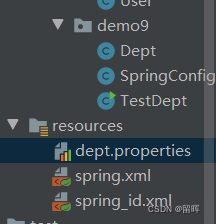
编辑properties配置文件
位置:
#1.数据结构 key=value
#2.其中的数据默认都是String类型,数值可以切换为数值类型
#3.程序读取时,默认的字符集ISO-8859-1 不支持中文,
#  如果支持中文,使用utf-8
dept.id=101
dept.name=行政部
dept.id=101
dept.name=行政部package com.jt.demo9;
import org.springframework.context.annotation.ComponentScan;
import org.springframework.context.annotation.Configuration;
@Configuration
@ComponentScan("com.jt.demo9")
public class SpringConfig {
}
为属性赋值
package com.jt.demo9;

import org.springframework.beans.factory.annotation.Autowired;
import org.springframework.beans.factory.annotation.Value;
import org.springframework.context.annotation.PropertySource;
import org.springframework.stereotype.Component;

@Component
//当spring容器启动时,加载指定的配置文件,将数据保存到容器中!!!
@PropertySource(value = "classpath:/dept.properties",encoding = "UTF-8")
public class Dept {

    //取值方式: 从spring容器中获取数据 ${pro中的key}
    @Value("${dept.id}")
    private Integer id;
    @Value("${dept.name}")
    private String name;

    //@Value注解可以为简单属性赋值.
    //@Value("财务部")
    //private String name;

    public void hello(){
        System.out.println("获取数据:"+id+":"+name);
    }
}
package com.jt.demo9;

import org.springframework.context.ApplicationContext;
import org.springframework.context.annotation.AnnotationConfigApplicationContext;

public class TestDept {
    public static void main(String[] args) {
        ApplicationContext context=new AnnotationConfigApplicationContext(SpringConfig.class);
        Dept dept=context.getBean(Dept.class);
        dept.hello();
    }
}
注解:
@Autowired:自动注入
@Qualifie():指定value的名称,就是spring中的key,必须和@Autowired联用.
@postConstruc:标识初始化方法
@preDestory:标识销毁方法.
@ComponentScan:为了让Spring的注解生效. 需要单独使用包扫描注解.
@Component :前提:注释了@Bean,Spring自动为该注解标识的类通过反射实例化对象,交给Spring容器管理.
@Value:自己生成set函数
单词:
component:组件
componentScan(components and parts):零部件





 扫一扫
扫一扫


 1127
1127

 被折叠的 条评论
为什么被折叠?
被折叠的 条评论
为什么被折叠?
 到【灌水乐园】发言





