





 该博客主要介绍了微信支付二维码的生成过程,包括从配置文件读取微信支付参数,设置请求参数,通过HTTP客户端发送请求到微信API,接收并解析返回的XML数据。此外,还涉及到订单信息的查询、支付状态的更新以及使用Redis缓存支付结果。整个流程覆盖了服务端的订单服务、支付服务以及工具类的HTTP请求操作。
一、流程图
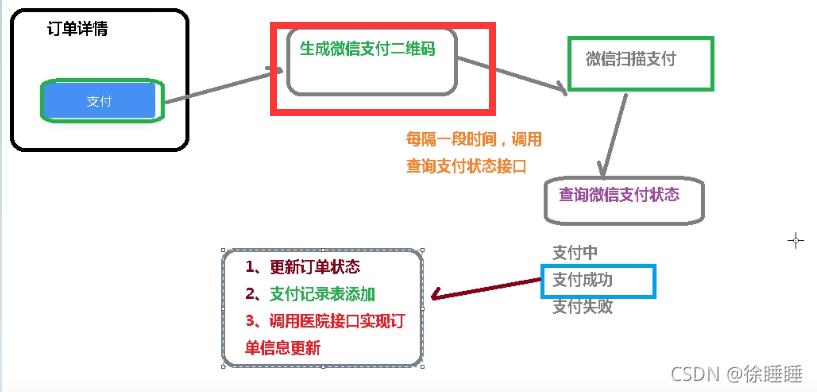
二、工具类
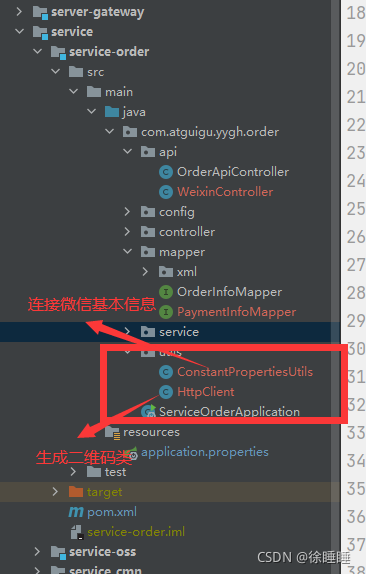
package com.atguigu.yygh.order.utils;

import org.springframework.beans.factory.InitializingBean;
import org.springframework.beans.factory.annotation.Value;
import org.springframework.stereotype.Component;

@Component
public class ConstantPropertiesUtils implements InitializingBean {

    @Value("${weixin.appid}")
    private String appid;

    @Value("${weixin.partner}")
    private String partner;

    @Value("${weixin.partnerkey}")
    private String partnerkey;

    public static String APPID;
    public static String PARTNER;
    public static String PARTNERKEY;
    @Override
    public void afterPropertiesSet() throws Exception {
        APPID = appid;
        PARTNER = partner;
        PARTNERKEY = partnerkey;
    }
}
package com.atguigu.yygh.order.utils;

import org.apache.http.Consts;
import org.apache.http.HttpEntity;
import org.apache.http.NameValuePair;
import org.apache.http.client.ClientProtocolException;
import org.apache.http.client.entity.UrlEncodedFormEntity;
import org.apache.http.client.methods.*;
import org.apache.http.conn.ssl.SSLConnectionSocketFactory;
import org.apache.http.conn.ssl.SSLContextBuilder;
import org.apache.http.conn.ssl.TrustStrategy;
import org.apache.http.entity.StringEntity;
import org.apache.http.impl.client.CloseableHttpClient;
import org.apache.http.impl.client.HttpClients;
import org.apache.http.message.BasicNameValuePair;
import org.apache.http.ssl.SSLContexts;
import org.apache.http.util.EntityUtils;

import javax.net.ssl.SSLContext;
import java.io.File;
import java.io.FileInputStream;
import java.io.IOException;
import java.security.KeyStore;
import java.security.cert.CertificateException;
import java.security.cert.X509Certificate;
import java.text.ParseException;
import java.util.HashMap;
import java.util.LinkedList;
import java.util.List;
import java.util.Map;

/**
 * http请求客户端
 */
public class HttpClient {
    private String url;
    private Map<String, String> param;
    private int statusCode;
    private String content;
    private String xmlParam;
    private boolean isHttps;
    private boolean isCert = false;
    //证书密码 微信商户号(mch_id)
    private String certPassword;
    public boolean isHttps() {
        return isHttps;
    }
    public void setHttps(boolean isHttps) {
        this.isHttps = isHttps;
    }
    public boolean isCert() {
        return isCert;
    }
    public void setCert(boolean cert) {
        isCert = cert;
    }
    public String getXmlParam() {
        return xmlParam;
    }
    public void setXmlParam(String xmlParam) {
        this.xmlParam = xmlParam;
    }
    public HttpClient(String url, Map<String, String> param) {
        this.url = url;
        this.param = param;
    }
    public HttpClient(String url) {
        this.url = url;
    }
    public String getCertPassword() {
        return certPassword;
    }
    public void setCertPassword(String certPassword) {
        this.certPassword = certPassword;
    }
    public void setParameter(Map<String, String> map) {
        param = map;
    }
    public void addParameter(String key, String value) {
        if (param == null)
            param = new HashMap<String, String>();
        param.put(key, value);
    }
    public void post() throws ClientProtocolException, IOException {
        HttpPost http = new HttpPost(url);
        setEntity(http);
        execute(http);
    }
    public void put() throws ClientProtocolException, IOException {
        HttpPut http = new HttpPut(url);
        setEntity(http);
        execute(http);
    }
    public void get() throws ClientProtocolException, IOException {
        if (param != null) {
            StringBuilder url = new StringBuilder(this.url);
            boolean isFirst = true;
            for (String key : param.keySet()) {
                if (isFirst)
                    url.append("?");
                else
                    url.append("&");
                url.append(key).append("=").append(param.get(key));
            }
            this.url = url.toString();
        }
        HttpGet http = new HttpGet(url);
        execute(http);
    }
    /**
     * set http post,put param
     */
    private void setEntity(HttpEntityEnclosingRequestBase http) {
        if (param != null) {
            List<NameValuePair> nvps = new LinkedList<NameValuePair>();
            for (String key : param.keySet())
                nvps.add(new BasicNameValuePair(key, param.get(key))); // 参数
            http.setEntity(new UrlEncodedFormEntity(nvps, Consts.UTF_8)); // 设置参数
        }
        if (xmlParam != null) {
            http.setEntity(new StringEntity(xmlParam, Consts.UTF_8));
        }
    }
    private void execute(HttpUriRequest http) throws ClientProtocolException,
            IOException {
        CloseableHttpClient httpClient = null;
        try {
            if (isHttps) {
                if(isCert) {
                    FileInputStream inputStream = new FileInputStream(new File(""));
                    KeyStore keystore = KeyStore.getInstance("PKCS12");
                    char[] partnerId2charArray = certPassword.toCharArray();
                    keystore.load(inputStream, partnerId2charArray);
                    SSLContext sslContext = SSLContexts.custom().loadKeyMaterial(keystore, partnerId2charArray).build();
                    SSLConnectionSocketFactory sslsf =
                            new SSLConnectionSocketFactory(sslContext,
                                    new String[] { "TLSv1" },
                                    null,
                                    SSLConnectionSocketFactory.BROWSER_COMPATIBLE_HOSTNAME_VERIFIER);
                    httpClient = HttpClients.custom().setSSLSocketFactory(sslsf).build();
                } else {
                    SSLContext sslContext = new SSLContextBuilder()
                            .loadTrustMaterial(null, new TrustStrategy() {
                                // 信任所有
                                public boolean isTrusted(X509Certificate[] chain,
                                                         String authType)
                                        throws CertificateException {
                                    return true;
                                }
                            }).build();
                    SSLConnectionSocketFactory sslsf = new SSLConnectionSocketFactory(
                            sslContext);
                    httpClient = HttpClients.custom().setSSLSocketFactory(sslsf)
                            .build();
                }
            } else {
                httpClient = HttpClients.createDefault();
            }
            CloseableHttpResponse response = httpClient.execute(http);
            try {
                if (response != null) {
                    if (response.getStatusLine() != null)
                        statusCode = response.getStatusLine().getStatusCode();
                    HttpEntity entity = response.getEntity();
                    // 响应内容
                    content = EntityUtils.toString(entity, Consts.UTF_8);
                }
            } finally {
                response.close();
            }
        } catch (Exception e) {
            e.printStackTrace();
        } finally {
            httpClient.close();
        }
    }
    public int getStatusCode() {
        return statusCode;
    }
    public String getContent() throws ParseException, IOException {
        return content;
    }
}
三、serviceimpl层
步骤:
1、根据orderId 查询订单信息
2、向支付表添加 订单信息和支付状态
3、通过工具类获取数据 设置二维码生成需要参数
4、调用微信二维码生成接口 (工具类)
5、微信返回相关数据 xml格式
6、封装最终结果集
package com.atguigu.yygh.order.service.impl;

import com.atguigu.yygh.enums.PaymentStatusEnum;
import com.atguigu.yygh.enums.PaymentTypeEnum;
import com.atguigu.yygh.model.order.OrderInfo;
import com.atguigu.yygh.order.service.OrderService;
import com.atguigu.yygh.order.service.PaymentService;
import com.atguigu.yygh.order.service.WeixinService;
import com.atguigu.yygh.order.utils.ConstantPropertiesUtils;
import com.atguigu.yygh.order.utils.HttpClient;
import com.github.wxpay.sdk.WXPayUtil;
import org.springframework.beans.factory.annotation.Autowired;
import org.springframework.data.redis.core.RedisTemplate;
import org.springframework.stereotype.Service;

import java.util.HashMap;
import java.util.Map;
import java.util.concurrent.TimeUnit;

@Service
public class WeixinServiceImpl implements WeixinService {

    @Autowired
    private OrderService orderService;
    @Autowired
    private PaymentService paymentService;
    @Autowired
    private RedisTemplate redisTemplate;

   //生成支付二维码
    @Override
    public Map createNative(Long orderId) {
        try {
            //1、根据orderId 查询订单信息
            OrderInfo orderInfo = orderService.getById(orderId);

            //2、向支付表添加 订单信息和支付状态
            paymentService.savePaymentInfo(orderInfo, PaymentTypeEnum.WEIXIN.getStatus());

            //设置二维生成 的参数
            //3、通过工具类获取数据 设置参数
            Map paramMap = new HashMap();
            paramMap.put("appid", ConstantPropertiesUtils.APPID);
            paramMap.put("mch_id", ConstantPropertiesUtils.PARTNER);
            paramMap.put("nonce_str", WXPayUtil.generateNonceStr());
            String body = orderInfo.getReserveDate() + "就诊"+ orderInfo.getDepname();
            paramMap.put("body", body);
            //订单编号
            paramMap.put("out_trade_no", orderInfo.getOutTradeNo());
            //实际值
            //paramMap.put("total_fee", order.getAmount().multiply(new BigDecimal("100")).longValue()+"");
            //0.01元 测试
            paramMap.put("total_fee", "1");
            paramMap.put("spbill_create_ip", "127.0.0.1");
            paramMap.put("notify_url", "http://guli.shop/api/order/weixinPay/weixinNotify");
            //支付方式
            paramMap.put("trade_type", "NATIVE");

            //4、调用微信二维码生成接口 (工具类)
            HttpClient client = new HttpClient("https://api.mch.weixin.qq.com/pay/unifiedorder");//微信官方网址
            client.setXmlParam(WXPayUtil.generateSignedXml(paramMap,ConstantPropertiesUtils.PARTNERKEY));
            //默认不支持 https请求
            client.setHttps(true);
            // 提交
            client.post();

            //5、微信返回相关数据 xml格式
            String xml = client.getContent();
            //转换xml 格式
            Map<String, String> resultMap = WXPayUtil.xmlToMap(xml);
            System.out.println("resultMap" + resultMap);

            //6、封装最终结果集
            Map<String, Object> map = new HashMap<>();
            map.put("orderId",orderId);
            map.put("totalFee", orderInfo.getAmount());
            map.put("resultCode", resultMap.get("result_code"));
            map.put("codeUrl", resultMap.get("code_url"));
            if(null != resultMap.get("result_code")) {
                //微信支付二维码2小时过期,可采取2小时未支付取消订单
                redisTemplate.opsForValue().set(orderId.toString(), map, 1000, TimeUnit.MINUTES);
            }
            return map;

        } catch (Exception e) {
            e.printStackTrace();
            return null;
        }
    }
}
四、支付服务paymentService 作用:向二维码页面添加一些支付相关的信息 如订单号 订单状态 日期等
package com.atguigu.yygh.order.service.impl;

import com.atguigu.yygh.enums.PaymentStatusEnum;
import com.atguigu.yygh.model.order.OrderInfo;
import com.atguigu.yygh.model.order.PaymentInfo;
import com.atguigu.yygh.order.mapper.PaymentInfoMapper;
import com.atguigu.yygh.order.service.PaymentService;
import com.baomidou.mybatisplus.core.conditions.query.QueryWrapper;
import com.baomidou.mybatisplus.extension.service.impl.ServiceImpl;
import org.joda.time.DateTime;
import org.springframework.stereotype.Service;

import java.util.Date;

@Service
public class PaymentServiceImpl extends
        ServiceImpl<PaymentInfoMapper, PaymentInfo> implements PaymentService {
    /**
     * 保存交易记录
     * @param orderInfo
     * @param paymentType 支付类型(1:微信 2:支付宝)
     */
    @Override
    public void savePaymentInfo(OrderInfo orderInfo, Integer paymentType) {
        //根据订单id 和支付类型 查询支付表是否有记录
        QueryWrapper<PaymentInfo> queryWrapper = new QueryWrapper<>();
        queryWrapper.eq("order_id", orderInfo.getId());
        queryWrapper.eq("payment_type", paymentType);
        Integer count = baseMapper.selectCount(queryWrapper);
        //有记录 则返回退出
        if(count >0) return;
        // 没有记录 保存交易记录
        PaymentInfo paymentInfo = new PaymentInfo();
        paymentInfo.setCreateTime(new Date());
        paymentInfo.setOrderId(orderInfo.getId());
        paymentInfo.setPaymentType(paymentType);
        paymentInfo.setOutTradeNo(orderInfo.getOutTradeNo());
        paymentInfo.setPaymentStatus(PaymentStatusEnum.UNPAID.getStatus());
        //交易内容 如医院信息 科室信息
        String subject = new DateTime(orderInfo.getReserveDate()).toString("yyyy-MM-dd")+"|"+orderInfo.getHosname()+"|"+orderInfo.getDepname()+"|"+orderInfo.getTitle();
        paymentInfo.setSubject(subject);
        //支付金额
        paymentInfo.setTotalAmount(orderInfo.getAmount());
        baseMapper.insert(paymentInfo);
    }
}
五、前端
  //查询订单状态
    queryPayStatus(orderId) {
          weixinApi.queryPayStatus(orderId).then(response => {
            if (response.message == '支付中') {
              return
            }
            //不是支付中 清除定时器
            clearInterval(this.timer);
            window.location.reload()
          })
        },


    //生成支付二维码
    pay() {
          this.dialogPayVisible = true  //弹框显示
          weixinApi.createNative(this.orderId).then(response => {
            this.payObj = response.data
            if(this.payObj.codeUrl == '') { //二维码地址 为空就说明二维码生成失败
              this.dialogPayVisible = false
              this.$message.error("支付错误")
            } else {
              this.timer = setInterval(() => {
                this.queryPayStatus(this.orderId)  //查询订单状态 每3秒一次
              }, 3000);
            }
          })
        },

        //关闭弹窗时 清除定时器
         closeDialog() {
              if(this.timer) {
                clearInterval(this.timer);
              }





 扫一扫
扫一扫


 1265
1265

 被折叠的 条评论
为什么被折叠?
被折叠的 条评论
为什么被折叠?
 到【灌水乐园】发言





