



 本文介绍如何使用Vue.js实现表格的动态表头功能,通过用户选择显示哪些列,并展示如何异步加载数据到表格中,提高用户体验。
入门示例
效果
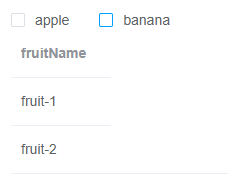
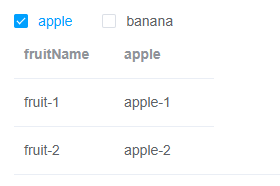
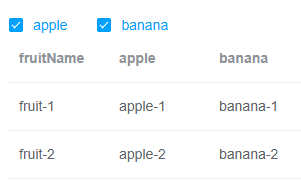
<template>
  <div class="app-container">
    <div class="filter-container">
      <el-checkbox-group v-model="checkboxVal">
        <el-checkbox label="apple">
          apple
        </el-checkbox>
        <el-checkbox label="banana">
          banana
        </el-checkbox>
      </el-checkbox-group>
    </div>
    <el-table :key="key" :data="tableData" style="width: 100%">
      <el-table-column prop="name" label="fruitName" width="100" />
      <el-table-column v-for="fruit in formThead" :key="fruit" :label="fruit" width="100px">
        <template slot-scope="scope">{{ scope.row[fruit] }}</template>
      </el-table-column>
    </el-table>
  </div>
</template>

<script>
const defaultFormThead = ['apple']
export default {
  data() {
    return {
      tableData: [
        {
          name: 'fruit-1',
          apple: 'apple-1',
          banana: 'banana-1'
        },
        {
          name: 'fruit-2',
          apple: 'apple-2',
          banana: 'banana-2'
        }
      ],
      key: 1, // table key
      formTheadOptions: ['apple', 'banana'],
      checkboxVal: defaultFormThead, // checkboxVal
      formThead: defaultFormThead // 默认表头 Default header
    }
  },
  watch: {
    checkboxVal(valArr) {
      this.formThead = this.formTheadOptions.filter(i => valArr.indexOf(i) >= 0)
      this.key = this.key + 1// 为了保证table 每次都会重渲 In order to ensure the table will be re-rendered each time
    }
  }
}
</script>
异步加载数据
<template>
  <div class="app-container">
    <div class="filter-container">
      <el-checkbox v-model="showInfo" class="filter-item" style="margin-left:15px;"
                   @change="tableKey=tableKey+1">
        说明
      </el-checkbox>
    </div>
    <el-table
      :key="tableKey"
      :data="tableData"
      style="width: 100%;">
      <el-table-column align="center" label="名称" width="300">
        <template slot-scope="scope">{{ scope.row.name }}</template>
      </el-table-column>
      <el-table-column v-if="showshowInfo" align="center" label="说明" width="300">
        <template slot-scope="scope">{{ scope.row.info }}</template>
      </el-table-column>
    </el-table>
  </div>
</template>
<script>
import {getData} from '@/api/manager'
export default {
  data() {
    return {
      loading: true,
      tableKey: 0,
      showInfo: false,
      tableData: []
    }
  },
  created() {
    this.loadTableData()
  },
  methods: {
    loadTableData() {
      this.loading = true
      getData().then(res => {
        this.tableData = res['...']
        this.loading = false
      }).catch((error) => {
        console.log(error)
        this.loading = false
      })
    }
  }
}
</script>
参考工程:vue-element-admin





 扫一扫
扫一扫


 9021
9021

 被折叠的 条评论
为什么被折叠?
被折叠的 条评论
为什么被折叠?
 到【灌水乐园】发言





